





 该博客详细介绍了如何利用JXLS库在Java项目中实现Excel文件的导出,包括在pom.xml中引入依赖、定义服务接口及其实现、创建模板文件以及调用方法进行数据填充。模板文件使用了jx:forEach标签来遍历数据,并展示了模板中的字段与Java对象字段的一一对应关系。
第一步:pom中引入依赖
<dependency>
    <groupId>net.sf.jxls</groupId>
    <artifactId>jxls-core</artifactId>
    <version>1.0.6</version>
</dependency>
第二步:编写接口服务和实现类
接口:
package com.unicom.buintelligence.service.file;

import javax.servlet.http.HttpServletRequest;
import javax.servlet.http.HttpServletResponse;
import java.util.List;
import java.util.Map;

/**
 * description: 文件服务
 **/
public interface FileDownloadService<T> {

   /**
    * 下载
    * @param request
    * @param response
    * @param list
    * @param path
    * @param name
    */
   void export(HttpServletRequest request, HttpServletResponse response, List<T> list, String path, String name);
   /**
    * 下载-多个sheet
    * @param request
    * @param response
    * @param mapList
    * @param path
    * @param name
    */
   void exportMulti(HttpServletRequest request, HttpServletResponse response, Map<String,Object> mapList, String path, String name);
实现类:
package com.unicom.buintelligence.service.file.impl;

import com.unicom.buintelligence.service.file.FileDownloadService;
import net.sf.jxls.transformer.XLSTransformer;
import org.apache.poi.ss.formula.functions.T;
import org.apache.poi.ss.usermodel.Workbook;
import org.springframework.core.io.ClassPathResource;
import org.springframework.stereotype.Service;

import javax.servlet.ServletOutputStream;
import javax.servlet.http.HttpServletRequest;
import javax.servlet.http.HttpServletResponse;
import java.io.InputStream;
import java.util.HashMap;
import java.util.List;
import java.util.Map;

/**
 * ClassName FileExportUtil
 * Description
 *
 * @Author zl
 * @Create 2019-08-07 23:19
 **/
@Service
public class FileDownloadServiceImpl implements FileDownloadService<T> {


   /**
    * 下载
    * @param request
    * @param response
    * @param list
    * @param path
    * @param name
    */
   @Override
   public void export(HttpServletRequest request, HttpServletResponse response, List<T> list, String path, String name) {
      Map<String, Object> map = new HashMap<>();
      map.put("datas", list);
      try {
         export(request, response, path, name, map);
      } catch (Exception e) {
         e.printStackTrace();
      }
   }

   @Override
   public void exportMulti(HttpServletRequest request, HttpServletResponse response, Map<String, Object> mapList, String path, String name) {
      try {
         export(request, response, path, name, mapList);
      } catch (Exception e) {
         e.printStackTrace();
      }
   }


   /**
    * 下载
    * @param req
    * @param resp
    * @param path
    * @param name
    * @param map
    * @throws Exception
    */
   private void export(HttpServletRequest req, HttpServletResponse resp, String path, String name,
                  Map<String, Object> map) throws Exception {
      // 设置文件下载的相关信息
      // 文件名中文乱码处理
      String fileName = new String(name.getBytes("UTF-8"), "ISO-8859-1");

      // 头信息
      resp.setContentType(
            "application/vnd.ms-excel");
      resp.setHeader("Content-Disposition",
            "attachment;filename=" + fileName);
      // 获取模板
      XLSTransformer transformer = new XLSTransformer();


      ClassPathResource classPathResource =  new ClassPathResource("downloadTemplate/" + path);

      InputStream inputStream = classPathResource.getInputStream();
      // 根据模板写入数据
      //把我们查询的数据集合输入流,生成一个workbook
      Workbook workbook = transformer.transformXLS(inputStream, map);
      //获取响应输出流
      ServletOutputStream outputStream = resp.getOutputStream();
      workbook.write(outputStream);
   }
}
第三步:在resource包下创建downloadTemplate文件夹并创建模板文件
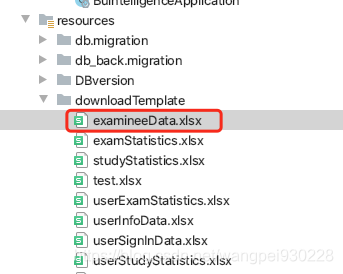
模板文件内容:
| 序号 | 账号 | 姓名 | 分组 | 考试结果 | 补考结果 | 考试得分 | 作答时长(分钟) | 考试次数 | 阅卷人 |
| <jx:forEach items="${datas}" var="model" > | |||||||||
| ${model.id} | ${model.accountName} | ${model.userName} | ${model.group} | ${model.examResult} | ${model.resitResult} | ${model.score} | ${model.examDuration} | ${model.examTimes} | ${model.judgeUser} |
| </jx:forEach> |
第四步:方法调用
Map<String, Object> map = new HashMap<>();
map.put("datas", examineeDataList);
map.put("datas2", questionAnalysisDataList);
fileDownloadService.exportMulti(request, response, map, "examineeData.xlsx", fileName);
注:代码调用Map里的key对应模板文件中items指定的对象,数据里面每个实体对象对应一个model,模板编写需要跟字段名称一一对应。





 扫一扫
扫一扫


 183
183

 被折叠的 条评论
为什么被折叠?
被折叠的 条评论
为什么被折叠?
 到【灌水乐园】发言





