


通过系统签名的应用没有root(su)执行权限,所以需要搭配脚本进行执行相关操作。
问题:在国科微老化过程FLASH过程中,因为频繁创建和删除文件在/data目录产生了大量的lost+found文件,导致8小时老化出现了空间不足情况。
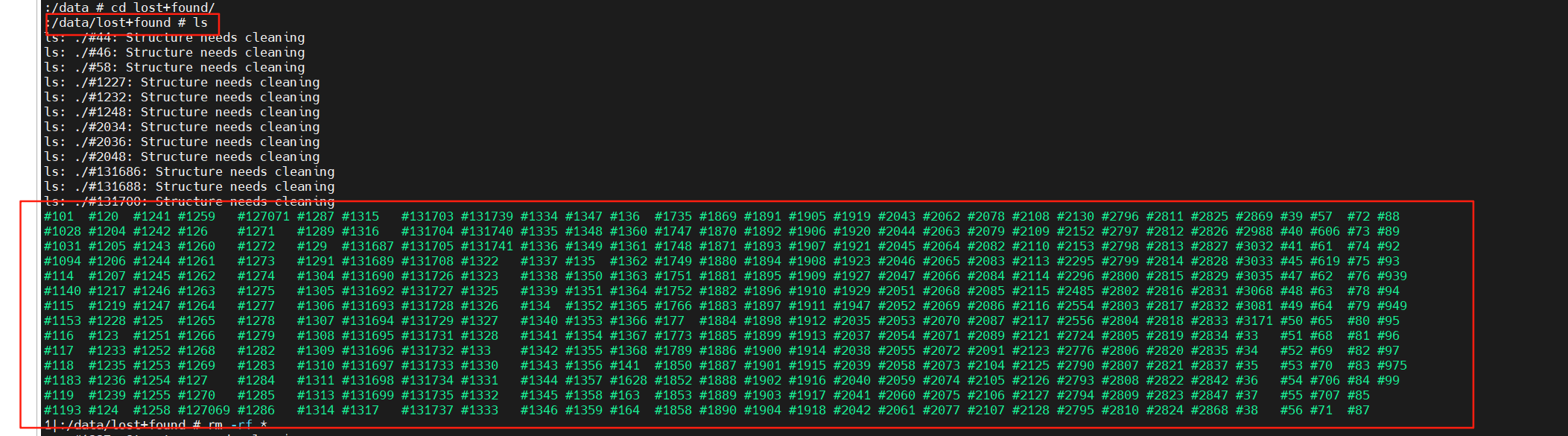
解决方法:
第一步:先写一个脚本文件负责清除/data/lost+found 下面文件
#!/system/bin/sh

LOST_FOUND_DIR="/data/lost+found"
THRESHOLD_MB=20

# 检查目录是否存在
if [ ! -d "$LOST_FOUND_DIR" ]; then
    exit 0
fi

# 计算目录大小 (MB)
size_mb=$(du -sm "$LOST_FOUND_DIR" | awk '{print $1}')
 echo "swlLost===$(date): Cleaned ${size_mb}MB"
# 如果超过阈值则清理
if [ "$size_mb" -gt "$THRESHOLD_MB" ]; then
    rm -rf "${LOST_FOUND_DIR}/"*
    echo "$(date): Cleaned ${size_mb}MB" >> /data/lostfound_clean.log
fi
第二步:注册服务
service clean_lostfound_server /system/xbin/clean_lostfound.sh
    user root
    group root
    disabled
    oneshot
    seclabel u:r:shell:s0 //这个很重要,不加会导致启动服务异常

on property:sys.start.cleanlostfound=1
   start clean_lostfound_server
https://gerrit.sunniwell.net/c/android-guoke/GK6323V100C-pie-20210827/platform/device/goke/+/147988
第三步:通过ctl.start启动对应服务或者属性变化启动服务。
   try {
            log.e("swlLost================clean_lostfound_server");
            SystemProperties.set("ctl.start","clean_lostfound_server");
            SystemProperties.set("sys.start.cleanlostfound","1");
        } catch (Exception e) {
            log.e("swlLost================clean_lostfound_server");
            log.e("Lost+found cleanup failed" + e);
        }





 扫一扫
扫一扫


 被折叠的 条评论
为什么被折叠?
被折叠的 条评论
为什么被折叠?
 到【灌水乐园】发言





