 MySQL用户与权限管理


1.用户
1.1.用户信息
mysql> use mysql;
mysql> select host, user, authentication_string, create_priv from user;
+-----------+---------------+-------------------------------------------+-------------+
| host      | user          | authentication_string                     | create_priv |
+-----------+---------------+-------------------------------------------+-------------+
| localhost | root          | *9D583243C8E77CC88649983AE3431D442644A48E | Y           |
| localhost | mysql.session | *THISISNOTAVALIDPASSWORDTHATCANBEUSEDHERE | N           |
| localhost | mysql.sys     | *THISISNOTAVALIDPASSWORDTHATCANBEUSEDHERE | N           |
+-----------+---------------+-------------------------------------------+-------------+
3 rows in set (0.00 sec)
字段解释:
- host: 表示这个用户可以从哪个主机登陆,如果是localhost,表示只能从本机登陆
- user: 用户名
- authentication_string: 用户密码通过password函数加密后的
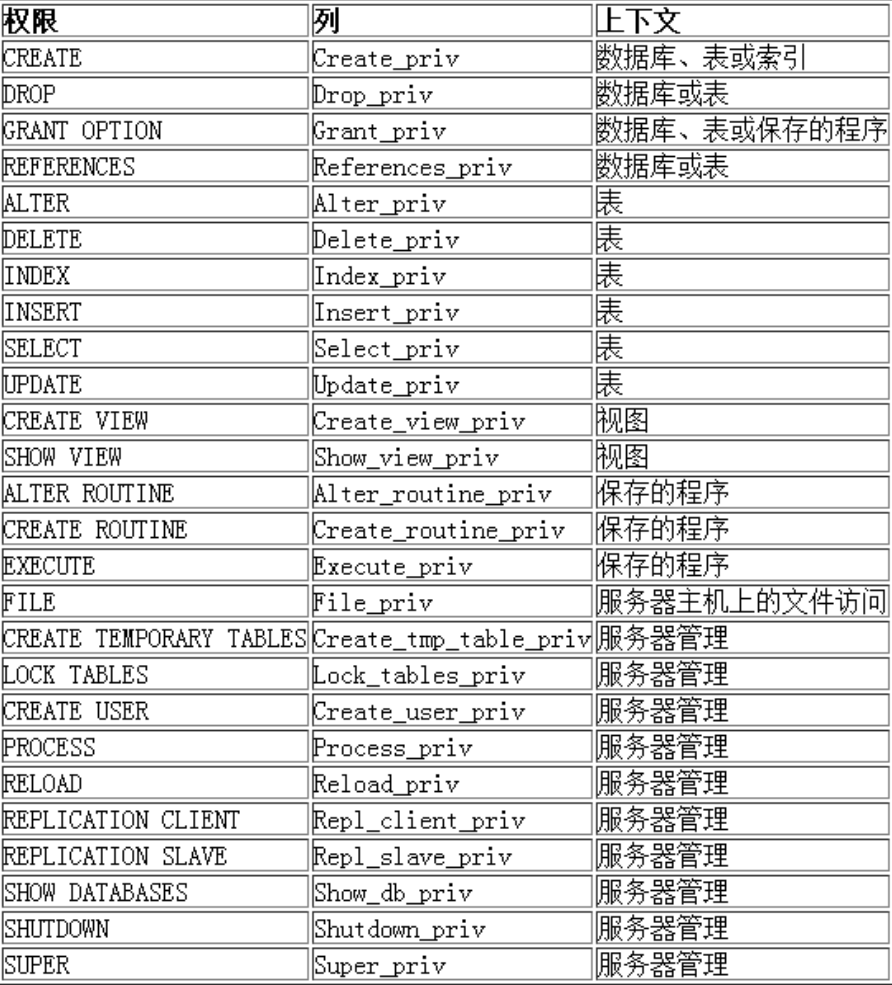
- *_priv: 用户拥有的权限(select_priv,insert_priv,update_priv,delete_priv,create_priv,drop_priv,grant_priv)
可以通过desc user初步查看一下表结构。
1.2.用户操作
(1)创建用户
create user '用户名'@'登陆主机/ip' identified by '密码';
mysql> create user 'wcy'@'localhost' identified by '123456';
Query OK, 0 rows affected (0.00 sec)

mysql> select host, user, authentication_string from user;
+-----------+---------------+-------------------------------------------+
| host      | user          | authentication_string                     |
+-----------+---------------+-------------------------------------------+
| localhost | root          | *9D583243C8E77CC88649983AE3431D442644A48E |
| localhost | mysql.session | *THISISNOTAVALIDPASSWORDTHATCANBEUSEDHERE |
| localhost | mysql.sys     | *THISISNOTAVALIDPASSWORDTHATCANBEUSEDHERE |
| localhost | wcy           | *6BB4837EB74329105EE4568DDA7DC67ED2CA2AD9 |
+-----------+---------------+-------------------------------------------+
4 rows in set (0.00 sec)
localhost 表示该用户只能从本地服务器(数据库所在的机器)登录,如果希望用户可以从任意主机登录,可以将 localhost 改为 %,但是不要轻易添加一个可以从任意地方登陆的user。
(2)删除用户
drop user '用户名'@'主机名'
mysql> drop user wcy;
ERROR 1396 (HY000): Operation DROP USER failed for 'wcy'@'%'
-- 直接给个用户名,不能删除,这种方式删除的是%所有地方可以登陆的用户
mysql> drop user 'wcy'@'localhost';
Query OK, 0 rows affected (0.00 sec)

mysql> select host, user, authentication_string from user;
+-----------+---------------+-------------------------------------------+
| host      | user          | authentication_string                     |
+-----------+---------------+-------------------------------------------+
| localhost | root          | *9D583243C8E77CC88649983AE3431D442644A48E |
| localhost | mysql.session | *THISISNOTAVALIDPASSWORDTHATCANBEUSEDHERE |
| localhost | mysql.sys     | *THISISNOTAVALIDPASSWORDTHATCANBEUSEDHERE |
+-----------+---------------+-------------------------------------------+
3 rows in set (0.00 sec)
(3)修改密码
修改当前用户的密码
set password=password('新的密码');
root用户修改指定用户的密码
set password for '用户名'@'主机名'=password('新的密码');
2.数据库的权限
MySQL数据库提供的权限列表:
2.1.给用户授权
刚创建的用户没有任何权限。需要给用户授权。
语法:
grant 权限列表 on 库.对象名 to '用户名'@'登陆位置' [identified by '密码']
权限列表,多个权限用逗号分开
grant select on ...
grant select, delete, create on ....
grant all [privileges] on ... -- 表示赋予该用户在该对象上的所有权限
*.* : 代表本系统中的所有数据库的所有对象(表,视图,存储过程等)
库.* : 表示某个数据库中的所有数据对象(表,视图,存储过程等)
identified by可选。 如果用户存在,赋予权限的同时修改密码,如果该用户不存在,就是创建用户。
终端A:
mysql> use test1;
mysql> show tables;
+-----------------+
| Tables_in_test1 |
+-----------------+
| DEPT            |
| EMP             |
| v_ename_dname   |
+-----------------+
3 rows in set (0.00 sec)

mysql> grant select on test1.* to 'wcy'@'localhost';
终端B:
mysql> use test1;
ERROR 1044 (42000): Access denied for user 'wcy'@'localhost' to database 'test1'
mysql> show databases;
+--------------------+
| Database           |
+--------------------+
| information_schema |
+--------------------+
1 row in set (0.00 sec)

-- 等root用户给wcy赋完权之后
mysql> show databases;
+--------------------+
| Database           |
+--------------------+
| information_schema |
| test1              |
+--------------------+
2 rows in set (0.00 sec)

mysql> use test1;
mysql> show tables;
+-----------------+
| Tables_in_test1 |
+-----------------+
| DEPT            |
| EMP             |
| v_ename_dname   |
+-----------------+
3 rows in set (0.00 sec)

mysql> select * from DEPT;
+--------+------------+----------+
| deptno | dname      | loc      |
+--------+------------+----------+
|     10 | ACCOUNTING | NEW YORK |
|     20 | RESEARCH   | DALLAS   |
|     30 | SALES      | CHICAGO  |
|     40 | OPERATIONS | BOSTON   |
+--------+------------+----------+
4 rows in set (0.00 sec)

--没有删除权限
mysql> delete from DEPT;
ERROR 1142 (42000): DELETE command denied to user 'wcy'@'localhost' for table 'DEPT'
特定用户现有查看权限
-- 终端A
mysql> show grants for 'root'@'localhost';
+---------------------------------------------------------------------+
| Grants for root@localhost                                           |
+---------------------------------------------------------------------+
| GRANT ALL PRIVILEGES ON *.* TO 'root'@'localhost' WITH GRANT OPTION |
| GRANT PROXY ON ''@'' TO 'root'@'localhost' WITH GRANT OPTION        |
+---------------------------------------------------------------------+
2 rows in set (0.00 sec)

-- 终端B
mysql> show grants for 'wcy'@'localhost';
+------------------------------------------------+
| Grants for wcy@localhost                       |
+------------------------------------------------+
| GRANT USAGE ON *.* TO 'wcy'@'localhost'        |
| GRANT SELECT ON `test1`.* TO 'wcy'@'localhost' |
+------------------------------------------------+
2 rows in set (0.00 sec)
2.2.收回权限
revoke 权限列表 on 库.对象名 from '用户名'@'登陆位置';
--终端A
mysql> revoke SELECT on test1.* from 'wcy'@'localhost';
Query OK, 0 rows affected (0.00 sec)

--终端B
mysql> use test1;
ERROR 1044 (42000): Access denied for user 'wcy'@'localhost' to database 'test1'
mysql> show grants for 'wcy'@'localhost';
+-----------------------------------------+
| Grants for wcy@localhost                |
+-----------------------------------------+
| GRANT USAGE ON *.* TO 'wcy'@'localhost' |
+-----------------------------------------+
1 row in set (0.00 sec)





 扫一扫
扫一扫


 2430
2430

 被折叠的 条评论
为什么被折叠?
被折叠的 条评论
为什么被折叠?
 到【灌水乐园】发言





