



 本文详细介绍了jQuery事件处理的概念、事件触发方式以及如何使用jQuery来处理各种常见的DOM事件,包括点击事件、双击事件、鼠标进入事件、鼠标离开事件、鼠标下按事件、鼠标释放事件、光标悬停事件、元素聚焦事件和元素失焦事件。
jQuery事件
jQuery 是为事件处理特别设计的
什么是事件?
页面对不同访问者的响应叫做事件。
事件处理程序指的是当 HTML 中发生某些事件时所调用的方法。术语由事件"触发"(或"激发")经常会被使用。
实例s:
- 在元素上移动鼠标。
- 选取单选按钮
- 点击元素
术语由事件"触发"(或"激发")经常会被使用。实例: "按钮事件在你按下按键时触发"。
常见 DOM 事件:
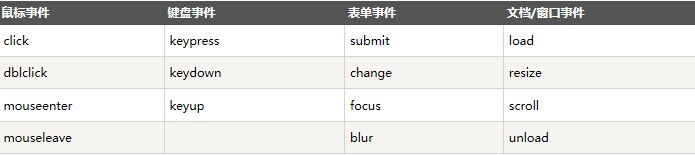
jQuery 事件方法语法
在jQuery中,大多数DOM事件都有一个等效的jQuery方法。
页面中指定一个点击事件:
$("p").click();
下一步是定义什么时间触发事件。你可以 通过一个事件函数实现:
$("p").click(function(){
   // action goes here!!
 });
常用的jQuery事件方法
$(document).ready()
$(document).ready() 方法允许我们在文档完全加载完后执行函数。该事件方法在 jQuery 语法 章节中已经提到够。
click()
click() 方法是当按钮点击事件被触发时会调用一个函数。
该函数在用户点击HTMl元素时执行。
在以下实例中,当点击事件在 <p> 元素中触发是隐藏所有当前页面的 <p> 元素:
<html>
<head>
<script src="http://libs.baidu.com/jquery/1.10.2/jquery.min.js">
</script>
<script>
$(document).ready(function(){
  $("p").click(function(){
    $(this).hide();
  });
});
</script>
</head>
<body>

<p>If you click on me, I will disappear.</p>
<p>Click me away!</p>
<p>Click me too!</p>

</body>
</html>
dblclick()
当双击元素时,会发生 dblclick 事件。
dblclick() 方法触发 dblclick 事件,或规定当发生 dblclick 事件时运行的函数:
<html>
<head>
<script src="http://libs.baidu.com/jquery/1.10.2/jquery.min.js">
</script>
<script>
$(document).ready(function(){
  $("p").dblclick(function(){
    $(this).hide();
  });
});
</script>
</head>
<body>

<p>If you double-click on me, I will disappear.</p>
<p>Click me away!</p>
<p>Click me too!</p>

</body>
</html>
mouseenter()
当鼠标指针穿过元素时,会发生 mouseenter 事件。
mouseenter() 方法触发 mouseenter 事件,或规定当发生 mouseenter 事件时运行的函数:
<html>
<head>
<script src="http://libs.baidu.com/jquery/1.10.2/jquery.min.js">
</script>
<script>
$(document).ready(function(){
  $("#p1").mouseenter(function(){
    alert("You entered p1!");
  });
});
</script>
</head>
<body>

<p id="p1">Enter this paragraph.</p>

</body>
</html>
mouseleave()
当鼠标指针离开元素时,会发生 mouseleave 事件。
mouseleave() 方法触发 mouseleave 事件,或规定当发生 mouseleave 事件时运行的函数:
<html>
<head>
<script src="http://libs.baidu.com/jquery/1.10.2/jquery.min.js">
</script>
<script>
$(document).ready(function(){
  $("#p1").mouseleave(function(){
    alert("Bye! You now leave p1!");
  });
});
</script>
</head>
<body>

<p id="p1">This is a paragraph.</p>

</body>
</html>
mousedown()
当鼠标指针移动到元素上方,并按下鼠标按键时,会发生 mousedown 事件。
mousedown() 方法触发 mousedown 事件,或规定当发生 mousedown 事件时运行的函数:
<html>
<head>
<script src="http://libs.baidu.com/jquery/1.10.2/jquery.min.js">
</script>
<script>
$(document).ready(function(){
  $("#p1").mousedown(function(){
    alert("Mouse down over p1!");
  });
});
</script>
</head>
<body>
<p id="p1">This is a paragraph.</p>
</body>
</html>
mouseup()
当在元素上放松鼠标按钮时,会发生 mouseup 事件。
mouseup() 方法触发 mouseup 事件,或规定当发生 mouseup 事件时运行的函数:
<html>
<head>
<script src="http://libs.baidu.com/jquery/1.10.2/jquery.min.js">
</script>
<script>
$(document).ready(function(){
  $("#p1").mouseup(function(){
    alert("Mouse up over p1!");
  });
});
</script>
</head>
<body>

<p id="p1">This is a paragraph.</p>

</body>
</html>
hover()
hover()方法用于模拟光标悬停事件。
当鼠标移动到元素上时,会触发指定的第一个函数(mouseenter);当鼠标移出这个元素时,会触发指定的第二个函数(mouseleave)。
<html>
<head>
<script src="http://libs.baidu.com/jquery/1.10.2/jquery.min.js">
</script>
<script>
$(document).ready(function(){
  $("#p1").hover(function(){
    alert("You entered p1!");
    },
    function(){
    alert("Bye! You now leave p1!");
  });
});
</script>
</head>
<body>

<p id="p1">This is a paragraph.</p>

</body>
</html>
focus()
当元素获得焦点时,发生 focus 事件。
focus() 方法触发 focus 事件,或规定当发生 focus 事件时运行的函数:
<html>
<head>
<script src="http://libs.baidu.com/jquery/1.10.2/jquery.min.js">
</script>
<script>
$(document).ready(function(){
  $("input").focus(function(){
    $(this).css("background-color","#cccccc");
  });
  $("input").blur(function(){
    $(this).css("background-color","#ffffff");
  });
});
</script>
</head>
<body>

Name: <input type="text" name="fullname"><br>
Email: <input type="text" name="email">

</body>
</html>
blur()
当元素失去焦点时发生 blur 事件。
当通过鼠标点击选中元素或通过 tab 键定位到元素时,该元素就会获得焦点:
<html>
<head>
<script src="http://libs.baidu.com/jquery/1.10.2/jquery.min.js">
</script>
<script>
$(document).ready(function(){
  $("input").focus(function(){
    $(this).css("background-color","#cccccc");
  });
  $("input").blur(function(){
    $(this).css("background-color","#ffffff");
  });
});
</script>
</head>
<body>

Name: <input type="text" name="fullname"><br>
Email: <input type="text" name="email">

</body>
</html>





 扫一扫
扫一扫


 1万+
1万+

 被折叠的 条评论
为什么被折叠?
被折叠的 条评论
为什么被折叠?
 到【灌水乐园】发言





