from selenium import webdriver
from selenium.webdriver.common.by import By
from selenium.webdriver.support.ui import WebDriverWait
from selenium.webdriver.support import expected_conditions as EC
from selenium.common.exceptions import TimeoutException, NoSuchElementException
import datetime
import time
import sys
import os
class EnergySystemLogin:
def __init__(self):
self.login_url = "http://10.11.20.117:7001/energy4/#/login"
self.credentials = {'username': 'E915285', 'password': '123456'}
self.driver = None
self.wait_timeout = 30 # 元素等待超时时间
def initialize_driver(self):
"""初始化Chrome浏览器(无头模式 + 支持文件下载)"""
try:
options = webdriver.ChromeOptions()
# --- 基础反检测设置 ---
options.add_argument("--disable-blink-features=AutomationControlled")
options.add_argument("--start-maximized")
options.add_argument("--headless=new") # 新版无头模式
options.add_argument("--disable-gpu")
options.add_argument("--no-sandbox")
options.add_argument("--disable-dev-shm-usage")
options.add_argument("--window-size=1920,1080")
options.add_argument("--log-level=3")
options.add_experimental_option("excludeSwitches", ["enable-automation"])
options.add_experimental_option("useAutomationExtension", False)
# === 👇 关键:添加下载配置 ===
download_dir = r"D:\Class\能管比对\导出文件" # ← 修改为你想保存的路径!
if not os.path.exists(download_dir):
os.makedirs(download_dir)
prefs = {
"download.default_directory": download_dir, # 必须用绝对路径
"download.prompt_for_download": False, # 不提示选择路径
"download.directory_upgrade": True, # 自动升级目录权限
"safebrowsing.enabled": True, # 启用安全浏览(避免警告)
"profile.default_content_settings.popups": 0, # 禁止弹窗
"plugins.always_open_pdf_externally": False, # PDF 外部打开(非必须)
}
options.add_experimental_option("prefs", prefs)
# === ✅ 配置结束 ===
self.driver = webdriver.Chrome(options=options)
self.driver.implicitly_wait(10)
# 防止被网站检测为机器人
self.driver.execute_script("Object.defineProperty(navigator, 'webdriver', {get: () => false});")
# 记录日志
self.log_action(f"浏览器初始化完成,下载路径: {download_dir}")
return True
except Exception as e:
self.log_error(f"浏览器初始化失败: {str(e)}")
return False
def log_action(self, message):
timestamp = datetime.datetime.now().strftime('%Y-%m-%d %H:%M:%S')
print(f"[{timestamp}] {message}")
def log_error(self, message):
timestamp = datetime.datetime.now().strftime('%Y%m%d_%H%M%S')
self.log_action(f"错误: {message}")
if self.driver:
try:
self.driver.save_screenshot(f"error_{timestamp}.png")
except Exception as e:
print(f"[{datetime.datetime.now().strftime('%Y-%m-%d %H:%M:%S')}] 截图失败: {str(e)}")
def locate_and_input(self, by, value, text, description):
"""定位输入框并输入内容"""
try:
element = WebDriverWait(self.driver, self.wait_timeout).until(
EC.visibility_of_element_located((by, value))
)
element.clear()
element.send_keys(text)
self.log_action(f"{description} 输入完成")
return True
except Exception as e:
self.log_error(f"{description} 输入失败: {str(e)}")
return False
def perform_login(self):
"""执行登录流程"""
try:
self.log_action("访问登录页面")
self.driver.get(self.login_url)
# 等待页面加载完成
WebDriverWait(self.driver, self.wait_timeout).until(
lambda d: d.execute_script("return document.readyState") == "complete"
)
# 输入用户名
if not self.locate_and_input(
By.CSS_SELECTOR,
"input.el-input__inner[type='text']",
self.credentials['username'],
"用户名"
):
return False
# 输入密码
if not self.locate_and_input(
By.CSS_SELECTOR,
"input.el-input__inner[type='password']",
self.credentials['password'],
"密码"
):
return False
# 点击登录按钮
try:
login_btn = WebDriverWait(self.driver, self.wait_timeout).until(
EC.element_to_be_clickable((By.CSS_SELECTOR, "button.loginBtn"))
)
login_btn.click()
self.log_action("点击登录按钮")
except Exception as e:
self.log_error(f"点击登录按钮失败: {str(e)}")
return False
# 验证是否登录成功(URL变化且不再有登录容器)
try:
WebDriverWait(self.driver, 20).until(
EC.url_contains("/energy4/#/") # 登录后跳转到主页面
)
WebDriverWait(self.driver, 10).until_not(
EC.presence_of_element_located((By.CLASS_NAME, "login-container"))
)
self.log_action("登录成功")
self.driver.save_screenshot("login_success.png")
return True
except TimeoutException:
self.log_error("登录验证超时,可能未成功登录")
return False
except Exception as e:
self.log_error(f"登录过程发生异常: {str(e)}")
return False
def get_driver(self):
return self.driver
def cleanup(self):
if self.driver:
try:
self.driver.quit()
except Exception as e:
print(f"清理浏览器资源时出错: {str(e)}")
class ACSystemOperator:
def __init__(self, driver):
self.driver = driver
self.wait_timeout = 10
self.click_delay = 3 # 每次点击后等待3秒
def get_timestamp(self):
return datetime.datetime.now().strftime('%Y-%m-%d %H:%M:%S')
def log_action(self, message):
print(f"[{self.get_timestamp()}] 操作: {message}")
# 删除此处的截图:不再每步都截图
def log_error(self, message):
print(f"[{self.get_timestamp()}] 错误: {message}")
# 错误时仍保留截图
self.driver.save_screenshot(f"error_{int(time.time())}.png")
def click_element(self, xpath, description):
"""直接点击元素,仅尝试一次,失败则记录错误"""
try:
element = WebDriverWait(self.driver, self.wait_timeout).until(
EC.visibility_of_element_located((By.XPATH, xpath))
)
element.click()
self.log_action(f"点击成功: {description}")
time.sleep(self.click_delay) # 固定等待3秒
return True
except Exception as e:
self.log_error(f"点击失败 ({description}): {str(e)}")
return False
def ACoperate(self):
"""依次点击菜单项进入‘低温冰水制冷功率’"""
operations1 = [
{"xpath": "//span[@slot='title'][text()='能耗统计']", "desc": "能耗统计"},
{"xpath": "//span[text()='分类统计' and contains(@data-v-11708afe,'')]", "desc": "分类统计"},
{"xpath": "//div[@role='button' and contains(@class,'el-collapse-item__header')][normalize-space()='系统分组']", "desc": "系统分组"},
{"xpath": "//span[@data-v-4fe475b6 and @title='空调系统' and normalize-space()='空调系统']", "desc": "空调系统"},
{"xpath": "//span[@data-v-4fe475b6 and @title='冷热水系统' and normalize-space()='冷热水系统']", "desc": "冷热水系统"},
{"xpath": "//div[contains(@class, 'el-tree-node__content') and contains(@style, 'padding-left: 36px')]//span[contains(@title, '低温冰水系统')]", "desc": "低温冰水系统"},
{"xpath": "//div[contains(@style, 'padding-left: 54px')]//span[contains(@title, '低温冰水制冷功率') and @data-v-4fe475b6]", "desc": "低温冰水制冷功率"},
{"xpath": "//div[contains(@style, 'padding-left: 72px')]//span[contains(@title, '低温冰水制冷功率') and @data-v-4fe475b6]", "desc": "子项 - 低温冰水制冷功率"},
{"xpath": "//span[@class='el-radio-button__inner' and normalize-space()='月']", "desc": "月"},
{"xpath": "//span[@class='el-radio-button__inner' and normalize-space()='能源种类']", "desc": "能源种类"},
{"xpath": "//button[contains(@class, 'el-button') and contains(span/text(), '查 询')]", "desc": "查询"},
{"xpath": "//button[contains(@class, 'el-button') and contains(span/text(), '导出Excel')]", "desc": "导出"},
]
for op in operations1:
if not self.click_element(op["xpath"], op["desc"]):
self.log_error(f"操作中断于: {op['desc']}")
return False
# ✅ 所有操作完成,现在等待3秒让页面加载(比如图表、Ajax 数据)
self.log_action("所有点击已完成,等待3秒以便页面加载...")
time.sleep(3)
# ✅ 然后进行最终截图
timestamp = int(time.time())
screenshot_name = f"final_result_{timestamp}.png"
self.driver.save_screenshot(screenshot_name)
self.log_action(f"✅ 最终截图已保存: {screenshot_name}")
return True
operations2 = [
{"xpath": "//span[@slot='title'][text()='能耗统计']", "desc": "能耗统计"},
{"xpath": "//span[text()='分类统计' and contains(@data-v-11708afe,'')]", "desc": "分类统计"},
{"xpath": "//div[@role='button' and contains(@class,'el-collapse-item__header')][normalize-space()='系统分组']","desc": "系统分组"},
{"xpath": "//span[@data-v-4fe475b6 and @title='空调系统' and normalize-space()='空调系统']","desc": "空调系统"},
{"xpath": "//span[@data-v-4fe475b6 and @title='冷热水系统' and normalize-space()='冷热水系统']","desc": "冷热水系统"},
{"xpath": "//div[contains(@class, 'el-tree-node__content') and contains(@style, 'padding-left: 36px')]//span[contains(@title, '低温冰水系统')]","desc": "低温冰水系统"},
{"xpath": "//div[contains(@style, 'padding-left: 54px')]//span[contains(@title, '低温冰水制冷功率') and @data-v-4fe475b6]","desc": "低温冰水制冷功率"},
{"xpath": "//div[contains(@style, 'padding-left: 72px')]//span[contains(@title, '低温冰水制冷功率') and @data-v-4fe475b6]","desc": "子项 - 低温冰水制冷功率"},
{"xpath": "//span[@class='el-radio-button__inner' and normalize-space()='月']", "desc": "月"},
]
for op in operations1:
if not self.click_element(op["xpath"], op["desc"]):
self.log_error(f"操作中断于: {op['desc']}")
return False
# ✅ 所有操作完成,现在等待3秒让页面加载(比如图表、Ajax 数据)
self.log_action("所有点击已完成,等待3秒以便页面加载...")
time.sleep(3)
# ✅ 然后进行最终截图
timestamp = int(time.time())
screenshot_name = f"final_result_{timestamp}.png"
self.driver.save_screenshot(screenshot_name)
self.log_action(f"✅ 最终截图已保存: {screenshot_name}")
return True
# ========================
# 主程序入口
# ========================
if __name__ == "__main__":
login = None
try:
login = EnergySystemLogin()
# 初始化浏览器
if not login.initialize_driver():
print("❌ 浏览器初始化失败,程序终止")
sys.exit(1)
# 执行登录
if not login.perform_login():
print("❌ 登录失败,程序终止")
sys.exit(1)
# 获取已登录的 driver
driver = login.get_driver()
# 执行后续菜单操作
operator = ACSystemOperator(driver)
if operator.ACoperate():
print("🎉 操作执行成功!")
else:
print("⚠️ 操作执行失败,请查看错误日志和截图")
except KeyboardInterrupt:
print("\n\n🛑 用户手动中断程序")
except Exception as e:
print(f"🚨 程序发生未预期异常: {str(e)}")
finally:
if login:
login.cleanup()
print("🔚 程序结束")
——除了options1,后续还会有内容不同的options2、3、4等等,请帮我修改这个框架,便于我后续补充和添加内容
最新发布


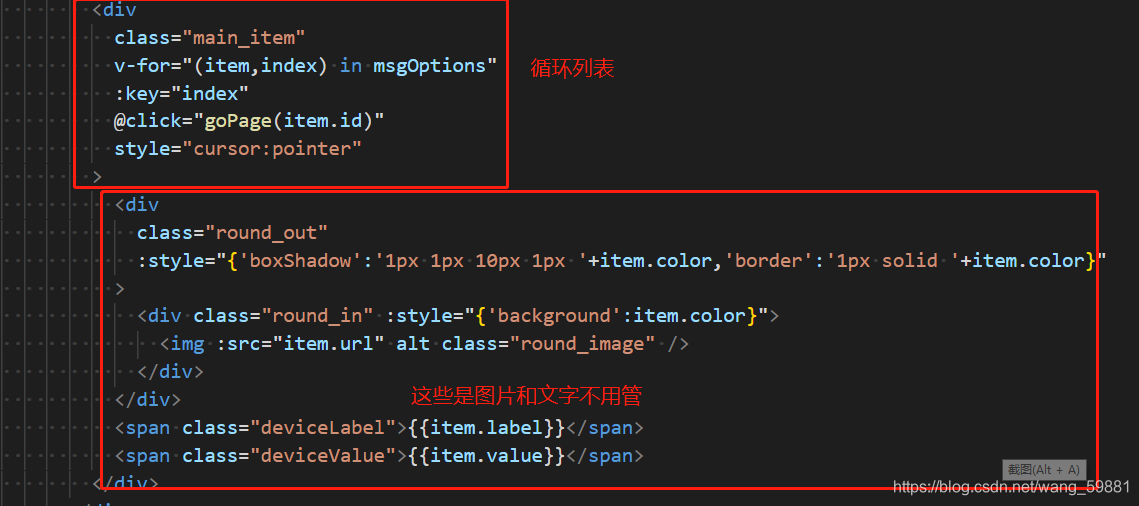
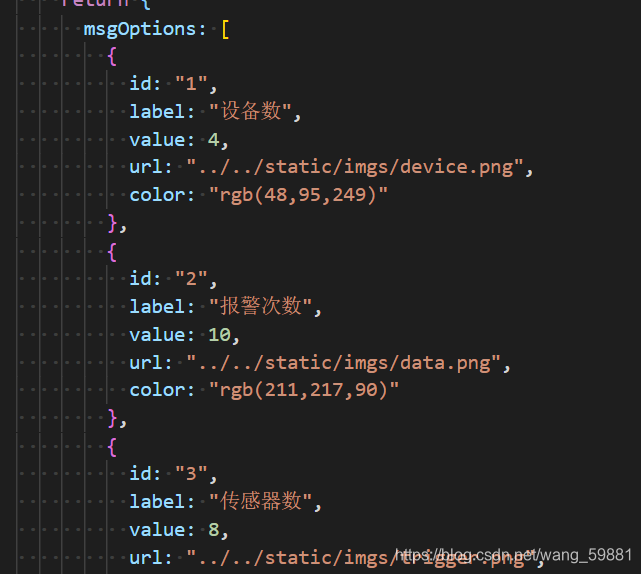
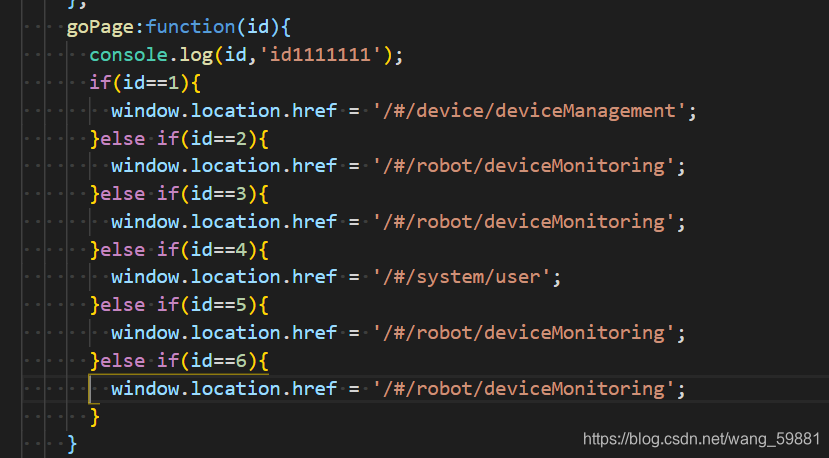
 本文介绍如何在HTML中使用点击事件,并结合Vue.js在methods中定义@click方法实现页面跳转。通过在data中设置假数据,以及利用href属性指定路由路径,实现功能性的页面导航。
 1335
1335

 被折叠的 条评论
为什么被折叠?
被折叠的 条评论
为什么被折叠?
 到【灌水乐园】发言








 扫一扫
扫一扫


