
tsConfig.json文件各配置项文件(自用版)

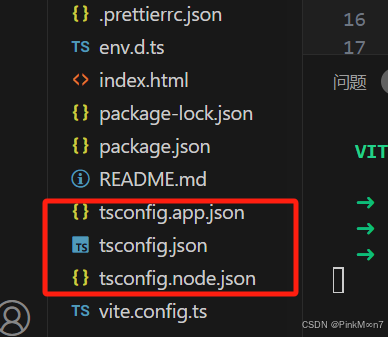
        在使用vue脚手架生成vue3项目时会生成tsconfig.json,tsconfig.app.json,tsconfig.node.json这三个文件,其中tsconfig.node.json是专门用来配置vite.config.ts文件的编译规则,tsconfig.app.json则是用来定义项目中其他文件的ts编译规则,后面两个文件最终会被引入到tsconfig.json中.

        或者在单独的学习中,vscode写入.ts文件,在终端输入tsc -init也可以生成tsconfig.json文件

{
  "compilerOptions": {
    /* Basic Options */
    "target": "es5" /* target用于指定编译之后的版本目标: 'ES3' (default), 'ES5', 'ES2015', 'ES2016', 'ES2017', 'ES2018', 'ES2019' or 'ESNEXT'. */,
    "module": "commonjs" /* 用来指定要使用的模块标准: 'none', 'commonjs', 'amd', 'system', 'umd', 'es2015', or 'ESNext'. */,
    "lib": ["es6", "dom"] /* lib用于指定要包含在编译中的库文件 */,
    "allowJs": true,                       /* allowJs设置的值为true或false,用来指定是否允许编译js文件,默认是false,即不编译js文件 */
    "checkJs": true,                      
在Vue 3项目中,tsconfig.jsontsconfig.app.jsontsconfig.node.json有不同的配置方法和作用。 ### tsconfig.json tsconfig.json是TypeScript项目的根配置文件,常作为基础配置或入口配置,通过`references`字段关联其他子配置(如tsconfig.node.jsontsconfig.app.json),实现多配置的统一管理。它本身可以没有太多具体配置,主要用于引入其他配置文件。示例如下: ```json { "files": [], "references": [ { "path": "./tsconfig.node.json" }, { "path": "./tsconfig.app.json" }, { "path": "./tsconfig.vitest.json" } ] } ``` 此配置文件没有具体的编译规则,只是将其他三个配置文件引入进来,起到统一管理的作用[^2][^3]。 ### tsconfig.app.json tsconfig.app.json用于定义项目中其他文件的ts编译规则,主要针对应用程序代码的TypeScript配置,比如Vue组件、浏览器环境。以下是一个示例: ```json { "extends": "./tsconfig.json", "compilerOptions": { "target": "ESNext", "module": "ESNext", "strict": true, "jsx": "preserve", "moduleResolution": "Node", "skipLibCheck": true, "esModuleInterop": true, "allowSyntheticDefaultImports": true, "sourceMap": true, "baseUrl": ".", "paths": { "@/*": ["src/*"] }, "lib": ["ESNext", "DOM"] }, "include": ["src/**/*.ts", "src/**/*.d.ts", "src/**/*.tsx", "src/**/*.vue"], "exclude": ["node_modules", "dist"] } ``` 在这个配置中,`extends`字段继承了tsconfig.json的配置,`compilerOptions`定义了编译选项,如目标本、模块系统等。`include`指定了需要编译的文件,`exclude`指定了不需要编译的文件[^1][^3]。 ### tsconfig.node.json tsconfig.node.json专门用来配置vite.config.ts文件的编译规则,针对Node.js环境相关代码的TypeScript配置,如项目的构建脚本、服务端逻辑等。示例如下: ```json { "extends": "./tsconfig.json", "compilerOptions": { "target": "ESNext", "module": "CommonJS", "strict": true, "esModuleInterop": true, "skipLibCheck": true, "forceConsistentCasingInFileNames": true }, "include": ["vite.config.ts"] } ``` 同样,`extends`继承了tsconfig.json的配置,`compilerOptions`中的`module`设置为`CommonJS`,以适应Node.js环境。`include`指定了需要编译的文件为`vite.config.ts`[^1][^3]。
评论
添加红包

请填写红包祝福语或标题

红包个数最小为10个

红包金额最低5元

当前余额3.43前往充值 >
需支付:10.00
成就一亿技术人!
领取后你会自动成为博主和红包主的粉丝 规则
hope_wisdom
发出的红包
实付
使用余额支付
点击重新获取
扫码支付
钱包余额 0

抵扣说明:

1.余额是钱包充值的虚拟货币,按照1:1的比例进行支付金额的抵扣。
2.余额无法直接购买下载,可以购买VIP、付费专栏及课程。

余额充值



