 qiankun 源码分析:微前端的样式隔离与沙盒机制



 本文详细分析了 qiankun@2.10.5 框架的 `loadApp` 和 `importEntry` 方法,探讨了如何实现子应用的样式隔离,包括 scoped CSS 和 `import-html-entry` 库的作用。此外,还解释了 sandbox 沙盒机制,阐述为何需要沙盒以及如何创建和管理沙盒,以防止全局变量污染。
微前端 qiankun@2.10.5 源码分析(二)
我们继续上一节的内容。
loadApp 方法
找到 src/loader.ts 文件的第 244 行:
export async function loadApp<T extends ObjectType>(
  app: LoadableApp<T>,
  configuration: FrameworkConfiguration = {

   },
  lifeCycles?: FrameworkLifeCycles<T>,
): Promise<ParcelConfigObjectGetter> {


  ...
  // 根据入口文件获取应用信息
  const {

    template, execScripts, assetPublicPath, getExternalScripts } = await importEntry(entry, importEntryOpts);
  // 在执行应用入口文件的之前先加载其它的资源文件
  // 比如:http://127.0.0.1:7101/static/js/chunk-vendors.js 文件
  await getExternalScripts();
  ...
 	// 创建当前应用元素,并且替换入口文件的 head 元素为 qiankun-head
  const appContent = getDefaultTplWrapper(appInstanceId, sandbox)(template);
  ...
  // 创建 css scoped,跟 vue scoped 的一样
  const scopedCSS = isEnableScopedCSS(sandbox);
  let initialAppWrapperElement: HTMLElement | null = createElement(
    appContent,
    strictStyleIsolation,
    scopedCSS,
    appInstanceId,
  );

  const initialContainer = 'container' in app ? app.container : undefined;
  // 获取渲染器,也就是在第一步中执行的 render 方法
  const render = getRender(appInstanceId, appContent, legacyRender);

  // 第一次加载设置应用可见区域 dom 结构
  // 确保每次应用加载前容器 dom 结构已经设置完毕
  // 将子应用的 initialAppWrapperElement 元素插入挂载节点 initialContainer
  render({

    element: initialAppWrapperElement, loading: true, container: initialContainer }, 'loading');
	// 创建一个 initialAppWrapperElement 元素的获取器
  const initialAppWrapperGetter = getAppWrapperGetter(
    appInstanceId,
    !!legacyRender,
    strictStyleIsolation,
    scopedCSS,
    () => initialAppWrapperElement,
  );

  let global = globalContext;
  let mountSandbox = () => Promise.resolve();
  let unmountSandbox = () => Promise.resolve();
  const useLooseSandbox = typeof sandbox === 'object' && !!sandbox.loose;
  // enable speedy mode by default
  const speedySandbox = typeof sandbox === 'object' ? sandbox.speedy !== false : true;
  let sandboxContainer;
  if (sandbox) {


    // 创建沙盒
    sandboxContainer = createSandboxContainer(
      appInstanceId,
      // FIXME should use a strict sandbox logic while remount, see https://github.com/umijs/qiankun/issues/518
      initialAppWrapperGetter,
      scopedCSS,
      useLooseSandbox,
      excludeAssetFilter,
      global,
      speedySandbox,
    );
    // 用沙箱的代理对象作为接下来使用的全局对象
    global = sandboxContainer.instance.proxy as typeof window;
    mountSandbox = sandboxContainer.mount;
    unmountSandbox = sandboxContainer.unmount;
  }

  const {


    beforeUnmount = [],
    afterUnmount = [],
    afterMount = [],
    beforeMount = [],
    beforeLoad = [],
  } = mergeWith({

   }, getAddOns(global, assetPublicPath), lifeCycles, (v1, v2) => concat(v1 ?? [], v2 ?? []));
  // 调用 beforeLoad 生命周期
  await execHooksChain(toArray(beforeLoad), app, global);

  // 获取子应用模块信息
  const scriptExports: any = await execScripts(global, sandbox && !useLooseSandbox, {


    scopedGlobalVariables: speedySandbox ? cachedGlobals : [],
  });
  // 获取子应用模块信息导出的生命周期
  const {

    bootstrap, mount, unmount, update } = getLifecyclesFromExports(
    scriptExports,
    appName,
    global,
    sandboxContainer?.instance?.latestSetProp,
  );
	// 全局状态
  const {

    onGlobalStateChange, setGlobalState, offGlobalStateChange }: Record<string, CallableFunction> =
    getMicroAppStateActions(appInstanceId);

    // 返回 spa 需要的钩子信息
    const parcelConfig: ParcelConfigObject = {


      name: appInstanceId,
      bootstrap, // bootstrap 钩子信息
      mount: [ // mount 钩子信息
       ...
      ],
      unmount: [ // unmount 钩子信息
        ...
      ],
    };
		// update 钩子信息
    if (typeof update === 'function') {


      parcelConfig.update = update;
    }

    return parcelConfig;
  };

  return parcelConfigGetter;
}
代码有点多,loadApp 算是 qiankun 框架最重要的一个方法了,不要慌,我们一步一步的来!
importEntry 方法
在 loadApp 方法中,使用了 importEntry 方法去根据子应用入口加载子应用信息:
export async function loadApp<T extends ObjectType>(
  app: LoadableApp<T>,
  configuration: FrameworkConfiguration = {

   },
  lifeCycles?: FrameworkLifeCycles<T>,
): Promise<ParcelConfigObjectGetter> {


  ...
  // 根据入口文件获取应用信息
  const {

    template, execScripts, assetPublicPath, getExternalScripts } = await importEntry(entry, importEntryOpts);
  // 在执行应用入口文件的之前先加载其它的资源文件
  // 比如:http://127.0.0.1:7101/static/js/chunk-vendors.js 文件
  await getExternalScripts();
  ...
}
importEntry 方法是 import-html-entry 库中提供的方法:
import-html-entry
以 html 文件为应用的清单文件,加载里面的(css、js),获取入口文件的导出内容。
Treats the index html as manifest and loads the assets(css,js), get the exports from entry script.
<!-- subApp/index.html -->

<!DOCTYPE html>
<html lang="en">
<head>
    <meta charset="UTF-8">
    <title>test</title>
</head>
<body>

<!-- mark the entry script with entry attribute -->
<script src="https://unpkg.com/mobx@5.0.3/lib/mobx.umd.js" entry></script>
<script src="https://unpkg.com/react@16.4.2/umd/react.production.min.js"></script>
</body>
</html>
import importHTML from 'import-html-entry';

importHTML('./subApp/index.html')
    .then(res => {
        console.log(res.template);

        res.execScripts().then(exports => {
            const mobx = exports;
            const { observable } = mobx;
            observable({
                name: 'kuitos'
            })
        })
});
更多 import-html-entry 库的内容,小伙伴们自己去看官网哦!
我们可以来测试一下,比如我们在第一步中注册的子应用信息:
{


      name: 'vue',
      entry: '//localhost:7101',
      container: '#subapp-viewport',
      loader,
      activeRule: '/vue',
}
vue 子应用的入口是 //localhost:7101,我们首先用 fetch 直接访问一下入口文件:
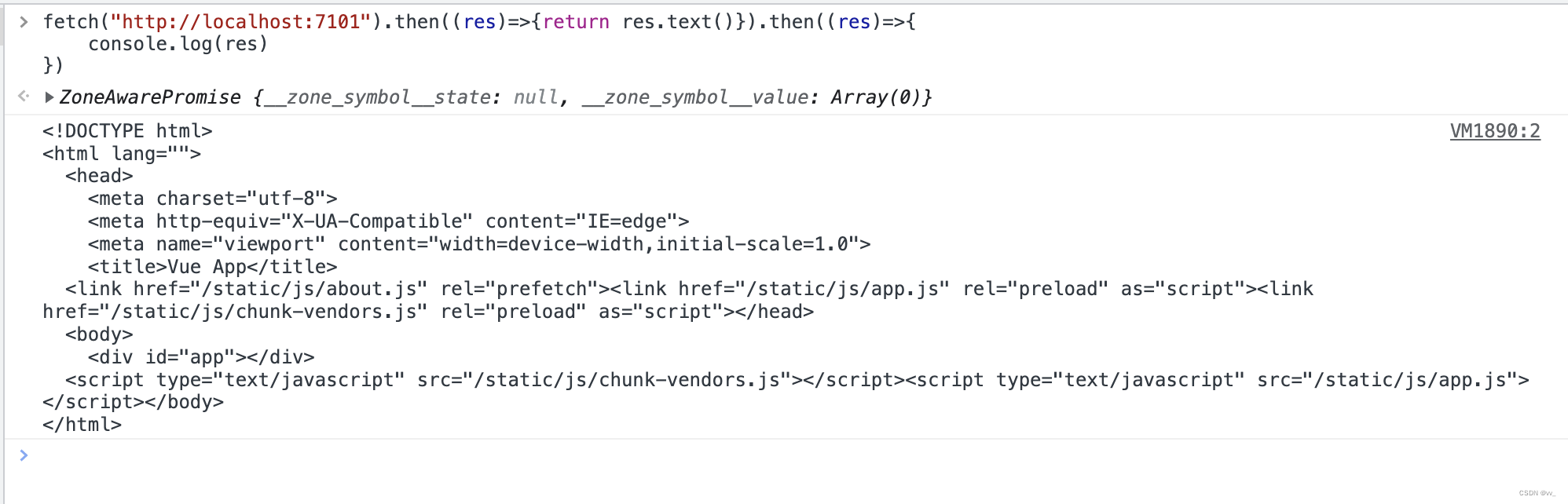
ok,可以看到,这是一个很普通的 vue 项目的入口文件,接着我们用 import-html-entry 库中提供的 importEntry 方法去测试一下:
import {

   importEntry} from "import-html-entry";
;(async ()=>{


  const {

    template, execScripts, assetPublicPath, getExternalScripts } = await importEntry("//localhost:7101");
  console.log("template", template);
  const externalScripts = await getExternalScripts();
  console.log("externalScripts", externalScripts);
  const module = await execScripts();
  console.log("module", module);
  console.log("assetPublicPath", assetPublicPath);
  console.log("assetPublicPath", assetPublicPath);
})()
我们运行看效果:
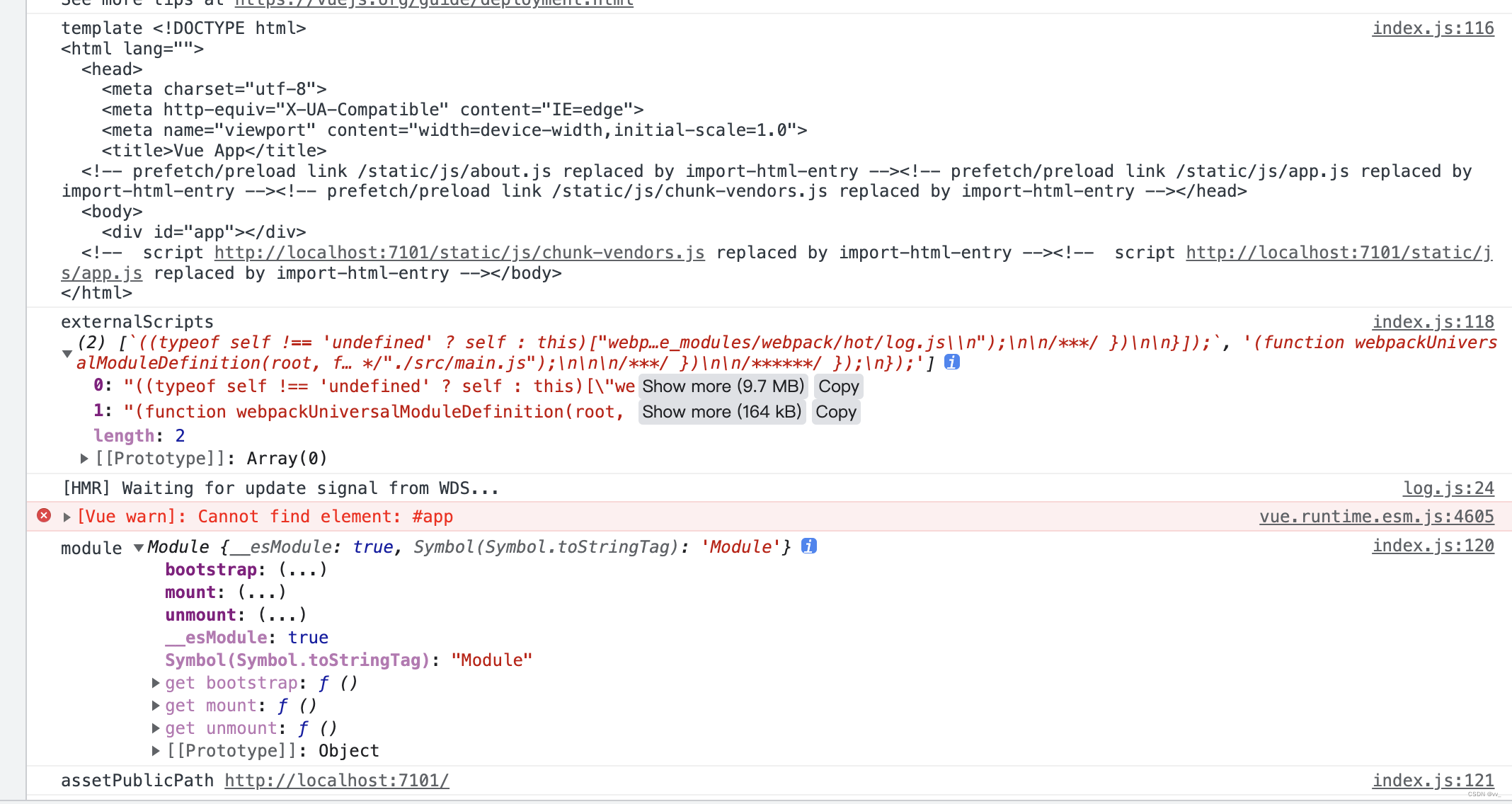
console.log("template", template) 的结果:
<html lang="">
  <head>
    <meta charset="utf-8">
    <meta http-equiv="X-UA-Compatible" content="IE=edge">
    <meta name="viewport" content="width=device-width,initial-scale=1.0">
    <title>Vue App</title>
  <!-- prefetch/preload link /static/js/about.js replaced by import-html-entry --><!-- prefetch/preload link /static/js/app.js replaced by import-html-entry --><!-- prefetch/preload link /static/js/chunk-vendors.js replaced by import-html-entry --></head>
  <body>
    <div id="app"></div>
  <!--  script http://localhost:7101/static/js/chunk-vendors.js replaced by import-html-entry --><!--  script http://localhost:7101/static/js/app.js replaced by import-html-entry --></body>
</html>
可以看到,我们的 js 文件都被 import-html-entry 框架给注释掉了,所以 template 返回的是一个被处理过后的入口模版文件,里面的 js、css 资源文件都被剔除了。
console.log("externalScripts", externalScripts); 的结果:
返回了原模版文件中两个 js 文件:
<script type="text/javascript 最低0.47元/天 解锁文章






 扫一扫
扫一扫


 1767
1767


 被折叠的 条评论
为什么被折叠?
被折叠的 条评论
为什么被折叠?
 到【灌水乐园】发言




