


 该实验涉及网络配置,包括子网划分、IP地址分配、路由设置及DHCP服务配置。192.168.1.0/24网段被划分为多个子网,并为路由器分配了特定的IP地址。R3上配置了DHCP服务,提供IP地址给客户端。所有路由器更新了路由表以实现网络连通性。此外,还进行了telnet配置,确保远程访问的可行性。
1.实验要求
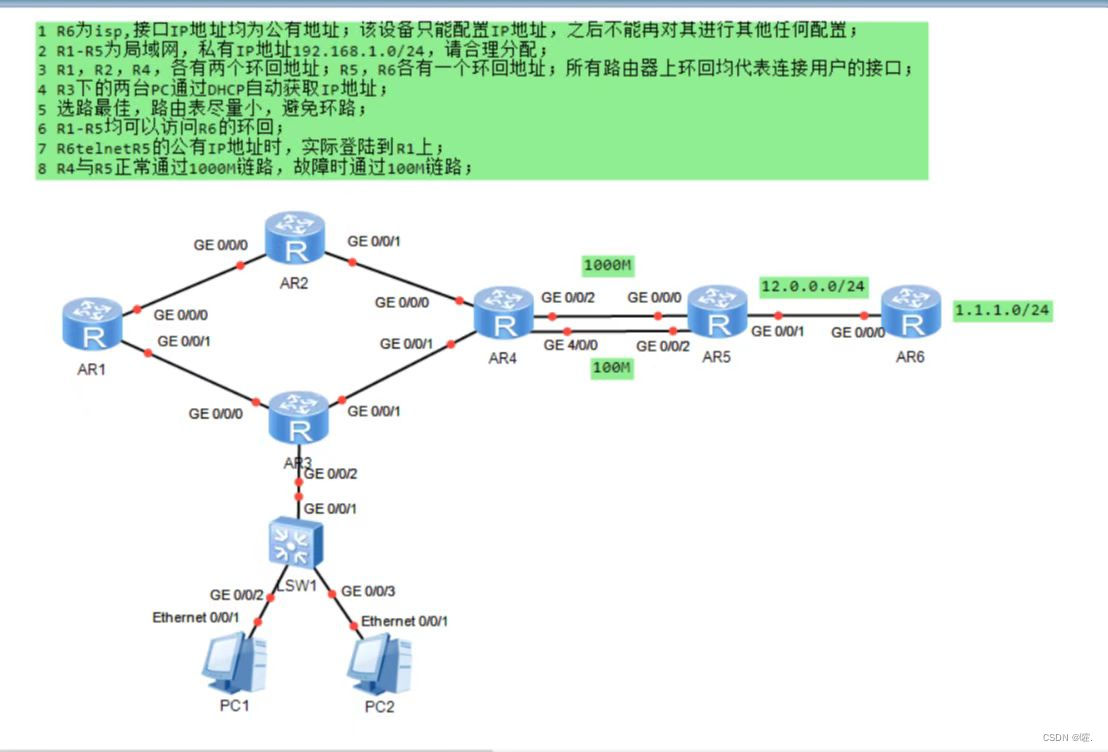
2.子网划分
根据实验要求对192.168.1.0/ 24网段进行划分,R6的环回地址更改为6.6.6.0/24
主干链路:
#由题意可知本实验共需要6个网段
我们将192.168.1.0/24划分成为8个网段
192.168.1.0/27---192.168.1.31/27
192.168.1.32/27---192.168.1.63/27
192.168.1.64/27---192.168.1.95/27
192.168.1.96/27---192.168.1.127/27
192.168.1.128/27---192.168.1.159/27
192.168.1.160/27---192.168.1.191/27
192.168.1.192/27---192.168.1.223/27
192.168.1.224/27---192.168.1.255/27
每条主干链路上的IP地址只需要两个
我们可以将8个网段中取出一个网段继续将其划分作为主干道IP
192.168.1.0/30、192.168.1.4/30、192.168.1.8/30、192.168.1.12/30、
192.168.1.16/30、192.168.1.20/30、192.168.1.24/30、192.168.1.28/30(主干道)
R1环回地址:
192.168.1.64/28、192.168.1.80/28
R2环回地址:
192.168.1.96/28、192.168.1.114/28
R4环回地址:
192.168.1.128/28、192.168.1.144/28
将192.168.1.32/27作为R3下的广播域IP地址
将192.168.1.160/27作为R5的换回地址
3.配置IP地址
AR1:

0/0/0接口:192.168.1.1/30

0/0/1接口:192.168.1.5/30

环回1:192.168.1.65/28

环回2:192.168.1.81/28

AR2:

0/0/0接口:192.168.1.2/30

0/0/1接口:192.168.1.9/30

环回1:192.168.1.97/28

环回2:192.168.1.113/28

AR3:

0/0/0接口:192.168.1.6/30

0/0/1接口:192.168.1.13/30

AR4:

0/0/0接口:192.168.1.10/30

0/0/1接口:192.168.1.14/30

0/0/2接口:192.168.1.17/30

4/0/0接口:192.168.1.21/30

环回1:192.168.1.129/28

环回2:192.168.1.145/28

AR5:

0/0/0接口:192.168.1.18/30

0/0/1接口:12.0.0.1/24

0/0/2接口:192.168.1.22/30

环回1:192.168.1.161/27

R6:

0/0/0接口:12.0.0.2/24

环回1:6.6.6.6/24
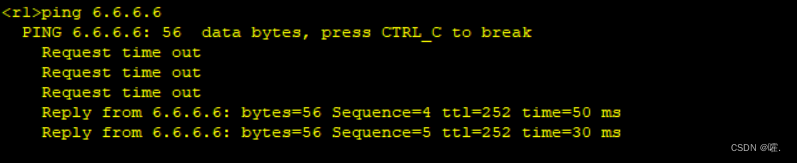
测试ping6.6.6.6,能正常ping通
4.R3的DHCP配置
[R3]dhcp enable
[R3]ip pool aa
[R3-ip-pool-aa]network 192.168.1.32 mask 27
[R3-ip-pool-aa]gateway-list 192.168.1.33
[R3-ip-pool-aa]dns-list 114.114.114.114 8.8.8.8
[R3-ip-pool-aa] quit
[R3]
[R3]int g 0/0/2
[R3-GigabitEthernet0/0/2]ip add 192.168.1.33 27
[R3-GigabitEthernet0/0/2]dhcp select global
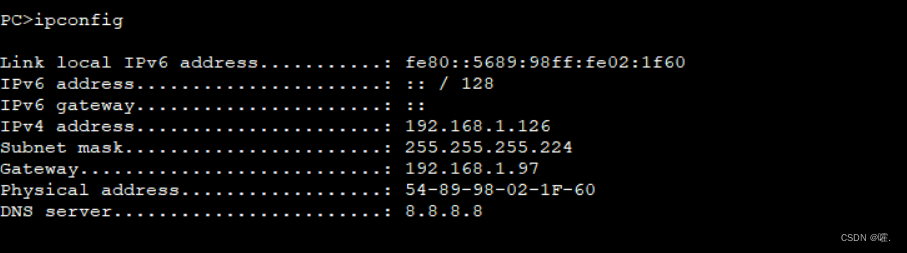
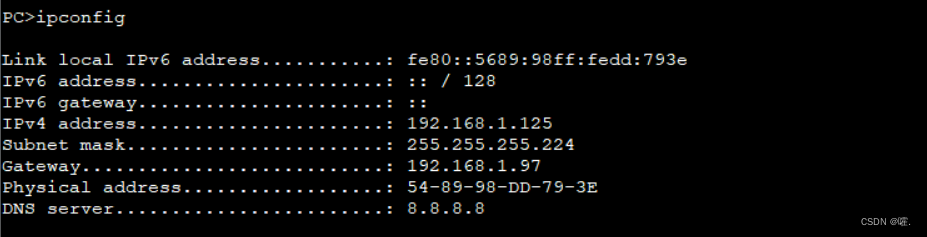
检验R3下两台PC的IP地址
PC1:
PC2:
5.添加路由表
R1:
[R1]ip route-static 0.0.0.0 0 192.168.1.2
[R1]ip route-static 0.0.0.0 0 192.168.1.6
[R1]ip route-static 192.168.1.96 27 192.168.1.2
[R1]ip route-static 192.168.1.8 30 192.168.1.2
[R1]ip route-static 192.168.1.32 27 192.168.1.6
[R1]ip route-static 192.168.1.12 30 192.168.1.6
R2:
[R2]ip route-static 192.168.1.64 27 192.168.1.1
[R2]ip route-static 192.168.1.4 30 192.168.1.1
[R2]ip route-static 192.168.1.12 30 192.168.1.10
[R2]ip route-static 192.168.1.32 27 192.168.1.1
[R2]ip route-static 192.168.1.32 27 192.168.1.10
R3:
[R3]ip route-static 0.0.0.0 0 192.168.1.14
[R3]ip route-static 192.168.1.64 27 192.168.1.5
[R3]ip route-static 192.168.1.0 30 192.168.1.5
[R3]ip route-static 192.168.1.8 30 192.168.1.14
[R3]ip route-static 192.168.1.96 27 192.168.1.5
[R3]ip route-static 192.168.1.96 27 192.168.1.14
R4:
[R4]ip route-static 0.0.0.0 0 192.168.1.18
[R4]ip route-static 0.0.0.0 0 192.168.1.22 pre
[R4]ip route-static 0.0.0.0 0 192.168.1.22 preference 70
[R4]ip route-static 192.168.1.96 27 192.168.1.9
[R4]ip route-static 192.168.1.0 30 192.168.1.9
[R4]ip route-static 192.168.1.64 27 192.168.1.9
[R4]ip route-static 192.168.1.64 27 192.168.1.13
[R4]ip route-static 192.168.1.4 30 192.168.1.13
[R4]ip route-static 192.168.1.32 27 192.168.1.13
R5:
[R5]ip route-static 192.168.1.0 24 192.168.1.17
[R5]ip route-static 192.168.1.0 24 GigabitEthernet 0/0/1 192.168.1.21
[R5]acl 2000
[R5-acl-basic-2000]rule 5 permit source 192.168.1.0 0.0.0.255
[R5-acl-basic-2000]quit
[R5]interface g 0/0/2
[R5-GigabitEthernet0/0/2]nat outbound 2000
添加空接口
[R1]ip route-static 192.168.1.64 27 NULL 0
[R2]ip route-static 192.168.1.96 27 NULL 0
[R3]ip route-static 192.168.1.32 27 NULL 0
[R4]ip route-static 192.168.1.128 27 NULL 0
[R5]ip route-static 192.168.1.160 27 NULL 0
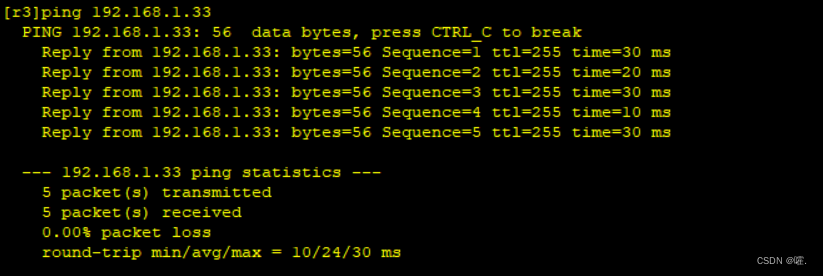
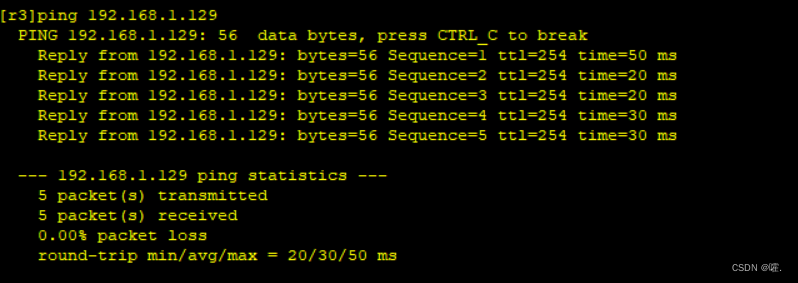
检测连通性
6.telnat配置
R1:
[R1]aaa
[R1-aaa]local-user admin privilege level 15 password cipher 123456
[R1-aaa]local-user admin service-type telnet
[R1]user-interface vty 0 4
[R1-ui-vty0-4]authentication-mode aaa
R5:
[R5]int g 0/0/2
[R5-GigabitEthernet0/0/1]nat server protocol tcp global current-interface 23 inside 192.168.1.5 23
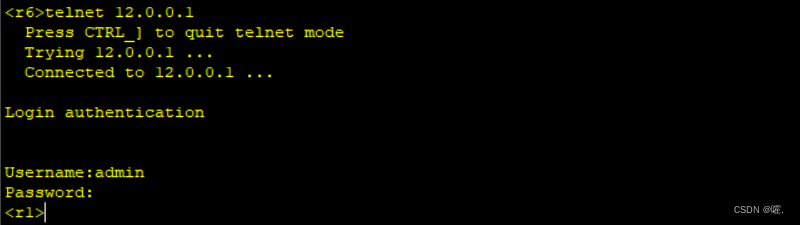
R6远程登录:





 扫一扫
扫一扫


 1394
1394

 被折叠的 条评论
为什么被折叠?
被折叠的 条评论
为什么被折叠?
 到【灌水乐园】发言





