


Java合成海报
一、背景
java服务端合成朋友圈海报,需要能实现前端编辑器的一些功能。
包括
- 字体加粗
- 文字左对齐
- 文字上下居中
- 文字描边
- 文字自动换行
- 文字透明度
本文分享一些java swing api的实现
二、关于字体Font和字体加粗
字体文件初始化
开发环境:windows字体文件位于C:\Windows\Fonts目录下
生产环境:部署的linux服务器一般预装字体,所以需要在代码里面打包字体文件,或者联系运维提前安装。
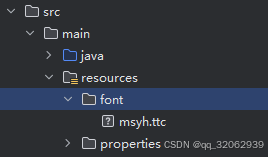
@SneakyThrows
public static Font getFont(Layer child) {


    InputStream is = null;
    try {


        //字体是否加粗
        int fontStyle = child.getFontWeight().contains("bold") ? Font.BOLD : Font.PLAIN;
        if (msyh != null) {


            return msyh.deriveFont(fontStyle, child.getFontSize());
        }

        String path = "/font/msyh.ttc";
        is = PosterImageDraw.class.getResourceAsStream(path);
        msyh = Font.createFont(Font.TRUETYPE_FONT, is);
        return msyh.deriveFont(fontStyle, child.getFontSize());

    } finally {


        if (is != null) {


            is.close();
        }
    }
}
三、关于FontMetrics
关于FontMetrics是字体学中非常重要的概念
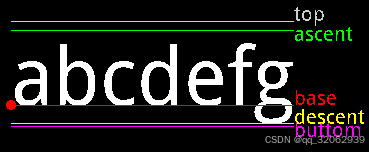
- 基准点是baseline
- Ascent是baseline之上至字符最高处的距离
- Descent是baseline之下至字符最低处的距离
- Leading文档说的很含糊,其实是上一行字符的descent到下一行的ascent之间的距离
- Top指的是指的是最高字符到baseline的值,即ascent的最大值
- 同上,bottom指的是最下字符到baseline的值,即descent的最大值
Font font = getFont(child);
FontDesignMetrics metrics = FontDesignMetrics.getMetrics(font);
四、文本图层的定义
@Data
public class Layer {
@JSONField(ordinal = 10)
private String tag;
@JSONField(ordinal = 5)
private String id;
@JSONField(ordinal = 20)
private String name;
@JSONField(ordinal = 30)
private Integer width;
@JSONField(ordinal = 40)
private Integer height;
@JSONFi 最低0.47元/天 解锁文章






 扫一扫
扫一扫


 2076
2076

 被折叠的 条评论
为什么被折叠?
被折叠的 条评论
为什么被折叠?
 到【灌水乐园】发言





