



 本文详细介绍了Android中使用SurfaceView进行视频播放时遇到的各种问题和解决方案,包括SurfaceView的背景颜色、层级管理、显示与隐藏、延迟问题以及Surface的生命周期管理。同时提供了示例代码,展示了如何在两个SurfaceView之间切换播放视频。
推荐阅读:
https://blog.youkuaiyun.com/luoshengyang/article/details/8661317
https://www.cnblogs.com/xuling/archive/2011/06/06/android.html
https://blog.youkuaiyun.com/zcmain/article/details/14454953
1、surfaceview默认是黑色的背景,并且给sfv设置背景颜色会覆盖在播放的画面上
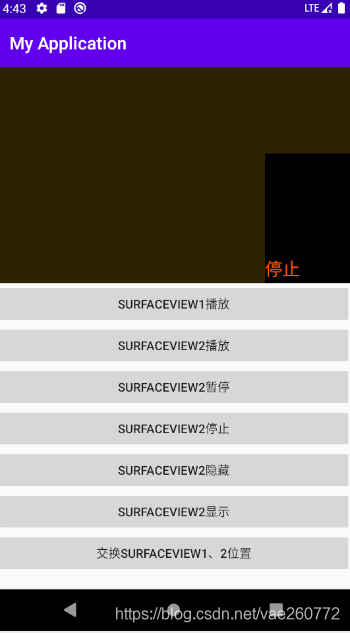
2、上下层surfaceview,当下层sfv开始播放画面,上层sfv自动会变为透明
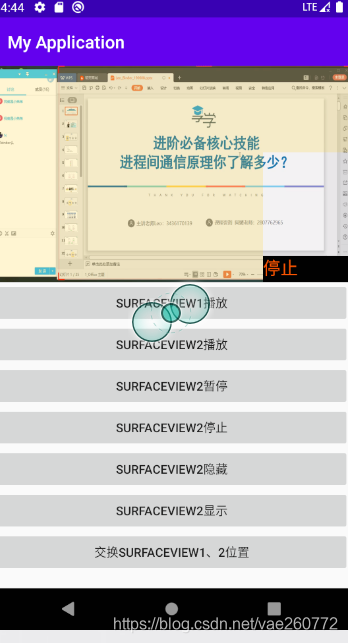
3、当上层surfaceview gone之后,父布局设置的背景色才会生效
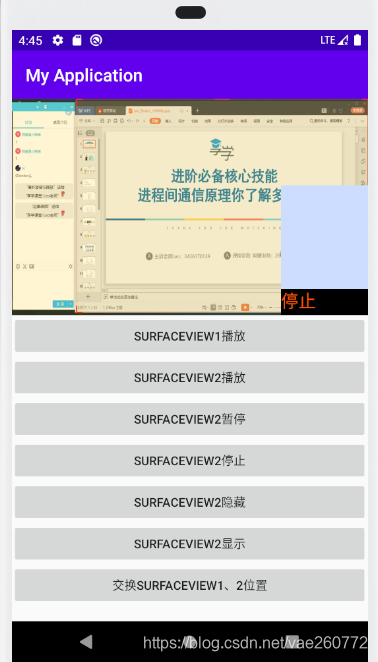
4、一旦sfv gone,就会回调surfaceDestroyed,surface先销毁,之后sfv被隐藏,重新显示时候,需要再次在surfaceCreated回调中绑定
mediaPlayer2.setDisplay(holder);
否则sfv会没有画面,好像被挖空,显示下层画面
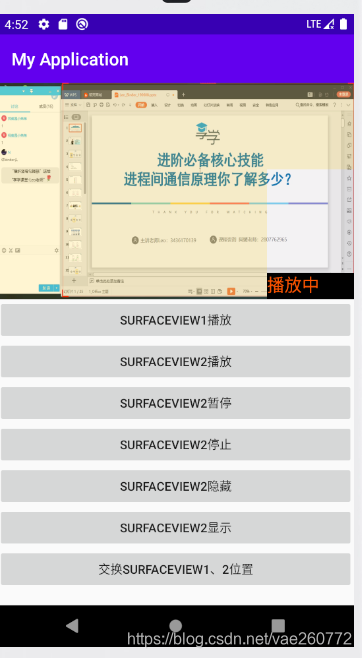
5、当下层、上层surfaceview都在播放视频,上层sfv 的父布局 gone了,会发现上层surfaceview依旧显示,无法隐藏掉。
要想讲sfv隐藏,需要同时
父布局 gone
sfv gone
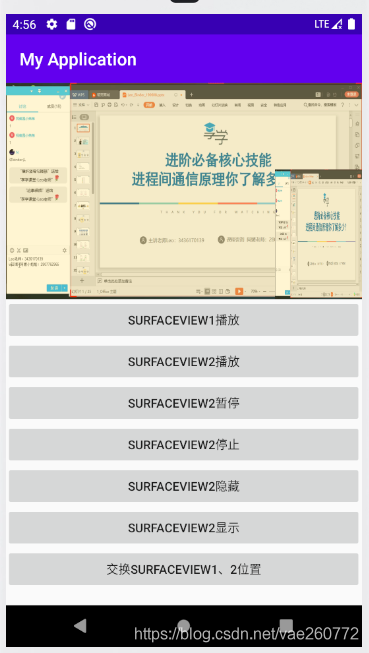
6、延迟问题:
surfaceview变得可见时,surface才会被创建,导致:
会出现surfaceview先透明,后出现画面;
surfaceview隐藏之前,surface先被销毁,导致:
透明之后,才会被隐藏。
7、下层surfaceview已经在播放画面,上层sfv会变成透明的(sfv背景颜色生效,所有的父布局颜色均无效),一旦上层sfv mediaplay播放准备耗时,透明时间就会变长。比如;
new Handler().postDelayed(new Runnable() {
@Override
public void run() {
mediaPlayer2.start();
}
}, 1000);
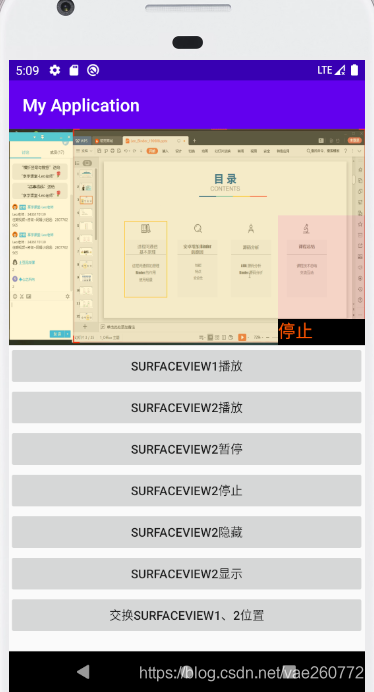
还有很多情况,大家可以自行测试,手机上最后使用
String uri = “android.resource://” + getPackageName() + “/” + R.raw.b;
mediaPlayer1.setDataSource(this, Uri.parse(uri));//设置要播放的内容在根目录下的位置
sd卡读取容易出现异常。
package com.example.myapplication.videoplayer;

import android.Manifest;
import android.content.pm.PackageManager;
import android.graphics.Color;
import android.media.AudioManager;
import android.media.MediaPlayer;
import android.net.Uri;
import android.os.Bundle;
import android.os.Handler;
import android.util.Log;
import android.view.Gravity;
import android.view.SurfaceHolder;
import android.view.SurfaceView;
import android.view.View;
import android.view.ViewGroup;
import android.widget.Button;
import android.widget.FrameLayout;
import android.widget.TextView;

import androidx.appcompat.app.AppCompatActivity;
import androidx.core.app.ActivityCompat;

import com.example.myapplication.R;

public class VideoPlayActivity2 extends AppCompatActivity implements View.OnClickListener {
    Button start, pause, stop;
    MediaPlayer mediaPlayer2;
    SurfaceHolder surfaceHolder2;

    Button start1, hidesfv, showsfv, change;

    SurfaceView sfv1, sfv2;

    TextView info;
    FrameLayout sfvfmlayout;
    FrameLayout sfv2fmlayout;

    SurfaceHolder surfaceHolder1;
    MediaPlayer mediaPlayer1 = null;

    @Override
    protected void onCreate(Bundle savedInstanceState) {
        super.onCreate(savedInstanceState);
        setContentView(R.layout.activity_video_play2);
        int permission = ActivityCompat.checkSelfPermission(this, Manifest.permission.READ_EXTERNAL_STORAGE);
        if (permission != PackageManager.PERMISSION_GRANTED) {
            ActivityCompat.requestPermissions(this, new String[]{Manifest.permission.READ_EXTERNAL_STORAGE}, 0);
        }

        start1 = findViewById(R.id.start1);
        start1.setOnClickListener(new View.OnClickListener() {
            @Override
            public void onClick(View v) {
                playVideo1();
            }
        });

        info = findViewById(R.id.info);
        start = findViewById(R.id.start);
        start.setOnClickListener(this);

        change = findViewById(R.id.change);
        change.setOnClickListener(this);


        pause = findViewById(R.id.pause);
        pause.setOnClickListener(this);

        stop = findViewById(R.id.stop);
        stop.setOnClickListener(this);

        sfvfmlayout = findViewById(R.id.flsfv1);
        sfv2fmlayout = findViewById(R.id.flsfv2);

        sfv1 = findViewById(R.id.sfv1);
        sfv2 = findViewById(R.id.sfv2);

        showsfv = findViewById(R.id.show);
        hidesfv = findViewById(R.id.hide);

        hidesfv.setOnClickListener(this);
        showsfv.setOnClickListener(this);

        isstop = true;//初始化,处于停止播放中

        //大屏幕
        surfaceHolder1 = sfv1.getHolder();
        surfaceHolder1.addCallback(new SurfaceHolder.Callback() {
            @Override
            public void surfaceCreated(SurfaceHolder holder) {
                Log.d(TAG, "surfaceHolder1 surfaceCreated");
//                new Handler().postDelayed(new Runnable() {
//                    @Override
//                    public void run() {
                playVideo1();
//                    }
//                }, 5000);
            }

            @Override
            public void surfaceChanged(SurfaceHolder holder, int format, int width, int height) {
                Log.d(TAG, "surfaceHolder1 surfaceChanged");

            }

            @Override
            public void surfaceDestroyed(SurfaceHolder holder) {
                Log.d(TAG, "surfaceHolder1 surfaceDestroyed");

            }
        });

        //小屏幕
        surfaceHolder2 = sfv2.getHolder();
        surfaceHolder2.addCallback(new SurfaceHolder.Callback() {
            @Override
            public void surfaceCreated(SurfaceHolder holder) {
                Log.d(TAG, "surfaceHolder2 surfaceCreated holder=" + holder);
                playVideo2();
            }

            @Override
            public void surfaceChanged(SurfaceHolder holder, int format, int width, int height) {
                Log.d(TAG, "surfaceHolder2 surfaceChanged holder=" + holder);

            }

            @Override
            public void surfaceDestroyed(SurfaceHolder holder) {
                Log.d(TAG, "surfaceHolder2 surfaceDestroyed holder=" + holder);

            }
        });

    }


    void playVideo2() {//小屏幕
        mediaPlayer2 = new MediaPlayer();
        isstop = false;
        mediaPlayer2.setAudioStreamType(AudioManager.STREAM_MUSIC);
        mediaPlayer2.reset();//重置MediaPlayer
        mediaPlayer2.setDisplay(surfaceHolder2);//把视频画面输出到SurfaceView中
        try {
            //获取raw.mp4的uri地址
            String uri = "android.resource://" + getPackageName() + "/" + R.raw.a;
            mediaPlayer2.setDataSource(this, Uri.parse(uri));//设置要播放的内容在根目录下的位置
            mediaPlayer2.prepare();//预加载
            info.setText("播放中");
        } catch (Exception e) {
            e.printStackTrace();
        }

        mediaPlayer2.start();

    }

    void playVideo1() {//大屏幕
        mediaPlayer1 = new MediaPlayer();
        mediaPlayer1.setAudioStreamType(AudioManager.STREAM_MUSIC);
        mediaPlayer1.reset();//重置MediaPlayer
        mediaPlayer1.setDisplay(surfaceHolder1);//把视频画面输出到SurfaceView中

        try {
            //获取raw.mp4的uri地址
            String uri = "android.resource://" + getPackageName() + "/" + R.raw.b;
            mediaPlayer1.setDataSource(this, Uri.parse(uri));//设置要播放的内容在根目录下的位置
            mediaPlayer1.prepare();//预加载
        } catch (Exception e) {
            e.printStackTrace();
        }
//        new Handler().postDelayed(new Runnable() {
//            @Override
//            public void run() {
        mediaPlayer1.start();
//            }
//        }, 1000);

    }

    boolean ispause = false;
    boolean isstop = true;

    String TAG = "lihui";

    @Override
    public void onClick(View v) {
        switch (v.getId()) {
            case R.id.hide:
                sfv2fmlayout.setVisibility(View.GONE);
                sfv2.setVisibility(View.GONE);//GONE、INVISIBLE 父布局背景才有效果
//                if (mediaPlayer2 != null) {
//                    try {
//                        mediaPlayer2.pause();
//                        mediaPlayer2.stop();
//                        mediaPlayer2.release();
//                        isstop = true;
//                    } catch (Exception e) {
//                        e.printStackTrace();
//                    }
//                }
                break;
            case R.id.show:
                sfv2fmlayout.setVisibility(View.VISIBLE);
//                sfv2.postDelayed(new Runnable() {
//                    @Override
//                    public void run() {
                sfv2.setVisibility(View.VISIBLE);
//                    }
//                }, 3000);

                break;


            case R.id.start:
                Log.d(TAG, "1 isstop=" + isstop + ",ispause=" + ispause);
                if (isstop) {
                    playVideo2();
                    isstop = false;
                } else if (ispause) {
                    mediaPlayer2.start();
                    ispause = false;
                }
                info.setText("播放中");
                break;
            case R.id.pause:
                Log.d(TAG, "2 isstop=" + isstop + ",ispause=" + ispause);
                if (mediaPlayer2 == null || isstop) return;
                if (mediaPlayer2.isPlaying()) {
                    mediaPlayer2.pause();
                    ispause = true;
                    info.setText("已暂停");
                }
                break;
            case R.id.stop:
                Log.d(TAG, "3 isstop=" + isstop + ",ispause=" + ispause);
                if (mediaPlayer2 == null || isstop) return;
                mediaPlayer2.stop();
                mediaPlayer2.release();
                info.setText("已停止");
                isstop = true;
                break;

            case R.id.change:
                ViewGroup.LayoutParams layoutParams1 = sfvfmlayout.getLayoutParams();
                ViewGroup.LayoutParams layoutParams2 = sfv2fmlayout.getLayoutParams();

                sfvfmlayout.setLayoutParams(layoutParams2);
                sfv2fmlayout.setLayoutParams(layoutParams1);
                sfv2.setZOrderMediaOverlay(true);
                sfv1.setZOrderMediaOverlay(true);

                if (sfvfmlayout.getLayoutParams().width == ViewGroup.LayoutParams.MATCH_PARENT) {
                    sfv2fmlayout.bringToFront();//sfv2小屏幕

                    stop2();
                    playVideo2();
                    //sfv2.setVisibility(View.VISIBLE);
                    Log.d(TAG, "playVideo2");


                } else {
                    sfvfmlayout.bringToFront();//sfv1小屏幕
                    stop1();
                    playVideo1();
                    //  sfv1.setVisibility(View.VISIBLE);
                    Log.d(TAG, "playVideo1");

                }


                break;
        }
    }

    void stop1() {
        try {
            if (mediaPlayer1 != null) {
                mediaPlayer1.stop();
                mediaPlayer1.release();
                Log.d(TAG, "stop1");
            }
        } catch (Exception e) {
        }

    }

    void stop2() {
        try {
            if (mediaPlayer2 != null) {
                mediaPlayer2.stop();
                mediaPlayer2.release();
                Log.d(TAG, "stop2");
            }
        } catch (Exception e) {
        }

    }

    @Override
    protected void onDestroy() {
        super.onDestroy();
        stop1();
        stop2();
    }
}
<?xml version="1.0" encoding="utf-8"?>
<ScrollView xmlns:android="http://schemas.android.com/apk/res/android"
    xmlns:app="http://schemas.android.com/apk/res-auto"
    xmlns:tools="http://schemas.android.com/tools"
    android:layout_width="match_parent"
    android:layout_height="match_parent"
    android:orientation="vertical">

    <LinearLayout
        android:layout_width="match_parent"
        android:layout_height="match_parent"
        android:orientation="vertical"
        tools:context=".videoplayer.VideoPlayActivity">

        <FrameLayout
            android:id="@+id/parent"
            android:layout_width="match_parent"
            android:layout_height="wrap_content"
            android:orientation="vertical">

            <FrameLayout
                android:id="@+id/flsfv1"
                android:layout_width="match_parent"
                android:layout_height="250dp">

                <SurfaceView
                    android:id="@+id/sfv1"
                    android:layout_width="match_parent"
                    android:layout_height="match_parent"
                    android:visibility="visible" />

                <TextView
                    android:layout_width="wrap_content"
                    android:layout_height="30dp"
                    android:layout_gravity="bottom"
                    android:text="主画面"
                    android:textColor="#ff5500"
                    android:textSize="20dp" />
            </FrameLayout>


            <FrameLayout
                android:id="@+id/flsfv2"
                android:layout_width="100dp"
                android:layout_height="150dp"
                android:layout_gravity="bottom|right"
                android:visibility="visible">

                <SurfaceView
                    android:id="@+id/sfv2"
                    android:layout_width="match_parent"
                    android:layout_height="match_parent" />

                <TextView
                    android:id="@+id/info"
                    android:layout_width="match_parent"
                    android:layout_height="wrap_content"
                    android:layout_gravity="bottom"
                    android:text="停止"
                    android:textColor="#ff5500"
                    android:textSize="20dp" />
            </FrameLayout>
        </FrameLayout>

        <Button
            android:id="@+id/start1"
            android:layout_width="match_parent"
            android:layout_height="wrap_content"
            android:text="surfaceview1播放" />

        <Button
            android:id="@+id/start"
            android:layout_width="match_parent"
            android:layout_height="wrap_content"
            android:text="surfaceview2播放" />

        <Button
            android:id="@+id/pause"
            android:layout_width="match_parent"
            android:layout_height="wrap_content"

            android:text="surfaceview2暂停" />

        <Button
            android:id="@+id/stop"
            android:layout_width="match_parent"
            android:layout_height="wrap_content"

            android:text="surfaceview2停止" />

        <Button
            android:id="@+id/hide"
            android:layout_width="match_parent"
            android:layout_height="wrap_content"

            android:text="surfaceview2隐藏" />

        <Button
            android:id="@+id/show"
            android:layout_width="match_parent"
            android:layout_height="wrap_content"
            android:text="surfaceview2显示" />


        <Button
            android:id="@+id/change"
            android:layout_width="match_parent"
            android:layout_height="wrap_content"
            android:text="交换surfaceview1、2位置" />

    </LinearLayout>
</ScrollView>






 扫一扫
扫一扫


 1561
1561

 被折叠的 条评论
为什么被折叠?
被折叠的 条评论
为什么被折叠?
 到【灌水乐园】发言





