


1.先下载bmpn-js和diagram-js-grid-bg

	npm i bmpn-js
	npm i diagram-js-grid-bg
diagram-js-grid-bg是方格背景图看需求是否需要
2.vue页面代码
<template>
  <div ref="bpmnContainer" style="width: 100%; height: 500px;border: 1px solid #ccc;"></div>
</template>
bpmnXML 的xml格式根据你需要的样子进行更改

<script setup>
import { ref, onMounted } from 'vue';
import BpmnViewer from "bpmn-js/lib/Modeler"
import GridLineModule from 'diagram-js-grid-bg'
import 'bpmn-js/dist/assets/bpmn-js.css'
// import 'diagram-js-minimap/assets/diagram-js-minimap.css'

import 'bpmn-js/dist/assets/diagram-js.css'
import 'bpmn-js/dist/assets/bpmn-font/css/bpmn.css'
import 'bpmn-js/dist/assets/bpmn-font/css/bpmn-codes.css'
import 'bpmn-js/dist/assets/bpmn-font/css/bpmn-embedded.css'
// 如果未引入css会导致侧边栏不展示;且使用Modeler而非NavigatedViewer,NavigatedViewer为仅查看

const bpmnContainer = ref(null);
const viewer = ref(null);

const initializeBpmnViewer = () => {
  viewer.value = new BpmnViewer({
    container: bpmnContainer.value,
    keyboard: {
      bindTo: window
    },
    additionalModules: [
      {
        // 禁用滚轮滚动
        zoomScroll: ["value", ""],

      },
      GridLineModule,
    ],
  });

  const bpmnXML = `<?xml version="1.0" encoding="UTF-8"?>
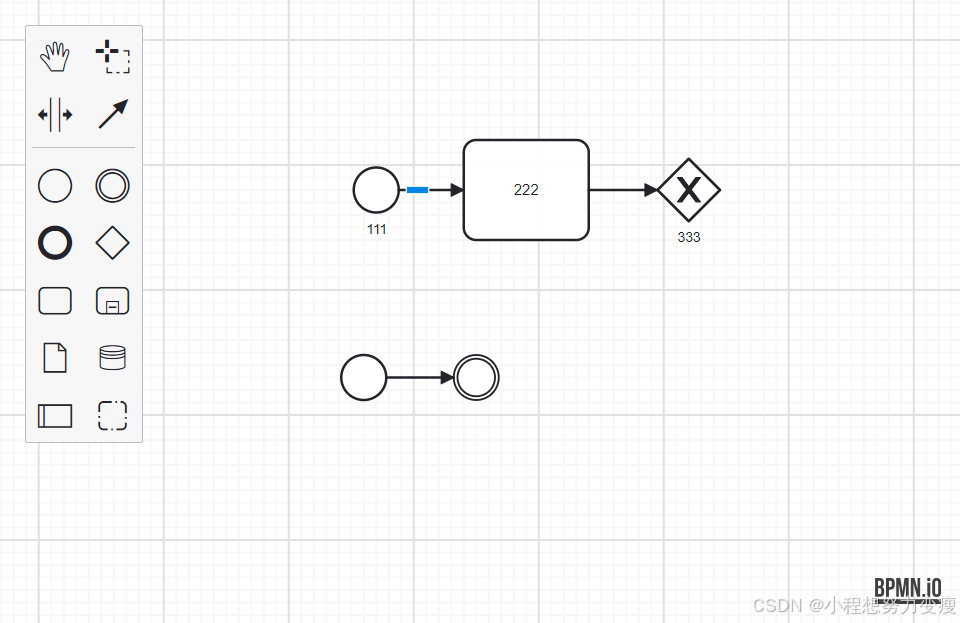
<definitions xmlns="http://www.omg.org/spec/BPMN/20100524/MODEL" xmlns:bpmndi="http://www.omg.org/spec/BPMN/20100524/DI" xmlns:omgdi="http://www.omg.org/spec/DD/20100524/DI" xmlns:omgdc="http://www.omg.org/spec/DD/20100524/DC" xmlns:xsi="http://www.w3.org/2001/XMLSchema-instance" id="sid-38422fae-e03e-43a3-bef4-bd33b32041b2" targetNamespace="http://bpmn.io/bpmn" exporter="bpmn-js (https://demo.bpmn.io)" exporterVersion="17.11.1">
  <process id="Process_1" isExecutable="false">
    <startEvent id="StartEvent_1y45yut" name="111">
      <outgoing>SequenceFlow_0h21x7r</outgoing>
    </startEvent>
    <task id="Task_1hcentk" name="222">
      <incoming>SequenceFlow_0h21x7r</incoming>
      <outgoing>SequenceFlow_0wnb4ke</outgoing>
    </task>
    <sequenceFlow id="SequenceFlow_0h21x7r" sourceRef="StartEvent_1y45yut" targetRef="Task_1hcentk" />
    <exclusiveGateway id="ExclusiveGateway_15hu1pt" name="333">
      <incoming>SequenceFlow_0wnb4ke</incoming>
    </exclusiveGateway>
    <sequenceFlow id="SequenceFlow_0wnb4ke" sourceRef="Task_1hcentk" targetRef="ExclusiveGateway_15hu1pt" />
  </process>
  <bpmndi:BPMNDiagram id="BpmnDiagram_1">
    <bpmndi:BPMNPlane id="BpmnPlane_1" bpmnElement="Process_1">
      <bpmndi:BPMNShape id="StartEvent_1y45yut_di" bpmnElement="StartEvent_1y45yut">
        <omgdc:Bounds x="152" y="102" width="36" height="36" />
        <bpmndi:BPMNLabel>
          <omgdc:Bounds x="134" y="145" width="73" height="14" />
        </bpmndi:BPMNLabel>
      </bpmndi:BPMNShape>
      <bpmndi:BPMNShape id="Task_1hcentk_di" bpmnElement="Task_1hcentk">
        <omgdc:Bounds x="240" y="80" width="100" height="80" />
      </bpmndi:BPMNShape>
      <bpmndi:BPMNShape id="ExclusiveGateway_15hu1pt_di" bpmnElement="ExclusiveGateway_15hu1pt" isMarkerVisible="true">
        <omgdc:Bounds x="395" y="95" width="50" height="50" />
        <bpmndi:BPMNLabel>
          <omgdc:Bounds x="388" y="152" width="65" height="14" />
        </bpmndi:BPMNLabel>
      </bpmndi:BPMNShape>
      <bpmndi:BPMNEdge id="SequenceFlow_0h21x7r_di" bpmnElement="SequenceFlow_0h21x7r">
        <omgdi:waypoint x="188" y="120" />
        <omgdi:waypoint x="240" y="120" />
      </bpmndi:BPMNEdge>
      <bpmndi:BPMNEdge id="SequenceFlow_0wnb4ke_di" bpmnElement="SequenceFlow_0wnb4ke">
        <omgdi:waypoint x="340" y="120" />
        <omgdi:waypoint x="395" y="120" />
      </bpmndi:BPMNEdge>
    </bpmndi:BPMNPlane>
  </bpmndi:BPMNDiagram>
</definitions>

`;

  viewer.value.importXML(bpmnXML);
};


onMounted(() => {
  console.log('11============bpmnContainer');
  initializeBpmnViewer();
});


// onBeforeUnmount(() => {
//   if (viewer.value) {
//     viewer.value.destroy();
//   }
// });

</script>
展示出来效果图如下:





 扫一扫
扫一扫


 1124
1124

 被折叠的 条评论
为什么被折叠?
被折叠的 条评论
为什么被折叠?
 到【灌水乐园】发言





