



 本文介绍了一个使用Java实现的HTTP Post请求示例,通过Apache HttpClient库发送JSON和表单数据,展示了如何设置请求头、参数实体及处理响应。
废话不多说,直接贴代码:
package com.example.demo.util;

import org.apache.http.HttpEntity;
import org.apache.http.client.methods.CloseableHttpResponse;
import org.apache.http.client.methods.HttpPost;
import org.apache.http.entity.StringEntity;
import org.apache.http.impl.client.CloseableHttpClient;
import org.apache.http.impl.client.HttpClients;
import org.apache.http.message.BasicHeader;
import org.apache.http.protocol.HTTP;
import org.apache.http.util.EntityUtils;

import java.io.IOException;

public class HttpUtil {

    public static String sendPostReq(String url, String param,String encoding,int contentType) throws IOException {
        String body = "";

        //创建httpclient对象
        CloseableHttpClient httpClient = HttpClients.createDefault();
        //创建post方式请求对象
        HttpPost httpPost = new HttpPost (url);

        //设置请求参数实体
        StringEntity reqParam = new StringEntity (param, "utf-8");
        reqParam.setContentEncoding(new BasicHeader (HTTP.CONTENT_TYPE,
                "application/json"));
        //将请求参数放到请求对象中
        httpPost.setEntity(reqParam);

        //设置请求报文头信息
        httpPost.setHeader ("Accept", "application/json, text/javascript, */*; q=0.01");
        if (contentType == 0){
            httpPost.setHeader("Content-type", "application/json;charset=UTF-8");//设置发送JSON请求
        }else if (contentType == 1){
            httpPost.setHeader("Content-type", "application/x-www-form-urlencoded;charset=UTF-8");//设置发送表单请求
        }

        httpPost.setHeader("User-Agent", "Mozilla/5.0 (Linux; Android 9; CLT-AL01 Build/HUAWEICLT-AL01; wv) AppleWebKit/537.36 (KHTML, like Gecko) Version/4.0 Chrome/69.0.3497.100 Mobile Safari/537.36 Html5Plus/1.0");

        //发送请求,并拿到结果(同步阻塞)
        CloseableHttpResponse response = httpClient.execute(httpPost);
        //获取返回结果
        HttpEntity entity = response.getEntity();
        if (entity != null) {
            //按指定编码转换结果实体为String类型
            body = EntityUtils.toString(entity, encoding);
        }
        EntityUtils.consume(entity);
        //释放Http请求链接
        response.close();
        return body;
    }

    public static void main(String[] args) {
        String url = "http://localhost:8080/receivePostReq";
        String url2 = "http://localhost:8080/receivePostReq2";

        //Json请求参数
        String param1 = "{\n" +
                "\t\"jsonReqParam\": 发送Json请求,\n" +
                "\t},\n" +
                "}";

        // 表单请求参数
        String param2 = "userName=表单请求"
                + "&password=密码";
        try {
            String result1 = sendPostReq (url, param1, "utf-8",0);
            System.out.println (result1);

            String result2 = sendPostReq (url2, param2, "utf-8",1);
            System.out.println (result2);
        } catch (Exception e) {
            e.printStackTrace ( );
        }
    }

}
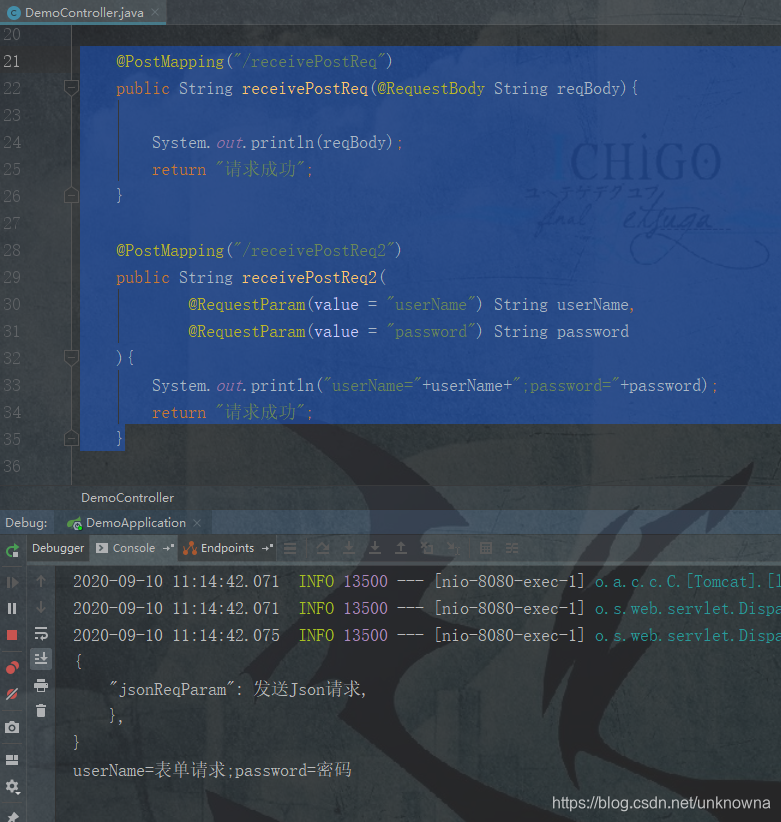
发送Post请求后我们简单验证一下,如下图,请求成功。
本demo用到的依赖:
        <dependency>
            <groupId>org.apache.httpcomponents</groupId>
            <artifactId>httpmime</artifactId>
            <version>4.5.2</version>
        </dependency>






 扫一扫
扫一扫


 1万+
1万+

 被折叠的 条评论
为什么被折叠?
被折叠的 条评论
为什么被折叠?
 到【灌水乐园】发言





