


一、使用技术
SSM框架:Spring+SpringMVC+Mybatis
数据库:MySQL
开发环境:idea+jdk11+tomcat+maven
数据库student表结构: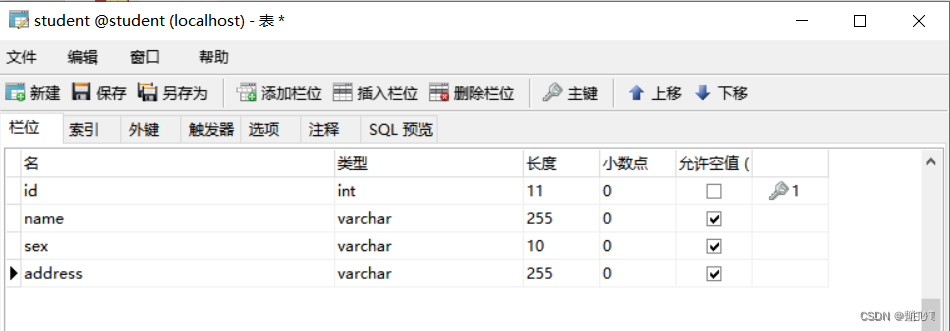
二、创建maven父工程
引入相关依赖:
<?xml version="1.0" encoding="UTF-8"?>
<project xmlns="http://maven.apache.org/POM/4.0.0"
         xmlns:xsi="http://www.w3.org/2001/XMLSchema-instance"
         xsi:schemaLocation="http://maven.apache.org/POM/4.0.0 http://maven.apache.org/xsd/maven-4.0.0.xsd">
    <modelVersion>4.0.0</modelVersion>

    <groupId>top.docalm</groupId>
    <artifactId>ssm_demo</artifactId>
    <packaging>pom</packaging>
    <version>1.0-SNAPSHOT</version>
    <modules>
        <module>ssm_dao</module>
        <module>ssm_service</module>
        <module>ssm_controller</module>
    </modules>

    <properties>
        <!--        Spring的版本-->
        <spring.version>5.2.12.RELEASE</spring.version>
    </properties>

    <dependencies>
        <!--        mybatis-->
        <dependency>
            <groupId>org.mybatis</groupId>
            <artifactId>mybatis</artifactId>
            <version>3.5.7</version>
        </dependency>
        <!--        mysql驱动-->
        <dependency>
            <groupId>mysql</groupId>
            <artifactId>mysql-connector-java</artifactId>
            <version>8.0.26</version>
        </dependency>
        <!--        druid连接池-->
        <dependency>
            <groupId>com.alibaba</groupId>
            <artifactId>druid</artifactId>
            <version>1.2.8</version>
        </dependency>
        <!--        mybatis与spring的整合包-->
        <dependency>
            <groupId>org.mybatis</groupId>
            <artifactId>mybatis-spring</artifactId>
            <version>2.0.6</version>
        </dependency>
        <dependency>
            <groupId>org.springframework</groupId>
            <artifactId>spring-jdbc</artifactId>
            <version>${spring.version}</version>
        </dependency>
        <!--        springMVC-->
        <dependency>
            <groupId>org.springframework</groupId>
            <artifactId>spring-context</artifactId>
            <version>${spring.version}</version>
        </dependency>
        <dependency>
            <groupId>org.springframework</groupId>
            <artifactId>spring-web</artifactId>
            <version>${spring.version}</version>
        </dependency>
        <dependency>
            <groupId>org.springframework</groupId>
            <artifactId>spring-webmvc</artifactId>
            <version>${spring.version}</version>
        </dependency>
        <!--        事务-->
        <dependency>
            <groupId>org.springframework</groupId>
            <artifactId>spring-tx</artifactId>
            <version>${spring.version}</version>
        </dependency>
        <dependency>
            <groupId>org.aspectj</groupId>
            <artifactId>aspectjweaver</artifactId>
            <version>1.8.7</version>
        </dependency>
        <!--        JSTL-->
        <dependency>
            <groupId>org.apache.taglibs</groupId>
            <artifactId>taglibs-standard-spec</artifactId>
            <version>1.2.5</version>
        </dependency>
        <dependency>
            <groupId>org.apache.taglibs</groupId>
            <artifactId>taglibs-standard-impl</artifactId>
            <version>1.2.5</version>
        </dependency>
        <!--        Servlet-->
        <dependency>
            <groupId>javax.servlet</groupId>
            <artifactId>servlet-api</artifactId>
            <version>2.5</version>
            <scope>provided</scope>
        </dependency>
        <!--        JSP-->
        <dependency>
            <groupId>javax.servlet.jsp</groupId>
            <artifactId>jsp-api</artifactId>
            <version>2.0</version>
            <scope>provided</scope>
        </dependency>
        <!--        Junit-->
        <dependency>
            <groupId>junit</groupId>
            <artifactId>junit</artifactId>
            <version>4.12</version>
            <scope>test</scope>
        </dependency>
        <dependency>
            <groupId>org.springframework</groupId>
            <artifactId>spring-test</artifactId>
            <version>${spring.version}</version>
        </dependency>
        <!--        log4j-->
        <dependency>
            <groupId>log4j</groupId>
            <artifactId>log4j</artifactId>
            <version>1.2.12</version>
        </dependency>
    </dependencies>

    <build>
        <plugins>
            <!--  配置Tomcat7插件-->
            <plugin>
                <groupId>org.apache.tomcat.maven</groupId>
                <artifactId>tomcat7-maven-plugin</artifactId>
                <version>2.1</version>
                <configuration>
                    <port>8080</port>
                    <path>/</path>
                    <uriEncoding>UTF-8</uriEncoding>
                    <server>tomcat7</server>
                    <systemProperties>
                        <java.util.logging.SimpleFormatter.format>%1$tH:%1$tM:%1$tS %2$s%n%4$s: %5$s%6$s%n
                        </java.util.logging.SimpleFormatter.format>
                    </systemProperties>
                </configuration>
            </plugin>
        </plugins>
    </build>
</project>
三、创建dao层子工程
1、创建Student实体类:
package top.docalm.pojo;

/**
 * 实体类
 */
public class Student {
    private int id;
    private String name;
    private String sex;
    private String address;

    @Override
    public String toString() {
        return "Student{" +
                "id=" + id +
                ", name='" + name + '\'' +
                ", sex='" + sex + '\'' +
                ", address='" + address + '\'' +
                '}';
    }

    public Student(int id, String name, String sex, String address) {
        this.id = id;
        this.name = name;
        this.sex = sex;
        this.address = address;
    }

    public Student() {
    }

    public int getId() {
        return id;
    }

    public void setId(int id) {
        this.id = id;
    }

    public String getName() {
        return name;
    }

    public void setName(String name) {
        this.name = name;
    }

    public String getSex() {
        return sex;
    }

    public void setSex(String sex) {
        this.sex = sex;
    }

    public String getAddress() {
        return address;
    }

    public void setAddress(String address) {
        this.address = address;
    }
}
四、创建service层子工程
1、service层SpringIOC配置文件(applicationContext-service.xml):
<?xml version="1.0" encoding="UTF-8"?>
<beans
        xmlns="http://www.springframework.org/schema/beans"
        xmlns:xsi="http://www.w3.org/2001/XMLSchema-instance"
        xmlns:context="http://www.springframework.org/schema/context"
        xmlns:aop="http://www.springframework.org/schema/aop"
        xmlns:tx="http://www.springframework.org/schema/tx"
        xsi:schemaLocation="http://www.springframework.org/schema/beans
                            http://www.springframework.org/schema/beans/spring-beans.xsd
                            http://www.springframework.org/schema/context
                            http://www.springframework.org/schema/context/spring-context.xsd
                            http://www.springframework.org/schema/aop
                            http://www.springframework.org/schema/aop/spring-aop.xsd
                            http://www.springframework.org/schema/tx
                            http://www.springframework.org/schema/tx/spring-tx.xsd">

    <!--    包扫描-->
    <context:component-scan base-package="top.docalm.service"></context:component-scan>
    <!--    事务管理器-->
    <bean id="transactionManager" class="org.springframework.jdbc.datasource.DataSourceTransactionManager">
        <property name="dataSource" ref="dataSource"></property>
    </bean>

    <!--    通知-->
    <tx:advice id="txAdvice" transaction-manager="transactionManager">
        <tx:attributes>
            <tx:method name="*"/>
        </tx:attributes>
    </tx:advice>
    <!--    事务管理器的切面-->
    <aop:config>
        <aop:advisor advice-ref="txAdvice" pointcut="execution(* top.docalm.service.*.*(..))"></aop:advisor>
    </aop:config>
</beans>
2、创建服务层:
package top.docalm.service;

import org.springframework.beans.factory.annotation.Autowired;
import org.springframework.stereotype.Service;
import top.docalm.dao.StudentDao;
import top.docalm.pojo.Student;

import java.util.List;

/**
 * 服务层
 */
@Service
public class StudentService {
    @Autowired
    private StudentDao studentDao;

    public List<Student> findAllStudent() {
        return studentDao.findAll();
    }

    public void addStudent(Student student) {
        studentDao.add(student);
    }

    public void deleteStudent(int id) {
        studentDao.delete(id);
    }

    public void updateStudent(Student student) {
        studentDao.update(student);
    }

    public Student findStudentById(int id){
        return studentDao.findById(id);
    }
}
五、创建controller层子工程(需要使用web框架)
1、controller层SpringIOC配置文件(applicationContext.xml):
<?xml version="1.0" encoding="UTF-8"?>
<beans
        xmlns="http://www.springframework.org/schema/beans"
        xmlns:xsi="http://www.w3.org/2001/XMLSchema-instance"
        xsi:schemaLocation="http://www.springframework.org/schema/beans
        http://www.springframework.org/schema/beans/spring-beans.xsd">
    <!--    引入dao层和service层的配置文件整合起来-->
    <import resource="applicationContext-dao.xml"></import>
    <import resource="applicationContext-service.xml"></import>
</beans>
2、SpringMVC配置文件(springmvc.xml):
<beans xmlns="http://www.springframework.org/schema/beans"
       xmlns:xsi="http://www.w3.org/2001/XMLSchema-instance"
       xmlns:context="http://www.springframework.org/schema/context"
       xmlns:mvc="http://www.springframework.org/schema/mvc"
       xsi:schemaLocation="http://www.springframework.org/schema/beans
                           http://www.springframework.org/schema/beans/spring-beans-4.3.xsd
                           http://www.springframework.org/schema/context
                           http://www.springframework.org/schema/context/spring-context-4.3.xsd
                           http://www.springframework.org/schema/mvc
                           http://www.springframework.org/schema/mvc/spring-mvc-4.3.xsd">
    <!--    扫描controller包-->
    <context:component-scan base-package="top.docalm.controller"></context:component-scan>
    <!--    配置试图解析器-->
    <bean id="internalResourceViewResolver" class="org.springframework.web.servlet.view.InternalResourceViewResolver">
        <property name="prefix" value="/"></property>
        <property name="suffix" value=".jsp"></property>
    </bean>
    <!--    开启springMVC的注解的支持-->
    <mvc:annotation-driven></mvc:annotation-driven>
    <!--    放行静态资源-->
    <mvc:default-servlet-handler></mvc:default-servlet-handler>
</beans>
3、web.xml配置文件:
<web-app xmlns:xsi="http://www.w3.org/2001/XMLSchema-instance"
         xmlns="http://xmlns.jcp.org/xml/ns/javaee"
         xsi:schemaLocation="http://xmlns.jcp.org/xml/ns/javaee
         http://xmlns.jcp.org/xml/ns/javaee/web-app_3_1.xsd"
         id="WebApp_ID" version="3.1">
    <display-name>Archetype Created Web Application</display-name>
    <!--    配置Spring监听器,该监听器会监听服务器的启动,并自动创建Spring的IOC容器-->
    <listener>
        <listener-class>org.springframework.web.context.ContextLoaderListener</listener-class>
    </listener>
    <!--  创建容器时需要读取的配置文件-->
    <context-param>
        <param-name>contextConfigLocation</param-name>
        <param-value>classpath:applicationContext.xml</param-value>
    </context-param>

    <!--    前端控制器-->
    <servlet>
        <servlet-name>dispatcherServlet</servlet-name>
        <servlet-class>org.springframework.web.servlet.DispatcherServlet</servlet-class>
        <init-param>
            <param-name>contextConfigLocation</param-name>
            <param-value>classpath:springmvc.xml</param-value>
        </init-param>
    </servlet>
    <servlet-mapping>
        <servlet-name>dispatcherServlet</servlet-name>
        <url-pattern>/</url-pattern>
    </servlet-mapping>
    <!--    编码过滤器-->
    <filter>
        <filter-name>encFilter</filter-name>
        <filter-class>org.springframework.web.filter.CharacterEncodingFilter</filter-class>
        <init-param>
            <param-name>encoding</param-name>
            <param-value>utf-8</param-value>
        </init-param>
    </filter>
    <filter-mapping>
        <filter-name>encFilter</filter-name>
        <url-pattern>/*</url-pattern>
    </filter-mapping>
</web-app>
4、控制层类:
package top.docalm.controller;

import org.springframework.beans.factory.annotation.Autowired;
import org.springframework.stereotype.Controller;
import org.springframework.ui.Model;
import org.springframework.web.bind.annotation.RequestMapping;
import top.docalm.pojo.Student;
import top.docalm.service.StudentService;

import java.util.List;

/**
 * 控制层
 */
@Controller
@RequestMapping("/student")//所有的方法路径都是以/student开头
public class StudentController {
    @Autowired
    private StudentService studentService;

    //查询所有学生的方法
    @RequestMapping("/all")
    public String all(Model model) {
        List<Student> allStudent = studentService.findAllStudent();
        model.addAttribute("allStudents", allStudent);
        return "allStudent";
    }

    //添加学生的方法
    @RequestMapping("/add")
    public String add(Student student) {
        studentService.addStudent(student);
        //添加完成之后重定向到查询所有学生的控制器处理
        return "redirect:/student/all";
    }


    //删除学生的方法
    @RequestMapping("/delete")
    public String delete(int id) {
        studentService.deleteStudent(id);
        return "redirect:/student/all";
    }

    //添加学生的方法
    @RequestMapping("/update")
    public String update(Student student) {
        studentService.updateStudent(student);
        return "redirect:/student/all";
    }

    //根据id查询学生
    @RequestMapping("/select")
    public String findByID(Model model, int id) {
        Student stu = studentService.findStudentById(id);
        model.addAttribute("stu", stu);
        return "allStudent";
    }
}





 扫一扫
扫一扫


 1291
1291

 被折叠的 条评论
为什么被折叠?
被折叠的 条评论
为什么被折叠?
 到【灌水乐园】发言





