



 本文介绍了如何使用PlantUML创建类图,重点讲解了利用模板定义类以及通过note关键字添加不同位置的备注。内容涵盖note left of, right of, top of, bottom of等用法,还探讨了在注释中使用HTML标签的可能性以及如何为链接添加注释。同时提到了改变链接注释位置的方法。"
114098622,10547073,Java 动态构建与执行SQL操作,"['Java', '数据库操作', 'SQL执行', '文件处理']
本文介绍了如何使用PlantUML创建类图,重点讲解了利用模板定义类以及通过note关键字添加不同位置的备注。内容涵盖note left of, right of, top of, bottom of等用法,还探讨了在注释中使用HTML标签的可能性以及如何为链接添加注释。同时提到了改变链接注释位置的方法。"
114098622,10547073,Java 动态构建与执行SQL操作,"['Java', '数据库操作', 'SQL执行', '文件处理']
模板通过类关键字("<<“和”>>")来定义
可以使用note left of , note right of , note top of , note bottom of这些关键字来添加备注。
你还可以在类的声明末尾使用note left, note right,note top, note bottom来添加备注。
此外,单独用note这个关键字也是可以的,使用 … 符号可以作出一条连接它与其它对象的虚线。
@startuml
class Object << general >>
Object <|--- ArrayList

note top of Object : In java, every class\nextends this one.

note "This is a floating note" as N1
note "This note is connected\nto several objects." as N2
Object .. N2
N2 .. ArrayList

class Foo
note left: On last defined class

@enduml

更多格式的注释
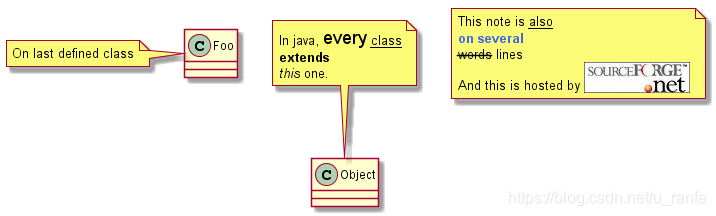
可以在注释中使用部分html标签:
你也可以在定义的class之后直接使用 note left, note right, note top, note bottom 来定义注释。
@startuml

class Foo
note left: On last defined class

note top of Object
  In java, <size:18>every</size> <u>class</u>
  <b>extends</b>
  <i>this</i> one.
end note

note as N1
  This note is <u>also</u>
  <b><color:royalBlue>on several</color>
  <s>words</s> lines
  And this is hosted by <img:sourceforge.jpg>
end note

@enduml
链接的注释
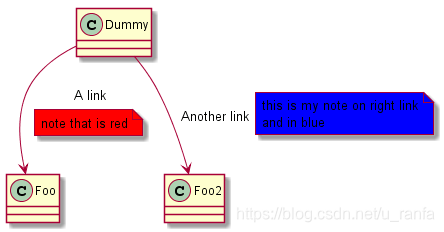
在定义链接之后,你可以用 note on link 给链接添加注释
如果想要改变注释相对于标签的位置,你也可以用 note left on link, note right on link, note bottom on link。
@startuml

class Dummy
Dummy --> Foo : A link
note on link #red: note that is red

Dummy --> Foo2 : Another link
note right on link #blue
	this is my note on right link
	and in blue
end note

@enduml





 扫一扫
扫一扫


 1464
1464

 被折叠的 条评论
为什么被折叠?
被折叠的 条评论
为什么被折叠?
 到【灌水乐园】发言





