


关键点说明:
原文地址:
ESP32/ESP8266 Insert Data into MySQL Database using PHP and Arduino IDE
完成项目的步骤:
软件部分:
1,使用phpstudu_pro架构建立php+mysqlh服务器
2,使用ARDUINO IDE在ESP8266或ESP12F上编写WIFICLIENT
硬件部分:
ESP8266/ESP32/ESP12F等带数据线
DO IT:
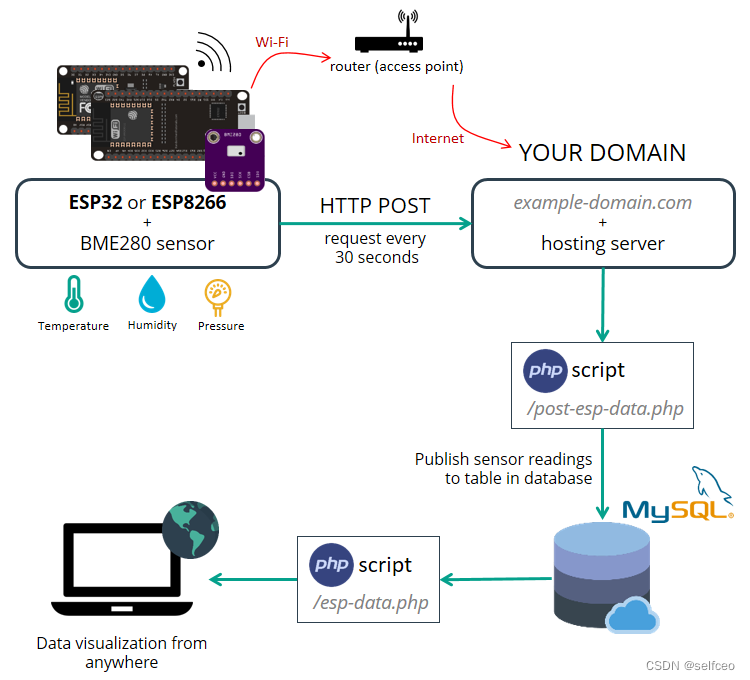
服务器制作部分这里就不再赘述了,这个得自己弄,简单点的就用phpstudy_pro,很快就搞定了。
我们说说ESP这边。
#include <ESP8266WiFi.h>
const char* ssid     = "your-ssid";
const char* password = "your-password";
const char* host = "your host ip address";
const String apiKeyValue = "tPmAT5Ab3j7F9";
const String sensorName = "BME280";
const String sensorLocation = "Office";
const int httpPort = 80;
const String url = "/replace with your serve page location that post-html-data.php";
void setup() {
  Serial.begin(115200);
  delay(10);
  // We start by connecting to a WiFi network
  Serial.println();
  Serial.println();
  Serial.print("Connecting to ");
  Serial.println(ssid);
  WiFi.begin(ssid, password);
  while (WiFi.status() != WL_CONNECTED) {
    delay(500);
    Serial.print(".");
  }
  Serial.println("");
  Serial.println("WiFi connected");
  Serial.println("IP address: ");
  Serial.println(WiFi.localIP());
}
int value = 0;
int value1 = 23;
int value2 = 45;
int value3 = 1023;
void loop() {
  delay(1000);
  ++value;
  Serial.print("connecting to ");
  Serial.println(host);

  // Use WiFiClient class to create TCP connections
  WiFiClient client;

  if (!client.connect(host, httpPort)) {
    Serial.println("connection failed");
    return;
  }
  if(value1<45){
    value1++;
    value2++;
    value3++;
    }
    else{
      value1 = 23;
      value2 = 45;
      value3 = 1023;
      }
  // We now create a URI for the request
  String httpRequestData = "api_key=" + apiKeyValue + "&sensor=" + sensorName
                          + "&location=" + sensorLocation + "&value1=" + String(value1)
                          + "&value2=" + String(value2) + "&value3=" + String(value3) + "";
  //adress that your server page had locate

  // This will send the request to the server
  client.print(String("GET ") + url + "?" + httpRequestData+ " HTTP/1.1\r\n" +
               "Host: " + host + "\r\n" +
               "Connection: close\r\n\r\n");
  unsigned long timeout = millis();
  while (client.available() == 0) {
    if (millis() - timeout > 5000) {
      Serial.println(">>> Client Timeout !");
      client.stop();
      return;
    }
  }
  // Read all the lines of the reply from server and print them to Serial
  while(client.available()){
    String line = client.readStringUntil('\r');
    Serial.print(line);
  }
}
修改const参数后就可以使用了
服务器端口,两个文件,一个是post-esp-data.php
```php
<?php
$servername = "replac with your server ip";
// REPLACE with your Database name
$dbname = "REPLACE with your Database name";
// REPLACE with Database user
$username = "REPLACE with Database user";
// REPLACE with Database user password
$password = "EPLACE with Database user password";

// Keep this API Key value to be compatible with the ESP32 code provided in the project page.
// If you change this value, the ESP32 sketch needs to match
$api_key_value = "tPmAT5Ab3j7F9";

$api_key= $sensor = $location = $value1 = $value2 = $value3 = "";
//you can use GET OR POST to receive and send accord esp8266
if ($_SERVER["REQUEST_METHOD"] == "GET") {
    $api_key = test_input($_GET["api_key"]);
    if($api_key == $api_key_value) {
        $sensor = test_input($_GET["sensor"]);
        $location = test_input($_GET["location"]);
        $value1 = test_input($_GET["value1"]);
        $value2 = test_input($_GET["value2"]);
        $value3 = test_input($_GET["value3"]);

        // Create connection
        $conn = new mysqli($servername, $username, $password, $dbname);
        // Check connection
        if ($conn->connect_error) {
            die("Connection failed: " . $conn->connect_error);
        }
        $reading_time=date("Y-m-d H:i:s");
        //$id=200;
        //$sql = "UPDATE `sensordata` SET `sensor`='".$sensor."',`location`='".$location."',`value1`='".$value1."',`value2`='".$value2."',`value3`='".$value3."',`reading_time`='".$reading_time."' WHERE `id` like '$id'";
        $sql1="INSERT INTO `sensordata` (sensor, location, value1, value2, value3)
        VALUES ('" . $sensor . "', '" . $location . "', '" . $value1 . "', '" . $value2 . "', '" . $value3 . "')";
        if ($conn->query($sql1) === TRUE) {
            echo $sensor."|".$location."|".$value1."|".$value2."|".$value3."|".$reading_time;
        }
        else {
            echo "Error: " . $sql1 . "<br>" . $conn->error;
        }

        $conn->close();
    }
    else {
        echo "Wrong API Key provided.";
    }

}
else {
    echo "No data posted with HTTP POST.";
}

function test_input($data) {
    $data = trim($data);
    $data = stripslashes($data);
    $data = htmlspecialchars($data);
    return $data;
}
```php
<!DOCTYPE html>
<html><body>
<?php
$servername = "REPLACE with your Database ip";
// REPLACE with your Database name
$dbname = "REPLACE with your Database name";
// REPLACE with Database user
$username = "REPLACE with Database user";
// REPLACE with Database user password
$password = "REPLACE with Database user password";
// Create connection
$conn = new mysqli($servername, $username, $password, $dbname);
// Check connection
if ($conn->connect_error) {
    die("Connection failed: " . $conn->connect_error);
}
$sql = "SELECT id, sensor, location, value1, value2, value3, reading_time FROM SensorData ORDER BY id DESC";

echo '<table border= border-padding="5">
      <tr>
        <td>ID</td>
        <td>Sensor</td>
        <td>Location</td>
        <td>Value 1</td>
        <td>Value 2</td>
        <td>Value 3</td>
        <td>Timestamp</td>
      </tr>';

if ($result = $conn->query($sql)) {
    while ($row = $result->fetch_assoc()) {
        $row_id = $row["id"];
        $row_sensor = $row["sensor"];
        $row_location = $row["location"];
        $row_value1 = $row["value1"];
        $row_value2 = $row["value2"];
        $row_value3 = $row["value3"];
        $row_reading_time = $row["reading_time"];
        // Uncomment to set timezone to - 1 hour (you can change 1 to any number)
        //$row_reading_time = date("Y-m-d H:i:s", strtotime("$row_reading_time - 1 hours"));

        // Uncomment to set timezone to + 4 hours (you can change 4 to any number)
        //$row_reading_time = date("Y-m-d H:i:s", strtotime("$row_reading_time + 4 hours"));

        echo '<tr>
                <td>' . $row_id . '</td>
                <td>' . $row_sensor . '</td>
                <td>' . $row_location . '</td>
                <td>' . $row_value1 . '</td>
                <td>' . $row_value2 . '</td>
                <td>' . $row_value3 . '</td>
                <td>' . $row_reading_time . '</td>
              </tr>';
    }
    $result->free();
}

$conn->close();
?>
</table>
</body>
</html>
服务器部分
CREATE TABLE SensorData (
    id INT(6) UNSIGNED AUTO_INCREMENT PRIMARY KEY,
    sensor VARCHAR(30) NOT NULL,
    location VARCHAR(30) NOT NULL,
    value1 VARCHAR(10),
    value2 VARCHAR(10),
    value3 VARCHAR(10),
    reading_time TIMESTAMP DEFAULT CURRENT_TIMESTAMP ON UPDATE CURRENT_TIMESTAMP
)


先连起来,咱们再分析,充满斗志!!!

DO IT
 382


 扫一扫


 被折叠的 条评论
为什么被折叠?
 到【灌水乐园】发言


