





 博客提及在项目中添加了hutool - all.jar工具类,给出了工具类文档链接https://hutool.cn/docs/#/ ,未提及执行结果相关具体信息技术内容。
如何优雅的用线程池创建线程并且命名
大家都知道阿里巴巴规范手册说要给线程命名,话不多说直接贴代码
import cn.hutool.core.thread.ExecutorBuilder;
import cn.hutool.core.thread.NamedThreadFactory;

import java.util.concurrent.ThreadPoolExecutor;

public class RunFirst {
    private static ThreadPoolExecutor threadPool = null;

    static {
        threadPool = ExecutorBuilder.create()
                .setCorePoolSize(10)
                .setMaxPoolSize(20)
                .setKeepAliveTime(1L, TimeUnit.SECONDS)
                .useArrayBlockingQueue(100000)
                .setThreadFactory(new NamedThreadFactory("my-task-", false))
                .setAllowCoreThreadTimeOut(true)
                .build();
    }


    public static void main(String[] args) {
        System.out.println("开始执行");
        int len = 10000000;//1亿次
        for (int i = 0; i < len; i++) {
            int finalI = i;
            threadPool.execute(() -> {
                System.out.println("当前线程名=" + Thread.currentThread().getName() + "==>工作任务是打印:" + finalI);
            });
            System.out.println("```当前线程名=" + Thread.currentThread().getName() + "==>工作任务是打印:" + finalI);
        }
        System.out.println("执行完毕");
    }
}
最后执行结果是
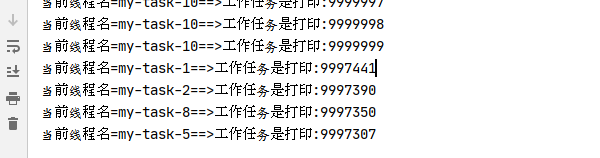
我只是在项目中添加了一个hutool-all.jar
<dependency>
    <groupId>cn.hutool</groupId>
    <artifactId>hutool-all</artifactId>
    <version>5.5.4</version>
</dependency>
工具类 https://hutool.cn/docs/#/





 扫一扫
扫一扫


 508
508


 到【灌水乐园】发言



