



 本文介绍了如何更改pip的下载源,包括清华源、阿里源和官方源,并提供了在PyCharm中设置国内源的方法。同时,详细讲解了conda的配置文件.condarc,包括查看、添加、删除源的操作,以及创建、管理conda环境的命令。
1 pip源
清华源地址:
https://pypi.tuna.tsinghua.edu.cn/simple
阿里源地址:
https://mirrors.aliyun.com/pypi/simple
官方源地址:
https://pypi.python.org/simple
使用 pip 安装模块时使用 -i 就可以指定自己想要的下载地址进行下载:
pip install tensorflow-gpu==2.0.0 -i https://mirrors.aliyun.com/pypi/simple
使用PyCharm时可以将仓库地址改成国内的源地址!
2 conda配置文件
.condarc 是 conda 应用程序的配置文件,在用户目录下(windows:C:\\users\\username\\,linux:/home/username/)。
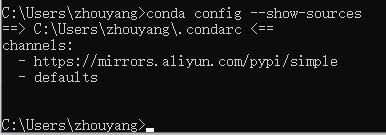
查看配置:
conda config --show-sources
查看源:
conda config --get channels

添加源:
# 添加清华源
conda config --add channels https://mirrors.tuna.tsinghua.edu.cn/anaconda/pkgs/free/

# 设置搜索时显示通道地址
conda config --set show_channel_urls yes

附:
# 清华源
conda config --add channels https://mirrors.tuna.tsinghua.edu.cn/anaconda/cloud/conda-forge
conda config --add channels https://mirrors.tuna.tsinghua.edu.cn/anaconda/cloud/msys2
conda config --add channels https://mirrors.tuna.tsinghua.edu.cn/anaconda/cloud/pytorch/
conda config --add channels https://mirrors.tuna.tsinghua.edu.cn/anaconda/pkgs/r
conda config --add channels https://mirrors.tuna.tsinghua.edu.cn/anaconda/pkgs/main
conda config --add channels https://mirrors.tuna.tsinghua.edu.cn/anaconda/pkgs/free

# 中科大源
conda config --add channels https://mirrors.ustc.edu.cn/anaconda/pkgs/main/
conda config --add channels https://mirrors.ustc.edu.cn/anaconda/pkgs/free/
conda config --add channels https://mirrors.ustc.edu.cn/anaconda/cloud/conda-forge/
conda config --add channels https://mirrors.ustc.edu.cn/anaconda/cloud/msys2/
conda config --add channels https://mirrors.ustc.edu.cn/anaconda/cloud/bioconda/
conda config --add channels https://mirrors.ustc.edu.cn/anaconda/cloud/menpo/
删除源:
conda config --remove channels https://mirrors.aliyun.com/pypi/simple

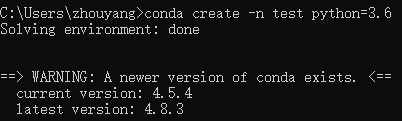
创建容器 tf2,-n 后面即是容器名,可自定义,然后指定 python 的版本。
conda create -n tf2 python=3.6
查看容器环境:
conda info --envs

删除容器:
conda remove -n test --all

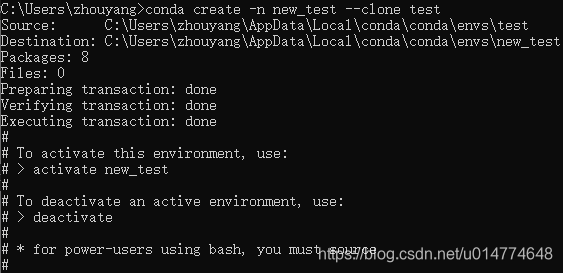
重命名:
# 先克隆
conda create -n new_name --clone test
# 然后删除旧的
conda remove -n test --all
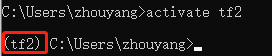
进入容器:
activate test
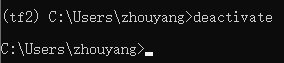
退出容器:
deactivate






 扫一扫
扫一扫


 4万+
4万+

 被折叠的 条评论
为什么被折叠?
被折叠的 条评论
为什么被折叠?
 到【灌水乐园】发言





