


 本文深入讲解SpringCloud Gateway作为微服务架构中的网关服务,提供安全、监控、限流等功能,替代Netflix Zuul,实现API路由管理。介绍其核心概念、快速入门、路由规则配置及前缀处理。
11 Spring Cloud Gateway网关
1. 简介
- Spring Cloud Gateway是Spring官网基于Spring 5.0、 Spring Boot 2.0、Project Reactor等技术开发的网关服 务。
- Spring Cloud Gateway基于Filter链提供网关基本功能:安全、监控/埋点、限流等。
- Spring Cloud Gateway为微服务架构提供简单、有效且统一的API路由管理方式。
- Spring Cloud Gateway是替代Netflix Zuul的一套解决方案。
Spring Cloud Gateway组件的核心是一系列的过滤器,通过这些过滤器可以将客户端发送的请求转发(路由)到对 应的微服务。 Spring Cloud Gateway是加在整个微服务前沿的防火墙和代理器,隐藏微服务结点IP端口信息,从 而加强安全保护。Spring Cloud Gateway本身也是一个微服务,需要注册到Eureka服务注册中心。
网关的核心功能是:过滤和路由
2. Gateway加入后的架构
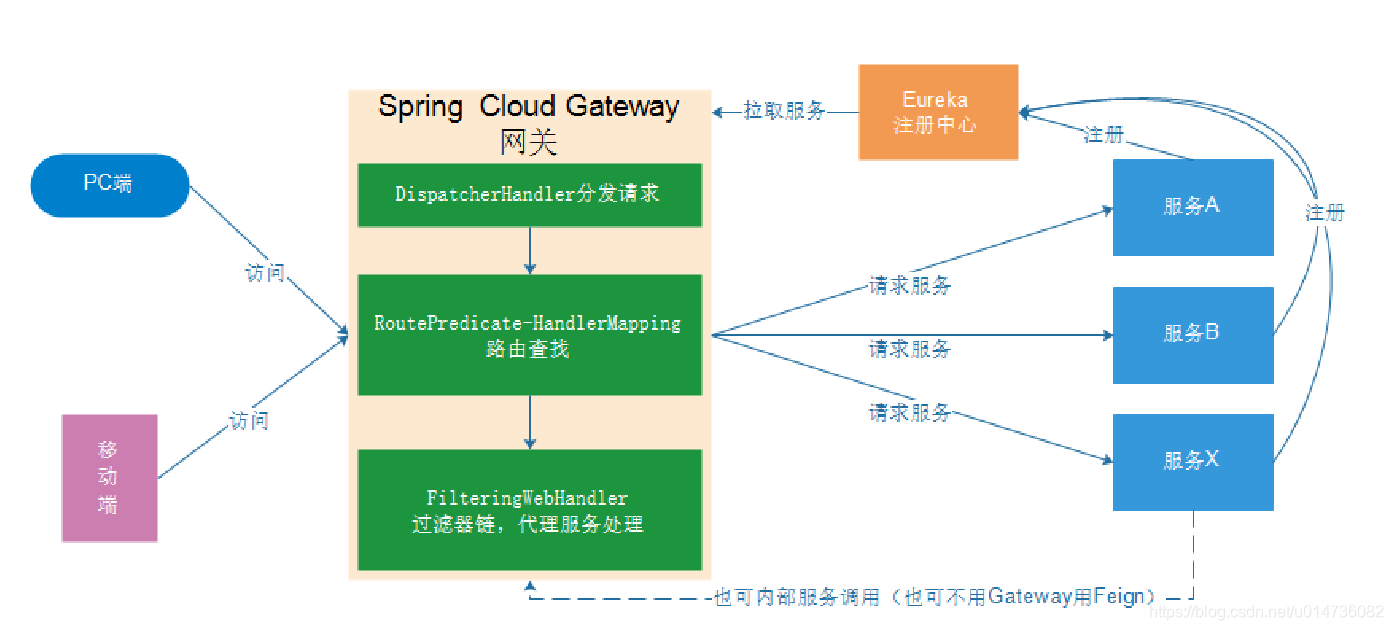
- 不管是来自于客户端(PC或移动端)的请求,还是服务内部调用。一切对服务的请求都可经过网关,然后再由 网关来实现 鉴权、动态路由等等操作。Gateway就是我们服务的统一入口。
3. 核心概念
- 路由(route) 路由信息的组成:由一个ID、一个目的URL、一组断言工厂、一组Filter组成。如果路由断言为 真,说明请求URL和配置路由匹配。
- 断言(Predicate) Spring Cloud Gateway中的断言函数输入类型是Spring 5.0框架中的 ServerWebExchange。Spring Cloud Gateway的断言函数允许开发者去定义匹配来自于Http Request中的任何 信息比如请求头和参数。
- 过滤器(Filter) 一个标准的Spring WebFilter。 Spring Cloud Gateway中的Filter分为两种类型的Filter,分别 是Gateway Filter和Global Filter。过滤器Filter将会对请求和响应进行修改处理。
4.快速入门
4.1新建工程
父工程为piziwang-sprinfgCloud
<?xml version="1.0" encoding="UTF-8"?>
<project xmlns="http://maven.apache.org/POM/4.0.0"
         xmlns:xsi="http://www.w3.org/2001/XMLSchema-instance"
         xsi:schemaLocation="http://maven.apache.org/POM/4.0.0 http://maven.apache.org/xsd/maven-4.0.0.xsd">
    <parent>
        <artifactId>piziwang-springCloud</artifactId>
        <groupId>com.piziwang</groupId>
        <version>1.0-SNAPSHOT</version>
    </parent>
    <modelVersion>4.0.0</modelVersion>

    <artifactId>piziwang-gateway</artifactId>

    <dependencies>
        <dependency>
            <groupId>org.springframework.cloud</groupId>
            <artifactId>spring-cloud-starter-gateway</artifactId>
        </dependency>
        <dependency>
            <groupId>org.springframework.cloud</groupId>
            <artifactId>spring-cloud-starter-netflix-eureka-client</artifactId>
        </dependency>
    </dependencies>

</project>
4.2编写启动类
创建com.piziwang.gateway.GatewayApplication 启动类
package com.piziwang.gateway;

import org.springframework.boot.SpringApplication;
import org.springframework.boot.autoconfigure.SpringBootApplication;
import org.springframework.cloud.client.discovery.EnableDiscoveryClient;

@SpringBootApplication
@EnableDiscoveryClient
public class GatewayApplication {
    public static void main(String[] args) {
        SpringApplication.run(GatewayApplication.class, args);
    }
}
4.3编写配置
server:
  port: 10010
spring:
  application:
    name: api-gateway

eureka:
  client:
    service-url:
      defaultZone: http://127.0.0.1:10086/eureka
    instance:
      prefer-ip-address: true
4.4编写路由规则
需要用网关来代理 user-service 服务,ip: 127.0.0.1 服务端口:9091
修改 piziwang-gateway\src\main\resources\application.yml 文件为:
server:
  port: 10010
spring:
  application:
    name: api-gateway
  cloud:
    gateway:
      routes:
         # 路由id,可以任意
        - id: user-service-route
          # 代理的服务地址
          uri: http://127.0.0.1:9091
          predicates:
            - Path=/user/**

eureka:
  client:
    service-url:
      defaultZone: http://127.0.0.1:10086/eureka
    instance:
      prefer-ip-address: true
将符合 Path 规则的一切请求,都代理到 uri 参数指定的地址
本例中,我们将路径中包含有 /user/** 开头的请求,代理到http://127.0.0.1:9091
4.5启动测试
访问的路径中需要加上配置规则的映射路径,我们访问:http://localhost:10010/user/8
5. 面向服务的路由
在刚才的路由规则中,把路径对应的服务地址写死了!如果同一服务有多个实例的话,这样做显然不合理。
应该根据服务的名称,去Eureka注册中心查找 服务对应的所有实例列表,然后进行动态路由!
5.1. 修改映射配置,通过服务名称获取
因为已经配置了Eureka客户端,可以从Eureka获取服务的地址信息。
修改 piziwang-gateway\src\main\resources\application.yml 文件如下:
server:
  port: 10010
spring:
  application:
    name: api-gateway
  cloud:
    gateway:
      routes:
         # 路由id,可以任意
        - id: user-service-route
          # 代理的服务地址:lb表示从eureka中获取具体服务
          uri: lb://user-service
          #路由断言,可以配置映射路径
          predicates:
            - Path=/user/**


eureka:
  client:
    service-url:
      defaultZone: http://127.0.0.1:10086/eureka
    instance:
      prefer-ip-address: true
路由配置中uri所用的协议为lb时(以uri: lb://user-service为例),gateway将使用 LoadBalancerClient把 user-service通过eureka解析为实际的主机和端口,并进行ribbon负载均衡。
5.2启动测试
再次启动 piziwang-gateway ,这次gateway进行代理时,会利用Ribbon进行负载均衡访问:
http://localhost:10010/user/8
日志中可以看到使用了负载均衡器:

6. 路由前缀
6.1. 添加前缀
在gateway中可以通过配置路由的过滤器PrefixPath,实现映射路径中地址的添加;
修改 piziwang-gateway\src\main\resources\application.yml 文件
server:
  port: 10010
spring:
  application:
    name: api-gateway
  cloud:
    gateway:
      routes:
         # 路由id,可以任意
        - id: user-service-route
          # 代理的服务地址:lb表示从eureka中获取具体服务
          uri: lb://user-service
          #路由断言,可以配置映射路径
          predicates:
            - Path=/user/**
          filters:
            #添加请求路径的前缀
            - PrefixPath=/user


eureka:
  client:
    service-url:
      defaultZone: http://127.0.0.1:10086/eureka
    instance:
      prefer-ip-address: true
通过 PrefixPath=/xxx 来指定了路由要添加的前缀。
也就是:
- PrefixPath=/user http://localhost:10010/8 --》http://localhost:9091/user/8
- PrefixPath=/user/abc http://localhost:10010/8 --》http://localhost:9091/user/abc/8
以此类推。
6.2. 去除前缀
在gateway中可以通过配置路由的过滤器StripPrefix,实现映射路径中地址的去除
修改 piziwang-gateway\src\main\resources\application.yml 文件
server:
  port: 10010
spring:
  application:
    name: api-gateway
  cloud:
    gateway:
      routes:
         # 路由id,可以任意
        - id: user-service-route
          # 代理的服务地址:lb表示从eureka中获取具体服务
          uri: lb://user-service
          #路由断言,可以配置映射路径
          predicates:
            - Path=/user/**
          filters:
            # 表示过滤1个路径,2表示两个路径,以此类推
            - StripPrefix=1


eureka:
  client:
    service-url:
      defaultZone: http://127.0.0.1:10086/eureka
    instance:
      prefer-ip-address: true
通过 StripPrefix=1 来指定了路由要去掉的前缀个数。如:路径 /api/user/1 将会被代理到 /user/1 。
也就是:
- StripPrefix=1 http://localhost:10010/api/user/8 --》http://localhost:9091/user/8
- StripPrefix=2 http://localhost:10010/api/user/8 --》http://localhost:9091/8
er-ip-address: true
通过 StripPrefix=1 来指定了路由要去掉的前缀个数。如:路径 /api/user/1 将会被代理到 /user/1 。

也就是:

- StripPrefix=1 http://localhost:10010/api/user/8 --》http://localhost:9091/user/8
- StripPrefix=2 http://localhost:10010/api/user/8 --》http://localhost:9091/8

以此类推





 扫一扫
扫一扫


 672
672


 到【灌水乐园】发言



