


默认是只能在HTTPS中使用,但是可以修改浏览器实现http的使用
Chrome浏览器,
chrome://flags/ 进入设置
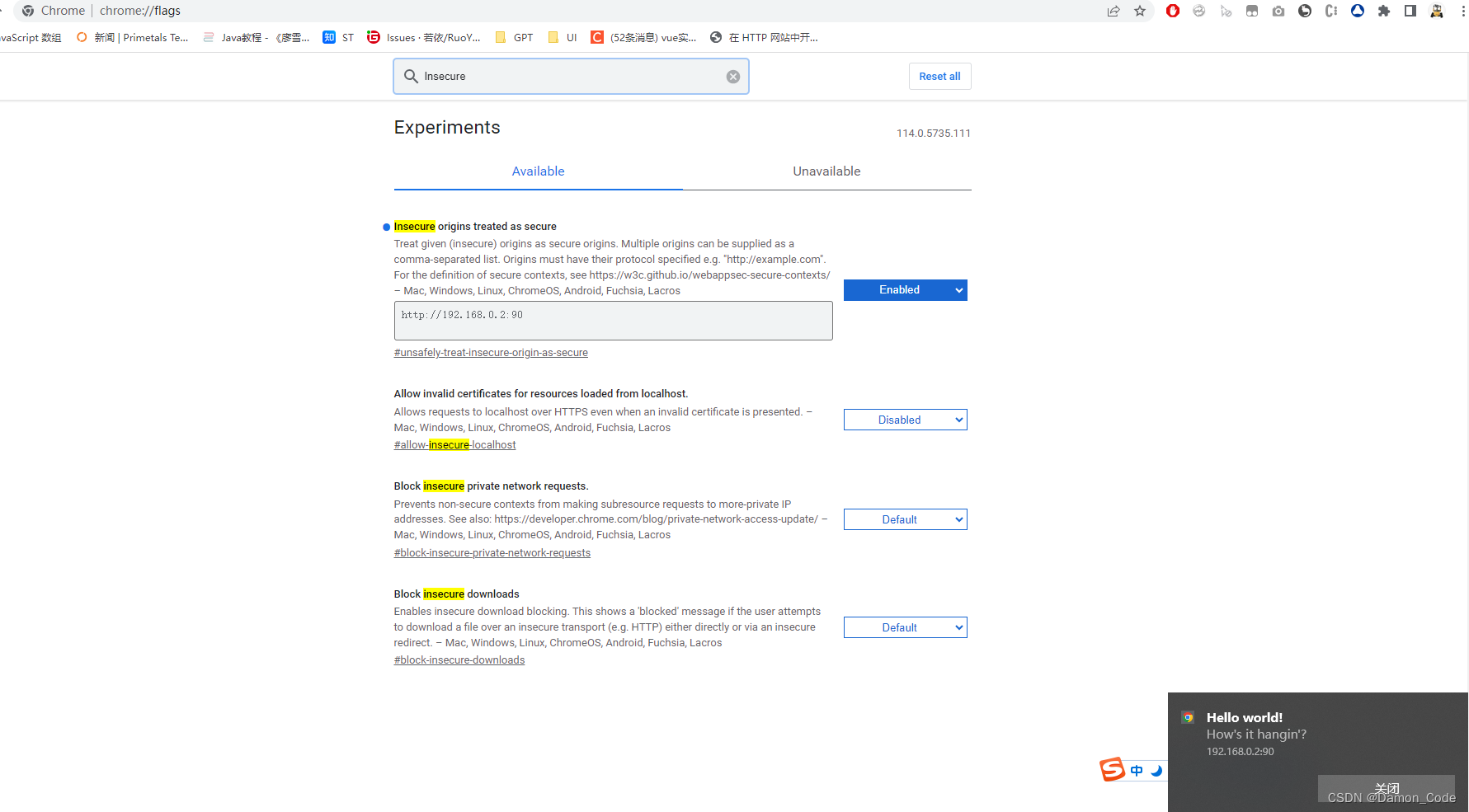
Insecure origins treated as secure 中填写需要开启 Notification API 的域名,重启浏览器,就可以在 HTTP 中使用 Notification API 了。
如果是局域网IP,写法如下:
看到效果:
 文章介绍了如何在Chrome浏览器中通过chrome://flags/设置,修改Insecureoriginstreatedassecure选项,添加特定域名或局域网IP(如http://192.168.0.2:90),以允许在非HTTPS环境下使用NotificationAPI。
默认是只能在HTTPS中使用,但是可以修改浏览器实现http的使用
Chrome浏览器,
chrome://flags/ 进入设置
Insecure origins treated as secure 中填写需要开启 Notification API 的域名,重启浏览器,就可以在 HTTP 中使用 Notification API 了。
如果是局域网IP,写法如下:
看到效果:
 888
888

 被折叠的 条评论
为什么被折叠?
被折叠的 条评论
为什么被折叠?
 到【灌水乐园】发言








 扫一扫
扫一扫


