






 本文介绍了如何在Excel VBA中使用Aspen插件进行过程数据的获取,包括当前值、历史趋势、批次信息和子批次信息。详细讲解了设置References、读取数据的方法,并给出了时间计算函数和查找特定字符串的示例。
Excel Addin 'Aspen process data '
获取当前值Current process data (single value)
References
打开VBA编辑器,找到References勾选需要的插件
需要额外勾选的插件有:
AspenProcessDataAddin
Aspen DataSource Locator
Aspen Process Data
如下图所示

读取当前值
'create a new IP21 DataSource object
Private IP21DataSources As New AtProcessData.DataSources

Public Const VAR_Server As String = "IP21-XXXXXXXX"'IP21 server name
Public Const ATTR_IP_INPUT_VALUE As String = "IP_INPUT_VALUE"
'attribute name of 'Current Value' in IP21 server

Public Function ReadTagValue(sTag As String, sAttribut As String) As Variant
    ' Read a tag for a given attribute
    ' return "" if nothing found or error

    Dim resu As Variant 'Variant for output
    Dim oAtDataSource As AtProcessData.DataSource
    Dim oAtTag As AtProcessData.Tag
    Dim oAtAttr As AtProcessData.Attribute

    resu = ""
    Set oAtDataSource = IP21DataSources.Item(VAR_Server)
    'Set DataSource
    Set oAtTag = oAtDataSource.Tags.Add(sTag)
    'Set Tag Name
    Set oAtAttr = oAtTag.Attributes.Add(sAttribut)
    'Set Attribute Name

    oAtTag.Attributes.Query.UseCurrentTime = True
    'Set Time as current time
    oAtTag.Attributes.Read False
    'Enable to read attribute value

    If (oAtAttr.Valid = True) Then
        If oAtAttr.Value = "" Then
        	'If failed to fetch current value, return ''
            ReadTagValue = resu
        	Exit Function
        Else
        	'Get current value
            resu = (oAtAttr.Value)
        End If
    Else
    	'If failed to recognize the attribute name, return ''
        ReadTagValue = resu
        Exit Function
    End If

    oAtDataSource.Tags.RemoveAll
    Set oAtDataSource = Nothing
    Set oAtAttr = Nothing
    Set oAtTag = Nothing

    ReadTagValue = resu
    'return Output value

End Function

Sub test()
Cells(1, 1).Value = ReadTagValue("XXXXXXXXX", ATTR_IP_INPUT_VALUE)
End Sub
Note:
1、获取当前时间值
oAtTag.Attributes.Query.UseCurrentTime = True
2、获取某时间点的值
oAtTag.Attributes.Query.Time = Format(“2021/07/01 00:00:00”, “yyyy/MM/DD HH:mm:ss”)
获取历史趋势Historic process data list
References
打开VBA编辑器,找到References勾选需要的插件
需要额外勾选的插件有:
AspenProcessDataAddin
Aspen DataSource Locator
Aspen Process Data
如下图所示
获取历史值列表
'create a new IP21 DataSource object
Private IP21DataSources As New AtProcessData.DataSources

Public Const VAR_Server As String = "IP21-XXXXXXX" 'IP21 server name
Public Const ATTR_IP_INPUT_VALUE As String = "IP_INPUT_VALUE" ''attribute name of 'Current Value' in IP21 server
Public Const ValueList_MaxNum As Integer = 500 ' maximum capacity of history value list
Public Const IntervalPeriod As Integer = 2 'interval period between each history data
Dim HistoryCap As Variant 'real capacity of history value list


Sub ReadTagHistory(sTag As String, sAttribut As String, sStartTime As Date, sEndTime As Date, HistoryOutput() As Double)
    ' Read a list of historic tag value for a given attribute
    ' Output to an externally defined list variable
    ' return "" if nothing found or error
    Dim i As Integer
    Dim oAtDataSource As AtProcessData.DataSource
    Dim oAtTag As AtProcessData.Tag
    Dim oAtAttr As AtProcessData.Attribute
    Dim oHistory As AtProcessData.History

    'Set DataSource
    Set oAtDataSource = IP21DataSources.Item(VAR_Server)
    'Set Tag Name
    Set oAtTag = oAtDataSource.Tags.Add(sTag)
    'Set Attribute Name
    Set oAtAttr = oAtTag.Attributes.Add(sAttribut)
    'Set History list object
    Set oHistory = oAtTag.History

    'Settings of history data filtter
    oHistory.Query.BeginTime = sStartTime
    oHistory.Query.EndTime = sEndTime
    oHistory.Query.Extrapolate = False
    oHistory.Query.DetermineInterpolationStart = False
    oHistory.Query.Period = IntervalPeriod 'interval period between each history data
    oHistory.Query.PeriodUnits = apdHour ' unit of interval period time
    oHistory.Query.Method = apdValue
    oHistory.Query.Start = apdStartTime
    oHistory.Query.Stepped = False
    oHistory.Query.MaxPoints = ValueList_MaxNum
    oHistory.Query.Type = apdInterpolated

    'Get history value
    oHistory.Read False
    oAtTag.Attributes.Read False

    'Fill the history value list
    HistoryCap = 0
    If oHistory.Samples.Count = 0 Then
        If oAtAttr.Value = "" Then
        End If
    Else
        For i = 1 To oHistory.Samples.Count
            If oHistory.Samples(i).Value = "" Then
            Else ' If value is not NULL
                HistoryCap = HistoryCap + 1 'add the capacity of history value list
                HistoryOutput(HistoryCap) = oHistory.Samples(i) 'save the value in the list
            End If
        Next
    End If

    oAtDataSource.Tags.RemoveAll
    Set oAtDataSource = Nothing
    Set oAtAttr = Nothing
    Set oAtTag = Nothing
    Set oHistory = Nothing

End Sub

Public Function AddHour(ByVal sTime As String, sAddNum As Integer) As String
'Add X hours to a Time string
    Dim dt As Date
    dt = CDate(sTime)
    dt = DateAdd("h", sAddNum, dt)
    AddHour = Format(dt, "YYYY/MM/DD hh:mm:ss")
End Function

Sub test()
    Dim ValueList(ValueList_MaxNum) As Double
    Dim index As Integer
    Dim Start_Time As Date, End_Time As Date
    Start_Time = Format("2021/07/01 00:00:00", "YYYY/MM/DD hh:mm:ss")
    End_Time = Format("2021/07/02 00:00:00", "YYYY/MM/DD hh:mm:ss")
    Call ReadTagHistory("XXXXXXXXX", ATTR_IP_INPUT_VALUE, Start_Time, End_Time, ValueList)
    Cells(1, 2) = "XXXXXXXXX"
    For index = 1 To HistoryCap - 1 'print result except value at End Time
        Cells(index + 1, 1) = AddHour(Start_Time, (index - 1) * IntervalPeriod)
        Cells(index + 1, 2) = ValueList(index)
    Next
End Sub
获取历史值列表运行结果

Note
时间计算函数——小时增加
输入时间字符串和增加的小时数,输出一个计算后的时间字符串
Public Function AddHour(ByVal sTime As String, sAddNum As Integer) As String
'Add X hours to a Time string
    Dim dt As Date
    dt = CDate(sTime)
    dt = DateAdd("h", sAddNum, dt)
    AddHour = Format(dt, "YYYY/MM/DD hh:mm:ss")
End Function
获取批次信息Batch information
Reference
打开VBA编辑器,找到References勾选需要的插件
需要额外勾选的插件有:
Aspen Batch.21 Application Interface
Aspen Data Source Locator
Aspen Process Data
Aspen Process Data Automation
Aspen Production Record Manager Characteristic Browser
Aspen Time Components
Aspen_Production_Record_Manager_Excel_AddIn
AspenProcessDataAddin
如下图所示
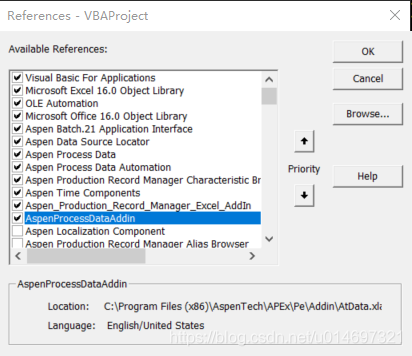
读取Batch信息
读取一段时间内批次号(Batch ID), 批次名(Batch handle), 批次开始时间(Batch start time), 及批次结束时间(Batch end time)等Batch的属性值(Attribute)
Public Const VAR_Server As String = "XXXXXXXX" 'PIMS Server name
Public Const VAR_Area As String = "XXXXXX" 'Area name
Public Const MaxBatchNum As Integer = 500 'Max length of Batch list to fetch
Public Const Row_Offset As Integer = 4 'First row of report data equals to (1+Row_Offset)
Public Const Col_length As Integer = 7 'In convenience to clear the report before generate a new one
Public Const CARA_START_TIME As String = "START_TIME" 'Characteristic name of start time in batch
Private BatchDataSources As New AtBatch21ApplicationInterface.BatchDataSources

Function iGetBatchList(iStartTime As Date, iEndTime As Date, iMaxBatchNum As Integer) As AtBatch21ApplicationInterface.BatchList
    ' return a list of batches during iStartTime and iEndTime,
    ' the max length of the list will be 'iMaxBatchNum'

    Dim oArea As AtBatch21ApplicationInterface.Area
    Dim oBatchQuery As AtBatch21ApplicationInterface.BatchQuery
    Dim oBatchList As AtBatch21ApplicationInterface.BatchList

    ' Setting the Data source and Define Time peirod of "oBatchQuery" to fetch
    Set oArea = BatchDataSources(VAR_Server).Areas(VAR_Area)
    Set oBatchQuery = oArea.BatchQuery
    oBatchQuery.Clear
    oBatchQuery.TimeRange.Start = iStartTime
    oBatchQuery.TimeRange.End = iEndTime
    oBatchQuery.MostRecentBatches = iMaxBatchNum

    ' run query to fetch data from server
    Set oBatchList = oBatchQuery.Get

    Set iGetBatchList = oBatchList

End Function

Function iGetBatchAttribute(oBatch As AtBatch21ApplicationInterface.Batch, oAttribute As String) As String
    ' return the Attribute value of one specific batch
    ' The Enum list of Attribute can be found at
    ' Aspen Production Record Manager Characteristic Browser - Procedure - Characteristics
    Dim resu As String
    resu = ""

    On Error GoTo Error_handle 'If meet any error, run codes under Error_handle
        If Not (oBatch Is Nothing) Then
            resu = CStr(oBatch.Characteristics.Item(oAttribute))
        End If
        iGetBatchAttribute = resu
    Exit Function

Error_handle:
    iGetBatchAttribute = "" 'In case the Attribute does not exist, return a Null value

End Function

Sub ClearLastReport()
'Clear the report data before generate a new one
Dim row_length As Integer
row_length = 1 + Row_Offset
While Cells(row_length, 1) <> ""
    row_length = row_length + 1
Wend
Range(Cells(1 + Row_Offset, 1), Cells(row_length, Col_length)).ClearContents
End Sub

Sub ReportFiller()

Dim BatchNum As Integer 'Used for the index of "FOR Loop"
Dim Batch_Pinner As AtBatch21ApplicationInterface.Batch 'Used for indicating the specific Batch in "FOR Loop"

Dim iBatchList As AtBatch21ApplicationInterface.BatchList 'Store the return result of batch list
Dim BatchIDList(1 To MaxBatchNum) As String 'Store the return result of Batch ID list
Dim BatchLineList(1 To MaxBatchNum) As String 'Store the return result of Line list
Dim BatchRecipeList(1 To MaxBatchNum) As String 'Store the return result of Recipe list
Dim BatchStTimeList(1 To MaxBatchNum) As String 'Store the return result of Batch Start time list
Dim BatchEdTimeList(1 To MaxBatchNum) As String 'Store the return result of Batch End time list
Dim BatchSpanList(1 To MaxBatchNum) As String 'Store the result of Batch Span list

'Fill the list of Batch Handle
    Dim Report_TimeStart As Date, Report_TimeEnd As Date
    Report_TimeStart = Format("2020/06/01 00:00:00", "YYYY/MM/DD hh:mm:ss")
    Report_TimeEnd = Format("2020/07/01 00:00:00", "YYYY/MM/DD hh:mm:ss")
    Set iBatchList = iGetBatchList(Report_TimeStart, Report_TimeEnd, MaxBatchNum)

'Fill the list of Batch ID
    For BatchNum = 1 To iBatchList.Count
        Set Batch_Pinner = iBatchList.Item((BatchNum))
        BatchIDList(BatchNum) = iGetBatchAttribute(Batch_Pinner, "BATCH_ID")
        If BatchIDList(BatchNum) = "" Then
            Exit For
        End If
    Next

'Fill the list of Batch Line
    For BatchNum = 1 To iBatchList.Count
        Set Batch_Pinner = iBatchList.Item((BatchNum))
        BatchLineList(BatchNum) = iGetBatchAttribute(Batch_Pinner, "AREA")
    Next

'Fill the list of Batch Recipe
    For BatchNum = 1 To iBatchList.Count
        Set Batch_Pinner = iBatchList.Item((BatchNum))
        BatchRecipeList(BatchNum) = iGetBatchAttribute(Batch_Pinner, "PRODUCT_NAME")
    Next

'Fill the list of Batch Start time
    For BatchNum = 1 To iBatchList.Count
        Set Batch_Pinner = iBatchList.Item((BatchNum))
        BatchStTimeList(BatchNum) = iGetBatchAttribute(Batch_Pinner, "START_TIME")
    Next

'Fill the list of Batch End time
    For BatchNum = 1 To iBatchList.Count
        Set Batch_Pinner = iBatchList.Item((BatchNum))
        BatchEdTimeList(BatchNum) = iGetBatchAttribute(Batch_Pinner, "END_TIME")

        'Fill the list of Batch Span
        If BatchStTimeList(BatchNum) <> "" And BatchEdTimeList(BatchNum) <> "" Then
            BatchSpanList(BatchNum) = _
            (CDate(BatchEdTimeList(BatchNum)) - CDate(BatchStTimeList(BatchNum))) * 24
        End If
    Next

'Fill the Cells within the data from lists
    For BatchNum = 1 To iBatchList.Count
        Cells(BatchNum + Row_Offset, 1) = VAR_Server & "." & iBatchList.Item(BatchNum)
        Cells(BatchNum + Row_Offset, 2).Value = Format(BatchIDList(BatchNum), "0.000000")
        Cells(BatchNum + Row_Offset, 3).Value = BatchLineList(BatchNum)
        Cells(BatchNum + Row_Offset, 4).Value = BatchRecipeList(BatchNum)
        Cells(BatchNum + Row_Offset, 5).Value = BatchStTimeList(BatchNum)
        Cells(BatchNum + Row_Offset, 6).Value = BatchEdTimeList(BatchNum)
        Cells(BatchNum + Row_Offset, 7).Value = BatchSpanList(BatchNum)
    Next

End Sub

Sub iGetResentBatchList_Test()
' clear last report
ClearLastReport
' Stop screen update, which can decrease runtime of macro
Application.ScreenUpdating = False
' Fetch and Fill the Report
ReportFiller
' Restore screen update
Application.ScreenUpdating = True
End Sub
Note
特征浏览器(Characteristic Browser)
打开特征浏览器(Characteristic Browser)
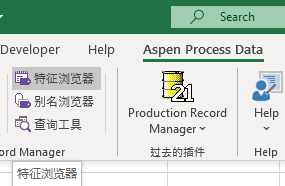
找到特征(Characteristic),即可查看特征名称
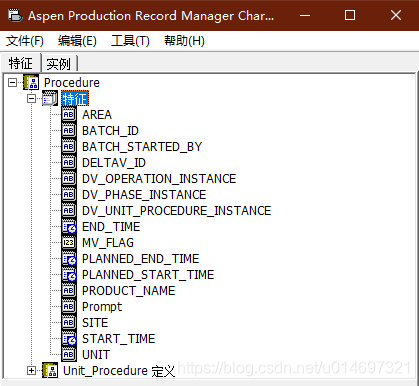
清空上次结果(Clear Last Report)
Public Const Row_Offset As Integer = 4 'First row of report data equals to (1+Row_Offset)
Public Const Col_length As Integer = 7 'In convenience to clear the report before generate a new one
Sub ClearLastReport()
'Clear the report data before generate a new one
Dim row_length As Integer
row_length = 1 + Row_Offset
While Cells(row_length, 1) <> ""
    row_length = row_length + 1
Wend
Range(Cells(1 + Row_Offset, 1), Cells(row_length, Col_length)).ClearContents
End Sub
获取子批次(流程)信息Subbatch information
Reference
打开VBA编辑器,找到References勾选需要的插件
需要额外勾选的插件有:
Aspen Batch.21 Application Interface
Aspen Data Source Locator
Aspen Process Data
Aspen Process Data Automation
Aspen Production Record Manager Characteristic Browser
Aspen Time Components
Aspen Production Record Manager Excel AddIn
AspenProcessDataAddin
如下图所示
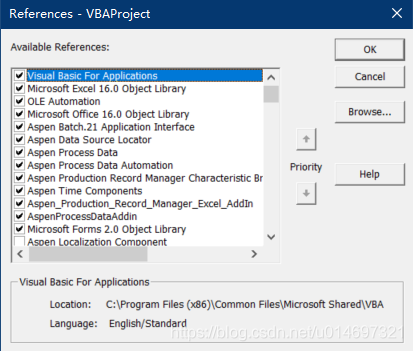
读取SubBatch信息
Public Const VAR_Server As String = "XXXXXXXX" 'PIMS Server name
Public Const VAR_Area As String = "PRO-LINE1" 'Area
Public Const MaxBatchNum As Integer = 500 'Max length of Batch list to fetch
Public Const Row_Offset As Integer = 2 'First row of report data equals to (1+Row_Offset)
Public Const Col_length As Integer = 11 'In convenience to clear the report before generate a new one
Public TimeRng_Start As Date'Start time of SubBatch information to fetch
Public TimeRng_End As Date'End time of SubBatch information to fetch
Type MatchLineSubbatch 'Datatype to discribe the relationship between Line name and subbatch handle
    LineGroup1 As String
    LineGroup2 As String
    LineGroup3 As String
    Subbatch1 As String
    Subbatch2 As String
    Subbatch3 As String
End Type
Type SubbatchCharac 'Characteristic name of subbatch
    Start_Time As MatchLineSubbatch
    End_Time As MatchLineSubbatch
End Type
Type LineSubbatch 'name of unit procedure
    Reactor As SubbatchCharac
    Stripper As SubbatchCharac
End Type

Public L2S As LineSubbatch'Create the object

Public Const CARA_START_TIME As String = "START_TIME" 'characteristic name of batch
Private BatchDataSources As New AtBatch21ApplicationInterface.BatchDataSources

Public BatchLineList(1 To MaxBatchNum) As String 'Store the return result of Line list

'Public variable list for Attribute Key Word of Reaction Time, Stripping Time
Public AttKW_ReactorSt(1 To MaxBatchNum) As String
Public AttKW_ReactorEt(1 To MaxBatchNum) As String
Public AttKW_StripperSt(1 To MaxBatchNum) As String
Public AttKW_StripperEt(1 To MaxBatchNum) As String
'Public variable list for storing Attribute Value of Reaction Time, Stripping Time
Public AttVal_ReactorSt(1 To MaxBatchNum) As String
Public AttVal_ReactorEt(1 To MaxBatchNum) As String
Public AttVal_StripperSt(1 To MaxBatchNum) As String
Public AttVal_StripperEt(1 To MaxBatchNum) As String

Public Sub ParamInitialize()'Load parameter from the sheet
 TimeRng_Start = Format("2020/06/01 00:00:00", "YYYY/MM/DD hh:mm:ss")
 TimeRng_End = Format("2020/07/01 00:00:00", "YYYY/MM/DD hh:mm:ss")

 L2S.Reactor.Start_Time.LineGroup1 = Range("Sht_RST_LineName_a").Value
 L2S.Reactor.Start_Time.LineGroup2 = Range("Sht_RST_LineName_b").Value
 L2S.Reactor.Start_Time.Subbatch1 = Range("Sht_RST_SubbatchName_a").Value
 L2S.Reactor.Start_Time.Subbatch2 = Range("Sht_RST_SubbatchName_b").Value
 L2S.Reactor.Start_Time.Subbatch3 = Range("Sht_RST_SubbatchName_c").Value

 L2S.Reactor.End_Time.LineGroup1 = Range("Sht_RET_LineName_a").Value
 L2S.Reactor.End_Time.Subbatch1 = Range("Sht_RET_SubbatchName_a").Value
 L2S.Reactor.End_Time.Subbatch2 = Range("Sht_RET_SubbatchName_b").Value

 L2S.Stripper.Start_Time.LineGroup1 = Range("Sht_SST_LineName_a").Value
 L2S.Stripper.Start_Time.Subbatch1 = Range("Sht_SST_SubbatchName_a").Value
 L2S.Stripper.Start_Time.Subbatch2 = Range("Sht_SST_SubbatchName_b").Value

 L2S.Stripper.End_Time.LineGroup1 = Range("Sht_SET_LineName_a").Value
 L2S.Stripper.End_Time.Subbatch1 = Range("Sht_SET_SubbatchName_a").Value
 L2S.Stripper.End_Time.Subbatch2 = Range("Sht_SET_SubbatchName_b").Value
 End Sub

Function iGetBatchList(iStartTime As Date, iEndTime As Date, iMaxBatchNum As Integer) As AtBatch21ApplicationInterface.BatchList
    ' return a list of batches during iStartTime and iEndTime,
    ' the max length of the list will be iMaxBatchNum

    Dim oArea As AtBatch21ApplicationInterface.Area
    Dim oBatchQuery As AtBatch21ApplicationInterface.BatchQuery
    Dim oBatchList As AtBatch21ApplicationInterface.BatchList

    ' Setting the Data source and Specific Time peirod of "oBatchQuery"
    Set oArea = BatchDataSources(VAR_Server).Areas(VAR_Area)
    Set oBatchQuery = oArea.BatchQuery
    oBatchQuery.Clear
    oBatchQuery.TimeRange.Start = iStartTime
    oBatchQuery.TimeRange.End = iEndTime
    oBatchQuery.MostRecentBatches = iMaxBatchNum

    ' run query to fetch data from server
    Set oBatchList = oBatchQuery.Get

    Set iGetBatchList = oBatchList

End Function

Function iGetBatchAttribute(oBatch As AtBatch21ApplicationInterface.Batch, oAttribute As String) As String
    ' return the Attribute value of one specific batch
    ' The Enum list of Attribute can be found at
    ' Aspen Production Record Manager Characteristic Browser - Procedure - Characteristics
    Dim resu As String
    resu = ""

    On Error GoTo Error_handle
        If Not (oBatch Is Nothing) Then
            resu = CStr(oBatch.Characteristics.Item(oAttribute))
        End If
        iGetBatchAttribute = resu
    Exit Function

Error_handle:
    iGetBatchAttribute = "" 'In case the Attribute does not exist, return a Null value
End Function

Function iGetBatchUnitAttribute(oBatch As AtBatch21ApplicationInterface.Batch, oSubbatch As String, oAttribute As String) As String
    ' return the Attribute value of one specific batch
    ' The Enum list of Attribute can be found at
    ' Aspen Production Record Manager Characteristic Browser - Procedure - Characteristics
    Dim resu As String
    resu = ""
    Dim i As Integer
    On Error GoTo Error_handle
        If Not (oBatch Is Nothing) Then
            'MsgBox (oBatch.Subbatches.Item(oAttribute).Characteristics.Item("START_TIME"))
            resu = CStr(oBatch.Subbatches.Item(oSubbatch).Characteristics.Item(oAttribute))
        End If
        iGetBatchUnitAttribute = resu
    Exit Function

Error_handle:
    iGetBatchUnitAttribute = "" 'In case the Attribute does not exist, return a Null value
End Function

Function iGetKeyWordOfRS(oKeyWordNum As Integer)
'Get Attribute Key Word of Reaction Time, Stripping Time
Dim index As Integer
For index = 1 To oKeyWordNum
'Reactor Start_Time
    If FindStringInCells(BatchLineList(index), L2S.Reactor.Start_Time.LineGroup1) Then
        AttKW_ReactorSt(index) = L2S.Reactor.Start_Time.Subbatch1
    ElseIf FindStringInCells(BatchLineList(index), L2S.Reactor.Start_Time.LineGroup2) Then
        AttKW_ReactorSt(index) = L2S.Reactor.Start_Time.Subbatch2
    Else
        AttKW_ReactorSt(index) = L2S.Reactor.Start_Time.Subbatch3
    End If
'Reactor End_Time
    If FindStringInCells(BatchLineList(index), L2S.Reactor.End_Time.LineGroup1) Then
        AttKW_ReactorEt(index) = L2S.Reactor.End_Time.Subbatch1
    Else: AttKW_ReactorEt(index) = L2S.Reactor.End_Time.Subbatch2
    End If
'Stripper Start_Time
    If FindStringInCells(BatchLineList(index), L2S.Stripper.Start_Time.LineGroup1) Then
        AttKW_StripperSt(index) = L2S.Stripper.Start_Time.Subbatch1
    Else: AttKW_StripperSt(index) = L2S.Stripper.Start_Time.Subbatch2
    End If
'Stripper End_Time
    If FindStringInCells(BatchLineList(index), L2S.Stripper.End_Time.LineGroup1) Then
        AttKW_StripperEt(index) = L2S.Stripper.End_Time.Subbatch1
    Else: AttKW_StripperEt(index) = L2S.Stripper.End_Time.Subbatch2
    End If
Next
End Function

Public Function CalMaxRowNum()
'get the row number of a sheet
    Dim row_length As Integer
    row_length = 1 + Row_Offset
    While Cells(row_length, 1) <> ""
        row_length = row_length + 1
    Wend
    CalMaxRowNum = row_length
End Function

Sub ClearLastReport()
'Clear the report data before generate a new one
Range(Cells(1 + Row_Offset, 1), Cells(CalMaxRowNum, Col_length)).Borders.LineStyle = None
Range(Cells(1 + Row_Offset, 1), Cells(CalMaxRowNum, Col_length)).ClearContents
End Sub

Sub ReportFiller()
'Fetch data from the batch server to local list varients
'And Fill Data into the sheet
    Dim BatchNum As Integer 'Used for the index of "FOR Loop"
    Dim Batch_Pinner As AtBatch21ApplicationInterface.Batch 'Used for indicating the specific Batch in "FOR Loop"

    Dim iBatchList As AtBatch21ApplicationInterface.BatchList 'Store the return result of batch list
    Dim BatchIDList(1 To MaxBatchNum) As String 'Store the return result of Batch ID list

    Dim BatchRecipeList(1 To MaxBatchNum) As String 'Store the return result of Recipe list
    Dim BatchStTimeList(1 To MaxBatchNum) As String 'Store the return result of Batch Start time list
    Dim BatchEdTimeList(1 To MaxBatchNum) As String 'Store the return result of Batch End time list
    Dim BatchSpanList(1 To MaxBatchNum) As String 'Store the result of Batch Span list
    Dim BatchReactionList(1 To MaxBatchNum) As String 'Store the result of Batch Reaction list
    Dim BatchStripList(1 To MaxBatchNum) As String 'Store the result of Batch Stripping list

'Fill the list of Batch Handle
    Dim Report_TimeStart As Date, Report_TimeEnd As Date
    Report_TimeStart = TimeRng_Start
    Report_TimeEnd = TimeRng_End
    Set iBatchList = iGetBatchList(Report_TimeStart, Report_TimeEnd, MaxBatchNum)

'Fill the list of Batch ID
    For BatchNum = 1 To iBatchList.Count
        Set Batch_Pinner = iBatchList.Item((BatchNum))
        BatchIDList(BatchNum) = iGetBatchAttribute(Batch_Pinner, "BATCH_ID")
        If BatchIDList(BatchNum) = "" Then
            Exit For
        End If
    Next

'Fill the list of Batch Line
    For BatchNum = 1 To iBatchList.Count
        Set Batch_Pinner = iBatchList.Item((BatchNum))
        BatchLineList(BatchNum) = iGetBatchAttribute(Batch_Pinner, "AREA")
    Next

'Fill the list of Batch Recipe
    For BatchNum = 1 To iBatchList.Count
        Set Batch_Pinner = iBatchList.Item((BatchNum))
        BatchRecipeList(BatchNum) = iGetBatchAttribute(Batch_Pinner, "PRODUCT_NAME")
    Next

'Fill the list of Batch Start time
    For BatchNum = 1 To iBatchList.Count
        Set Batch_Pinner = iBatchList.Item((BatchNum))
        BatchStTimeList(BatchNum) = iGetBatchAttribute(Batch_Pinner, "START_TIME")
    Next

'Fill the list of Batch End time
    For BatchNum = 1 To iBatchList.Count
        Set Batch_Pinner = iBatchList.Item((BatchNum))
        BatchEdTimeList(BatchNum) = iGetBatchAttribute(Batch_Pinner, "END_TIME")

        'Fill the list of Batch Span
        If BatchStTimeList(BatchNum) <> "" Then
            If BatchEdTimeList(BatchNum) <> "" Then
                BatchSpanList(BatchNum) = _
                (CDate(BatchEdTimeList(BatchNum)) - CDate(BatchStTimeList(BatchNum))) * 24
            Else: BatchSpanList(BatchNum) = 0
            End If
        End If
    Next

    iGetKeyWordOfRSFA (iBatchList.Count)
    For BatchNum = 1 To iBatchList.Count
        Set Batch_Pinner = iBatchList.Item((BatchNum))
        AttVal_ReactorSt(BatchNum) = _
        iGetBatchUnitAttribute(Batch_Pinner, AttKW_ReactorSt(BatchNum), "START_TIME")
        AttVal_ReactorEt(BatchNum) = _
        iGetBatchUnitAttribute(Batch_Pinner, AttKW_ReactorEt(BatchNum), "END_TIME")
        AttVal_StripperSt(BatchNum) = _
        iGetBatchUnitAttribute(Batch_Pinner, AttKW_StripperSt(BatchNum), "END_TIME")
        AttVal_StripperEt(BatchNum) = _
        iGetBatchUnitAttribute(Batch_Pinner, AttKW_StripperEt(BatchNum), "END_TIME")

        'Fill the list of Batch Reactor
        If AttVal_ReactorSt(BatchNum) <> "" Then
            If AttVal_ReactorEt(BatchNum) <> "" Then
                BatchReactionList(BatchNum) = _
                (CDate(AttVal_ReactorEt(BatchNum)) - CDate(AttVal_ReactorSt(BatchNum))) * 24
            Else: BatchReactionList(BatchNum) = 0
            End If
        End If
        'Fill the list of Batch Stripper
        If AttVal_StripperSt(BatchNum) <> "" Then
            If AttVal_StripperEt(BatchNum) <> "" Then
                BatchStripList(BatchNum) = _
                (CDate(AttVal_StripperEt(BatchNum)) - CDate(AttVal_StripperSt(BatchNum))) * 24
            Else: BatchStripList(BatchNum) = 0
            End If
        End If
           Next


'Fill the Cells within the data from lists
    For BatchNum = 1 To iBatchList.Count
        Cells(BatchNum + Row_Offset, 1) = VAR_Server & "." & iBatchList.Item(BatchNum)
        Cells(BatchNum + Row_Offset, 2).Value = Format(BatchIDList(BatchNum), "0.000000")
        Cells(BatchNum + Row_Offset, 3).Value = BatchLineList(BatchNum)
        Cells(BatchNum + Row_Offset, 4).Value = BatchRecipeList(BatchNum)
        Cells(BatchNum + Row_Offset, 5).Value = BatchStTimeList(BatchNum)
        Cells(BatchNum + Row_Offset, 6).Value = BatchEdTimeList(BatchNum)
        Cells(BatchNum + Row_Offset, 7).Value = BatchSpanList(BatchNum)
        Cells(BatchNum + Row_Offset, 8).Value = BatchReactionList(BatchNum)
        Cells(BatchNum + Row_Offset, 9).Value = BatchStripList(BatchNum)
    Next

End Sub

Function FindStringInCells(Str As String, SearchFrom As String) As Boolean
'Match Keywords in a Cell
Dim resc As String
    resc = Chr(10) & Str & Chr(10)
    If InStr(1, SearchFrom, resc) Then
        FindStringInCells = True
    Else
        FindStringInCells = False
    End If
End Function

Sub iGetResentBatchList_Test()

ParamInitialize' Load parameters from the sheet

Sheets("BatchCycleTimeQuery").Activate 'the sheet to fill data

ClearLastReport 'clear last report

Application.ScreenUpdating = False ' Stop screen update, which can decrease runtime of macro

ReportFiller ' Fetch and Fill the Report

Application.ScreenUpdating = True ' Restore screen update

End Sub
说明
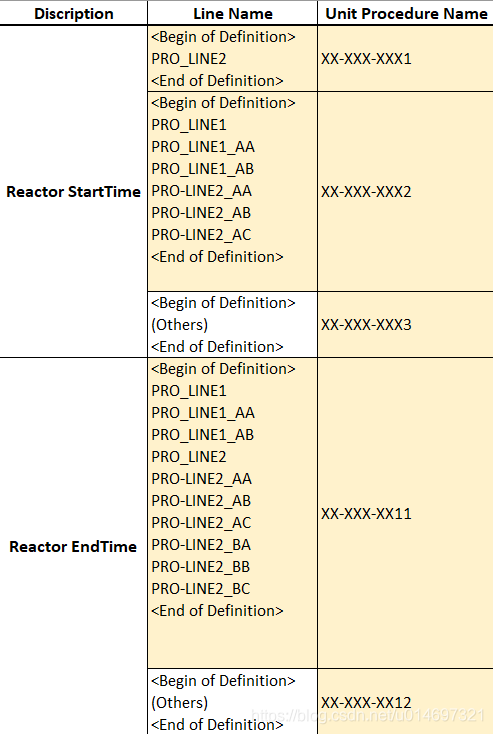
SubBatch的批次名(Unit Procedure Name)是根据Batch的生产线名称与其的对照表,通过查询得到的。(多个生产线名称会对应到一个SubBatch上)
对照表如图:
Note
自定义结构体
Type MatchLineSubbatch 'Define a Datatype
    LineGroup1 As String 'Item name and its Datatype
    LineGroup2 As String
    LineGroup3 As String
    Subbatch1 As String
    Subbatch2 As String
    Subbatch3 As String
End Type

Type SubbatchCharac
'You can Define a new Datatype with self-defined Datatype
    Start_Time As MatchLineSubbatch
    End_Time As MatchLineSubbatch
End Type

Dim Matcher as SubbatchCharac 'Define a varient within self-defined Datatype

Sub Test()
	Matcher.LineGroup1.Start_Time = "XXXXXX"
	Matcher.Subbatch1.End_Time = "XXXXXX"
End Sub
查找单元格中是否存在某个字符串
Function FindStringInCells(Str As String, SearchFrom As String) As Boolean
'Match Keywords in a Cell
Dim resc As String
    resc = Chr(10) & Str & Chr(10)'Chr(10) = Alt+Enter
    If InStr(1, SearchFrom, resc) Then
        FindStringInCells = True
    Else
        FindStringInCells = False
    End If
End Function





 扫一扫
扫一扫


 1023
1023

 被折叠的 条评论
为什么被折叠?
被折叠的 条评论
为什么被折叠?
 到【灌水乐园】发言





