


 本文详细探讨了在Java中使用反射获取和修改静态变量的方法,阐述了其优点如降低耦合性和灵活性,以及性能上的消耗。通过代码示例展示了如何实现实时监控静态变量的变化并进行性能测试。
目录
一、功能描述
二、使用反射获取静态变量的好处
三、具体代码示例
总结
一、功能描述
- 每10ms对变量加1
- 每隔2秒打印线程中静态变量数值变化率
- 控制台输入q(quit)停止程序
二、使用反射获取静态变量的好处与缺陷
好处
- 降低耦合性、更具灵活性
注:通过反射可以动态的访问和修改类的信息。而不需要通过类.变量的方式获取,降低了耦合性,提高了灵活性 - 优雅的监控方式
注:只需要知道变量名称和类的名称就可以做到观看和控制,还是1中那句话,不需要耦合代码
缺陷
- 会耗费更多性能。
注:相比较而言,直接使用(类.变量)的方式访问。需要编写更多的代码和耗费更多的性能
三、具体代码示例
看效果
注:每一秒打印输出,都可以看到每一秒钟变量累加的数量,相当于每秒钟平局加数的速度。
注:可以使用这种方式测试接口的传输速率,对接口的性能进行测试。
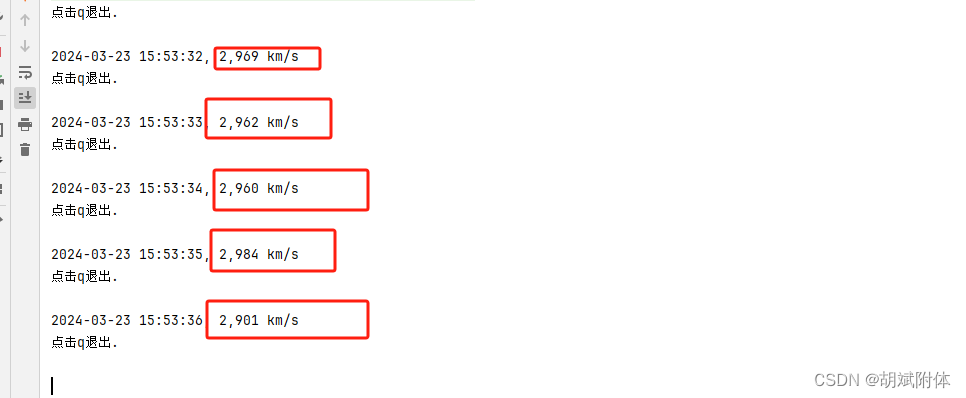
具体代码
1. 入口类
注:程序启动的地方。
package comp.monitor.other;
/**
 * 默认执行50个线程一同对赛车加速(一同加1)
 * threadNum+1的原因:Print类中也需要用到ThreadLatch
 */
public class Test {
    public static void main(String[] args) {
        int threadNum = 50;
        //启动打印线程
        new Thread(new Print(F1Car.class)).start();
        //启动停止线程
        new Thread(new Stop(F1Car.class, Print.class)).start();
        ThreadLatch.createLatch(threadNum + 1);
        for(int i=0; i<threadNum; i++) {
            new Thread(new F1Car(), "racer-"+i).start();
        }
        ThreadLatch.waitLatch();
    }
}
2. 业务实现类
注:业务实现类(车飞驰), 每10ms mile+1 km
package comp.monitor.other;

/**
 * 赛车类
 * 累加, 每10ms向mile变量加1
 */
public class F1Car implements Runnable {
	public volatile static int mile = 0;
	public static boolean running = true;// 运行标志
	public void run() {
		while(running) {
			try {
				Thread.sleep(10);
				mile++;
			} catch (Exception e) {
				e.printStackTrace();
			}
		}
		ThreadLatch.decLatch();
	}
}
3. 监控类
注:打印业务类中发生的变量增加的行为
注:下面这行重点取自监控类代码 意思是计算速率:通过1秒前后的数值相减进行计算
msg = MessageFormat.format("{0}, {1} km/s", Utils.sdf.format(new Date()), (Utils.get(classOperation, "mile") - mile));
package comp.monitor.other;

import java.text.MessageFormat;
import java.util.Date;

/**
 * 监控类
 */
public class Print implements Runnable {
	private Class classOperation;
	public Print(Class classOperation) {
		running = true;
		this.classOperation = classOperation;
	}

	String filename = null;

	public static boolean running = true;

	public void run() {
		int mile;
		String msg;
		while (running) {
			System.out.println("点击q退出. ");
			if(filename != null){
				System.out.println("\t\t"+filename);
			}else{
				System.out.println();
			}
			mile = Utils.get(classOperation, "mile");
			try {
				Thread.sleep(1000);
			} catch (InterruptedException e) {
				e.printStackTrace();
			}
			// 每秒中增加的数量做记录
			msg = MessageFormat.format("{0}, {1} km/s", Utils.sdf.format(new Date()), (Utils.get(classOperation, "mile") - mile));
			System.out.println(msg);
		}
		running = true;
		ThreadLatch.decLatch();
	}

}
4. 刹车类
注:停止程序运行
package comp.monitor.other;

import java.lang.reflect.Field;
import java.util.Scanner;

/**
 * 刹车类
 * 按q踩刹车, running = false
 */
public class Stop implements Runnable{
	private Class claszOperation;
	private Class claszPrint;
	public Stop(Class claszOperation, Class claszPrint) {
		this.claszOperation = claszOperation;
		this.claszPrint = claszPrint;
	}
	public void run() {
		while(true) {
			String str = new Scanner(System.in).next();
			if("q".equals(str)) {
				setBoolean(claszOperation, "running", false);
				setBoolean(claszPrint, "running", false);
				try {
					Thread.sleep(1000);
				} catch (InterruptedException e) {
					e.printStackTrace();
				}
				return;
			}
		}
	}
	@SuppressWarnings("rawtypes")
	public static boolean setBoolean(Class clasz, String fieldName, boolean flag) {
		try {
			Field f = clasz.getDeclaredField(fieldName);
			f.setBoolean(clasz, flag);
			return f.getBoolean(clasz);
		} catch (Exception e) {
			e.printStackTrace();
		}
		return false;
	}
}
5. 阀门类
注:控制线程的同步运行(latch的用法可上网搜搜,或者直接让【文心一言】给个demo)
package comp.monitor.other;

import java.util.concurrent.CountDownLatch;

/**
 * 阀门类
 */
public class ThreadLatch {
	private static CountDownLatch latch = null;

	public static void createLatch(int count){
		latch = new CountDownLatch(count);
	}
	public static void decLatch(){
		latch.countDown();
	}
	public static void waitLatch(){
		try {
			latch.await();
		} catch (InterruptedException e) {
			e.printStackTrace();
		}
	}
}
6. 反射类
注:用于监控和改变变量的值
package comp.monitor.other;

import java.lang.reflect.Field;
import java.text.SimpleDateFormat;

/**
 * 反射类
 */
public class Utils {
    public static final SimpleDateFormat sdf = new SimpleDateFormat("yyyy-MM-dd HH:mm:ss");
	public static int get(Class clasz, String fieldName) {
		try {
			Field f = clasz.getDeclaredField(fieldName);
			return f.getInt(clasz);
		} catch (Exception e) {
			e.printStackTrace();
		}
		return 0;
	}
}
总结
- 多看源码
注:多理解、多动手实际去感受运行产生的效果
注:其次。java编程久了都知道有反射这样的高级特性。但是如何应用,用在哪里却不是门清。
注:多问一些问什么,他是怎么做到的。我又是如何做的,有了对比后,有了积累,才有了成长。 - 反射做监控别出心裁
注:看过一些大牛写的文章,说的有些内容很干货。【知识掌握的意思,应该是只有懂了并且能用起来才真的属于自己,所以真的回了就要举一反三。】





 扫一扫
扫一扫


 5万+
5万+

 被折叠的 条评论
为什么被折叠?
被折叠的 条评论
为什么被折叠?
 到【灌水乐园】发言





