



 本文介绍了Linux系统中时间同步相关知识,包括查看或设置系统时间的命令、时区修改方法。详细说明了ntp时间同步工具的安装,分析了可能出现的错误及解决办法。还以两台服务器为例,阐述了搭建ntp服务器进行集群时间同步的步骤,以及同步时可能出现的错误及参考资料。
基础知识
#date #查看或者设置当前系统的时间
#ntpdate #手工临时同步系统时间
#ntpd #作为守护进程,按照一定的算法进行时间同步,即使你启动了该进程,ntpd也不会立刻进行时间同步
Linux里面用Asia/Shanghai表示东八区,等价于Windows中的 北京、重庆、香港特别行政区,乌鲁木齐的时区设置。
如果安装时选错了时区,或者使用了默认的纽约时区,可以通过以下命令进行修改:
#cp /usr/share/zoneinfo/Asia/Shanghai /etc/localtime
1. 安装ntp时间同步工具
yum -y install ntp ntpdate #安装ntpdate时间同步工具

ntpdate cn.pool.ntp.org    #设置时间同步

hwclock --systohc          #将系统时间写入硬件时间

timedatectl #查看系统时间 一般来讲,经过这几部之后,应该就OK了。关于时间服务的网址,可以到http://www.ntp.org.cn/pool.php查阅.
transmit(192.168.30.22)
transmit(192.168.30.22)
transmit(192.168.30.22)
transmit(192.168.30.22)
transmit(192.168.30.22)
192.168.30.22: Server dropped: no data
server 192.168.30.22, port 123
.....
28 Jul 17:42:24 ntpdate[14148]: no server suitable for synchronization found
解决办法:
(1)
ntpq -c version #查看ntp版本如果版本是ntp4.2(包括4.2)之后的版本,在restrict的定义中使用了notrust的话,会导致以上错误,官网说明
The behavior of notrust changed between versions 4.1 and 4.2.
In 4.1 (and earlier) notrust meant "Don't trust this host/subnet for time".
In 4.2 (and later) notrust means "Ignore all NTP packets that are not cryptographically authenticated." This forces remote time servers to authenticate themselves to your (client) ntpd
(2)把notrust去掉。
sudo vim /etc/ntp.conf如果这个还不能解决,就只能自己选择集群中一台机器为ntp时间服务器,其他机器以此机器的时间为基准来进行同步了。
2. 搭建ntp服务器进行集群时间同步
本节以两台服务器为例:192.168.1.101(作为ntp服务器) 、192.168.1.102(客户端)
2.1 集群中所有机器安装ntp时间同步工具
sudo yum -y install ntp ntpdate #安装ntpdate时间同步工具2.2 192.168.1.101时间同步服务器设置
(1)启动时间同步服务器
sudo systemctl start ntpd     #启动时间同步程序
sudo systemctl enable ntpd  #允许时间同步程序开机启动
(2)修改/etc/ntp.conf文件,添加server设置127.127.1.0为其自身
sudo vim /etc/ntp.conf(3)在public servers节下添加
server 127.127.1.0 #设置自己作为时间同步服务器(4)在access节下新增加一个restrict段为可以接受服务的网段(自己设置),本例为192.168.0.0。
restrict 192.168.0.0如下图所示:

(5)保存退出,并重启ntp系统服务
sudo systemctl restart ntpd 2.3 ntp同步客户端设置
(1)本例中192.168.1.102为作为时间同步客户端来同步服务器的时间。在192.168.1.102中编辑/etc/ntp.conf
sudo vim /etc/ntp.conf
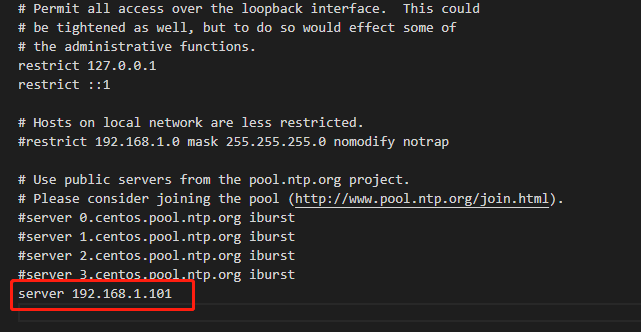
在server下面添加一个时间同步服务器地址,本例为192.168.1.101
server 192.168.1.101(2)注释下面四行
# server 0.centos.pool.ntp.org iburst           #以下四行注释掉
# server 1.centos.pool.ntp.org iburst
# server 2.centos.pool.ntp.org iburst
# server 3.centos.pool.ntp.org iburst
如图:
(3)在192.168.1.102中同步时间
sudo ntpdate 192.168.1.101 #如果需要查看调试信息,可以添加参数-d 
2.4 所有节点设置ntp服务开启启动
sudo systemctl start ntpd       #启动ntp服务
sudo systemctl enable ntpd    #设置ntp服务开机启动
2.5 所有节点启动时间同步
sudo timedatectl set-ntp yes
可能出现的错误:
1.执行ntpdate cn.pool.ntp.org更新时间时会提示:
no server suitable for synchronization found可以执行ntpdate -d {ip or url} 来查看调试信息,如果出现类似下面的信息,说明服务器连接不上,
参考:
https://www.cnblogs.com/lenmom/p/10348150.html
https://blog.youkuaiyun.com/chengqiuming/article/details/78735433





 扫一扫
扫一扫


 1781
1781

 被折叠的 条评论
为什么被折叠?
被折叠的 条评论
为什么被折叠?
 到【灌水乐园】发言





