



 本文探讨了Flutter中的ListView控件,包括如何创建一个基本的ListView,以及如何通过设置scrollDirection属性实现横屏滚动效果。
一个基本的ListView
import 'package:flutter/material.dart';

void main() => runApp(new MyApp());

class MyApp extends StatelessWidget {
  @override
  Widget build(BuildContext context) {
    final title = 'Basic List';

    return new MaterialApp(
      title: title,
      home: new Scaffold(
        appBar: new AppBar(
         title:new Text(title),
        ),
        body:new ListView(
          children: <Widget>[
            new ListTile(
              leading: new Icon(Icons.map),
              title: new Text('Map'),
            ),
            new ListTile(
              leading: new Icon(Icons.photo),
              title: new Text('Album'),
            ),
            new ListTile(
              leading: new Icon(Icons.phone),
              title: new Text('Phone'),
            ),
          ],
        ),
      ),
    );
  }
}
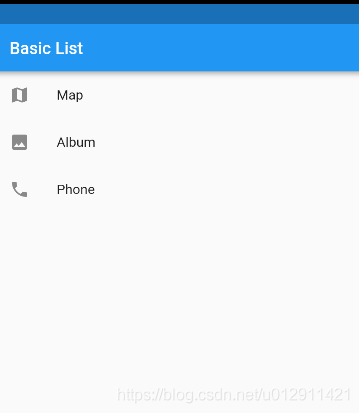
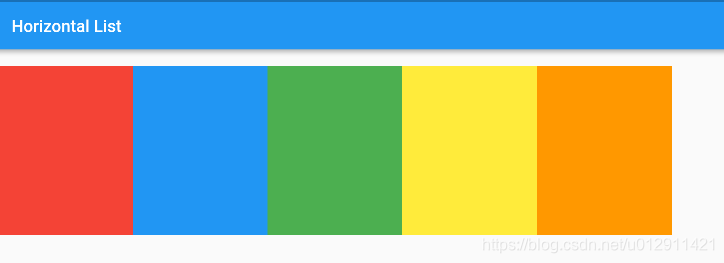
横屏的ListView,在创建ListView时,设置scrollDirection为水平方向以覆盖默认的垂直方向。
import 'package:flutter/material.dart';

void main() => runApp(new MyApp());

class MyApp extends StatelessWidget {
  @override
  Widget build(BuildContext context) {
    final title = 'Horizontal List';

    return new MaterialApp(
      title: title,
      home: new Scaffold(
        appBar: new AppBar(
          title: new Text(title),
        ),
        body: new Container(
          margin: new EdgeInsets.symmetric(vertical: 20.0),
          height: 200.0,
          child: new ListView(
            scrollDirection: Axis.horizontal,
            children: <Widget>[
              new Container(
                width: 160.0,
                color: Colors.red,
              ),
              new Container(
                width: 160.0,
                color: Colors.blue,
              ),
              new Container(
                width: 160.0,
                color: Colors.green,
              ),
              new Container(
                width: 160.0,
                color: Colors.yellow,
              ),
              new Container(
                width: 160.0,
                color: Colors.orange,
              ),
            ],
          ),
        ),
      ),
    );
  }
}





 扫一扫
扫一扫


 984
984

 被折叠的 条评论
为什么被折叠?
被折叠的 条评论
为什么被折叠?
 到【灌水乐园】发言





