




更新信息
最大的更新莫过于对 Llama 3.2 Vision 视觉模型的支持!ollama 的版本也因此从v0.3.14直接升级到v0.4.0。
升级 ollama 后,运行如下命令体验
# 默认运行 11B 大小模型
ollama run llama3.2-vision
# 运行 90B 大小模型,需要显存支持
ollama run llama3.2-vision:90b
支持 Llama 3.2 Vision(即 Llama)架构,即 Llama 最新的视觉模型。
向
视觉模型发送后续请求将显著加快速度。修复了停止序列无法正确检测的问题
现在可以在运行
ollama create my-model时从 Safetensors 导入模型,而不需要 Modelfile 文件解决了在 Windows 下重定向输出到文件会导致
写入无效字符的问题解决了导致 Ollama 出错的不合法模型数据问题
图片识别 Demo
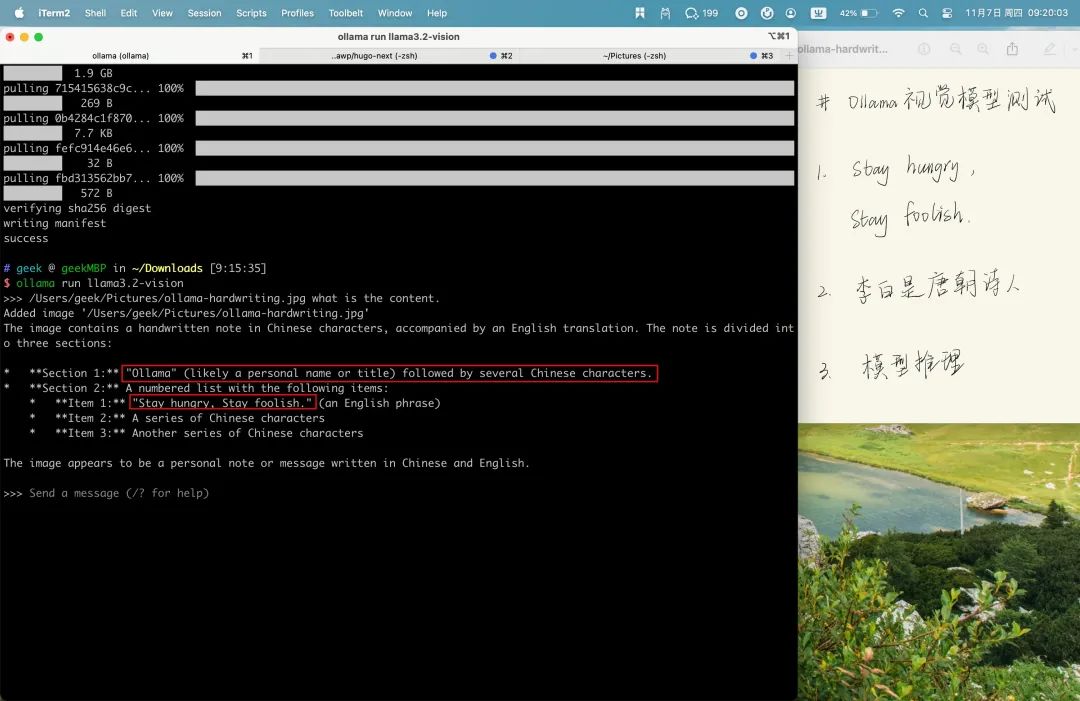
>>> /Users/geek/Pictures/ollama-hardwriting.jpg what is the content.
Added image '/Users/geek/Pictures/ollama-hardwriting.jpg'
The image contains a handwritten note in Chinese characters, accompanied by an English translation. The note is divided into three sections:

*   **Section 1:** "Ollama" (likely a personal name or title) followed by several Chinese characters.
*   **Section 2:** A numbered list with the following items:
    *   **Item 1:** "Stay hungry, Stay foolish." (an English phrase)
    *   **Item 2:** A series of Chinese characters
    *   **Item 3:** Another series of Chinese characters

The image appears to be a personal note or message written in Chinese and English.
从测试来看,手写字体识别中,Llama 3.2 Vision 模型很好的支持英文,无法识别中文,对中文的支持比较差,但是能区分出哪些字符是中文。
OCR
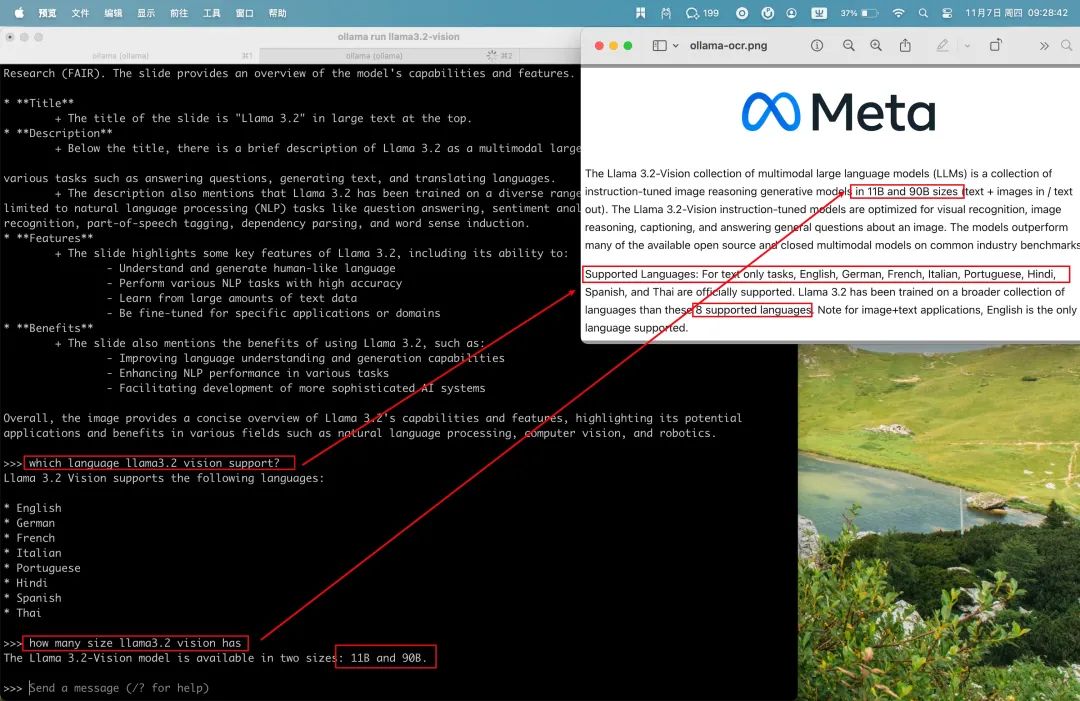
$ ollama run llama3.2-vision
>>> /Users/geek/Pictures/ollama-ocr.png  what is the content.
Added image '/Users/geek/Pictures/ollama-ocr.png'
The image displays a slide from Meta's presentation about Llama 3.2, a large language model developed by Facebook AI
Research (FAIR). The slide provides an overview of the model's capabilities and features.

* **Title**
 + The title of the slide is "Llama 3.2" in large text at the top.
* **Description**
 + Below the title, there is a brief description of Llama 3.2 as a multimodal large language model that can perform

various tasks such as answering questions, generating text, and translating languages.
 + The description also mentions that Llama 3.2 has been trained on a diverse range of datasets, including but not
limited to natural language processing (NLP) tasks like question answering, sentiment analysis, named entity
recognition, part-of-speech tagging, dependency parsing, and word sense induction.
* **Features**
 + The slide highlights some key features of Llama 3.2, including its ability to:
  - Understand and generate human-like language
  - Perform various NLP tasks with high accuracy
  - Learn from large amounts of text data
  - Be fine-tuned for specific applications or domains
* **Benefits**
 + The slide also mentions the benefits of using Llama 3.2, such as:
  - Improving language understanding and generation capabilities
  - Enhancing NLP performance in various tasks
  - Facilitating development of more sophisticated AI systems

Overall, the image provides a concise overview of Llama 3.2's capabilities and features, highlighting its potential
applications and benefits in various fields such as natural language processing, computer vision, and robotics.

>>> which language llama3.2 vision support?
Llama 3.2 Vision supports the following languages:

* English
* German
* French
* Italian
* Portuguese
* Hindi
* Spanish
* Thai

>>> how many size llama3.2 vision has
The Llama 3.2-Vision model is available in two sizes: 11B and 90B.
Llama 3.2 Vision 原生支持英文,对英文内容的识别非常准确,输出支持标准的 MarkDown 格式,并且能够正确理解识别的内容,并进行简单的问答。
感觉可以用来做大陆的英文试卷,比如选择题和阅读理解,后续可以测试下看看效果。
图表
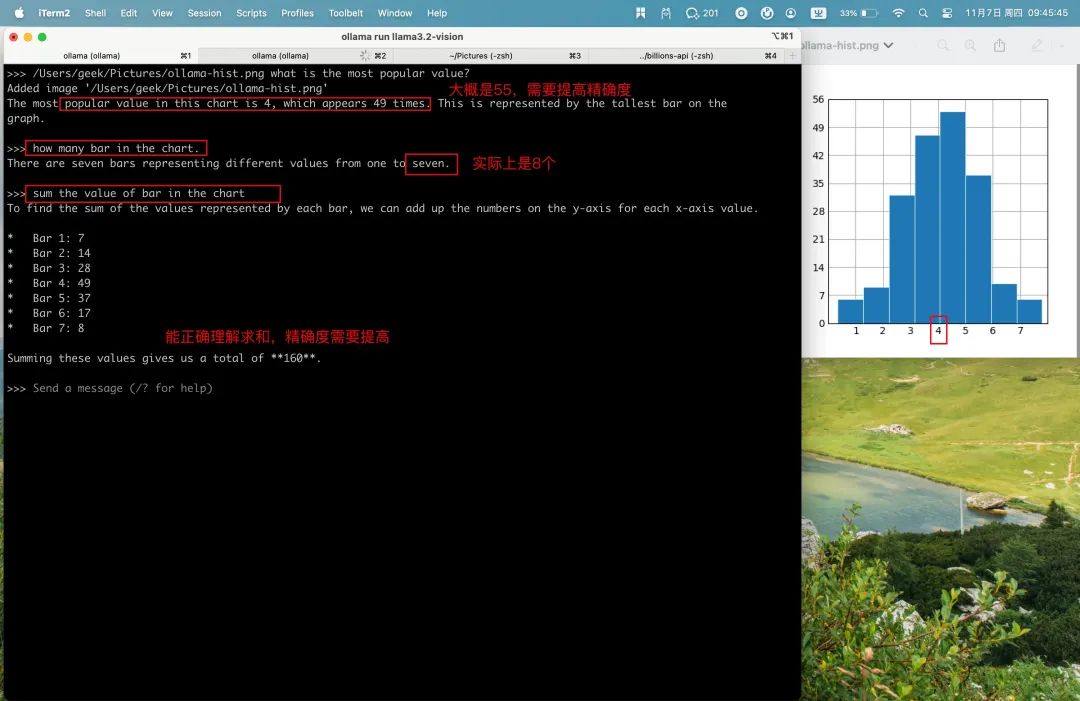
>>> /Users/geek/Pictures/ollama-hist.png what is the most popular value?
Added image '/Users/geek/Pictures/ollama-hist.png'
The most popular value in this chart is 4, which appears 49 times. This is represented by the tallest bar on the
graph.

>>> how many bar in the chart.
There are seven bars representing different values from one to seven.

>>> sum the value of bar in the chart
To find the sum of the values represented by each bar, we can add up the numbers on the y-axis for each x-axis value.

*   Bar 1: 7
*   Bar 2: 14
*   Bar 3: 28
*   Bar 4: 49
*   Bar 5: 37
*   Bar 6: 17
*   Bar 7: 8

Summing these values gives us a total of **160**.能够理解问题,并结合图标内容给出答案,缺点是不能精确识别图标中的值,需要提高精确度。
图片问答
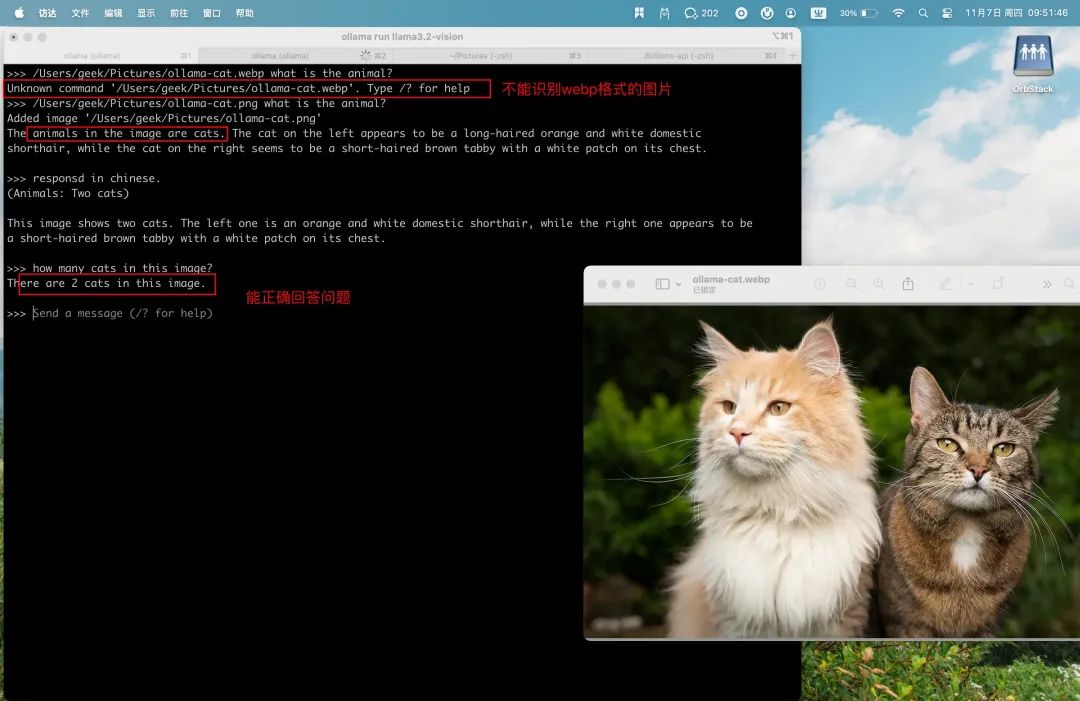
>>> /Users/geek/Pictures/ollama-cat.webp what is the animal?
Unknown command '/Users/geek/Pictures/ollama-cat.webp'. Type /? for help
>>> /Users/geek/Pictures/ollama-cat.png what is the animal?
Added image '/Users/geek/Pictures/ollama-cat.png'
The animals in the image are cats. The cat on the left appears to be a long-haired orange and white domestic
shorthair, while the cat on the right seems to be a short-haired brown tabby with a white patch on its chest.

>>> responsd in chinese.
(Animals: Two cats)

This image shows two cats. The left one is an orange and white domestic shorthair, while the right one appears to be
a short-haired brown tabby with a white patch on its chest.

>>> how many cats in this image?
There are 2 cats in this image.
从测试看,Llama 3.2 Vision 能够正确识别动物,并且描述图片的内容,能够计算出有 2 只猫。不足之处是图片格式还不支持 webp。
性能分析
内存占用
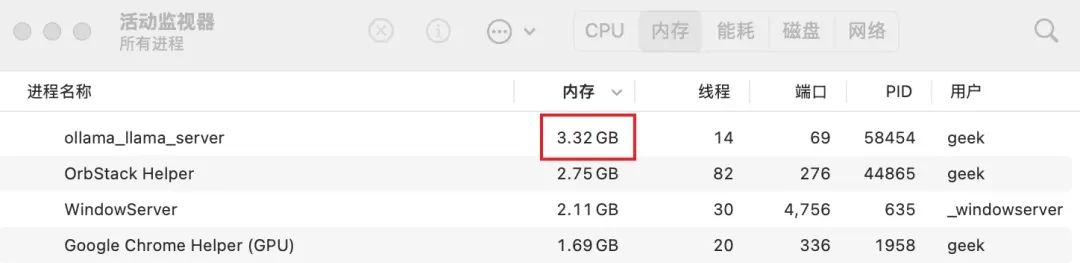
Llama 3.2 Vision 11B 在 MacBook Pro 2022, M2x Max 上的内存占用仅有 3.32G,和 Chrome 浏览器占用的内存一个数量级。
ollama 加载与理解图片
加在图片的时间在 30-60ms 之间。理解图片的内容要长的多,耗时在秒级,具体时间取决于图片内容的复杂度,图片越简单,耗时越少,越复杂耗时越久。像 OCR 和手写字体的例子,耗时在 40s。
至于 token 的生成速度,基本都在 25 token/s,能够满足日常使用。
# 手写字体识别
/Users/geek/Pictures/ollama-hardwriting.jpg what is the content.
Added image '/Users/geek/Pictures/ollama-hardwriting.jpg'

total duration:       39.276179625s
load duration:        38.170708ms
prompt eval count:    17 token(s)
prompt eval duration: 29.411s
prompt eval rate:     0.58 tokens/s
eval count:           242 token(s)
eval duration:        9.605s
eval rate:            25.20 tokens/s

# 动物识别
>>> /Users/geek/Pictures/ollama-cat.png what is the animal?
Added image '/Users/geek/Pictures/ollama-cat.png'

total duration:       1.628926916s
load duration:        66.047166ms
prompt eval count:    17 token(s)
prompt eval duration: 201ms
prompt eval rate:     84.58 tokens/s
eval count:           40 token(s)
eval duration:        1.15s
eval rate:            34.78 tokens/s

# meta 博客内容 OCR 识别
>>> /Users/geek/Pictures/ollama-ocr.png  what is the content.
Added image '/Users/geek/Pictures/ollama-ocr.png'

total duration:       41.742993542s
load duration:        31.597584ms
prompt eval count:    17 token(s)
prompt eval duration: 29.122s
prompt eval rate:     0.58 tokens/s
eval count:           302 token(s)
eval duration:        12.409s
eval rate:            24.34 tokens/s
总结
Ollama v0.4.0 最大的特点就是对 Meta Llama 3.2 Vision视觉模型的支持了。
在实际测试过程中,Llama 3.2 Vision能够很好的识别并理解图片内容,理解图片的耗时取决于图片内容的复杂度,简单图片耗时在 5s 内,复杂图片也在 1min 内。
11B 模型在 Mac 上的内存占用仅 3G 左右,token 的生成速度在 25Token/s,使用效果上个人认为和 ChatGPT 的图片理解在同一水平,能够满足个人的日常使用需求了。
参考资料[1]
ollama release: https://github.com/ollama/ollama/releases/tag/v0.4.0
[2]Llama 3.2 Vision: https://ollama.com/blog/llama3.2-vision
[3]ollama x status: https://x.com/ollama/status/1854269461144174764





 扫一扫
扫一扫


 486
486

 被折叠的 条评论
为什么被折叠?
被折叠的 条评论
为什么被折叠?
 到【灌水乐园】发言





