



一、flannel特点
1.overlay(覆盖网络)  将TCP数据包装在另一种网络包里面进行路由转发和通信,目前已经支持udp、vxlan、host-gw、aws-vpc、gce和alloc路由等数据转发方式,默认的节点间数据通信方式是UDP转发。

2.使集群中的不同Node主机创建的Docker容器都具有全集群唯一的虚拟IP地址。

3.建立一个覆盖网络(overlay network),通过这个覆盖网络,将数据包原封不动的传递到目标容器。覆盖网络是建立在另一个网络之上并由其基础设施支持的虚拟网络。覆盖网络通过将一个分组封装在另一个分组内来将网络服务与底层基础设施分离。在将封装的数据包转发到端点后,将其解封装。

4.创建一个新的虚拟网卡flannel0接收docker网桥的数据,通过维护路由表,对接收到的数据进行封包和转发(vxlan)。

5.etcd保证了所有node上flanned所看到的配置是一致的。同时每个node上的flanned监听etcd上的数据变化,实时感知集群中node的变化。

6. flannel工作于二层。
二、不冲突的IP,为每个node分配不同的子网段
node1
cat /run/flannel/subnet.env
FLANNEL_NETWORK=172.120.0.0/16
FLANNEL_SUBNET=172.120.0.1/24
FLANNEL_MTU=1450
FLANNEL_IPMASQ=true
node2
cat /run/flannel/subnet.env
FLANNEL_NETWORK=172.120.0.0/16
FLANNEL_SUBNET=172.120.1.1/24
FLANNEL_MTU=1450
FLANNEL_IPMASQ=true
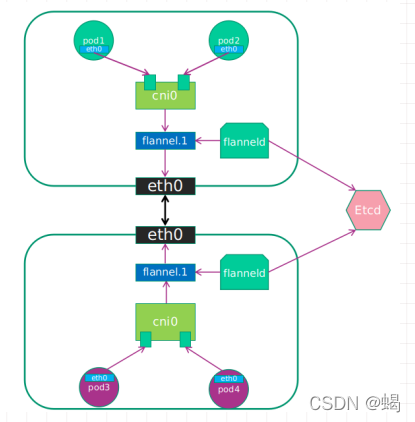
三、不同node之间Pod通信流程
1.pod中产生数据,根据pod的路由信息.将数据发送到cni0

2.cni0根据节点的路由表,将数据发送到隧道设备flannel.1

3.flannel.1查看数据包的目的IP,从flanneld获取对端隧道设备的信息,封装数据包

4.flannel.1将数据发送给对端设备,对端节点的网卡接收到数据包,发现是overlay数据包,解开外层封装.并发送内层封装到flannel.1设备

5.flannel.1查看数据包,根据路由表匹配,将数据发送给cni0设备

6.cni0匹配路由表,发送数据给网桥上对应的端口
mkdir -p /etc/cni/net.d
#删除原有CNI配置
rm /etc/cni/net.d/10-default.conf  /etc/cni/net.d/10-containerd-net.conflist -rf
#以下配置会自动生成
cat /run/flannel/subnet.env
FLANNEL_NETWORK=172.120.0.0/16
FLANNEL_SUBNET=172.120.1.1/24
FLANNEL_MTU=1450
FLANNEL_IPMASQ=true
---
apiVersion: policy/v1beta1
kind: PodSecurityPolicy
metadata:
  name: psp.flannel.unprivileged
  annotations:
    seccomp.security.alpha.kubernetes.io/allowedProfileNames: docker/default
    seccomp.security.alpha.kubernetes.io/defaultProfileName: docker/default
    apparmor.security.beta.kubernetes.io/allowedProfileNames: runtime/default
    apparmor.security.beta.kubernetes.io/defaultProfileName: runtime/default
spec:
  privileged: false
  volumes:
  - configMap
  - secret
  - emptyDir
  - hostPath
  allowedHostPaths:
  - pathPrefix: "/etc/cni/net.d"
  - pathPrefix: "/etc/kube-flannel"
  - pathPrefix: "/run/flannel"
  readOnlyRootFilesystem: false
  # Users and groups
  runAsUser:
    rule: RunAsAny
  supplementalGroups:
    rule: RunAsAny
  fsGroup:
    rule: RunAsAny
  # Privilege Escalation
  allowPrivilegeEscalation: false
  defaultAllowPrivilegeEscalation: false
  # Capabilities
  allowedCapabilities: ['NET_ADMIN', 'NET_RAW']
  defaultAddCapabilities: []
  requiredDropCapabilities: []
  # Host namespaces
  hostPID: false
  hostIPC: false
  hostNetwork: true
  hostPorts:
  - min: 0
    max: 65535
  # SELinux
  seLinux:
    # SELinux is unused in CaaSP
    rule: 'RunAsAny'
---
kind: ClusterRole
apiVersion: rbac.authorization.k8s.io/v1
metadata:
  name: flannel
rules:
- apiGroups: ['policy']
  resources: ['podsecuritypolicies']
  verbs: ['use']
  resourceNames: ['psp.flannel.unprivileged']
- apiGroups:
  - ""
  resources:
  - pods
  verbs:
  - get
- apiGroups:
  - ""
  resources:
  - nodes
  verbs:
  - list
  - watch
- apiGroups:
  - ""
  resources:
  - nodes/status
  verbs:
  - patch
---
kind: ClusterRoleBinding
apiVersion: rbac.authorization.k8s.io/v1
metadata:
  name: flannel
roleRef:
  apiGroup: rbac.authorization.k8s.io
  kind: ClusterRole
  name: flannel
subjects:
- kind: ServiceAccount
  name: flannel
  namespace: kube-system
---
apiVersion: v1
kind: ServiceAccount
metadata:
  name: flannel
  namespace: kube-system
---
kind: ConfigMap
apiVersion: v1
metadata:
  name: kube-flannel-cfg
  namespace: kube-system
  labels:
    tier: node
    app: flannel
data:
  cni-conf.json: |
    {
      "name": "cbr0",
      "cniVersion": "0.3.1",
      "plugins": [
        {
          "type": "flannel",
          "delegate": {
            "hairpinMode": true,
            "isDefaultGateway": true
          }
        },
        {
          "type": "portmap",
          "capabilities": {
            "portMappings": true
          }
        }
      ]
    }
  net-conf.json: |
    {
      "Network": "172.120.0.0/16",
      "Backend": {
        "Type": "vxlan"
      }
    }
---
apiVersion: apps/v1
kind: DaemonSet
metadata:
  name: kube-flannel-ds
  namespace: kube-system
  labels:
    tier: node
    app: flannel
spec:
  selector:
    matchLabels:
      app: flannel
  template:
    metadata:
      labels:
        tier: node
        app: flannel
    spec:
      affinity:
        nodeAffinity:
          requiredDuringSchedulingIgnoredDuringExecution:
            nodeSelectorTerms:
            - matchExpressions:
              - key: kubernetes.io/os
                operator: In
                values:
                - linux
      hostNetwork: true
      priorityClassName: system-node-critical
      tolerations:
      - operator: Exists
        effect: NoSchedule
      serviceAccountName: flannel
      initContainers:
      - name: install-cni
        image: flannelcni/flannel:v0.16.0
        command:
        - cp
        args:
        - -f
        - /etc/kube-flannel/cni-conf.json
        - /etc/cni/net.d/10-flannel.conflist
        volumeMounts:
        - name: cni
          mountPath: /etc/cni/net.d
        - name: flannel-cfg
          mountPath: /etc/kube-flannel/
      containers:
      - name: kube-flannel
        image: flannelcni/flannel:v0.16.0
        command:
        - /opt/bin/flanneld
        args:
        - --ip-masq
        - --kube-subnet-mgr
        resources:
          requests:
            cpu: "100m"
            memory: "50Mi"
          limits:
            cpu: "100m"
            memory: "50Mi"
        securityContext:
          privileged: false
          capabilities:
            add: ["NET_ADMIN", "NET_RAW"]
        env:
        - name: POD_NAME
          valueFrom:
            fieldRef:
              fieldPath: metadata.name
        - name: POD_NAMESPACE
          valueFrom:
            fieldRef:
              fieldPath: metadata.namespace
        volumeMounts:
        - name: run
          mountPath: /run/flannel
        - name: flannel-cfg
          mountPath: /etc/kube-flannel/
      volumes:
      - name: run
        hostPath:
          path: /run/flannel
      - name: cni
        hostPath:
          path: /etc/cni/net.d
      - name: flannel-cfg
        configMap:
          name: kube-flannel-cfg





 扫一扫
扫一扫


 1590
1590

 被折叠的 条评论
为什么被折叠?
被折叠的 条评论
为什么被折叠?
 到【灌水乐园】发言





