


 本文介绍了随机曲线生成的各种方法,包括线性插值、余弦插值、立方插值,以及力导图算法生成曲线。这些方法广泛应用于游戏场景如赛道、树木、藤蔓的创建。此外,还探讨了BSpline、HSpline曲线和布料模拟的弹簧质点模型,用于生成更加平滑和复杂的曲线。最后,展示了如何通过数学函数和向量运算生成各种有趣和实用的曲线形状。
曲线生成是随机生成算法中不可或缺的基础,
比如之前介绍过的随机生成赛道,第一步就是生成一个好看的平滑曲线。
比如随机生成树木,每一根树枝都可以使用一段横截面曲线沿着另一段路径曲线放样得到。
比如随机生成森林中的藤蔓,可以沿着一些悬链线曲线来使用路径变形动画。
曲线的差值:
合理选择差值方式可以生成不同类型的平滑曲线。
//线性插值
vec3 Linear_Interpolate(const vec3& a, const vec3& b, float t)
{
return a*(1-t) + b*t;
}
//余弦插值,平滑的曲线, x匀速增加 y cos速增加
vec3 Cosine_Interpolate(const vec3& a, const vec3& b, float t)
{
float t2 = (1 - cos(t * _PI)) * 0.5f;
return a*(1-t2) + b*t2;
}
//立方插值,非常平滑的结果,不确定能比余弦插值好很多
vec3 Cubic_Interpolate(const vec3& prea, const vec3& a, const vec3& b, const vec3& aftb,float t)
{
vec3 P = (aftb - b) - (prea - a);
vec3 Q = (prea - a) - P;
vec3 R = b - prea;
vec3 S = a;
float t2 = t*t;
float t3 = t*t2;
return P*t3 + Q*t2 + R*t + S;
}
平滑曲线类型:
Curve是曲线基类,参见附录源码
BSpline(B曲线)是控制点平滑曲线,曲线穿过控制点
HSpline(H曲线)是控制点平滑曲线,每个控制点有两个独立的切线控制手柄,曲线穿过控制点
贝塞尔曲线,不穿过控制点,(未实现)
还有很多其它类型的曲线,这里不一一列举了。
随机曲线的生成:暂时总结几种,应该还有很多没发现的其它方法。
第一种方法,之前在赛道的生成算法中介绍过一种,通过旋转欧拉角逐段向前铺路产生路径曲线。
第二种方法,使用力导图(force-directed-graph)算法,在库伦斥力和弹簧引力共同作用下,布局路点产生网状曲线。有时局部会陷入不太好的平衡状态,需要配合手动辅助布局。
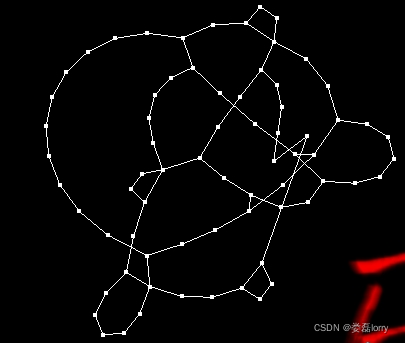
//力导引算法应用: 1生成随机树 2生成随机赛道
class DiPoint
{
public:
	DiPoint();
	void SetMass(int mass);

public:
	vec3 pos;
	vec3 normal;

	float mass;
	float massDev;
	vec3  speed;
	vec3  force;
};


class DiSpring
{
public:
	DiSpring();
	bool CalculateForce();

public:
	DiPoint* pointStart;
	DiPoint* pointEnd;
	float    originLength;
};

//
class DiGraph
{
public:
	DiGraph();
	~DiGraph();
	void Free();
	void LoadFromFile(const char* fileName);
	void Rand();
	void Render();
	void CalculateForce();
	void Solve();
	bool AddSpring(const DiSpring& spring);
	void SetFixedPoint(int index);

public:
	//限制二维
	bool m_bPlane;
	int  m_pointNum;
	int  m_springNum;
	float Ku;
	DiPoint*	m_points;
	DiSpring*	m_springs;
};


DiPoint::DiPoint()
    : mass(1)
    , pos(0, 0, 0)
    , speed(0, 0, 0)
    , force(0, 0, 0)
{
}

void DiPoint::SetMass(int mass_)
{
    mass = mass_;
    if(mass)
        massDev = 1.0f / mass;
    else
        massDev = 0;	// 没有质量的固定点
}


//==================^_^==================^_^==================^_^==================^_^
DiSpring::DiSpring()
    : originLength(0)
{
}

bool DiSpring::CalculateForce()
{
    //!弹性系数
    float KSpring = 18;//0.8f;
    vec3  difVec = pointStart->pos - pointEnd->pos;
    float difLen = difVec.Length();
    float forceLen;
    vec3  finalforce;
    if(difLen != 0)
    {
        //互斥力 拉力与距离有关
        forceLen = (difLen -  originLength) * 0.5f;
        if(abs(difLen) < 0.00001f)
        {
            difLen = 0.00001f;
        }
        finalforce = difVec * ((forceLen / difLen) * KSpring);
        pointStart->force -= finalforce;
        pointEnd->force += finalforce;
    }
    return 0;
}


//==================^_^==================^_^==================^_^==================^_^
DiGraph::DiGraph()
    : m_points(NULL)
    , m_springs(NULL)
{
}

DiGraph::~DiGraph()
{
    Free();
}

void DiGraph::Free()
{
    SafeDeleteArray(m_springs);
    SafeDeleteArray(m_points);
}

bool DiGraph::AddSpring(const DiSpring& spring)
{
    DiSpring* it = m_springs;
    for(int i = 0; i < m_springNum; i++, it++)
    {
        //if(spring->pointStart->pos == it->pointStart->pos)
        //	if(spring->pointEnd->pos == it->pointEnd->pos)
        //		return true;
        //if(spring->pointStart->pos == it->pointEnd->pos)
        //	if(spring->pointEnd->pos == it->pointStart->pos)
        //		return true;
        if(spring.pointStart == it->pointStart && spring.pointEnd == it->pointEnd)
            return false;
        if(spring.pointStart == it->pointEnd && spring.pointEnd == it->pointStart)
            return false;
    }
    //it->pointStart = spring->pointStart;
    *it = spring;
    m_springNum++;
    return true;
}

void DiGraph::SetFixedPoint(int index)
{
    m_points[index].SetMass(0);
}

void DiGraph::LoadFromFile(const char* fileName)
{
}

void DiGraph::Rand()
{
    Ku = 0;
    m_bPlane = true;
    m_bPlane = false;
    //tree 结构 各层节点数 1 2 4 8 16 32 64
#define  layerNum 7
    int layerNodeNum[7] = {1, 2, 4, 8, 16, 32, 64 };
    int layerBegin[7] = {0, 1, 3, 7, 15, 31, 63 };
    int layerEnd[7]   = {0, 2, 6, 14, 30, 62, 126 };
    m_pointNum = 127;
    m_points = new DiPoint[m_pointNum];
    for(int i = 0; i < m_pointNum; i++)
    {
        m_points[i].mass = 1;
        m_points[i].massDev = 1.0f;
        m_points[i].pos = vec3(RandRange(-10.0f, 10.0f), RandRange(-10.0f, 10.0f), RandRange(-10.0f, 10.0f));
        m_points[i].speed = vec3(0, 0, 0);
    }
    SetFixedPoint(0);
    DiPoint *p1, *p2;
    DiSpring spring;
    m_springNum = 0;
    m_springs = new DiSpring[m_pointNum * 2];
    for(int i = 0; i < layerNum - 1; i++)
    {
        for(int j = 0; j < layerNodeNum[i]; j++)
        {
            p1 = &m_points[layerBegin[i] + j];
            for(int m = 0; m < 4; m++)
            {
                p2 = &m_points[layerBegin[i + 1] + rand() % layerNodeNum[i + 1] ];
                spring.pointStart = p1;
                spring.pointEnd   = p2;
                spring.originLength = 1.0f;
                AddSpring(spring);
            }
        }
    }
}


#define StepTime 0.005f
void DiGraph::CalculateForce()
{
    vec3 zero(0, 0, 0);
    DiPoint* point = m_points;
    for(int i = 0; i < m_pointNum; i++, point++)
    {
        point->force = vec3();
        point->force = (point->mass * vec3(0, -1.1f, 0));
        //特殊力 比如:原点向外的发散力; x轴向两边的发散力
        //限制二维
        if(m_bPlane)
            point->pos.z = 0;
    }
    //计算库仑力,距离平方成反比
    vec3  difVec;
    float difLenSq;
    float difLen;
    DiPoint* point1 = m_points;
    DiPoint* point2 = m_points;
    DiPoint* end1 = m_points + m_pointNum - 1;
    DiPoint* end2 = m_points + m_pointNum;
    float forceKu;
    for(; point1 < end1; point1++)
    {
        point2 = point1 + 1;
        for(; point2 < end2; point2++)
        {
            MinusVec3(difVec, point1->pos, point2->pos);
            difLenSq = difVec.LengthSq();
            difLen = sqrt(difLenSq);
            if(difLen)
            {
                //todo 先适用重力把所有的点悬起来 再慢慢增大库仑力
                forceKu = Ku / difLenSq;
                forceKu = min(3.5f, forceKu);
                difVec *= (forceKu / difLen);
                AddEqualVec3(point1->force, difVec);
                MinusEqualVec3(point2->force, difVec);
            }
        }
    }
    DiSpring* spring = m_springs;
    for(int i = 0; i < m_springNum; i++, spring++)
    {
        spring->CalculateForce();
    }
}

void DiGraph::Solve()
{
    PROFILEFUN("DiGraphObject::Update;", 0.001f, ALWAYSHIDE);
    float stepTime = 0.05f;
    Ku += stepTime;
    if(Ku > 23)
    {
        Ku = 23;
    }
    while(stepTime > _EPSILON)
    {
        float time = Min(stepTime, StepTime);
        CalculateForce();
        vec3 normal(0, 1, 0);
        //float d = 0;
        vec3 addSpeed;
        DiPoint* it = m_points;
        for(int i = 0; i < m_pointNum; i++, it++)
        {
            if(it->mass)
            {
                addSpeed = it->force * it->massDev;
                //StepTime太大不收敛
                it->speed += addSpeed * time;
                it->speed *= 0.998f;
                it->pos += it->speed * time;
            }
        }
        stepTime -= StepTime;
    }
}

void DiGraph::Render()
{
#ifdef CLIENT_APP
    G_RendDriver->SetRenderStateEnable(RS_CULL_FACE, false);
    G_RendDriver->SetRenderStateEnable(RS_TEXTURE_2D, false);
    G_RendDriver->Color3f(0.0f, 1.0f, 0.0f);
    G_RendDriver->RendBegin(RS_LINES);
    for(int i = 0; i < m_springNum; i++)
    {
        G_RendDriver->Vertex3f(m_springs[i].pointStart->pos.x, m_springs[i].pointStart->pos.y, m_springs[i].pointStart->pos.z);
        G_RendDriver->Vertex3f(m_springs[i].pointEnd->pos.x, m_springs[i].pointEnd->pos.y, m_springs[i].pointEnd->pos.z);
    }
    G_RendDriver->RendEnd();
    //
    G_RendDriver->SetPointSize(4.0f);
    G_RendDriver->Color3f(1.0f, 0.0f, 0.0f);
    G_RendDriver->RendBegin(RS_POINTS);
    for(int i = 0; i < m_pointNum; i++)
    {
        G_RendDriver->Vertex3f(m_points[i].pos.x, m_points[i].pos.y, m_points[i].pos.z);
    }
    G_RendDriver->RendEnd();
    G_RendDriver->SetPointSize(1.0f);
 #endif
}
第三种方法,使用类似布料模拟的弹簧质点模型,固定曲线两端,曲线每个分段处添加质点,给质点添加好重力和弹簧连接。模拟收敛后,曲线呈网形悬链线状,可以模拟森林藤蔓、浮岛吊桥等。
第四种方法,求解曲线方程。比如根据悬链线两端坐标及悬链线长度求解悬链线方程,再根据方程构筑曲线。解方程的方法有时很难从数学上推导出相应的公式,可以试试通用的迭代法。
//求过两点p1[x1,y1],p2[x2,y2],长度为len的悬链线方程
bool GetCatenary(const vec2& p1_,const vec2& p2_,double len_, double& A,double& B,double& C)
{
vec2 p1 = p1_;
vec2 p2 = p2_;
double len = len_;
if (p1.x > p2.x)
{
Swap(p1,p2);
}
double x1 = p1.x;
double y1 = p1.y;
double x2 = p2.x;
double y2 = p2.y;
//求曲线弧长的方法 integration{sqrt(dx^+dy^)} = integration{sqrt(1+(f'(x))^)*dx}
//悬链线方程: y = A*cosh(x/A) 准线为x轴,对称轴为y轴
//过原点的悬链线方程: y = A*(cosh(x/A)-1)
//悬链线弧长: len[x1,x2] = A*(-sinh(x1/A)+sinh(x2/A))
//不定悬链线方程: y = A*cosh((x-B)/A) + C 准线为y=C轴,对称轴为x=B轴
//不定悬链线弧长: len[x1,x2] = A*{-sinh((x1-B)/A)+sinh((x2-B)/A)} x1<B<x2
// len[x1,x2] = A*{-sinh((x1-B)/A)+sinh((x2-B)/A)} B<x1<x2
//过两点p1[x1,y1],p2[x2,y2],长度为len的悬链线方程组:
//y1 = A*cosh((x1-B)/A)+C
//y2 = A*cosh((x2-B)/A)+C
//len = A*(-sinh((x1- 最低0.47元/天 解锁文章






 扫一扫
扫一扫


 557
557

 被折叠的 条评论
为什么被折叠?
被折叠的 条评论
为什么被折叠?
 到【灌水乐园】发言





