


 本文展示了如何使用FFmpeg预处理视频,然后通过OpenCV识别每帧的人脸,并在人脸区域添加红色方框。作者详细介绍了帧率调整、滤镜链接和人脸数量限制等关键步骤。
之前一直认为ffmpeg比opencv牛逼很多,不想用opencv,不过后面发现,opencv还是有些用处,主要集中于图片处理这块,比如识别人脸。
今天从电视剧美人心计中,截取一段10秒钟的视频,一帧一帧读取里面的内容,对单独一帧,先从YUV420转RGB,再用opencv从转换后RGB图像数据中获取人脸坐标和宽高,然后用drawbox滤镜将人脸部分框选出来,效果如下:

后面我再会加上一些特征,比如性别,年龄,置于红色方框之内。
现在做下简短说明:
1.本人事先将视频的帧率调整到10
2.本人在滤镜连接的时候,用的是avfilter_link,若滤镜比较多时,这种连接写起来会比较费劲,采取 avfilter_graph_parse_ptr可能会方便些。
3.本人在代码中限制了人脸选择的张数为10.
代码结构如下:
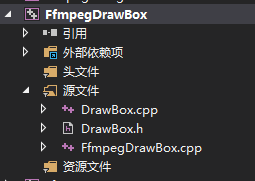
其中FfmpegDrawBox.cpp的内容如下:
#include <iostream>
#include "DrawBox.h"
#include <vector>

#ifdef	__cplusplus
extern "C"
{


#endif

#pragma comment(lib, "avcodec.lib")
#pragma comment(lib, "avformat.lib")
#pragma comment(lib, "avutil.lib")
#pragma comment(lib, "avdevice.lib")
#pragma comment(lib, "avfilter.lib")
#pragma comment(lib, "postproc.lib")
#pragma comment(lib, "swresample.lib")
#pragma comment(lib, "swscale.lib")


#ifdef __cplusplus
};
#endif


std::string Unicode_to_Utf8(const std::string & str)
{


	int nwLen = ::MultiByteToWideChar(CP_ACP, 0, str.c_str(), -1, NULL, 0);
	wchar_t * pwBuf = new wchar_t[nwLen + 1];//一定要加1,不然会出现尾巴
	ZeroMemory(pwBuf, nwLen * 2 + 2);
	::MultiByteToWideChar(CP_ACP, 0, str.c_str(), str.length(), pwBuf, nwLen);
	int nLen = ::WideCharToMultiByte(CP_UTF8, 0, pwBuf, -1, NULL, NULL, NULL, NULL);
	char * pBuf = new char[nLen + 1];
	ZeroMemory(pBuf, nLen + 1);
	::WideCharToMultiByte(CP_UTF8, 0, pwBuf, nwLen, pBuf, nLen, NULL, NULL);
	std::string retStr(pBuf);
	delete[]pwBuf;
	delete[]pBuf;
	pwBuf = NULL;
	pBuf = NULL;
	return retStr;
}


int main()
{


	CDrawBox cCDrawBox;
	const char *pFileA = "E:\\learn\\ffmpeg\\convert\\04_10framerate.mp4";

	const char *pFileOut = "E:\\learn\\ffmpeg\\convert\\04_10framerate_result.mp4";

	cCDrawBox.StartDrawBox(pFileA, pFileOut);
	cCDrawBox.WaitFinish();
	return 0;
}
DrawBox.h的内容如下:
#pragma once

#include <Windows.h>
#include <string>

#ifdef	__cplusplus
extern "C"
{


#endif
#include "libavcodec/avcodec.h"
#include "libavformat/avformat.h"
#include "libswscale/swscale.h"
#include "libswresample/swresample.h"
#include "libavdevice/avdevice.h"
#include "libavutil/audio_fifo.h"
#include "libavutil/avutil.h"
#include "libavutil/fifo.h"
#include "libavutil/frame.h"
#include "libavutil/imgutils.h"

#include "libavfilter/avfilter.h"
#include "libavfilter/buffersink.h"
#include "libavfilter/buffersrc.h"


#ifdef __cplusplus
};
#endif


#include "opencv2/objdetect/objdetect.hpp"
#include "opencv2/highgui/highgui.hpp"
#include "opencv2/imgproc/imgproc.hpp"
using namespace std;
using namespace cv;


class CDrawBox
{


public:
	CDrawBox();
	~CDrawBox();
public:
	int StartDrawBox(const char *pFileA, const char *pFileOut);
	int WaitFinish();
private:
	int OpenFileA(const char *pFileA);
	int OpenOutPut(const char *pFileOut);
	int InitFilter(std::vector<Rect>& facesRect);
	void UnInitFilter();
private:
	static DWORD WINAPI VideoAReadProc(LPVOID lpParam);
	void VideoARead();


	static DWORD WINAPI VideoDrawBoxProc(LPVOID lpParam);
	void VideoDrawBox();
private:
	AVFormatContext *m_pFormatCtx_FileA = NULL;

	AVCodecContext *m_pReadCodecCtx_VideoA = NULL;
	AVCodec *m_pReadCodec_VideoA = NULL;


	AVCodecContext	*m_pCodecEncodeCtx_Video = NULL;
	AVFormatContext *m_pFormatCtx_Out = NULL;

	AVFifoBuffer *m_pVideoAFifo = NULL;


	int m_iVideoWidth = 1920;
	int m_iVideoHeight = 1080;
	int m_iYuv420FrameSize = 0;
	int m_iFaceCount = 0;
private:
	AVFilterGraph* m_pFilterGraph = NULL;
	AVFilterContext* m_pFilterCtxSrcVideoA = NULL;
	AVFilterContext* m_pFilterCtxDrawBox[10];
	AVFilterContext* m_pFilterCtxSink = NULL;
private:
	CRITICAL_SECTION m_csVideoASection;
	HANDLE m_hVideoAReadThread = NULL;
	HANDLE m_hVideoDrawTextThread = NULL;
private:
	CascadeClassifier m_cpufaceCascade;
};
DrawBox.cpp的代码如下:
#include "DrawBox.h"
static void CopyYUVToImage(uchar * dst, uint8_t *pY, uint8_t *pU, uint8_t *pV, int width, int height)
{
uint32_t size = width * height;
memcpy(dst, pY, size);
memcpy(dst + size, pU, size / 4);
memcpy(dst + size + size / 4, pV, size / 4 最低0.47元/天 解锁文章






 扫一扫
扫一扫


 762
762

 被折叠的 条评论
为什么被折叠?
被折叠的 条评论
为什么被折叠?
 到【灌水乐园】发言





