


今天讲解往视频里面添加图片水印,命令行如下所示:
ffmpeg.exe -i E:\learn\ffmpeg\convert\out2345678.mp4 -vf "movie=filename='E\:\\learn\\ffmpeg\\convert\\flower.jpg'[watermask];[in][watermask]overlay=100:100[out]" e:\learn\ffmpeg\convert\out2345678_convert.mp4
这里面我需要说下路径问题,:在滤镜里面是特殊的存在,用于同一滤镜不同参数之间的间隔,windows的路径含有:,所以需要进行转义,前面加\,这里面的对于路径分隔符\,前面也需要加\用来转义,就成了两个\。
如果路径写成下面这种,是绝对不行的。
ffmpeg.exe -i E:\learn\ffmpeg\convert\out2345678.mp4 -vf "movie=filename='E\:\learn\ffmpeg\convert\flower.jpg'[watermask];[in][watermask]overlay=100:100[out]" e:\learn\ffmpeg\convert\out2345678_convert.mp4
此时报错信息如下:
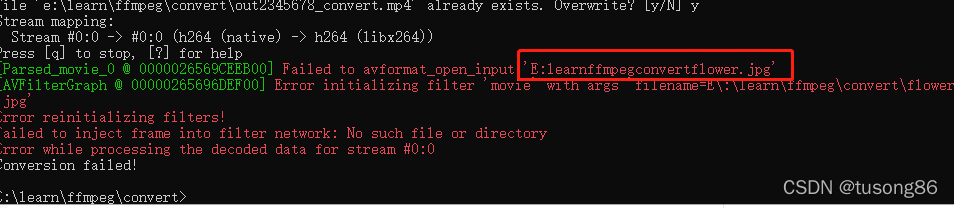
一看就是少了路径反斜杠\。
下面说下代码里面的实现,首先我们看下main函数
int main()
{


	CDrawMovie cVideoDrawMovie;
	const char *pFileA = "E:\\learn\\ffmpeg\\FfmpegFilterTest\\x64\\Release\\in-computer.mp4";

	const char *pFileOut = "E:\\learn\\ffmpeg\\FfmpegFilterTest\\x64\\Release\\in-computer_drawmovie.mp4";

	std::string strMovieFile = "E\\:\\\\learn\\\\ffmpeg\\\\convert\\\\flower.jpg";
	//std::string strMovieFile = "flower.jpg";
	cVideoDrawMovie.StartDrawMovie(pFileA, pFileOut, 100, 300, strMovieFile);
	cVideoDrawMovie.WaitFinish();
	return 0;
}
其中strMovieFile = “E\:\\learn\\ffmpeg\\convert\\flower.jpg”,反斜杠很多,这个是一定要的,首先代码里面写成E\:\\learn\\ffmpeg\\convert\\flower.jpg,实际对应的字符串就是
E:\learn\ffmpeg\convert\flower.jpg,然后再放到滤镜里面转义,这跟命令行是一致的。
下面我们再看下滤镜解析字符串:
_snprintf(szFilterDesc, sizeof(szFilterDesc),
			"movie=filename=\'%s\'[movie0];[in0][movie0]overlay=%d:%d[out]",
			strMovieFile.c_str(), x, y);
其中属性filename也可以去掉
之前我曾写过一篇博客ffmpeg代码实现往视频文件里面叠加文字
其中,滤镜drawtext的参数如下:
char szFilterDesc[512] = {

    0 };

std::string strFontFile;

strFontFile = "E\:\\learn\\ffmpeg\\ffmpeg_x264_freetype_static\\bin\\zihun152hao-jijiachaojihei.ttf";

_snprintf(szFilterDesc, sizeof(szFilterDesc),
	"fontcolor=blue:fontsize=%d:fontfile=\'%s\':text=\'%s\':x=%d:y=%d",
	iFontSize, strFontFile.c_str(), strText.c_str(), x, y);

InitFilter(szFilterDesc);
大家看下,这里面的strFontFile并没有那么多的反斜杠\,但是最终的执行结果ok,这是为何,这是因为本文,本人用的是avfilter_graph_parse_ptr进行滤镜的连接。
而在drawtext滤镜的博客中,本人用的是avfilter_link进行滤镜的连接。
代码结构如下:
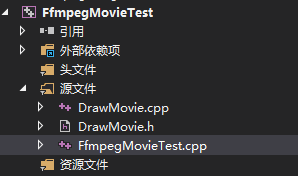
其中FfmpegMovieTest.cpp的内容如下:
#include <iostream>
#include "DrawMovie.h"
#include <vector>

#ifdef	__cplusplus
extern "C"
{


#endif

#pragma comment(lib, "avcodec.lib")
#pragma comment(lib, "avformat.lib")
#pragma comment(lib, "avutil.lib")
#pragma comment(lib, "avdevice.lib")
#pragma comment(lib, "avfilter.lib")
#pragma comment(lib, "postproc.lib")
#pragma comment(lib, "swresample.lib")
#pragma comment(lib, "swscale.lib")


#ifdef __cplusplus
};
#endif


std::string Unicode_to_Utf8(const std::string & str)
{


	int nwLen = ::MultiByteToWideChar(CP_ACP, 0, str.c_str(), -1, NULL, 0);
	wchar_t * pwBuf = new wchar_t[nwLen + 1];//一定要加1,不然会出现尾巴
	ZeroMemory(pwBuf, nwLen * 2 + 2);
	::MultiByteToWideChar(CP_ACP, 0, str.c_str(), str.length(), pwBuf, nwLen);
	int nLen = ::WideCharToMultiByte(CP_UTF8, 0, pwBuf, -1, NULL, NULL, NULL, NULL);
	char * pBuf = new char[nLen + 1];
	ZeroMemory(pBuf, nLen + 1);
	::WideCharToMultiByte(CP_UTF8, 0, pwBuf, nwLen, pBuf, nLen, NULL, NULL);
	std::string retStr(pBuf);
	delete[]pwBuf;
	delete[]pBuf;
	pwBuf = NULL;
	pBuf = NULL;
	return retStr;
}


int main()
{


	CDrawMovie cVideoDrawMovie;
	const char *pFileA = "E:\\learn\\ffmpeg\\FfmpegFilterTest\\x64\\Release\\in-computer.mp4";

	const char *pFileOut = "E:\\learn\\ffmpeg\\FfmpegFilterTest\\x64\\Release\\in-computer_drawmovie.mp4";

	std::string strMovieFile = "E\\:\\\\learn\\\\ffmpeg\\\\convert\\\\flower.jpg";
	//std::string strMovieFile = "flower.jpg";
	cVideoDrawMovie.StartDrawMovie(pFileA, pFileOut, 100, 300, strMovieFile);
	cVideoDrawMovie.WaitFinish();
	return 0;
}
DrawMovie.h的内容如下
#pragma once

#include <Windows.h>
#include <string>

#ifdef	__cplusplus
extern "C"
{


#endif
 最低0.47元/天 解锁文章






 扫一扫
扫一扫


 3164
3164

 被折叠的 条评论
为什么被折叠?
被折叠的 条评论
为什么被折叠?
 到【灌水乐园】发言





