


阅读原文
建议阅读原文,始终查看最新文档版本,获得最佳阅读体验:《基于知识库的AI客服系统开发和实施文档》
前言
本文详细说明如何实施我开发的AI客服系统
项目总结报告
源代码
代码已开源,github项目网址为:iamtornado/AI-Assistant
开发环境
Windows11系统,用trae国内版(基于vs code)开发
python版本:3.13
技术选型
我选择了以下技术栈:
前端与应用框架: Chainlit
一个用于快速构建聊天应用的Python框架,提供了用户认证、会话管理和友好的UI。其支持实时渲染,比如,消息中如果有代码,则会自动显示代码块,方便阅读。
知识库与问答引擎: RAGFlow
领先的检索增强生成(RAG)平台,负责知识的存储、检索和智能问答。其还支持多语言、MCP、agent等。
人工客服平台: Rocket.Chat
一个功能强大的开源团队沟通协作平台,用作人工客服的工作台。
消息队列: Redis
利用其发布/订阅和Stream数据结构,实现各服务间的异步消息通信,确保系统的响应速度和稳定性。
Web服务: FastAPI
用于构建接收Rocket.Chat消息的Webhook服务,性能卓越。
身份认证: Keycloak
通过OAuth 2.0协议,为Chainlit提供统一、安全的用户身份认证服务。keycloak对接的是企业LDAP,因此用户可以直接通过现有的域账号登录AI客服系统。
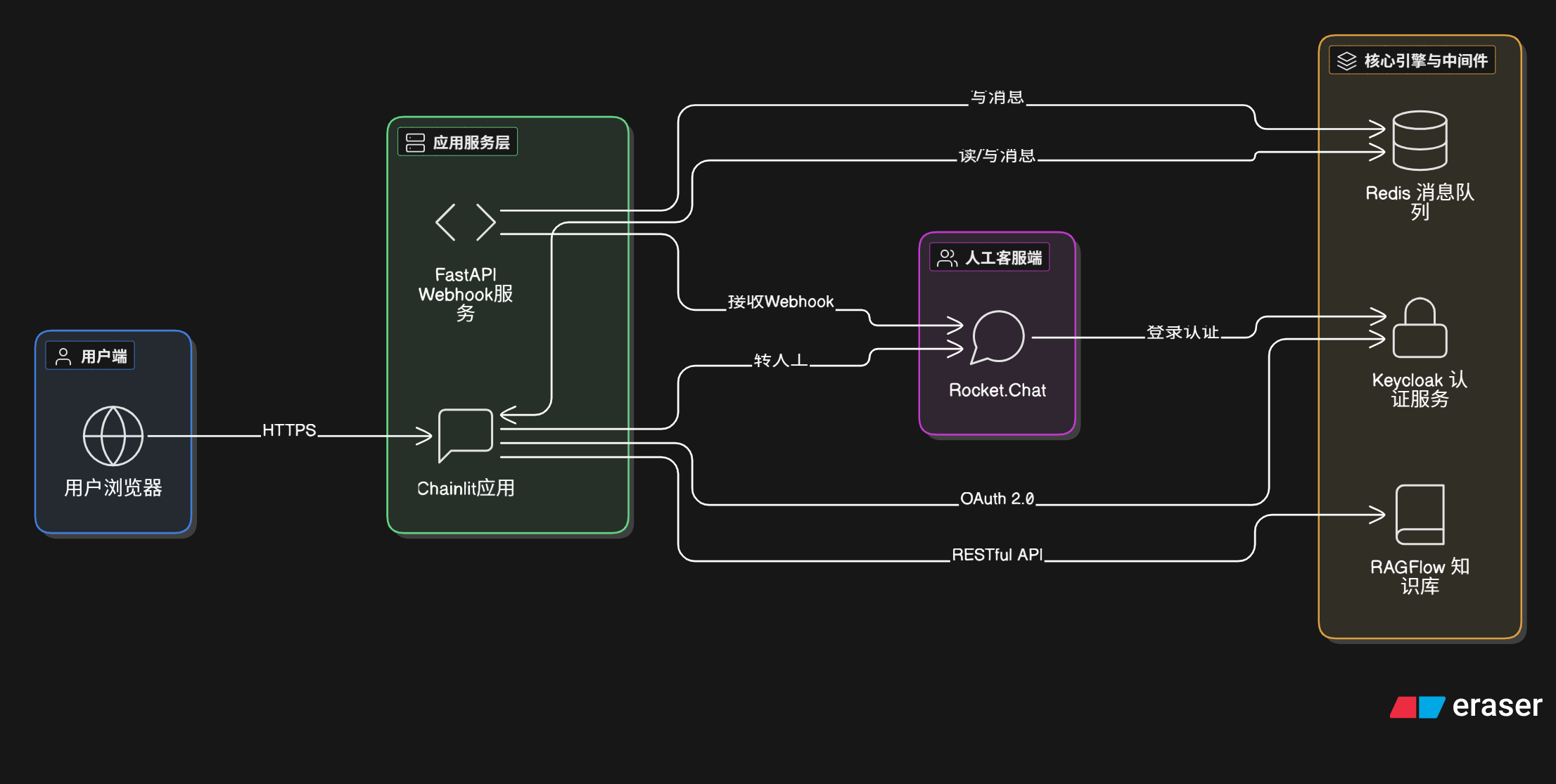
系统架构图
总体架构图
时序图
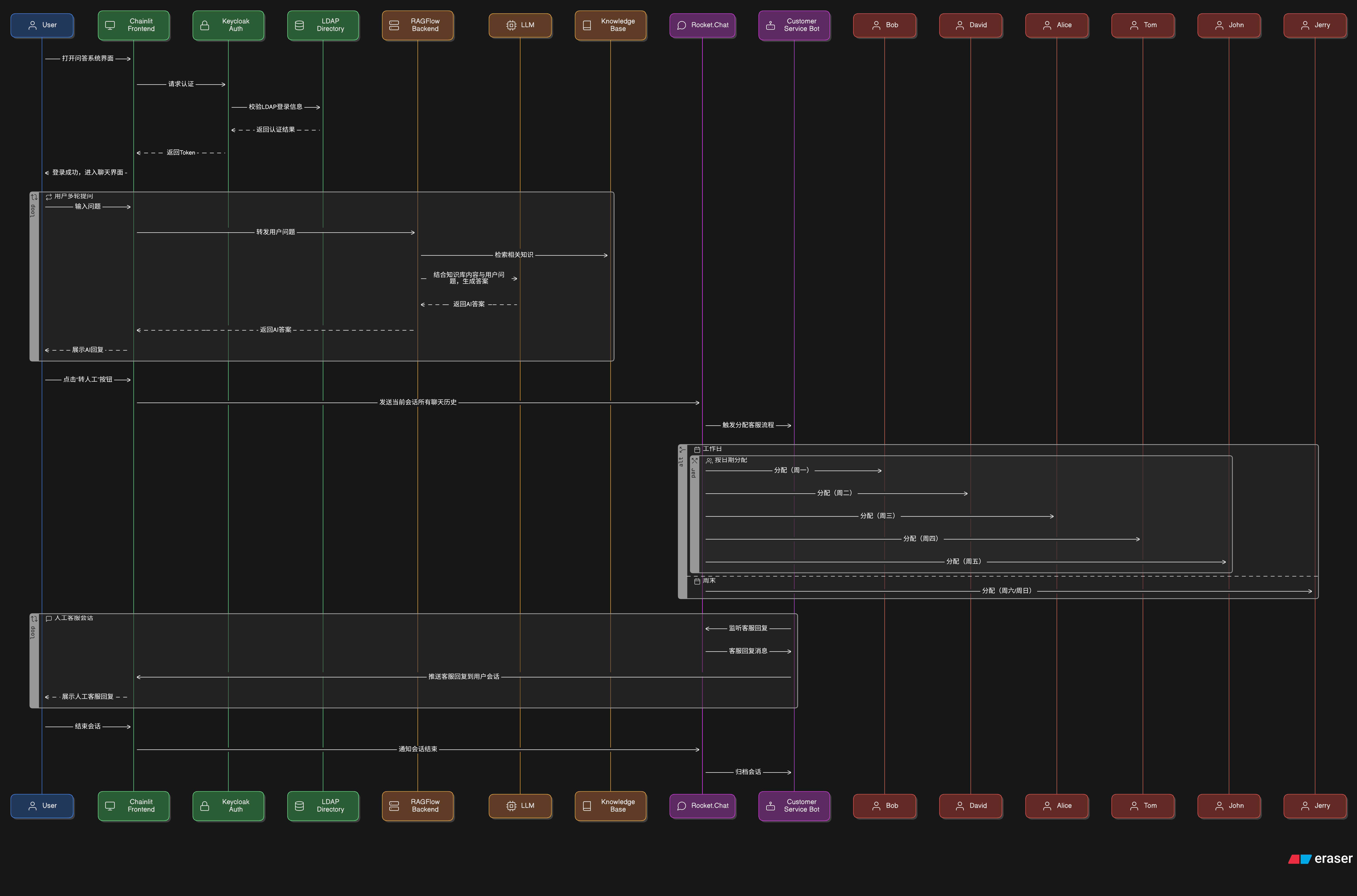
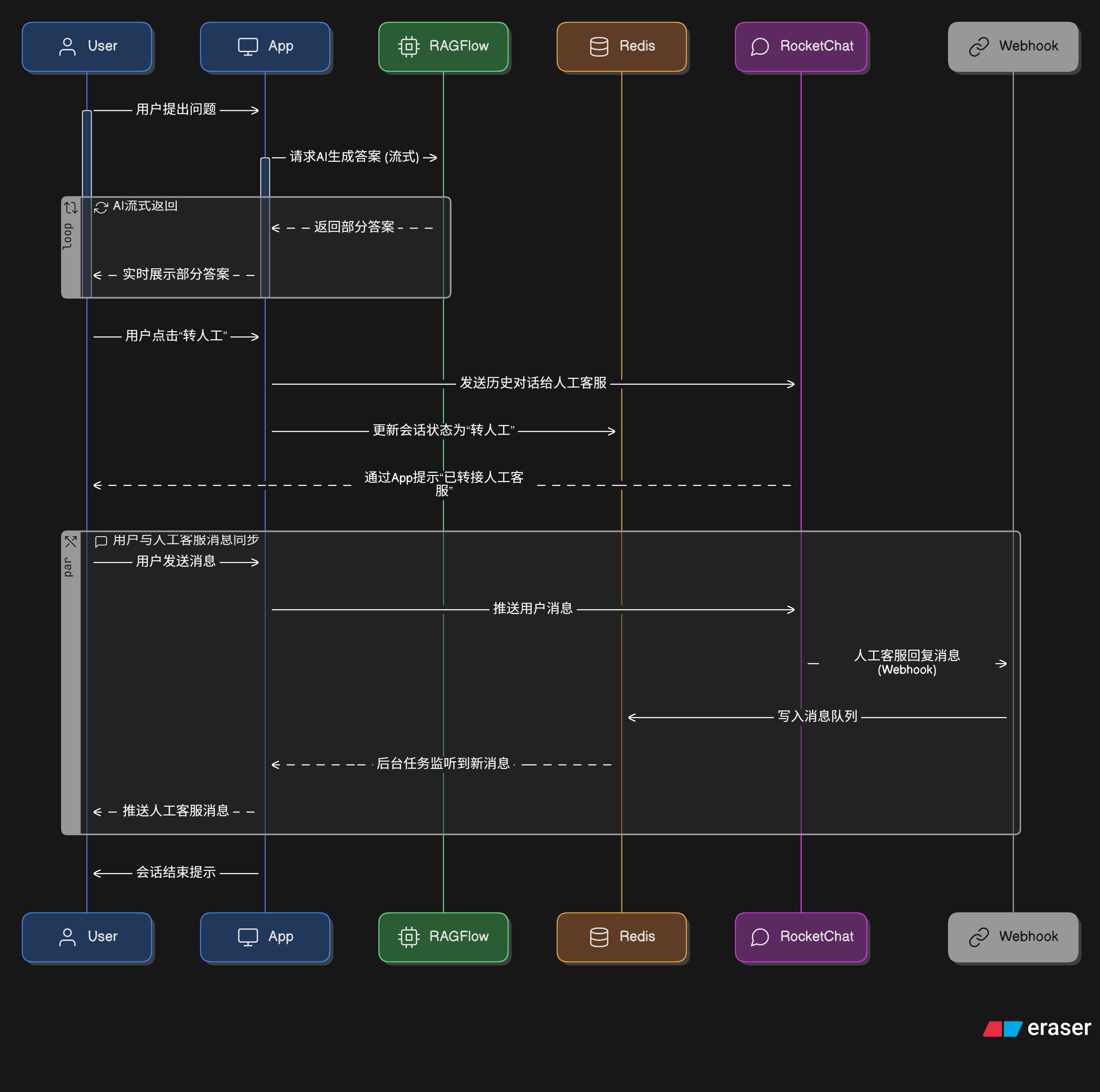
以上图形是利用 DiagramGPT(eraser) 生成的
前端(chainlit)
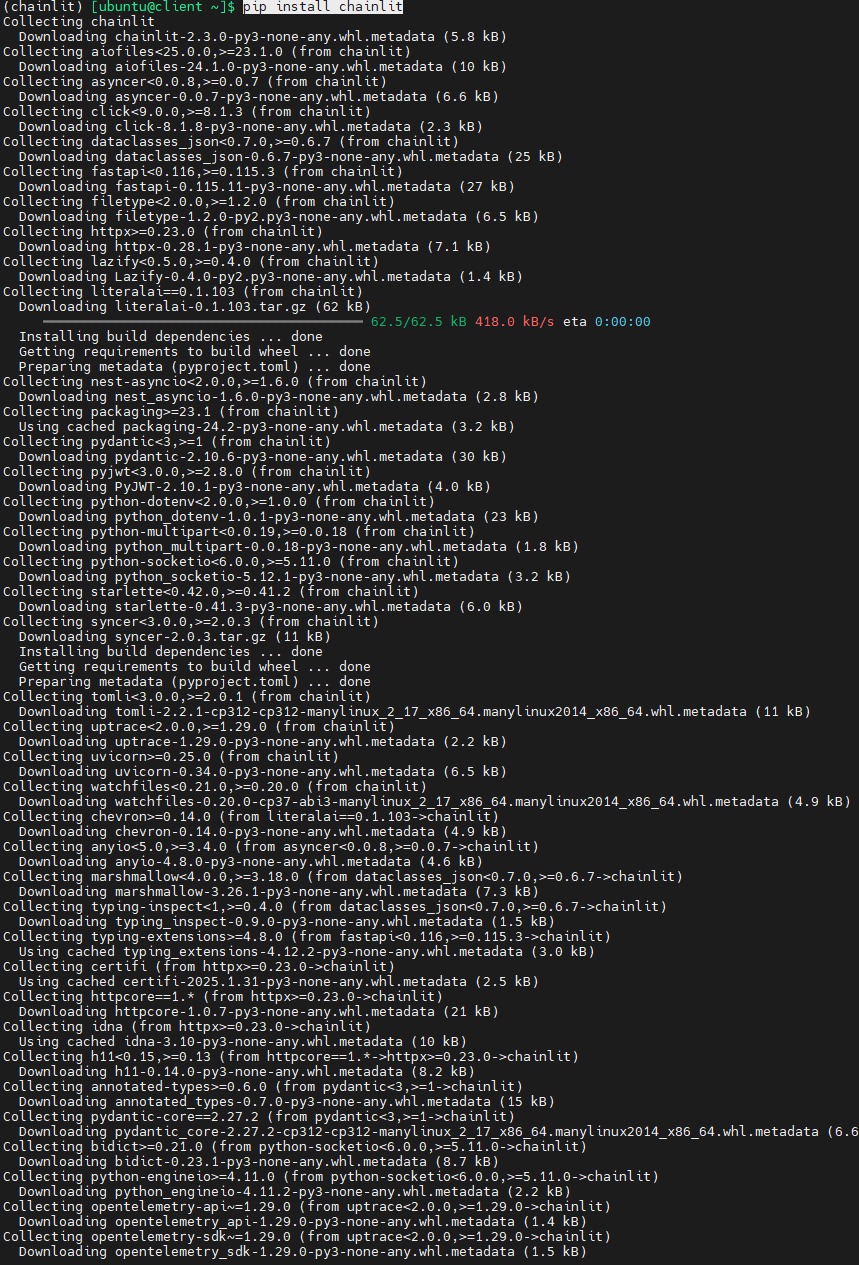
安装chainlit
Linux系统
首先要安装python和pip,此过程省略
注意,下面几行命令是在ubuntu desktop 24.04系统上运行的,Windows系统命令有所区别
#创建虚拟环境
python3 -m venv chainlit
#激活虚拟环境
source ./chainlit/bin/activate
#用pip安装chainlit包
pip install -U chainlit

Windows系统,trae(vs code)
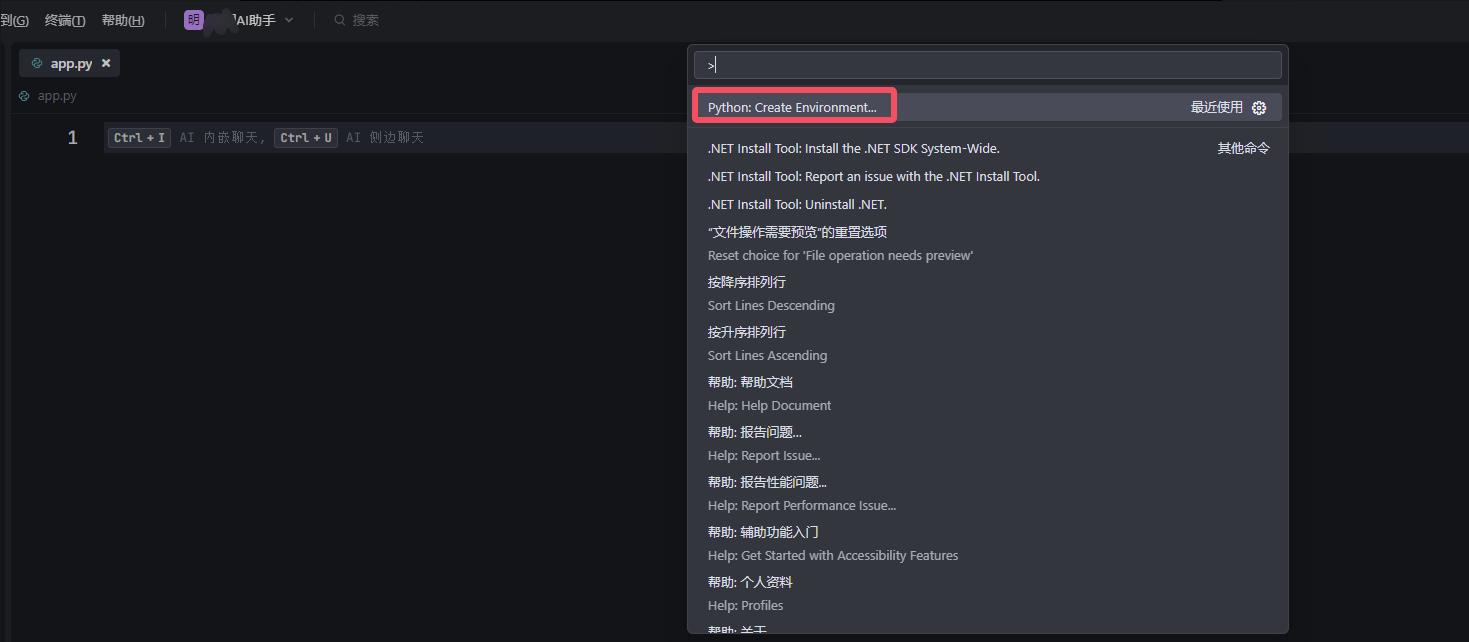
先通过vs code创建一个空的app.py文件,然后通过命令面板创建虚拟环境
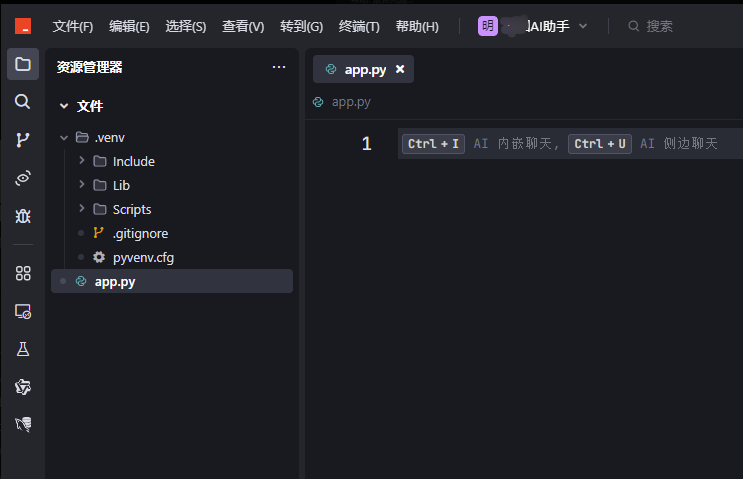
成功创建虚拟环境后,就可以在资源管理中看到自动生成了.env文件夹
激活虚拟环境
.venv\Scripts\activate

检查当前python解释器是不是虚拟环境中的解释器,如果不是,务必选择虚拟环境中的解释器
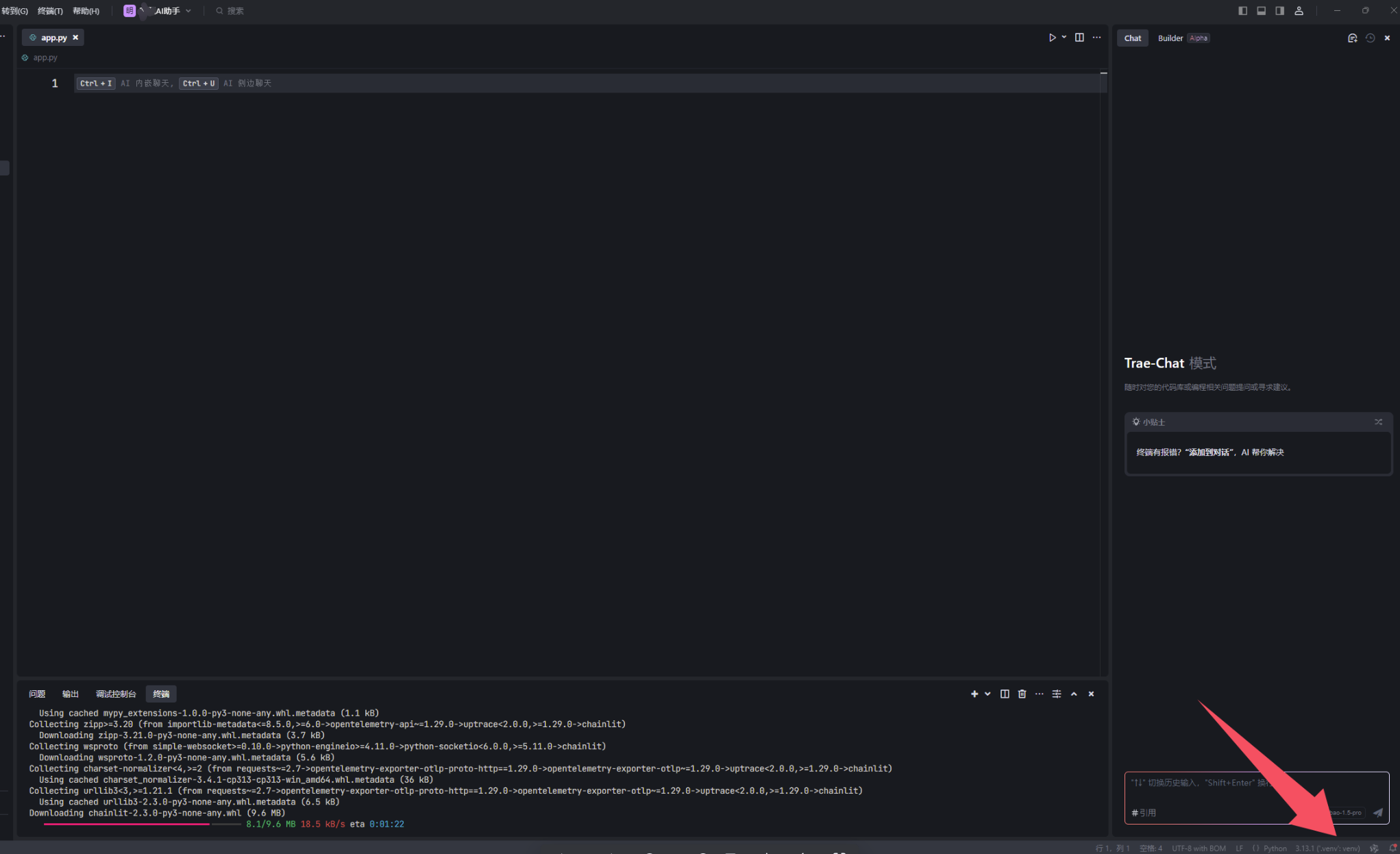
用pip安装chainlit包,时间会比较长,因为国内下载包会比较慢
pip install --upgrade chainlit
初步了解chainlit–编写极简应用逻辑
参考资料:In Pure Python - Chainlit
如果你对chainlit已经有了初步了解,可以直接看下一小节。
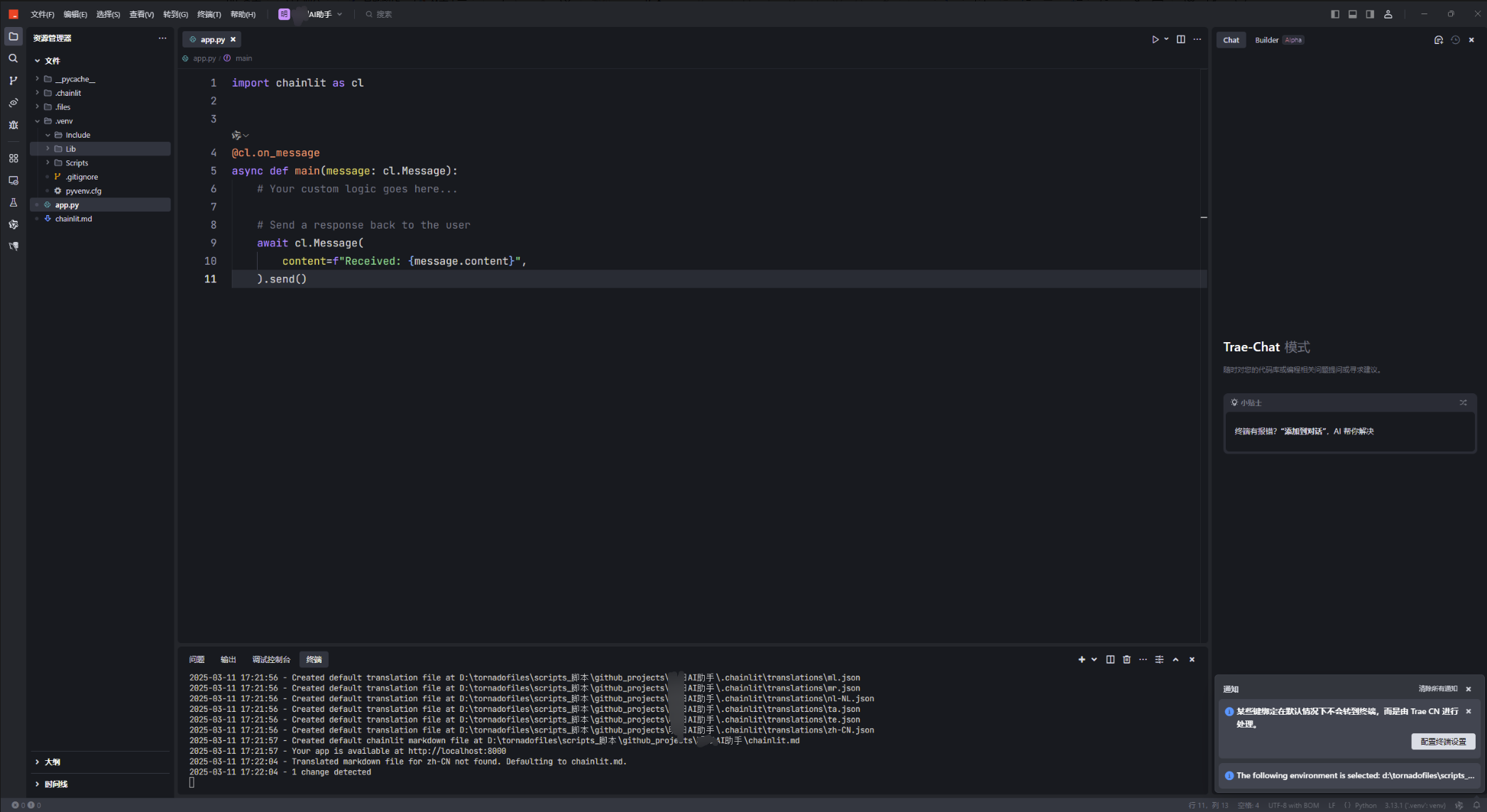
这是一个非常简单的应用,就是会将用户的输入再返回,前面加上Received:
import chainlit as cl


@cl.on_message
async def main(message: cl.Message):
    # Your custom logic goes here...

    # Send a response back to the user
    await cl.Message(
        content=f"Received: {

     message.content}",
    ).send()
设置环境变量(API key)
下面这种方式是用于临时设置环境变量
$env:OPENAI_API_KEY = "<替换为你的API key>"
官方建议用.env文件设置环境变量,官方文档为Environment Variables - Chainlit
运行应用
在终端中导航到app.py文件所在的文件夹,然后运行命令:
chainlit run app.py -w
下图是Linux系统中的截图
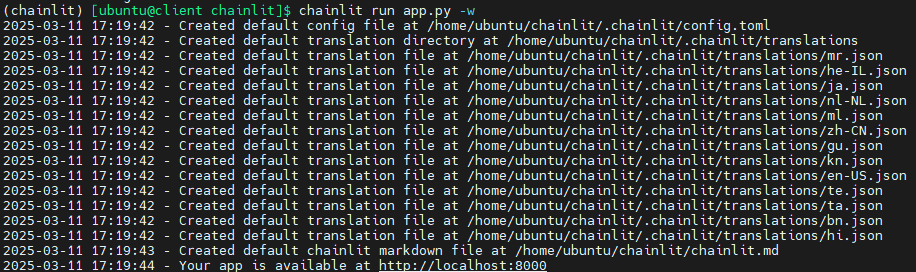
会自动打开浏览器
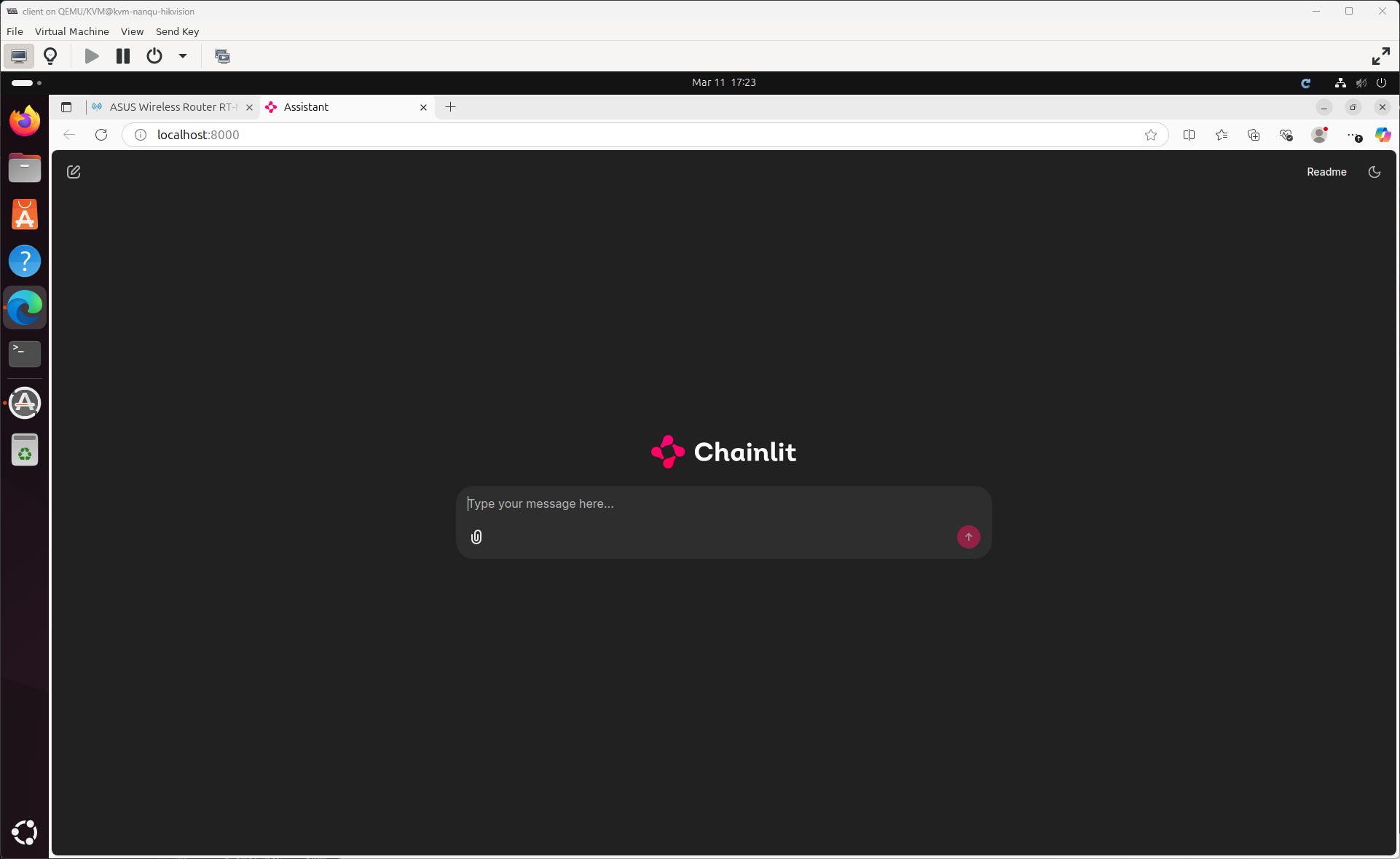
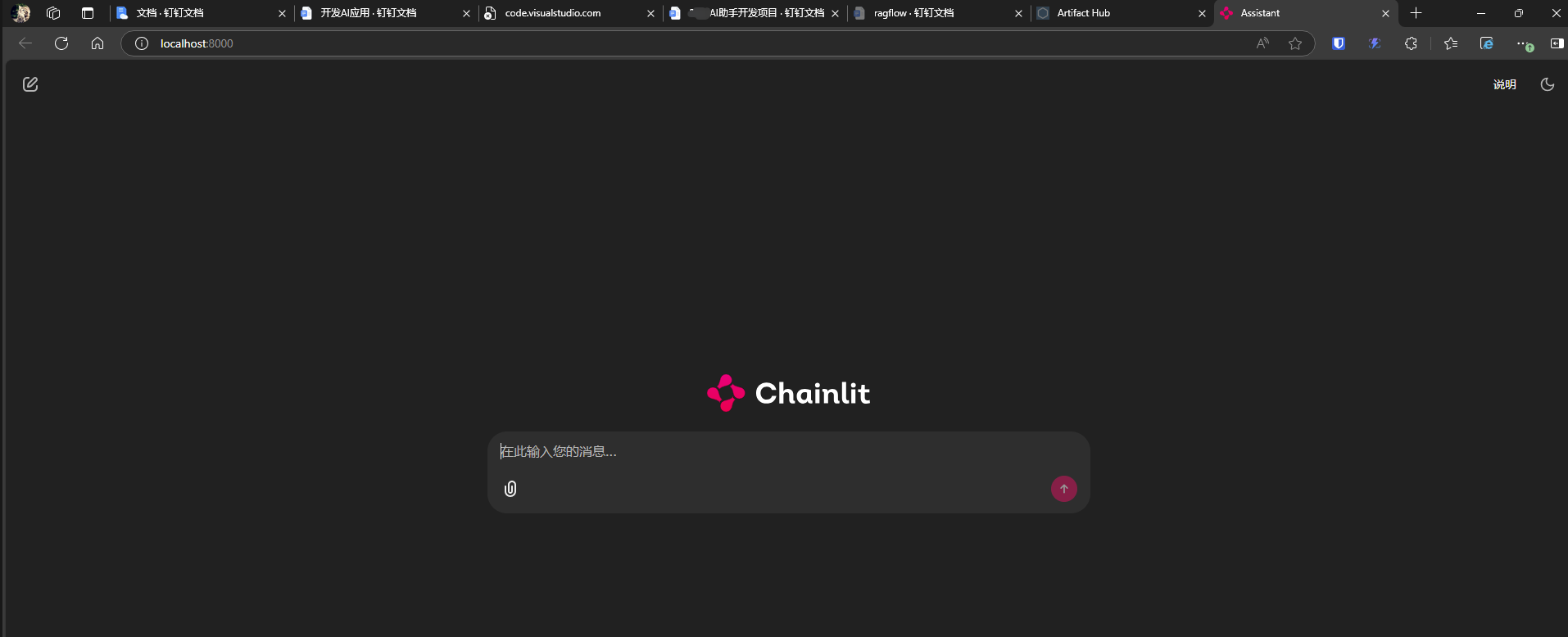
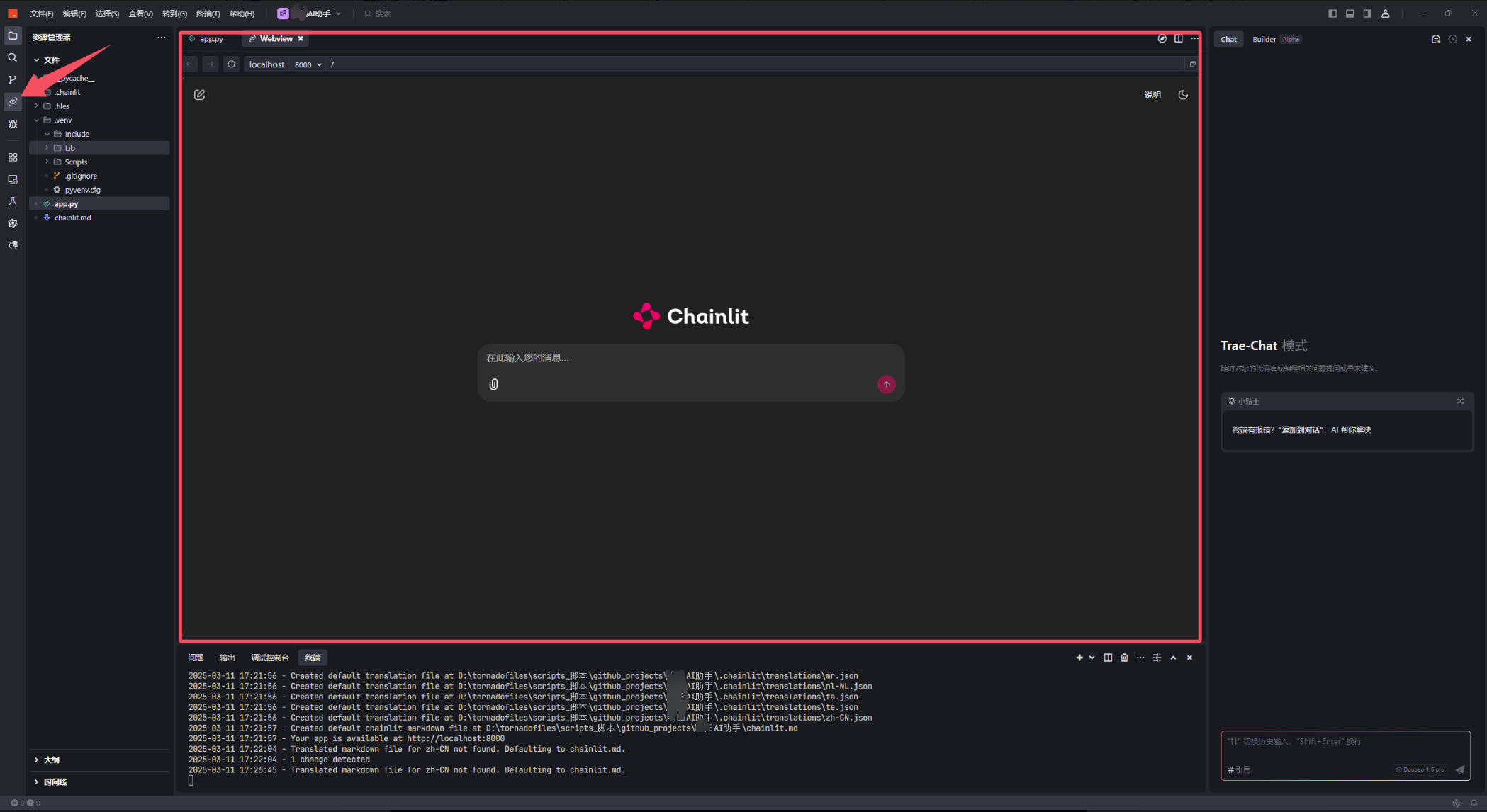
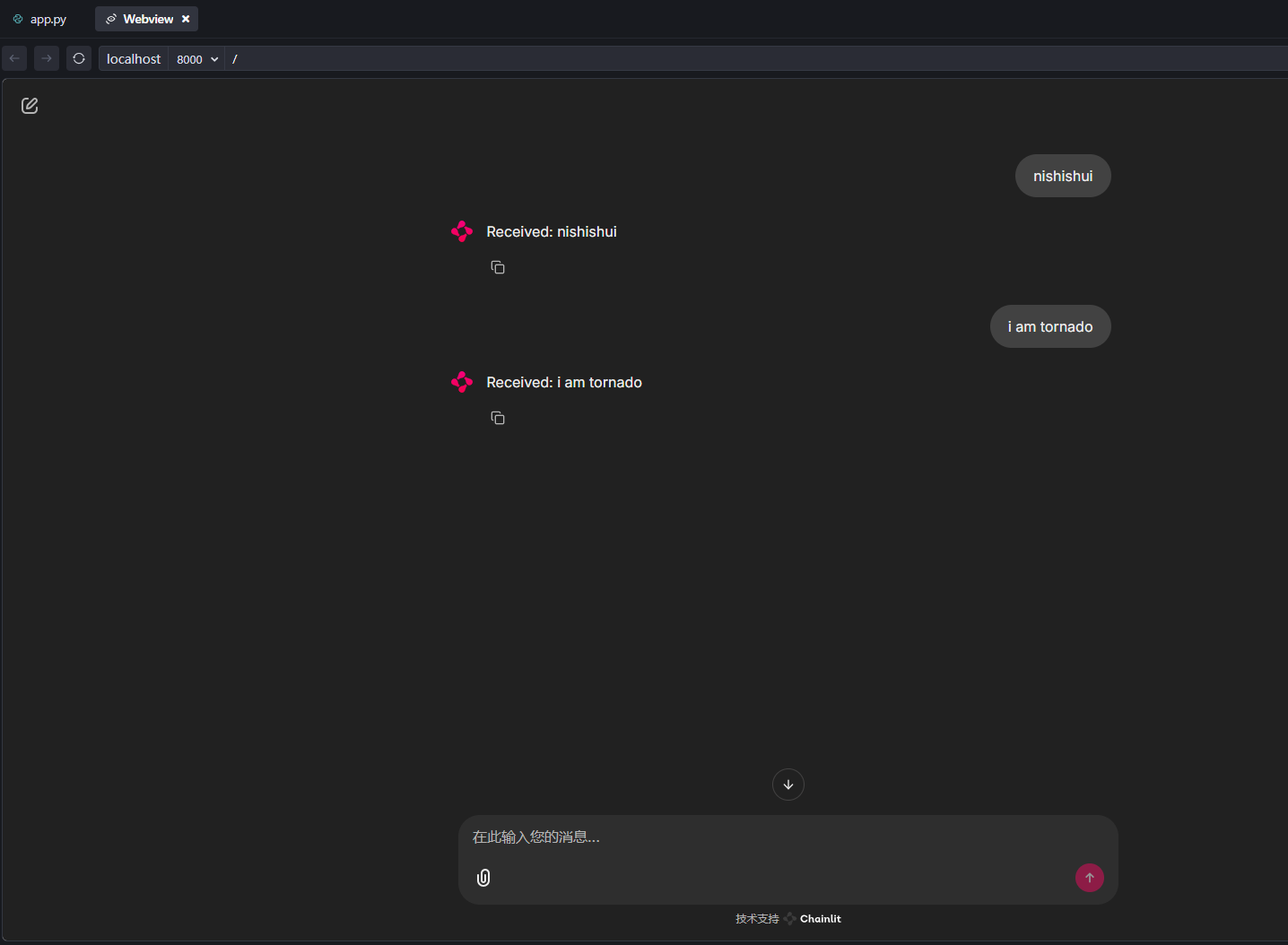
下面是Windows系统中trae的截图,也会自动在Windows系统默认浏览器中打开网页
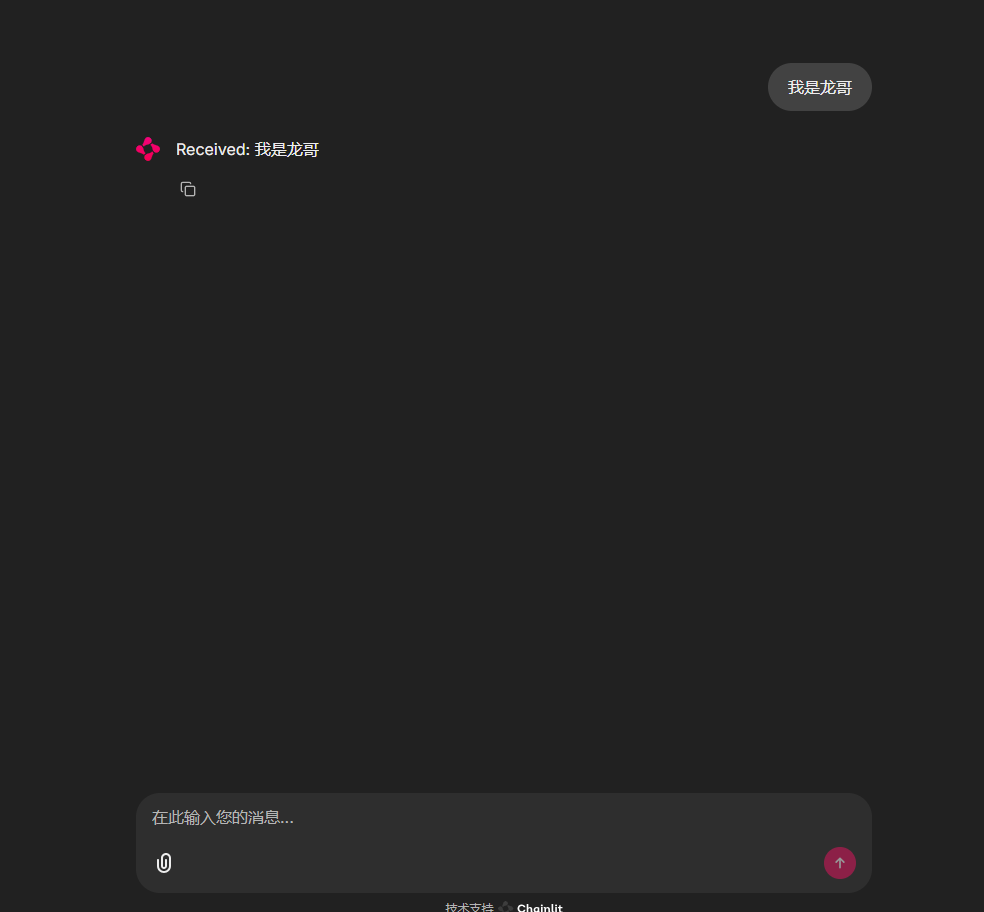
也可以通过trae的webview功能直接预览,更加方便开发调试
实现对接LDAP(存在问题,请勿阅读)
本小节的内容是我在做实验时记录的,存在问题,请直接阅读下一小节,了解如何将keycloak对接企业LDAP(Microsoft AD)
部署keycloak
参考资料:Docker - Keycloak
:::
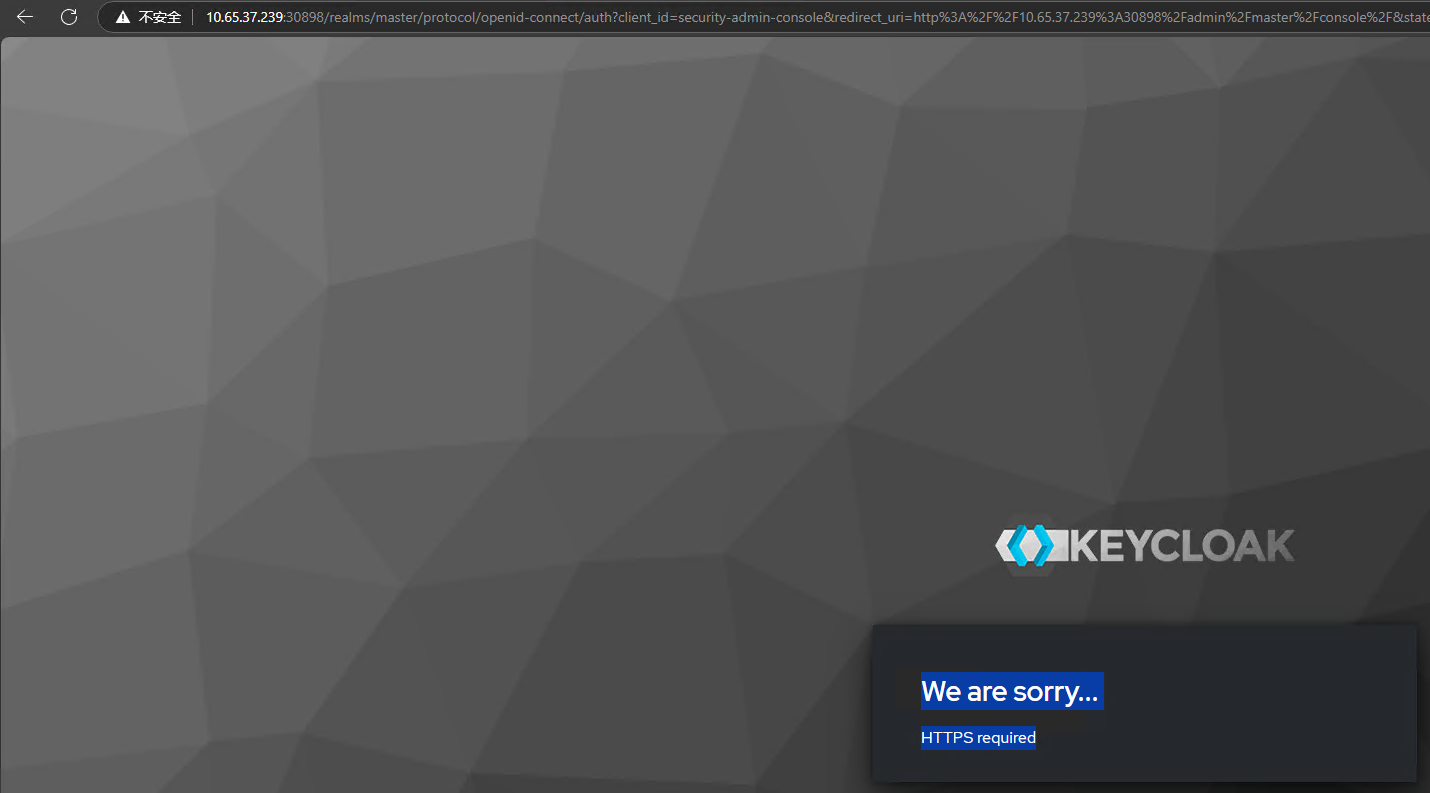
我在k8s部署keycloak时(无论是helmkeycloak 24.4.12 · bitnami/bitnami,还是官方的教程Kubernetes - Keycloak),发现一个问题,用web登录,一直提示“We are sorry… HTTPS required”,但是用docker部署没有这个问题。
我想应该是这两种方式强制要求用https
官方还提供了通过operator的方式部署keycloak,我没有试过。Keycloak Operator Installation - Keycloak
https://operatorhub.io/operator/keycloak-operator
:::
用docker部署(无持久存储)
不建议用下面的方式部署keycloak,重启容器后,所有数据都会丢失
#注意,下行命令中的--dns=192.168.124.7参数含义为让容器使用此dns,如果不指定,则容器内的程序无法访问企业内部网络,从而导致无法进行dns解析,在连接LDAP时会报错
docker run -p 8080:8080 -e KC_BOOTSTRAP_ADMIN_USERNAME=admin -e KC_BOOTSTRAP_ADMIN_PASSWORD=admin --dns=192.168.124.7 docker.1ms.run/keycloak/keycloak:26.2.5 start-dev
用docker部署(持久存储)
对于开发环境和测试环境,建议用下面的方法部署keycloak,数据不会丢失,保存在本地(以文件形式)
mkdir -p /opt/keycloak/data
sudo chmod -R a+rwx /opt/keycloak/data
docker run -d \
  --name keycloak \
  -p 8080:8080 \
  -e KC_DB=dev-file \
  -v /opt/keycloak/data:/opt/keycloak/data \
  -e KC_BOOTSTRAP_ADMIN_USERNAME=admin \
  -e KC_BOOTSTRAP_ADMIN_PASSWORD=admin \
  docker.1ms.run/keycloak/keycloak:26.2.5 start-dev
:::
如果出现下面的错误日志,则说明容器或者说是keycloak程序无法解析域名解析,需要调整dns,使其能解析指定域名
2025-03-12 11:50:46,712 ERROR [org.keycloak.services] (executor-thread-17) KC-SERVICES0055: Error when connecting to LDAP: dc-t.dltornado2.com:389: javax.naming.CommunicationException: dc-t.dltornado2.com:389 [Root exception is java.net.UnknownHostException: dc-t.dltornado2.com]
    at java.naming/com.sun.jndi.ldap.Connection.<init>(Connection.java:251)

    at java.naming/com.sun.jndi.ldap.LdapClient.<init>(LdapClient.java:141)

    at java.naming/com.sun.jndi.ldap.LdapClient.getInstance(LdapClient.java:1620)

    at java.naming/com.sun.jndi.ldap.LdapCtx.connect(LdapCtx.java:2848)

    at java.naming/com.sun.jndi.ldap.LdapCtx.<init>(LdapCtx.java:349)

    at java.naming/com.sun.jndi.ldap.LdapCtxFactory.getLdapCtxFromUrl(LdapCtxFactory.java:229)

    at java.naming/com.sun.jndi.ldap.LdapCtxFactory.getUsingURL(LdapCtxFactory.java:189)

    at java.naming/com.sun.jndi.ldap.LdapCtxFactory.getUsingURLs(LdapCtxFactory.java:247)

    at java.naming/com.sun.jndi.ldap.LdapCtxFactory.getLdapCtxInstance(LdapCtxFactory.java:154)

    at java.naming/com.sun.jndi.ldap.LdapCtxFactory.getInitialContext(LdapCtxFactory.java:84)

    at java.naming/javax.naming.spi.NamingManager.getInitialContext(NamingManager.java:520)

    at java.naming/javax.naming.InitialContext.getDefaultInitCtx(InitialContext.java:305)

    at java.naming/javax.naming.InitialContext.init(InitialContext.java:236)

    at java.naming/javax.naming.ldap.InitialLdapContext.<init>(InitialLdapContext.java:154)

    at org.keycloak.storage.ldap.idm.store.ldap.LDAPContextManager.createLdapContext(LDAPContextManager.java:81)

    at org.keycloak.storage.ldap.idm.store.ldap.LDAPContextManager.getLdapContext(LDAPContextManager.java:106)

    at org.keycloak.services.managers.LDAPServerCapabilitiesManager.testLDAP(LDAPServerCapabilitiesManager.java:202)

    at org.keycloak.services.resources.admin.TestLdapConnectionResource.testLDAPConnection(TestLdapConnectionResource.java:92)

    at org.keycloak.services.resources.admin.TestLdapConnectionResource$quarkusrestinvoker$testLDAPConnection\_d65ae9343a71f2736595679e81594225f9de5d6f.invoke(Unknown Source)

    at org.jboss.resteasy.reactive.server.handlers.InvocationHandler.handle(InvocationHandler.java:29)

    at io.quarkus.resteasy.reactive.server.runtime.QuarkusResteasyReactiveRequestContext.invokeHandler(QuarkusResteasyReactiveRequestContext.java:141)

    at org.jboss.resteasy.reactive.common.core.AbstractResteasyReactiveContext.run(AbstractResteasyReactiveContext.java:147)

    at io.quarkus.vertx.core.runtime.VertxCoreRecorder$14.runWith(VertxCoreRecorder.java:635)

    at org.jboss.threads.EnhancedQueueExecutor$Task.doRunWith(EnhancedQueueExecutor.java:2516)

    at org.jboss.threads.EnhancedQueueExecutor$Task.run(EnhancedQueueExecutor.java:2495)

    at org.jboss.threads.EnhancedQueueExecutor$ThreadBody.run(EnhancedQueueExecutor.java:1521)

    at org.jboss.threads.DelegatingRunnable.run(DelegatingRunnable.java:11)

    at org.jboss.threads.ThreadLocalResettingRunnable.run(ThreadLocalResettingRunnable.java:11)

    at io.netty.util.concurrent.FastThreadLocalRunnable.run(FastThreadLocalRunnable.java:30)

    at java.base/java.lang.Thread.run(Thread.java:1583)
Caused by: java.net.UnknownHostException: dc-t.dltornado2.com
    at java.base/sun.nio.ch.NioSocketImpl.connect(NioSocketImpl.java:567)

    at java.base/java.net.SocksSocketImpl.connect(SocksSocketImpl.java:327)

    at java.base/java.net.Socket.connect(Socket.java:751)

    at java.naming/com.sun.jndi.ldap.Connection.createConnectionSocket(Connection.java:340)

    at java.naming/com.sun.jndi.ldap.Connection.createSocket(Connection.java:283)

    at java.naming/com.sun.jndi.ldap.Connection.<init>(Connection.java:230)

    ... 29 more
:::
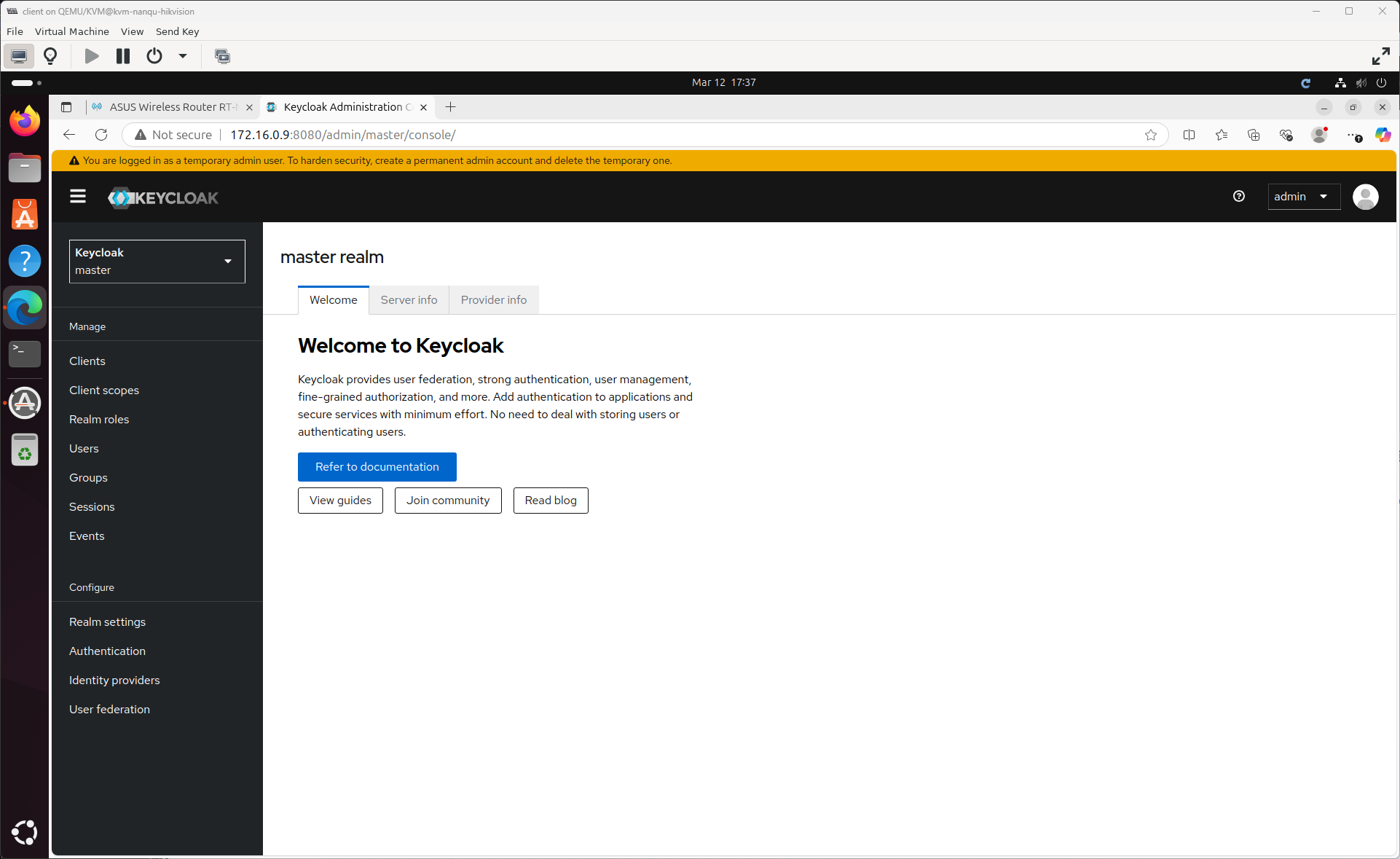
然后通过web访问,网址是:http://server_ip:8080
需要登录,用户名是admin 密码是一样的,这是来自于上面的命令,设置了环境变量,可以更改环境变量。
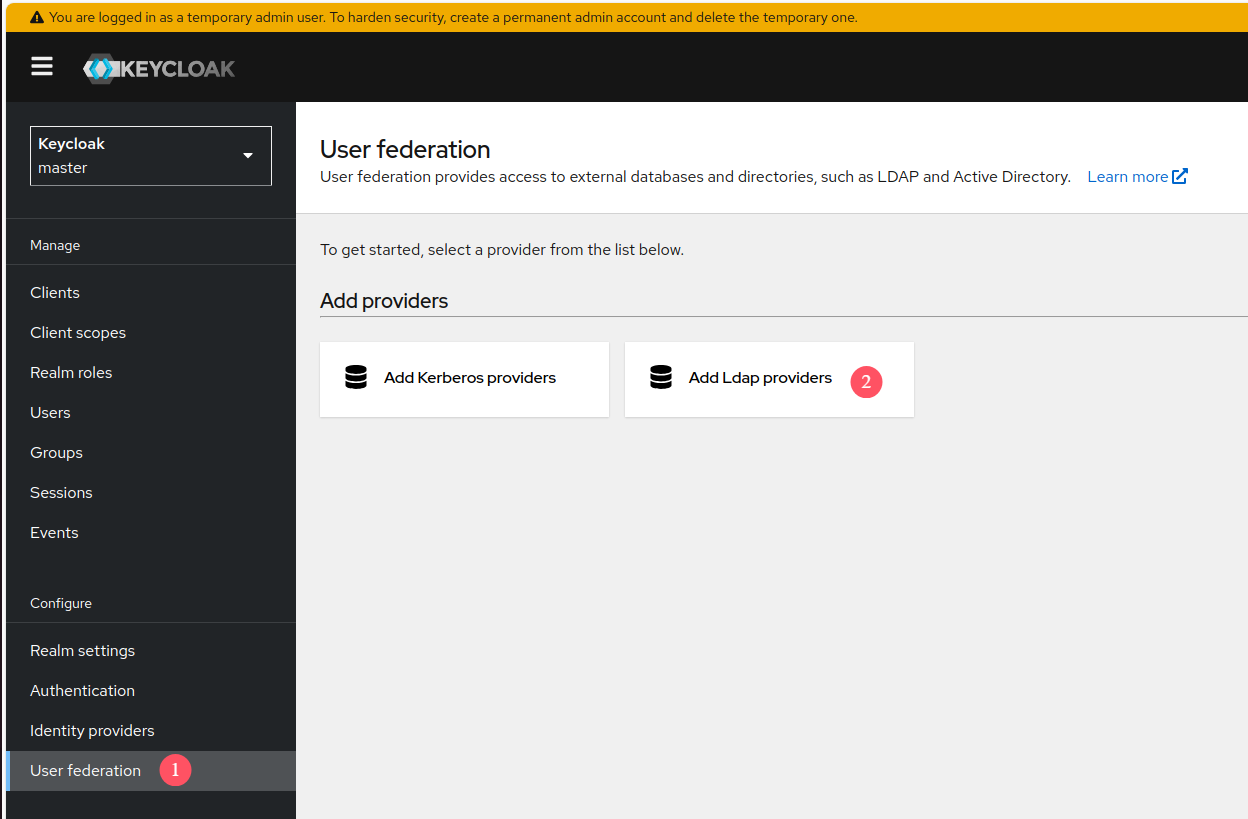
添加一个provider
参考资料:Server Administration Guide
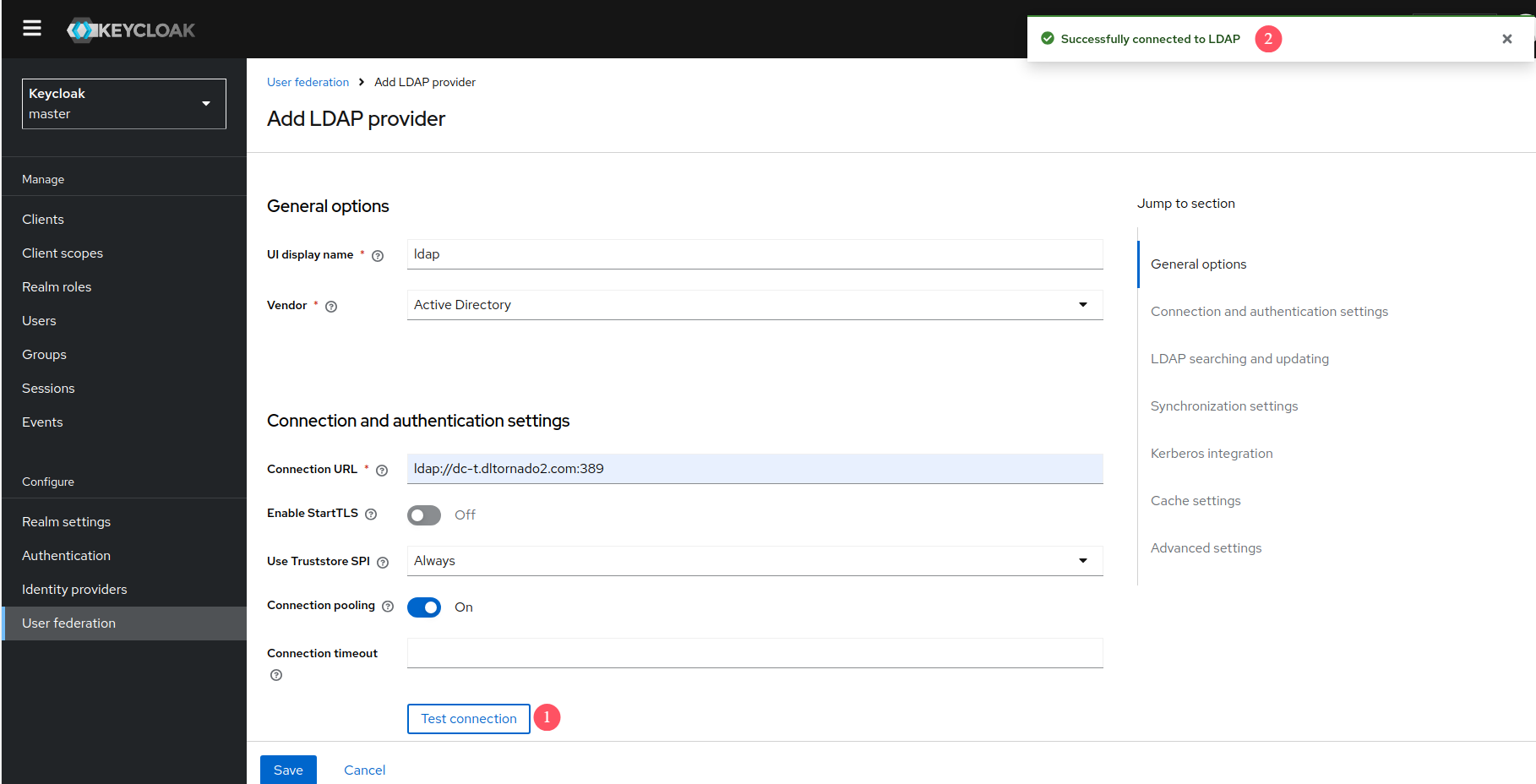
测试LDAP连接:
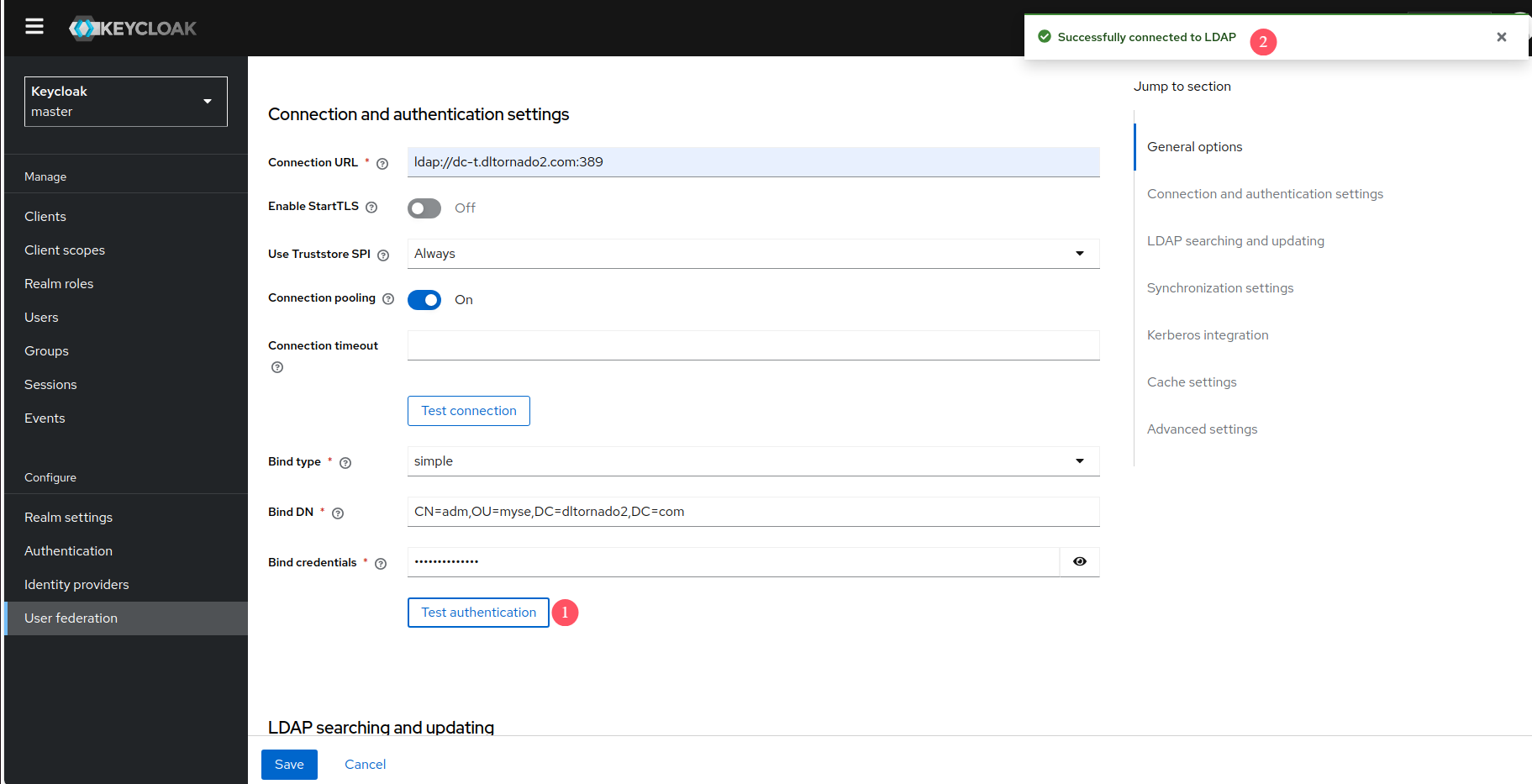
测试认证:
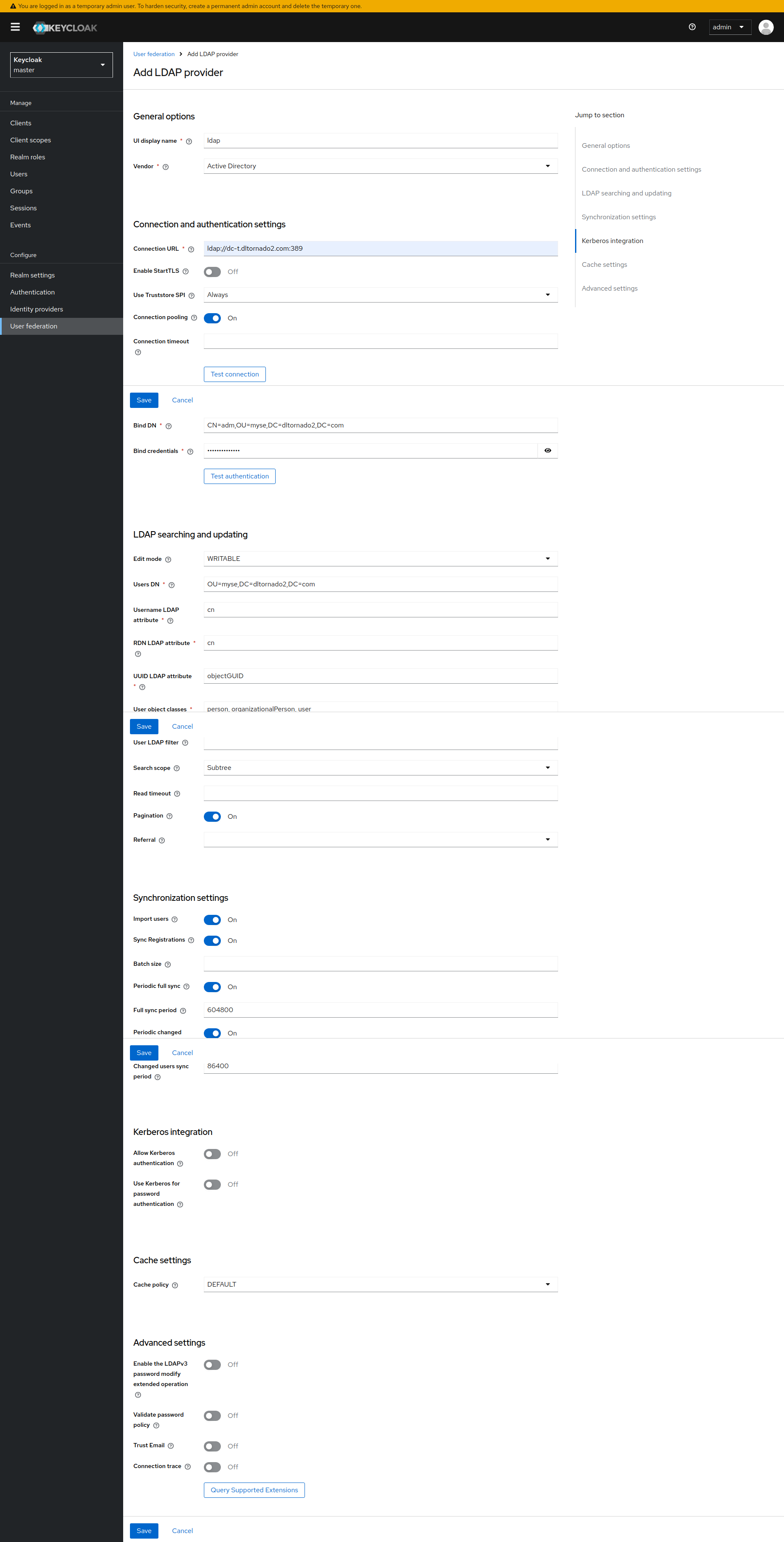
其它选项填写示例:
Keycloak OAuth客户端配置
在Realm中创建新Client
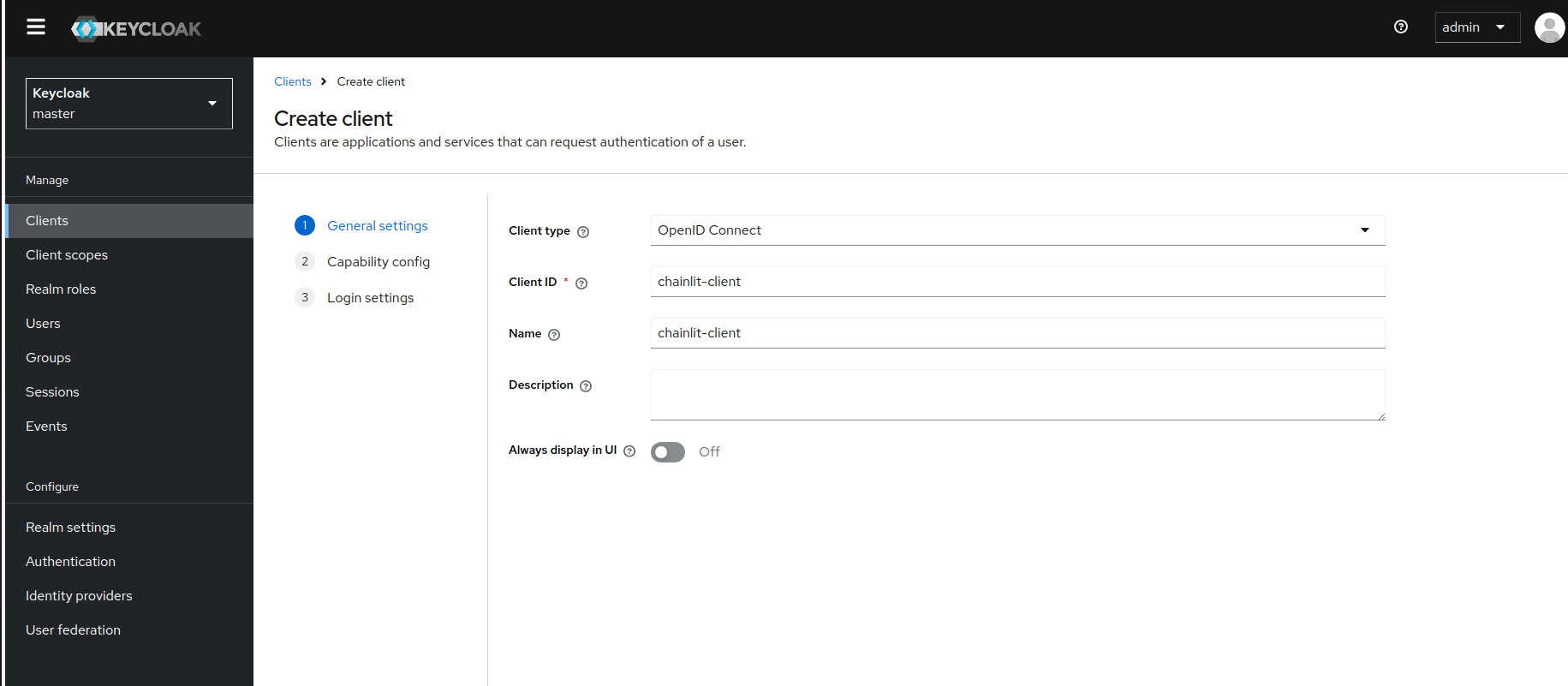
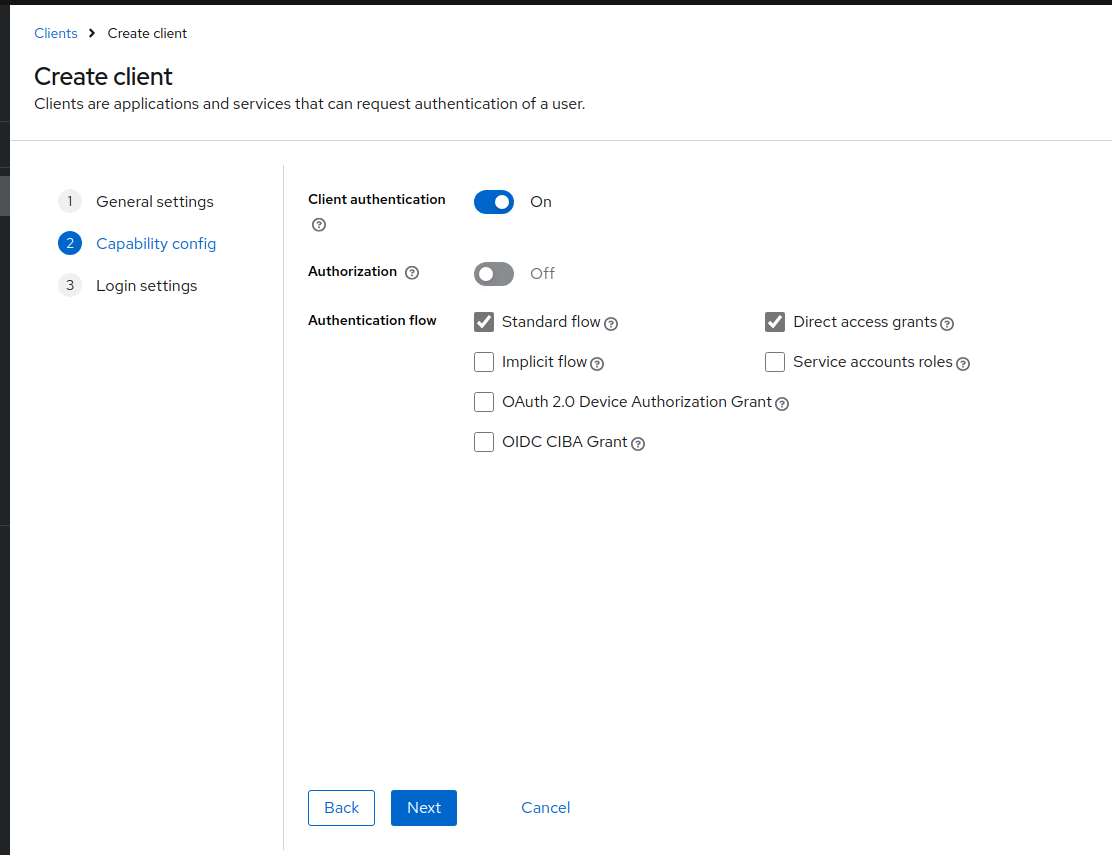
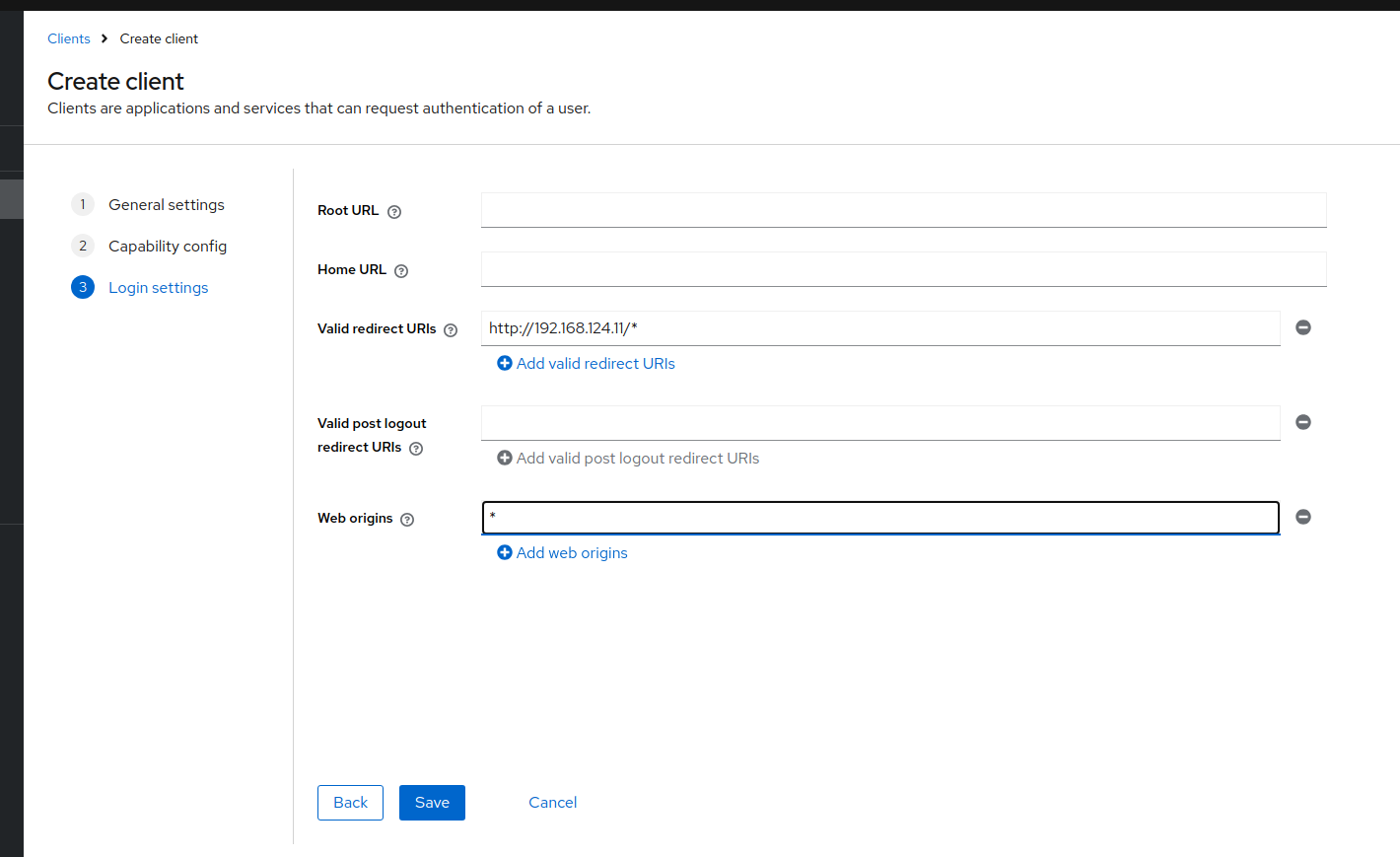
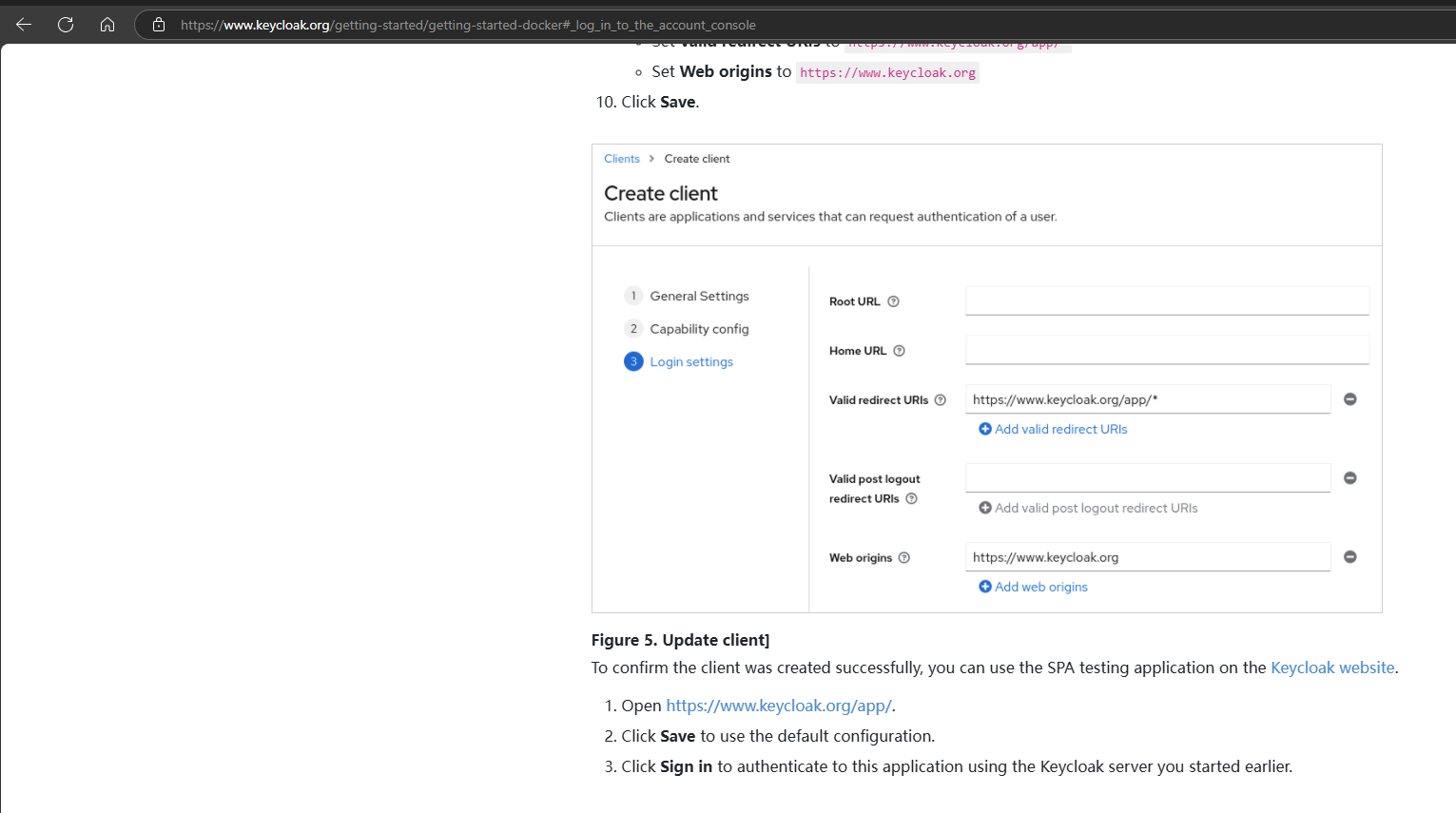
验证刚刚创建的client是否成功
参考资料:Docker - Keycloak
查询各个endpoint url的值,与keycloak连接的应用需要用到这些endpoint url
参考资料:OAuth - Chainlit
Invoke-RestMethod -Uri http://10.65.37.239:8080/realms/master/.well-known/openid-configuration
Invoke-RestMethod -Uri https://keycloak-admin.dltornado2.com/realms/master/.well-known/openid-configuration
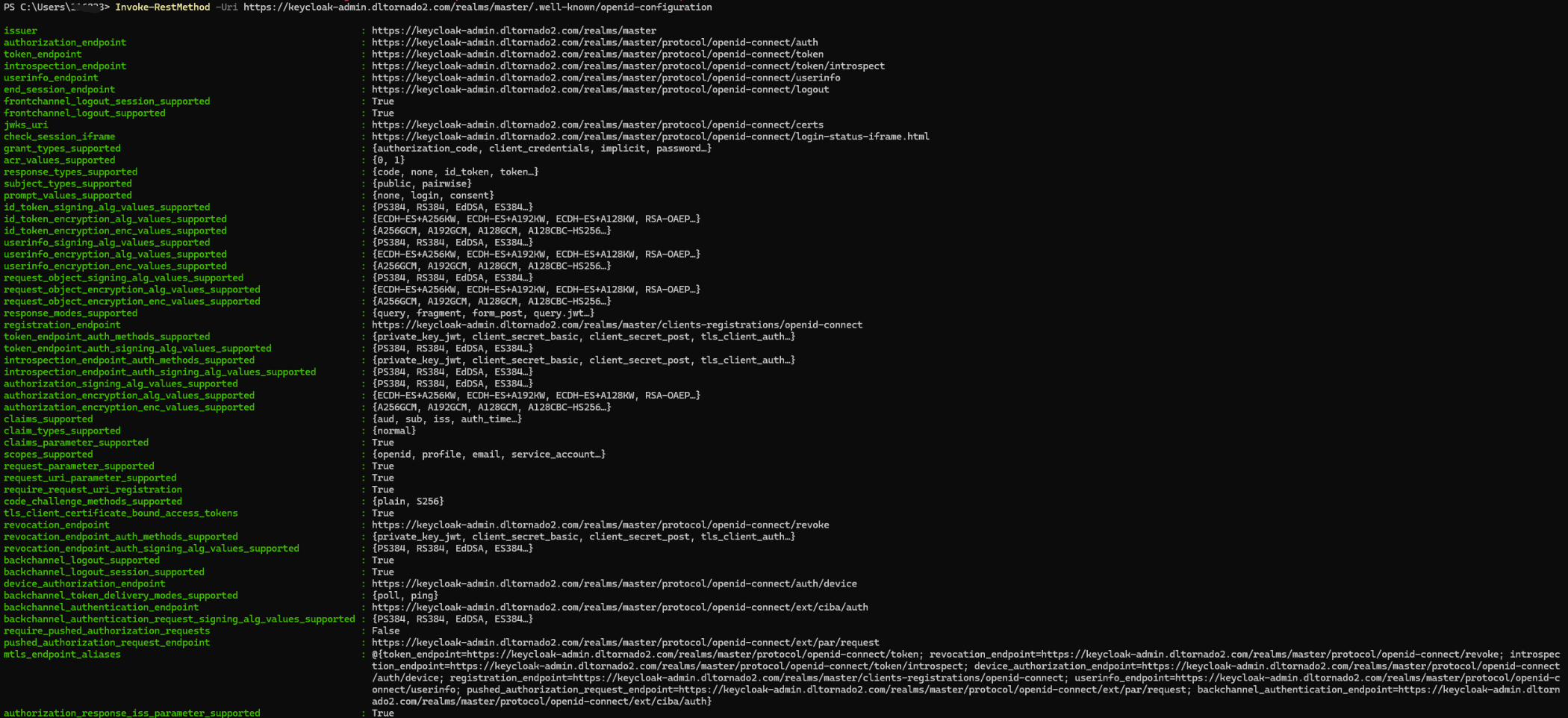
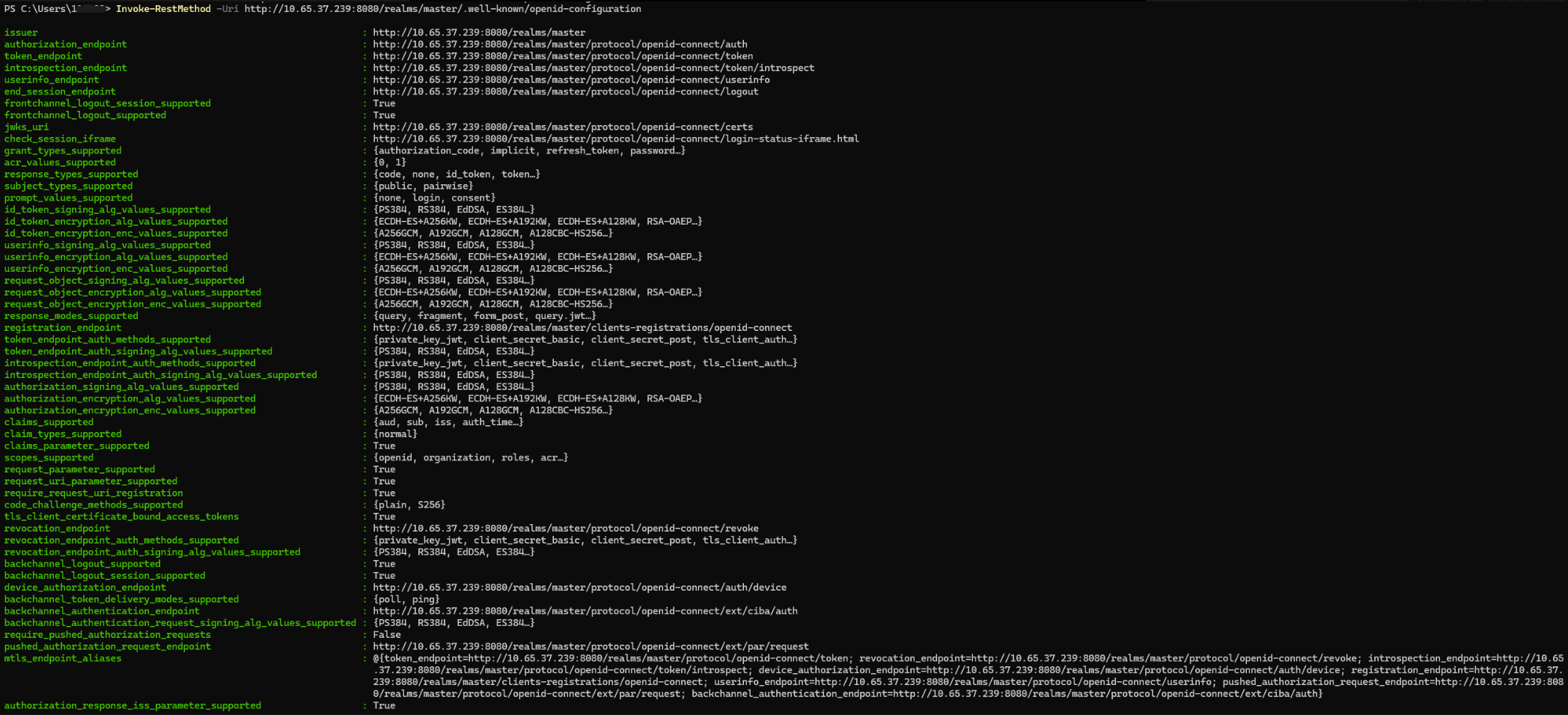
从上面的输出,我们可以知道,对于chainlit,需要配置的环境变量的值为
OAUTH_AUTHORIZATION_URL=http://10.65.37.239:8080/realms/master/protocol/openid-connect/auth
OAUTH_TOKEN_URL=http://10.65.37.239:8080/realms/master/protocol/openid-connect/token
OAUTH_USERINFO_URL=http://10.65.37.239:8080/realms/master/protocol/openid-connect/userinfo

OAUTH_KEYCLOAK_CLIENT_ID=chainlit-client
#下方的环境变量的值可以通过chainlit.exe create-secret这个命令生成
CHAINLIT_AUTH_SECRET="t@k?3LolU1X%3X.PHL@_UDpQ6tf4Cg@wFbjwS^0VOy5iZl2>QP*KEikp:?Y6Pely"

设置环境变量
参考资料:OAuth - Chainlit
请使用.env文件设置环境变量,而不是通过终端命令
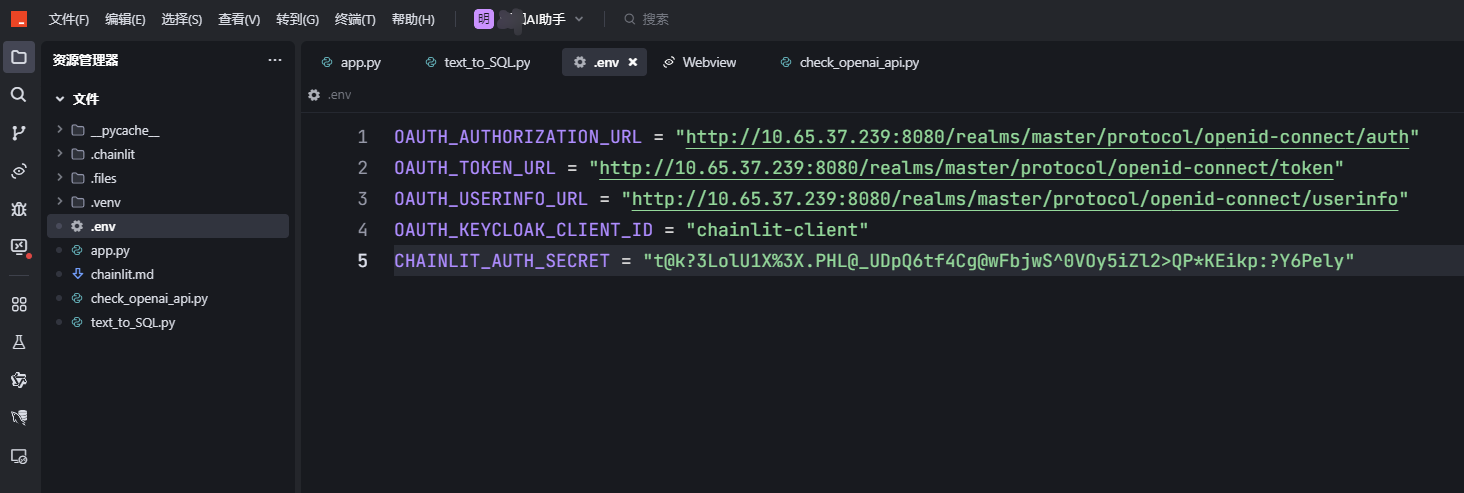
注意:下面第二行,等号两边不能有空格,否则执行程序时会将环境变量设置为none
# OAUTH_KEYCLOAK_BASE_URL = "http://10.65.37.239:8080"
OAUTH_KEYCLOAK_BASE_URL=http://10.65.37.239:8080
OAUTH_KEYCLOAK_REALM = "master"
OAUTH_KEYCLOAK_CLIENT_ID = "chainlit-client"
OAUTH_KEYCLOAK_CLIENT_SECRET = "t@k?3LolU1X%3X.PHL@_UDpQ6tf4Cg@wFbjwS^0VOy5iZl2>QP*KEikp:?Y6Pely"  # 这里需要你填入实际的客户端密钥
OAUTH_KEYCLOAK_NAME = "chainlit-Keycloak"
OAUTH_KEYCLOAK_CLIENT_ID
OAUTH_KEYCLOAK_CLIENT_SECRET
OAUTH_KEYCLOAK_REALM
OAUTH_KEYCLOAK_BASE_URL
OAUTH_KEYCLOAK_NAME
实验时,我发现在输入用户名密码后,页面报错了,如下图:
分析日志后,是因为chainlit向keycloak发送请求时使用的是http而不是https,必须要使用https才行,因此需要对于keycloak配置证书以使用https
后续研究,发现,不是必须要用https,用http也是可以的,出现问题的原因其实是环境变量设置错误,请参考此文:《chainlit身份验证方案oauth2.0及常用社交应用账户集成》

以下是chainlit的部分日志:
 File "d:\tornadofiles\scripts_脚本\github_projects\DreamAI-AI助手\.venv\Lib\site-packages\uvicorn\middleware\proxy_headers.py", line 60, in __call__
    return await self.app(scope, receive, send)
           ^^^^^^^^^^^^^^^^^^^^^^^^^^^^^^^^^^^^
  File "d:\tornadofiles\scripts_脚本\github_projects\DreamAI-AI助手\.venv\Lib\site-packages\fastapi\applications.py", line 1054, in __call__
    await super().__call__(scope, receive, send)
  File "d:\tornadofiles\scripts_脚本\github_projects\DreamAI-AI助手\.venv\Lib\site-packages\starlette\applications.py", line 113, in __call__
    await self.middleware_stack(scope, receive, send)
  File "d:\tornadofiles\scripts_脚本\github_projects\DreamAI-AI助手\.venv\Lib\site-packages\starlette\middleware\errors.py", line 187, in __call__
    raise exc
  File "d:\tornadofiles\scripts_脚本\github_projects\DreamAI-AI助手\.venv\Lib\site-packages\starlette\middleware\errors.py", line 165, in __call__
    await self.app(scope, receive, _send)
  File "d:\tornadofiles\scripts_脚本\github_projects\DreamAI-AI助手\.venv\Lib\site-packages\starlette\middleware\cors.py", line 85, in __call__
    await self.app(scope, receive, send)
  File "d:\tornadofiles\scripts_脚本\github_projects\DreamAI-AI助手\.venv\Lib\site-packages\starlette\middleware\exceptions.py", line 62, in __call__
    await wrap_app_handling_exceptions(self.app, conn)(scope, receive, send)
  File "d:\tornadofiles\scripts_脚本\github_projects\DreamAI-AI助手\.venv\Lib\site-packages\starlette\_exception_handler.py", line 53, in wrapped_app
    raise exc
  File "d:\tornadofiles\scripts_脚本\github_projects\DreamAI-AI助手\.venv\Lib\site-packages\starlette\_exception_handler.py", line 42, in wrapped_app
    await app(scope, receive, sender)
  File "d:\tornadofiles\scripts_脚本\github_projects\DreamAI-AI助手\.venv\Lib\site-packages\starlette\routing.py", line 715, in __call__
    await self.middleware_stack(scope, receive, send)
  File "d:\tornadofiles\scripts_脚本\github_projects\DreamAI-AI助手\.venv\Lib\site-packages\starlette\routing.py", line 735, in app
    await route.handle(scope, receive, send)
  File "d:\tornadofiles\scripts_脚本\github_projects\DreamAI-AI助手\.venv\Lib\site-packages\starlette\routing.py", line 288, in handle
    await self.app(scope, receive, send)
  File "d:\tornadofiles\scripts_脚本\github_projects\DreamAI-AI助手\.venv\Lib\site-packages\starlette\routing.py", line 76, in app
    await wrap_app_handling_exceptions(app, request)(scope, receive, send)
  File "d:\tornadofiles\scripts_脚本\github_projects\DreamAI-AI助手\.venv\Lib\site-packages\starlette\_exception_handler.py", line 53, in wrapped_app
    raise exc
  File "d:\tornadofiles\scripts_脚本\github_projects\DreamAI-AI助手\.venv\Lib\site-packages\starlette\_exception_handler.py", line 42, in wrapped_app
    await app(scope, receive, sender)
  File "d:\tornadofiles\scripts_脚本\github_projects\DreamAI-AI助手\.venv\Lib\site-packages\starlette\routing.py", line 73, in app
    response = await f(request)
               ^^^^^^^^^^^^^^^^
  File "d:\tornadofiles\scripts_脚本\github_projects\DreamAI-AI助手\.venv\Lib\site-packages\fastapi\routing.py", line 301, in app
    raw_response = await run_endpoint_function(
                   ^^^^^^^^^^^^^^^^^^^^^^^^^^^^
    ...<3 lines>...
    )
    ^
  File "d:\tornadofiles\scripts_脚本\github_projects\DreamAI-AI助手\.venv\Lib\site-packages\fastapi\routing.py", line 212, in run_endpoint_function
    return await dependant.call(**values)
           ^^^^^^^^^^^^^^^^^^^^^^^^^^^^^^
  File "d:\tornadofiles\scripts_脚本\github_projects\DreamAI-AI助手\.venv\Lib\site-packages\chainlit\server.py", line 637, in oauth_callback
    token = await provider.get_token(code, url)
            ^^^^^^^^^^^^^^^^^^^^^^^^^^^^^^^^^^^
  File "d:\tornadofiles\scripts_脚本\github_projects\DreamAI-AI助手\.venv\Lib\site-packages\chainlit\oauth_providers.py", line 715, in get_token
    response = await client.post(
               ^^^^^^^^^^^^^^^^^^
    ...<2 lines>...
    )
    ^
  File "d:\tornadofiles\scripts_脚本\github_projects\DreamAI-AI助手\.venv\Lib\site-packages\httpx\_client.py", line 1859, in post
    return await self.request(
           ^^^^^^^^^^^^^^^^^^^
    ...<13 lines>...
    )
    ^
  File "d:\tornadofiles\scripts_脚本\github_projects\DreamAI-AI助手\.venv\Lib\site-packages\httpx\_client.py", line 1540, in request
    return await self.send(request, auth=auth, follow_redirects=follow_redirects)
           ^^^^^^^^^^^^^^^^^^^^^^^^^^^^^^^^^^^^^^^^^^^^^^^^^^^^^^^^^^^^^^^^^^^^^^
  File "d:\tornadofiles\scripts_脚本\github_projects\DreamAI-AI助手\.venv\Lib\site-packages\httpx\_client.py", line 1629, in send
    response = await self._send_handling_auth(
               ^^^^^^^^^^^^^^^^^^^^^^^^^^^^^^^
    ...<4 lines>...
    )
    ^
  File "d:\tornadofiles\scripts_脚本\github_projects\DreamAI-AI助手\.venv\Lib\site-packages\httpx\_client.py", line 1657, in _send_handling_auth
    response = await self._send_handling_redirects(
               ^^^^^^^^^^^^^^^^^^^^^^^^^^^^^^^^^^^^
    ...<3 lines>...
    )
    ^
  File "d:\tornadofiles\scripts_脚本\github_projects\DreamAI-AI助手\.venv\Lib\site-packages\httpx\_client.py", line 1694, in _send_handling_redirects
    response = await self._send_single_request(request)
               ^^^^^^^^^^^^^^^^^^^^^^^^^^^^^^^^^^^^^^^^
  File "d:\tornadofiles\scripts_脚本\github_projects\DreamAI-AI助手\.venv\Lib\site-packages\httpx\_client.py", line 1730, in _send_single_request
    response = await transport.handle_async_request(request)
               ^^^^^^^^^^^^^^^^^^^^^^^^^^^^^^^^^^^^^^^^^^^^^
  File "d:\tornadofiles\scripts_脚本\github_projects\DreamAI-AI助手\.venv\Lib\site-packages\httpx\_transports\default.py", line 393, in handle_async_request
    with map_httpcore_exceptions():
         ~~~~~~~~~~~~~~~~~~~~~~~^^
  File "C:\Program Files\Python313\Lib\contextlib.py", line 162, in __exit__
    self.gen.throw(value)
    ~~~~~~~~~~~~~~^^^^^^^
  File "d:\tornadofiles\scripts_脚本\github_projects\DreamAI-AI助手\.venv\Lib\site-packages\httpx\_transports\default.py", line 118, in map_httpcore_exceptions
    raise mapped_exc(message) from exc
httpx.ReadTimeout
INFO:     192.168.124.11:61808 - "GET /favicon.ico HTTP/1.1" 200 OK
INFO:     192.168.124.11:65425 - "GET / HTTP/1.1" 200 OK
INFO:     192.168.124.11:65425 - "GET /auth/config HTTP/1.1" 200 OK
INFO:     192.168.124.11:65426 - "GET /user HTTP/1.1" 401 Unauthorized
INFO:     192.168.124.11:65429 - "GET /project/translations?language=zh-CN HTTP/1.1" 200 OK
INFO:     192.168.124.11:65429 - "GET /login HTTP/1.1" 200 OK
INFO:     192.168.124.11:65429 - "GET /user HTTP/1.1" 401 Unauthorized
INFO:     192.168.124.11:65426 - "GET /auth/config HTTP/1.1" 200 OK
INFO:     192.168.124.11:65425 - "GET /project/translations?language=zh-CN HTTP/1.1" 200 OK
INFO:     192.168.124.11:65425 - "GET /auth/oauth/chainlit-Keycloak HTTP/1.1" 307 Temporary Redirect
INFO:     192.168.124.11:65487 - "GET /user HTTP/1.1" 401 Unauthorized
2025-03-14 19:43:19 - HTTP Request: POST http://10.65.37.239:8080/realms/master/protocol/openid-connect/token "HTTP/1.1 502 Bad Gateway"
INFO:     192.168.124.11:65425 - "GET /auth/oauth/chainlit-Keycloak/callback?state=cY.Z%3AJl3eKdK%2Fg96248L8ef?lTXrEemD&session_state=fd05d8be-8824-423e-a46a-812dd3153207&iss=http%3A%2F%2F10.65.37.239%3A8080%2Frealms%2Fmaster&code=1e1ad80e-2a61-40e7-8d9a-af4c6b3890e1.fd05d8be-8824-423e-a46a-812dd3153207.5a90b396-a6c7-4708-a12e-b5351668252e HTTP/1.1" 500 Internal Server Error
ERROR:    Exception in ASGI application
Traceback (most recent call last):
  File "d:\tornadofiles\scripts_脚本\github_projects\DreamAI-AI助手\.venv\Lib\site-packages\uvicorn\protocols\http\h11_impl.py", line 403, in run_asgi
    result = await app(  # type: ignore[func-returns-value]
             ^^^^^^^^^^^^^^^^^^^^^^^^^^^^^^^^^^^^^^^^^^^^^^
        self.scope, self.receive, self.send
        ^^^^^^^^^^^^^^^^^^^^^^^^^^^^^^^^^^^
    )
    ^
  File "d:\tornadofiles\scripts_脚本\github_projects\DreamAI-AI助手\.venv\Lib\site-packages\uvicorn\middleware\proxy_headers.py", line 60, in __call__
    return await self.app(scope, receive, send)
           ^^^^^^^^^^^^^^^^^^^^^^^^^^^^^^^^^^^^
  File "d:\tornadofiles\scripts_脚本\github_projects\DreamAI-AI助手\.venv\Lib\site-packages\fastapi\applications.py", line 1054, in __call__
    await super().__call__(scope, receive, send)
  File "d:\tornadofiles\scripts_脚本\github_projects\DreamAI-AI助手\.venv\Lib\site-packages\starlette\applications.py", line 113, in __call__
    await self.middleware_stack(scope, receive, send)
  File "d:\tornadofiles\scripts_脚本\github_projects\DreamAI-AI助手\.venv\Lib\site-packages\starlette\middleware\errors.py", line 187, in __call__
    raise exc
  File "d:\tornadofiles\scripts_脚本\github_projects\DreamAI-AI助手\.venv\Lib\site-packages\starlette\middleware\errors.py", line 165, in __call__
    await self.app(scope, receive, _send)
  File "d:\tornadofiles\scripts_脚本\github_projects\DreamAI-AI助手\.venv\Lib\site-packages\starlette\middleware\cors.py", line 85, in __call__
    await self.app(scope, receive, send)
  File "d:\tornadofiles\scripts_脚本\github_projects\DreamAI-AI助手\.venv\Lib\site-packages\starlette\middleware\exceptions.py", line 62, in __call__
    await wrap_app_handling_exceptions(self.app, conn)(scope, receive, send)
  File "d:\tornadofiles\scripts_脚本\github_projects\DreamAI-AI助手\.venv\Lib\site-packages\starlette\_exception_handler.py", line 53, in wrapped_app
    raise exc
  File "d:\tornadofiles\scripts_脚本\github_projects\DreamAI-AI助手\.venv\Lib\site-packages\starlette\_exception_handler.py", line 42, in wrapped_app
    await app(scope, receive, sender)
  File "d:\tornadofiles\scripts_脚本\github_projects\DreamAI-AI助手\.venv\Lib\site-packages\starlette\routing.py", line 715, in __call__
    await self.middleware_stack(scope, receive, send)
  File "d:\tornadofiles\scripts_脚本\github_projects\DreamAI-AI助手\.venv\Lib\site-packages\starlette\routing.py", line 735, in app
    await route.handle(scope, receive, send)
  File "d:\tornadofiles\scripts_脚本\github_projects\DreamAI-AI助手\.venv\Lib\site-packages\starlette\routing.py", line 288, in handle
    await self.app(scope, receive, send)
  File "d:\tornadofiles\scripts_脚本\github_projects\DreamAI-AI助手\.venv\Lib\site-packages\starlette\routing.py", line 76, in app
    await wrap_app_handling_exceptions(app, request)(scope, receive, send)
  File "d:\tornadofiles\scripts_脚本\github_projects\DreamAI-AI助手\.venv\Lib\site-packages\starlette\_exception_handler.py", line 53, in wrapped_app
    raise exc
  File "d:\tornadofiles\scripts_脚本\github_projects\DreamAI-AI助手\.venv\Lib\site-packages\starlette\_exception_handler.py", line 42, in wrapped_app
    await app(scope, receive, sender)
  File "d:\tornadofiles\scripts_脚本\github_projects\DreamAI-AI助手\.venv\Lib\site-packages\starlette\routing.py", line 73, in app
    response = await f(request)
               ^^^^^^^^^^^^^^^^
  File "d:\tornadofiles\scripts_脚本\github_projects\DreamAI-AI助手\.venv\Lib\site-packages\fastapi\routing.py", line 301, in app
    raw_response = await run_endpoint_function(
                   ^^^^^^^^^^^^^^^^^^^^^^^^^^^^
    ...<3 lines>...
    )
    ^
  File "d:\tornadofiles\scripts_脚本\github_projects\DreamAI-AI助手\.venv\Lib\site-packages\fastapi\routing.py", line 212, in run_endpoint_function
    return await dependant.call(**values)
           ^^^^^^^^^^^^^^^^^^^^^^^^^^^^^^
  File "d:\tornadofiles\scripts_脚本\github_projects\DreamAI-AI助手\.venv\Lib\site-packages\chainlit\server.py", line 637, in oauth_callback
    token = await provider.get_token(code, url)
            ^^^^^^^^^^^^^^^^^^^^^^^^^^^^^^^^^^^
  File "d:\tornadofiles\scripts_脚本\github_projects\DreamAI-AI助手\.venv\Lib\site-packages\chainlit\oauth_providers.py", line 719, in get_token
    response.raise_for_status()
    ~~~~~~~~~~~~~~~~~~~~~~~~~^^
  File "d:\tornadofiles\scripts_脚本\github_projects\DreamAI-AI助手\.venv\Lib\site-packages\httpx\_models.py", line 829, in raise_for_status
    raise HTTPStatusError(message, request=request, response=self)
httpx.HTTPStatusError: Server error '502 Bad Gateway' for url 'http://10.65.37.239:8080/realms/master/protocol/openid-connect/token'
For more information check: https://developer.mozilla.org/en-US/docs/Web/HTTP/Status/502
下面是keycloak中出现的日志:
Non-secure context detected; cookies are not secured
对接企业LDAP
将keycloak与LDAP集成后,用户就可以直接通过企业内部的域账号登录应用了。
详细步骤请参考此文:《chainlit身份验证方案oauth2.0及常用社交应用账户集成》
keycloak故障诊断
internal server error
用浏览器访问,登录账户后,提示“internal server error”,chainlit的日志如下,其中关键是“httpx.ConnectError: [SSL: CERTIFICATE_VERIFY_FAILED] certificate verify failed: unable to get local issuer certificate”
这说明证书验证出现了问题,无法找到本地的root ca
chainlit.exe run .\text_to_SQL.py -d --host 192.168.124.11
2025-06-09 15:01:05 - Loaded .env file
https://keycloak-admin.dltornado2.com
master
chainlit-client
S=l@E.9ONQ~66XggeZZdhYn.ti=3%:kM5U7hGlH1y=T4gK1IoFBZgS@1metLI_T~
chainlit-Keycloak
INFO: Started server process [4380]
INFO: Waiting for application startup.
2025-06-09 15:01:08 - Your app is available at http://192.168.124.11:8000
INFO: Application startup complete.
INFO: Uvicorn running on http://192.168.124.11:8000 (Press CTRL+C to quit)
INFO: 192.168.124.11:63143 - "GET / HTTP/1.1" 200 OK
INFO: 192.168.124.11:63143 - "GET /user HTTP/1.1" 401 Unauthorized
INFO: 192.168.124.11:63144 - "GET /auth/config HTTP/1.1" 200 OK
INFO: 192.168.124.11:63161 - "GET /project/translations?language=zh-CN& HTTP/1.1" 200 OK
INFO: 192.168.124.11:63161 - "GET /login HTTP/1.1" 200 OK
INFO: 192.168.124.11:63161 - "GET /auth/config HTTP/1.1" 200 OK
INFO: 192.168.124.11:63144 - "GET /user HTTP/1.1" 401 Unauthorized
INFO: 192.168.124.11:63143 - "GET /project/translations?language=zh-CN& HTTP/1.1" 200 OK
INFO: 192.168.124.11:63251 - "GET /user HTTP/1.1" 401 Unauthorized
INFO: 192.168.124.11:63273 - "GET /user HTTP/1.1" 401 Unauthorized
INFO: 192.168.124.11:63274 - "GET /project/translations?language=zh-CN& HTTP/1.1" 200 OK
INFO: 192.168.124.11:63274 - "GET /auth/oauth/chainlit-Keycloak HTTP/1.1" 307 Temporary Redirect
INFO: 192.168.124.11:63274 - "GET /auth/oauth/chainlit-Keycloak/callback?state=h%25%2FcOw_eex9gdLW?7.agzb8?tVia4%25_%24&session_state=cf707a93-9532-4a49-adfc-f7650aa7cbaf&iss=https%3A%2F%2Fkeycloak-admin.dltornado2.com%2Frealms%2Fmaster&code=b0360efd-30fd-4d0b-a3fa-3a3fc4db9ede.cf707a93-9532-4a49-adfc-f7650aa7cbaf.6cc6b113-468a-4426-852a-b0cf586ed621 HTTP/1.1" 500 Inter 最低0.47元/天 解锁文章






 扫一扫
扫一扫


 被折叠的 条评论
为什么被折叠?
被折叠的 条评论
为什么被折叠?
 到【灌水乐园】发言





