


这篇博文主要用于新手学习Spring Boot,同时也记录自己学习的过程…
文章内容主要来源于易百教程
这是一个Spring Boot Web应用示例,使用嵌入式Tomcat + Thymeleaf模板引擎,并将其作为可执行JAR文件。
使用的相关技术:
- Spring Boot 1.4.2.RELEASE
- Spring 4.3.4.RELEASE
- Thymeleaf 2.1.5.RELEASE
- Tomcat Embed 8.5.6
- Maven 3
- Java 8
1. 项目目录
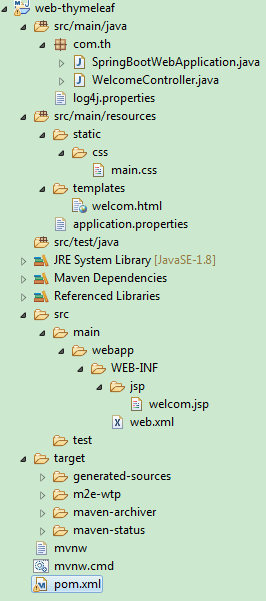
手动创建以下文件夹目录结构:
2. 项目依赖
声明 spring-boot-starter-thymeleaf以获得开发Spring + Thymeleaf Web应用程序所需的任何程序类库。
参考如下 pom.xml 文件 -
<?xml version="1.0" encoding="UTF-8"?>
<project xmlns="http://maven.apache.org/POM/4.0.0"
    xmlns:xsi="http://www.w3.org/2001/XMLSchema-instance"
    xsi:schemaLocation="http://maven.apache.org/POM/4.0.0
    http://maven.apache.org/xsd/maven-4.0.0.xsd">
    <modelVersion>4.0.0</modelVersion>

    <artifactId>web-thymeleaf</artifactId>
    <packaging>jar</packaging>
    <name>Spring Boot Web Thymeleaf 示例</name>
    <description>Spring Boot Web Thymeleaf 示例描述</description>
    <url>http://www.yiibai.com</url>
    <version>1.0</version>

    <parent>
        <groupId>org.springframework.boot</groupId>
        <artifactId>spring-boot-starter-parent</artifactId>
        <version>1.4.2.RELEASE</version>
    </parent>

    <properties>
        <java.version>1.8</java.version>
    </properties>

    <dependencies>

        <dependency>
            <groupId>org.springframework.boot</groupId>
            <artifactId>spring-boot-starter-thymeleaf</artifactId>
        </dependency>

        <!-- hot swapping, disable cache for template, enable live reload -->
        <dependency>
            <groupId>org.springframework.boot</groupId>
            <artifactId>spring-boot-devtools</artifactId>
            <optional>true</optional>
        </dependency>

        <!-- Optional, for bootstrap -->
        <dependency>
            <groupId>org.webjars</groupId>
            <artifactId>bootstrap</artifactId>
            <version>3.3.7</version>
        </dependency>

    </dependencies>

    <build>
        <plugins>
            <!-- Package as an executable jar/war -->
            <plugin>
                <groupId>org.springframework.boot</groupId>
                <artifactId>spring-boot-maven-plugin</artifactId>
            </plugin>
        </plugins>
    </build>
</project>
显示项目依赖关系:
提示:spring-boot-devtools
这个spring-boot-devtools有助于禁用缓存并启用热插拔,以便开发人员总是看到最后的更改。有利于发展。阅读这篇-Spring Boot –开发工具。尝试修改Thymeleaf模板或属性文件,刷新浏览器以查看更改立即生效。
3. Spring Boot
使用@SpringBootApplication进行注释。运行此类来启动Spring Boot Web应用程序。
SpringBootWebApplication.java
package com.th;

import org.springframework.boot.SpringApplication;
import org.springframework.boot.autoconfigure.SpringBootApplication;


@SpringBootApplication
public class SpringBootWebApplication{

    public static void main(String[] args) {
        SpringApplication.run(SpringBootWebApplication.class, args);
    }
}
一个简单的Spring控制器类:WelcomeController.java代码如下-
package com.th;

import java.util.Map;

import org.springframework.beans.factory.annotation.Value;
import org.springframework.stereotype.Controller;
import org.springframework.web.bind.annotation.RequestMapping;

@Controller
public class WelcomeController {

    @Value("${welcome.message:test}")
    private String message = "Hello World";

    @RequestMapping("/")
    public String welcome(Map<String, Object> model) {
        model.put("message", this.message);
        return "welcom";
    }
}
4. Thymeleaf +资源+静态文件
对于Thymeleaf模板文件,放入 src/main/resources/templates/ 目录下, src/main/resources/templates/welcome.html 文件代码如下 -
<!DOCTYPE HTML>
<html xmlns:th="http://www.thymeleaf.org">
<head>
<title>Spring Boot Thymeleaf Hello World示例</title>
<meta http-equiv="Content-Type" content="text/html; charset=UTF-8" />

<link rel="stylesheet" type="text/css"
    href="webjars/bootstrap/3.3.7/css/bootstrap.min.css" />

<link rel="stylesheet" th:href="@{/css/main.css}"
    href="../../css/main.css" />

</head>
<body>

    <nav class="navbar navbar-inverse">
        <div class="container">
            <div class="navbar-header">
                <a class="navbar-brand" href="#">Spring Boot</a>
            </div>
            <div id="navbar" class="collapse navbar-collapse">
                <ul class="nav navbar-nav">
                    <li class="active"><a href="#">首页</a></li>
                    <li><a href="#about">关于</a></li>
                </ul>
            </div>
        </div>
    </nav>

    <div class="container">

        <div class="starter-template">
            <h1>Spring Boot Web Thymeleaf示例</h1>
            <h2>
                <span th:text="'Message: ' + ${message}"></span>
            </h2>
        </div>

    </div>
    <!-- /.container -->

    <script type="text/javascript" src="webjars/bootstrap/3.3.7/js/bootstrap.min.js"></script>
</body>
</html>
对于静态文件,如CSS或Javascript,将它们放入 /src/main/resources/static/ 目录, /src/main/resources/static/css/main.css文件代码如下 -
h1{
    font-size: 20pt;
}
h2{
    font-size: 16pt;
}
对于属性文件,放入 /src/main/resources/ 目录中,
/src/main/resources/application.properties 文件中的代码内容如下 -
welcome.message: Hello, Spring Boot注意:阅读此Spring Boot服务静态内容以了解资源映射。
5. 运行演示
启动Spring Boot Web应用程序,使用Maven命令:mvn spring-boot:run,运行结果输出如下-
D:\workspace\web-thymeleaf>mvn spring-boot:run
[INFO] Scanning for projects...
[INFO]
[INFO] ------------------------------------------------------------------------
[INFO] Building Spring Boot Web Thymeleaf ?? 1.0
[INFO] ------------------------------------------------------------------------
[INFO]
[INFO] >>> spring-boot-maven-plugin:1.4.2.RELEASE:run (default-cli) > test-compile @ web-t
hymeleaf >>>
[INFO]
[INFO] --- maven-resources-plugin:2.6:resources (default-resources) @ web-thymeleaf ---
[INFO] Using 'UTF-8' encoding to copy filtered resources.
[INFO] Copying 1 resource
[INFO] Copying 2 resources
[INFO]
[INFO] --- maven-compiler-plugin:3.1:compile (default-compile) @ web-thymeleaf ---
[INFO] Nothing to compile - all classes are up to date
[INFO]
[INFO] --- maven-resources-plugin:2.6:testResources (default-testResources) @ web-thymelea
f ---
[INFO] Using 'UTF-8' encoding to copy filtered resources.
[INFO] skip non existing resourceDirectory D:\workspace\web-thymeleaf\src\test\resources
[INFO]
[INFO] --- maven-compiler-plugin:3.1:testCompile (default-testCompile) @ web-thymeleaf ---

[INFO] Nothing to compile - all classes are up to date
[INFO]
[INFO] <<< spring-boot-maven-plugin:1.4.2.RELEASE:run (default-cli) < test-compile @ web-t
hymeleaf <<<
[INFO]
[INFO]
[INFO] --- spring-boot-maven-plugin:1.4.2.RELEASE:run (default-cli) @ web-thymeleaf ---
[INFO] Attaching agents: []

  .   ____          _            __ _ _
 /\\ / ___'_ __ _ _(_)_ __  __ _ \ \ \ \
( ( )\___ | '_ | '_| | '_ \/ _` | \ \ \ \
 \\/  ___)| |_)| | | | | || (_| |  ) ) ) )
  '  |____| .__|_| |_|_| |_\__, | / / / /
 =========|_|==============|___/=/_/_/_/
 :: Spring Boot ::        (v1.4.2.RELEASE)

2018-08-08 11:35:18.219  INFO 11240 --- [  restartedMain] com.th.SpringBootWebApplication
         : Starting SpringBootWebApplication on SZ10PD0703 with PID 11240 (D:\workspace\we
b-thymeleaf\target\classes started by nicoletang in D:\workspace\web-thymeleaf)
2018-08-08 11:35:18.235  INFO 11240 --- [  restartedMain] com.th.SpringBootWebApplication
         : No active profile set, falling back to default profiles: default
2018-08-08 11:35:18.703  INFO 11240 --- [  restartedMain] ationConfigEmbeddedWebApplicatio
nContext : Refreshing org.springframework.boot.context.embedded.AnnotationConfigEmbeddedWe
bApplicationContext@5e9a1d78: startup date [Wed Aug 08 11:35:18 CST 2018]; root of context
 hierarchy
2018-08-08 11:35:20.668  INFO 11240 --- [  restartedMain] s.b.c.e.t.TomcatEmbeddedServletC
ontainer : Tomcat initialized with port(s): 8080 (http)
2018-08-08 11:35:20.684  INFO 11240 --- [  restartedMain] o.apache.catalina.core.StandardS
ervice   : Starting service Tomcat
2018-08-08 11:35:20.684  INFO 11240 --- [  restartedMain] org.apache.catalina.core.Standar
dEngine  : Starting Servlet Engine: Apache Tomcat/8.5.6
2018-08-08 11:35:21.027  INFO 11240 --- [ost-startStop-1] o.a.c.c.C.[Tomcat].[localhost].[
/]       : Initializing Spring embedded WebApplicationContext
2018-08-08 11:35:21.042  INFO 11240 --- [ost-startStop-1] o.s.web.context.ContextLoader
         : Root WebApplicationContext: initialization completed in 2339 ms
2018-08-08 11:35:21.245  INFO 11240 --- [ost-startStop-1] o.s.b.w.servlet.ServletRegistrat
ionBean  : Mapping servlet: 'dispatcherServlet' to [/]
2018-08-08 11:35:21.245  INFO 11240 --- [ost-startStop-1] o.s.b.w.servlet.FilterRegistrati
onBean   : Mapping filter: 'characterEncodingFilter' to: [/*]
2018-08-08 11:35:21.245  INFO 11240 --- [ost-startStop-1] o.s.b.w.servlet.FilterRegistrati
onBean   : Mapping filter: 'hiddenHttpMethodFilter' to: [/*]
2018-08-08 11:35:21.245  INFO 11240 --- [ost-startStop-1] o.s.b.w.servlet.FilterRegistrati
onBean   : Mapping filter: 'httpPutFormContentFilter' to: [/*]
2018-08-08 11:35:21.245  INFO 11240 --- [ost-startStop-1] o.s.b.w.servlet.FilterRegistrati
onBean   : Mapping filter: 'requestContextFilter' to: [/*]
2018-08-08 11:35:21.573  INFO 11240 --- [  restartedMain] s.w.s.m.m.a.RequestMappingHandle
rAdapter : Looking for @ControllerAdvice: org.springframework.boot.context.embedded.Annota
tionConfigEmbeddedWebApplicationContext@5e9a1d78: startup date [Wed Aug 08 11:35:18 CST 20
18]; root of context hierarchy
2018-08-08 11:35:21.651  INFO 11240 --- [  restartedMain] s.w.s.m.m.a.RequestMappingHandle
rMapping : Mapped "{[/]}" onto public java.lang.String com.th.WelcomeController.welcome(ja
va.util.Map<java.lang.String, java.lang.Object>)
2018-08-08 11:35:21.651  INFO 11240 --- [  restartedMain] s.w.s.m.m.a.RequestMappingHandle
rMapping : Mapped "{[/error]}" onto public org.springframework.http.ResponseEntity<java.ut
il.Map<java.lang.String, java.lang.Object>> org.springframework.boot.autoconfigure.web.Bas
icErrorController.error(javax.servlet.http.HttpServletRequest)
2018-08-08 11:35:21.651  INFO 11240 --- [  restartedMain] s.w.s.m.m.a.RequestMappingHandle
rMapping : Mapped "{[/error],produces=[text/html]}" onto public org.springframework.web.se
rvlet.ModelAndView org.springframework.boot.autoconfigure.web.BasicErrorController.errorHt
ml(javax.servlet.http.HttpServletRequest,javax.servlet.http.HttpServletResponse)
2018-08-08 11:35:21.697  INFO 11240 --- [  restartedMain] o.s.w.s.handler.SimpleUrlHandler
Mapping  : Mapped URL path [/webjars/**] onto handler of type [class org.springframework.w
eb.servlet.resource.ResourceHttpRequestHandler]
2018-08-08 11:35:21.697  INFO 11240 --- [  restartedMain] o.s.w.s.handler.SimpleUrlHandler
Mapping  : Mapped URL path [/**] onto handler of type [class org.springframework.web.servl
et.resource.ResourceHttpRequestHandler]
2018-08-08 11:35:21.760  INFO 11240 --- [  restartedMain] o.s.w.s.handler.SimpleUrlHandler
Mapping  : Mapped URL path [/**/favicon.ico] onto handler of type [class org.springframewo
rk.web.servlet.resource.ResourceHttpRequestHandler]
2018-08-08 11:35:22.337  INFO 11240 --- [  restartedMain] o.s.b.d.a.OptionalLiveReloadServ
er       : LiveReload server is running on port 35729
2018-08-08 11:35:22.415  INFO 11240 --- [  restartedMain] o.s.j.e.a.AnnotationMBeanExporte
r        : Registering beans for JMX exposure on startup
2018-08-08 11:35:22.586  INFO 11240 --- [  restartedMain] s.b.c.e.t.TomcatEmbeddedServletC
ontainer : Tomcat started on port(s): 8080 (http)
2018-08-08 11:35:22.602  INFO 11240 --- [  restartedMain] com.th.SpringBootWebApplication
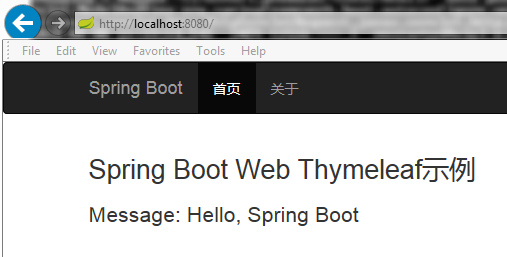
: Started SpringBootWebApplication in 4.866 seconds (JVM running for 5.591)运行成功后,打开浏览器访问:http://localhost:8080 ,没有问题应该会看到以下输出页面 -
6. 构建可执行JAR
打包项目以创建可执行的JAR文件。使用Maven命令:mvn clean package,
D:\workspace\web-thymeleaf>mvn clean package
[INFO] Scanning for projects...
[INFO]
[INFO] ------------------------------------------------------------------------
[INFO] Building Spring Boot Web Thymeleaf ?? 1.0
[INFO] ------------------------------------------------------------------------
[INFO]
[INFO] --- maven-clean-plugin:2.6.1:clean (default-clean) @ web-thymeleaf ---
[INFO] Deleting D:\workspace\web-thymeleaf\target
[INFO]
[INFO] --- maven-resources-plugin:2.6:resources (default-resources) @ web-thymeleaf ---
[INFO] Using 'UTF-8' encoding to copy filtered resources.
[INFO] Copying 1 resource
[INFO] Copying 2 resources
[INFO]
[INFO] --- maven-compiler-plugin:3.1:compile (default-compile) @ web-thymeleaf ---
[INFO] Changes detected - recompiling the module!
[INFO] Compiling 2 source files to D:\workspace\web-thymeleaf\target\classes
[INFO]
[INFO] --- maven-resources-plugin:2.6:testResources (default-testResources) @ web-thymelea
f ---
[INFO] Using 'UTF-8' encoding to copy filtered resources.
[INFO] skip non existing resourceDirectory D:\workspace\web-thymeleaf\src\test\resources
[INFO]
[INFO] --- maven-compiler-plugin:3.1:testCompile (default-testCompile) @ web-thymeleaf ---

[INFO] Nothing to compile - all classes are up to date
[INFO]
[INFO] --- maven-surefire-plugin:2.18.1:test (default-test) @ web-thymeleaf ---
[INFO] No tests to run.
[INFO]
[INFO] --- maven-jar-plugin:2.6:jar (default-jar) @ web-thymeleaf ---
[INFO] Building jar: D:\workspace\web-thymeleaf\target\web-thymeleaf-1.0.jar
[INFO]
[INFO] --- spring-boot-maven-plugin:1.4.2.RELEASE:repackage (default) @ web-thymeleaf ---
[INFO] ------------------------------------------------------------------------
[INFO] BUILD SUCCESS
[INFO] ------------------------------------------------------------------------
[INFO] Total time: 5.674 s
[INFO] Finished at: 2018-08-08T14:11:06+08:00
[INFO] Final Memory: 29M/212M
[INFO] ------------------------------------------------------------------------

D:\workspace\web-thymeleaf>
然后再执行
D:\workspace\web-thymeleaf>java -jar target/web-thymeleaf-1.0.jar

  .   ____          _            __ _ _
 /\\ / ___'_ __ _ _(_)_ __  __ _ \ \ \ \
( ( )\___ | '_ | '_| | '_ \/ _` | \ \ \ \
 \\/  ___)| |_)| | | | | || (_| |  ) ) ) )
  '  |____| .__|_| |_|_| |_\__, | / / / /
 =========|_|==============|___/=/_/_/_/
 :: Spring Boot ::        (v1.4.2.RELEASE)

2018-08-08 14:11:36.418  INFO 7768 --- [           main] com.th.SpringBootWebApplication
        : Starting SpringBootWebApplication v1.0 on SZ10PD0703 with PID 7768 (D:\workspace
\web-thymeleaf\target\web-thymeleaf-1.0.jar started by nicoletang in D:\workspace\web-thym
eleaf)
2018-08-08 14:11:36.434  INFO 7768 --- [           main] com.th.SpringBootWebApplication
        : No active profile set, falling back to default profiles: default
2018-08-08 14:11:37.167  INFO 7768 --- [           main] ationConfigEmbeddedWebApplication
Context : Refreshing org.springframework.boot.context.embedded.AnnotationConfigEmbeddedWeb
ApplicationContext@2328c243: startup date [Wed Aug 08 14:11:37 CST 2018]; root of context
hierarchy
2018-08-08 14:11:39.944  INFO 7768 --- [           main] s.b.c.e.t.TomcatEmbeddedServletCo
ntainer : Tomcat initialized with port(s): 8080 (http)
2018-08-08 14:11:39.975  INFO 7768 --- [           main] o.apache.catalina.core.StandardSe
rvice   : Starting service Tomcat
2018-08-08 14:11:39.975  INFO 7768 --- [           main] org.apache.catalina.core.Standard
Engine  : Starting Servlet Engine: Apache Tomcat/8.5.6
2018-08-08 14:11:40.241  INFO 7768 --- [ost-startStop-1] o.a.c.c.C.[Tomcat].[localhost].[/
]       : Initializing Spring embedded WebApplicationContext
2018-08-08 14:11:40.241  INFO 7768 --- [ost-startStop-1] o.s.web.context.ContextLoader
        : Root WebApplicationContext: initialization completed in 3074 ms
2018-08-08 14:11:40.521  INFO 7768 --- [ost-startStop-1] o.s.b.w.servlet.ServletRegistrati
onBean  : Mapping servlet: 'dispatcherServlet' to [/]
2018-08-08 14:11:40.537  INFO 7768 --- [ost-startStop-1] o.s.b.w.servlet.FilterRegistratio
nBean   : Mapping filter: 'characterEncodingFilter' to: [/*]
2018-08-08 14:11:40.537  INFO 7768 --- [ost-startStop-1] o.s.b.w.servlet.FilterRegistratio
nBean   : Mapping filter: 'hiddenHttpMethodFilter' to: [/*]
2018-08-08 14:11:40.537  INFO 7768 --- [ost-startStop-1] o.s.b.w.servlet.FilterRegistratio
nBean   : Mapping filter: 'httpPutFormContentFilter' to: [/*]
2018-08-08 14:11:40.537  INFO 7768 --- [ost-startStop-1] o.s.b.w.servlet.FilterRegistratio
nBean   : Mapping filter: 'requestContextFilter' to: [/*]
2018-08-08 14:11:40.990  INFO 7768 --- [           main] s.w.s.m.m.a.RequestMappingHandler
Adapter : Looking for @ControllerAdvice: org.springframework.boot.context.embedded.Annotat
ionConfigEmbeddedWebApplicationContext@2328c243: startup date [Wed Aug 08 14:11:37 CST 201
8]; root of context hierarchy
2018-08-08 14:11:41.130  INFO 7768 --- [           main] s.w.s.m.m.a.RequestMappingHandler
Mapping : Mapped "{[/]}" onto public java.lang.String com.th.WelcomeController.welcome(jav
a.util.Map<java.lang.String, java.lang.Object>)
2018-08-08 14:11:41.130  INFO 7768 --- [           main] s.w.s.m.m.a.RequestMappingHandler
Mapping : Mapped "{[/error]}" onto public org.springframework.http.ResponseEntity<java.uti
l.Map<java.lang.String, java.lang.Object>> org.springframework.boot.autoconfigure.web.Basi
cErrorController.error(javax.servlet.http.HttpServletRequest)
2018-08-08 14:11:41.130  INFO 7768 --- [           main] s.w.s.m.m.a.RequestMappingHandler
Mapping : Mapped "{[/error],produces=[text/html]}" onto public org.springframework.web.ser
vlet.ModelAndView org.springframework.boot.autoconfigure.web.BasicErrorController.errorHtm
l(javax.servlet.http.HttpServletRequest,javax.servlet.http.HttpServletResponse)
2018-08-08 14:11:41.177  INFO 7768 --- [           main] o.s.w.s.handler.SimpleUrlHandlerM
apping  : Mapped URL path [/webjars/**] onto handler of type [class org.springframework.we
b.servlet.resource.ResourceHttpRequestHandler]
2018-08-08 14:11:41.177  INFO 7768 --- [           main] o.s.w.s.handler.SimpleUrlHandlerM
apping  : Mapped URL path [/**] onto handler of type [class org.springframework.web.servle
t.resource.ResourceHttpRequestHandler]
2018-08-08 14:11:41.239  INFO 7768 --- [           main] o.s.w.s.handler.SimpleUrlHandlerM
apping  : Mapped URL path [/**/favicon.ico] onto handler of type [class org.springframewor
k.web.servlet.resource.ResourceHttpRequestHandler]
2018-08-08 14:11:41.957  INFO 7768 --- [           main] o.s.j.e.a.AnnotationMBeanExporter
        : Registering beans for JMX exposure on startup
2018-08-08 14:11:42.222  INFO 7768 --- [           main] s.b.c.e.t.TomcatEmbeddedServletCo
ntainer : Tomcat started on port(s): 8080 (http)
2018-08-08 14:11:42.238  INFO 7768 --- [           main] com.th.SpringBootWebApplication
        : Started SpringBootWebApplication in 6.88 seconds (JVM running for 7.752)
运行成功后,打浏览器再次访问: http://localhost:8080 ,没有问题应该会看到以下输出页面
相关文章:
- Spring Boot教程(一)
- Spring Boot是什么?(二)
- Spring Boot主要目标(三)
- 新项目为什么需要Spring Boot?(四)
- Spring Boot核心和限制(五)
- Spring Boot优点和缺点(六)
- Spring Boot入门(七)
- Spring Boot安装(八)
- Spring Boot应用程序开发入门(九)
- Spring Boot JSP应用实例(十)
- Spring Boot将WAR文件部署到Tomcat(十一)
- Spring Boot非web应用程序实例(十三)
- Spring Boot @ConfigurationProperties实例(十四)
- Spring Boot SLF4J日志实例(十五)
- Spring Boot Ajax实例(十六)

 5278


 扫一扫


 被折叠的 条评论
为什么被折叠?
 到【灌水乐园】发言


