



 本文介绍了控件常用的属性,包括BrowsableAttribute、CategoryAttribute等,并通过一个自定义控件示例展示了这些属性的应用。
转自:http://www.cnblogs.com/bobbychencj/archive/2010/11/30/1892105.html
今天我们主要来介绍一下控件的Attribute属性,
下表列出了常用于属性 (Property) 和事件的属性 (Attribute)。
| 属性 (Attribute) | 应用于 | 说明 |
| BrowsableAttribute | 属性 (Property) 和事件 | 指定属性 (Property) 或事件是否应该显示在属性 (Property) 浏览器中。 |
| CategoryAttribute | 属性 (Property) 和事件 | 指定类别的名称,在该类别中将对属性 (Property) 或事件进行分组。当使用了类别时,组件属性 (Property) 和事件可以按逻辑分组显示在属性 (Property) 浏览器中。 |
| DescriptionAttribute | 属性 (Property) 和事件 | 定义一小块文本,该文本将在用户选择属性 (Property) 或事件时显示在属性 (Property) 浏览器底部。 |
| BindableAttribute | 属性 | 指定是否要绑定到该属性 (Property)。 |
| DefaultPropertyAttribute | 属性 (将此属性 (Attribute) 插入类声明前。) | 指定组件的默认属性 (Property)。当用户单击控件时,将在属性 (Property) 浏览器中选定该属性 (Property)。 |
| DefaultValueAttribute | 属性 | 为属性 (Property) 设置一个简单的默认值。 |
| EditorAttribute | 属性 | 指定在可视设计器中编辑(更改)属性 (Property) 时要使用的编辑器。 |
| LocalizableAttribute | 属性 | 指定属性 (Property) 可本地化。当用户要本地化某个窗体时,任何具有该属性 (Attribute) 的属性 (Property) 都将自动永久驻留到资源文件中。 |
| DesignerSerializationVisibilityAttribute | 属性 | 指定显示在属性 (Property) 浏览器中的属性 (Property) 是否应该(以及如何)永久驻留在代码中。 |
| TypeConverterAttribute | 属性 | 指定将属性 (Property) 的类型转换为另一个数据类型时要使用的类型转换器。 |
| DefaultEventAttribute | 事件 (将此属性 (Attribute) 插入类声明前。) | 指定组件的默认事件。这是当用户单击组件时在属性 (Property) 浏览器中选定的事件。 |
除非另外说明,属性 (Property) 和事件的属性 (Attribute) 在代码中紧接在属性 (Property) 或事件声明的前面。
下面是一个自定义控件使用属性的示例,其中使用了自定义的属性:
using System;
using System.ComponentModel;
using System.Windows.Forms;

namespace WinFormControlLibrary
{
    public partial class SecondControl自定义控件的属性 :TextBox
    {
        #region Field
        /// <summary>
        /// Id
        /// </summary>
        private Int32 _id = 0;
        /// <summary>
        /// 年龄
        /// </summary>
        private Int32 _age = 18;
        /// <summary>
        /// 名
        /// </summary>
        private String _firstName = String.Empty;
        /// <summary>
        /// 姓
        /// </summary>
        private String _lastName = String.Empty;


        [
        BrowsableAttribute(true),
        BindableAttribute(false),
        CategoryAttribute("自定义项目"),
        DescriptionAttribute("Id")
        ]
        public Int32 Id
        {
            get { return _id; }
        }

        // BrowsableAttribute(true)        是否应该在属性浏览器中显示出来
        // BindableAttribute(false)        是否要绑定到该属性
        // CategoryAttribute("自定义项目") 在属性浏览器中按“自定义项目”类别显示
        // DescriptionAttribute("年龄,默认为18岁") 对该属性的描述
        // DefaultValueAttribute("18")              DefaultValueAttribute这个特性可以帮助IDE减少Code生成的工作,
        //                                          如果设计时某个标示有DefaultValueAttribute的Property的值和_field设置的值一样,IDE将不会为这个属性生成代码;
        //                                          否则,IDE会自动在InitializeComponent中添加的代码
        [
        BrowsableAttribute(true),
        BindableAttribute(false),
        CategoryAttribute("自定义项目"),
        DescriptionAttribute("年龄,默认为18岁"),
        DefaultValueAttribute(18),
        ]
        public Int32 Age
        {
            get { return _age; }
            set { _age = value; }
        }


        [
        BrowsableAttribute(true),
        BindableAttribute(false),
        CategoryAttribute("自定义项目"),
        DescriptionAttribute("名")
        ]
        public String FirstName
        {
            get { return _firstName; }
            set { _firstName = value; }
        }

        [
        BrowsableAttribute(true),
        BindableAttribute(false),
        CategoryAttribute("自定义项目"),
        DescriptionAttribute("姓")
        ]
        public String LastName
        {
            get { return _lastName; }
            set { _lastName = value; }
        }

        #endregion

        /// <summary>
        /// Constructor
        /// </summary>
        public SecondControl自定义控件的属性()
        {
            InitializeComponent();
        }


        protected override void OnPaint(PaintEventArgs pe)
        {
            base.OnPaint(pe);
        }
    }
}
创建一个Form,并将该控件加入:
namespace 之三窗体控件设计时属性Attribute
{
    partial class Form2
    {
        /// <summary>
        /// Required designer variable.
        /// </summary>
        private System.ComponentModel.IContainer components = null;

        /// <summary>
        /// Clean up any resources being used.
        /// </summary>
        /// <param name="disposing">true if managed resources should be disposed; otherwise, false.</param>
        protected override void Dispose(bool disposing)
        {
            if (disposing && (components != null))
            {
                components.Dispose();
            }
            base.Dispose(disposing);
        }

        #region Windows Form Designer generated code

        /// <summary>
        /// Required method for Designer support - do not modify
        /// the contents of this method with the code editor.
        /// </summary>
        private void InitializeComponent()
        {
            this.secondControl自定义控件的属性1 = new WinFormControlLibrary.SecondControl自定义控件的属性();
            this.SuspendLayout();
            //
            // secondControl自定义控件的属性1
            //
            this.secondControl自定义控件的属性1.FirstName = "";
            this.secondControl自定义控件的属性1.LastName = "";
            this.secondControl自定义控件的属性1.Location = new System.Drawing.Point(36, 28);
            this.secondControl自定义控件的属性1.Name = "secondControl自定义控件的属性1";
            this.secondControl自定义控件的属性1.Size = new System.Drawing.Size(100, 20);
            this.secondControl自定义控件的属性1.TabIndex = 0;
            //
            // Form2
            //
            this.AutoScaleDimensions = new System.Drawing.SizeF(6F, 13F);
            this.AutoScaleMode = System.Windows.Forms.AutoScaleMode.Font;
            this.ClientSize = new System.Drawing.Size(235, 155);
            this.Controls.Add(this.secondControl自定义控件的属性1);
            this.Name = "Form2";
            this.Text = "Form2";
            this.ResumeLayout(false);
            this.PerformLayout();

        }

        #endregion

        private WinFormControlLibrary.SecondControl自定义控件的属性 secondControl自定义控件的属性1;
    }
}
在设计时看到的效果:
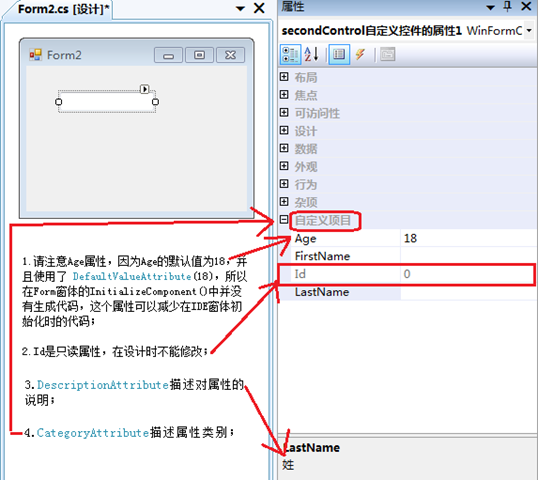
关于窗体控件的属性就简单介绍到这里。





 扫一扫
扫一扫


 1230
1230

 被折叠的 条评论
为什么被折叠?
被折叠的 条评论
为什么被折叠?
 到【灌水乐园】发言





