



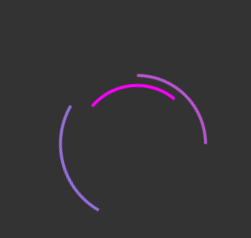
 这篇博客介绍了如何利用CSS的伪元素和关键帧动画创建一个简单的加载动画。通过定义不同的旋转动画时间和颜色,实现了一个由三层边框组成的旋转加载效果。动画以匀速无限循环的方式展示,适用于网页加载等待场景。
加载动画
基本思想
使用伪元素,定义旋转动画,使用不同时间完成动画,动画采用匀速无限循环设置;
<!DOCTYPE html>
<html lang="en">
<head>
    <meta charset="UTF-8">
    <title>加载动画</title>
    <link rel="stylesheet" href="day_8.css">
</head>
<body>
<div class="loading"></div>
</body>
</html>
CSS
*{
    margin: 0;
    padding: 0;
}
body{
    background-color: #333333;
    display:flex;
    justify-content:center;
    align-items:center;
    height:100vh;
}
.loading{
    position:relative;
    width:150px;
    height:150px;
    border-radius:50%;
    border:3px solid transparent;
    border-top-color:#9370db;
    animation:rotate 2s linear infinite;

}
.loading::before{
    content:"";
    position:absolute;
    top:5px;
    right:5px;
    bottom:5px;
    left:5px;
    border-radius:50%;
    border:3px solid transparent;
    border-top-color:#ba55d3;
    animation:rotate 1s linear infinite;

}
.loading::after{
    content:"";
    position:absolute;
    top:15px;
    right:15px;
    bottom:15px;
    left:15px;
    border-radius:50%;
    border:3px solid transparent;
    border-top-color:#f0f;
    animation:rotate 1.5s linear infinite;
}
@keyframes rotate{
    0%{
        transform:rotate(0);
    }
    100%{
        transform:rotate(360deg);
    }
}
效果





 扫一扫
扫一扫


 562
562

 被折叠的 条评论
为什么被折叠?
被折叠的 条评论
为什么被折叠?
 到【灌水乐园】发言





