

Betaflight连接飞控相关问题

本文介绍如何通过ImpulseRC驱动修复器解决Betaflight飞控连接问题,包括下载链接、使用方法和解决步骤,确保驱动安装以便设备管理器显示硬件。

问题描述:Betaflight连接飞控时,若遇到“打开串口失败”,则为飞控芯片驱动未安装的原因,此时,在设备管理器中是看不到所连接的硬件的。

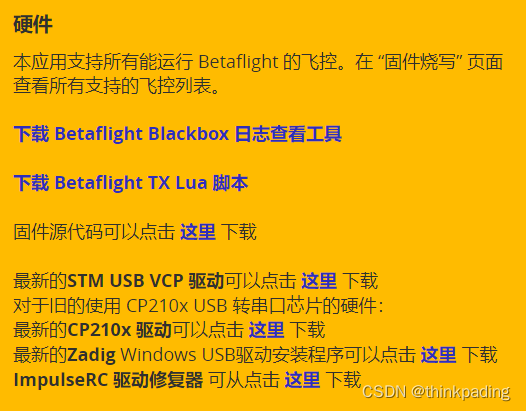
解决方法:Betaflight软件界面上提示了多种解决方法,即下载安装对应驱动
在这里插入图片描述
其中,最为便捷的方法应该是使用ImpulseRC驱动修复器,该软件能够自动识别芯片并完成所需驱动安装。但ImpulseRC的官网可能无法访问,这里提供一个下载链接,笔者就是通过这个地方下载并安装成功的:
https://canable.io/utilities/ImpulseRC_Driver_Fixer.exe
下载完成后,直接双击即可打开使用。

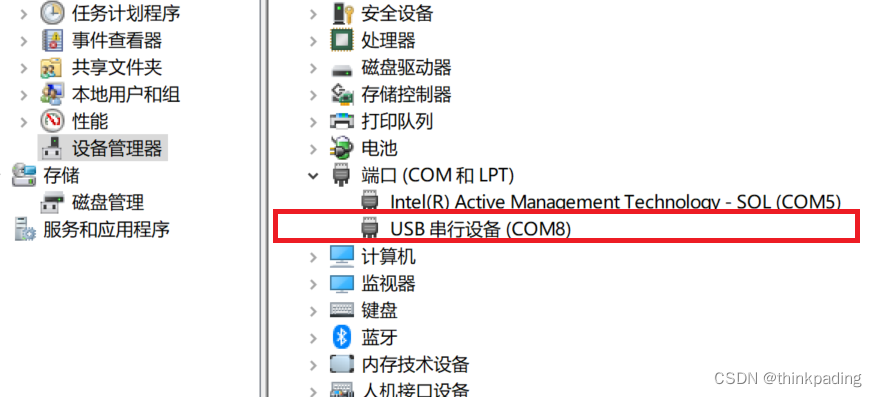
使用方法:打开betaflight、连接飞控的前提下,ImpulseRC软件会自动识别并完成驱动安装。安装完成后,即可在设备管理器中看到相应硬件:
在这里插入图片描述
重启betaflight,系统会自动连接飞控。

Use this tool for fixing Import Elimination, Directly Imports and Hashed Imports.<br>so you can use this tool for changing IAT Base Address and Sorting IATs in<br>New (other) Address.<br><br>Tested on:<br><br>Armadillo<br>ASProtect<br>Enigma<br>ExeCryptor<br>eXPressor<br>PeSpin<br>RlPack<br>TheMida<br>HyperUnpackMe1<br><br>and any protector with Import Elimination, Directly Imports and Hashed Imports.<br><br><br>Notes:<br>=======<br>This tool is an Import Fixer (not Import Rebuilder ImpRec etc) and Just work<br>in memory of target process. dont tell me how to use this Tool...if you can<br>not use this Simple Tool plz DRAG IT TO THE RECYCLE BIN ok?<br><br><br>How to use :<br>=============<br>1.fill <Process ID> with target Process ID<br>2.fill <Code Start> with start address of code that you want to fix it.<br> if you fill it with ZERO, UIF will fill it automatically.<br>3.fill <Code End> with End address of code that you want to fix it.<br> if you fill it with ZERO, UIF will fill it automatically.<br>4.fill <New IAT VA> with address of Empty or unused area<br> (in Code section or Data section or any...) that IAT will repair to it.<br> if you fill it with ZERO, UIF will fill it automatically.<br><br>so you can fill <code Start> , <Code End> with a Dll address area, UIF will<br>detect it automatically.<br><br>for Fast Speed:<br>===============<br> -After Click on <Start> you can Minimize UIF to the taskbar.<br> -Just enter Code section start and end.<br> -Dont check "Fix Directly Imports" if you dont need to it.<br><br>News in Final version (2008.02.23):<br>====================================<br>+Algorithm improved for better fixing Directly imports.<br>+Show modules count and progress in StatusBar.<br>-GUI bug fixed on large fonts >=120 dpi.<br><br><br>News in Final version (2008.01.15):<br>====================================<br>-Some small bugs fixed.<br>+Algorithm improved for very big IAT size.<br>+Auto fill improved for detecting dlls correctly.<br><br><br>magic_h2001@yahoo.com<br>http://magic.shabgard.org<br><br>
评论
成就一亿技术人!
拼手气红包6.0元
还能输入1000个字符
 
红包 添加红包
表情包 插入表情
 条评论被折叠 查看
添加红包

请填写红包祝福语或标题

红包个数最小为10个

红包金额最低5元

当前余额3.43前往充值 >
需支付:10.00
成就一亿技术人!
领取后你会自动成为博主和红包主的粉丝 规则
hope_wisdom
发出的红包
实付
使用余额支付
点击重新获取
扫码支付
钱包余额 0

抵扣说明:

1.余额是钱包充值的虚拟货币,按照1:1的比例进行支付金额的抵扣。
2.余额无法直接购买下载,可以购买VIP、付费专栏及课程。

余额充值


