


 本文详细介绍JaCoCo开源覆盖率工具的使用方法,包括如何在Maven项目中配置依赖和执行覆盖率分析,生成详细的报告,帮助开发者了解代码覆盖率情况。
JaCoCo 是一个开源的覆盖率工具
6种覆盖率统计如下
指令级覆盖(Instructions,C0coverage),分支(Branches,C1coverage)、圈复杂度(CyclomaticComplexity)、行覆盖(Lines)、方法覆盖(non-abstract methods)、类覆盖(classes)
首先在pom.xml中加入以下依赖 这个是无需加vm参数的
<build>
<plugins>
<plugin>
<groupId>org.jacoco</groupId>
<artifactId>jacoco-maven-plugin</artifactId>
<version>0.8.2</version>
<configuration>
<destFile>target/coverage-reports/jacoco-unit.exec</destFile>
<dataFile>target/coverage-reports/jacoco-unit.exec</dataFile>
<excludes>
<!--<!–这个是设置屏蔽规则的地方,在分析报告中不会出现--!>-->
<exclude>**/*TargetManagerProvider.class</exclude>
</excludes>
</configuration>
<executions>
<execution>
<id>jacoco-initialize</id>
<goals>
<goal>prepare-agent</goal>
</goals>
</execution>
<!--这个report:对代码进行检测,然后生成index.html在 target/site/index.html中可以查看检测的详细结果-->
<execution>
<id>jacoco-site</id>
<phase>package</phase>
<goals>
<goal>report</goal>
</goals>
</execution>
</executions>
</plugin>
<plugin>
<groupId>org.apache.maven.plugins</groupId>
<artifactId>maven-surefire-plugin</artifactId>
<configuration>
<skip>false</skip>
</configuration>
</plugin>
</plugins>
</build>
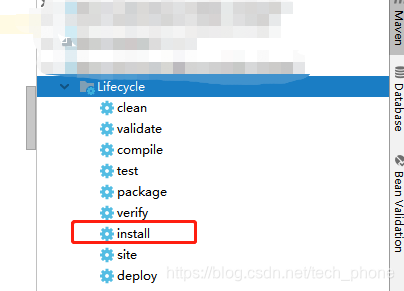
添加依赖后,刷新maven ,然后install 如图
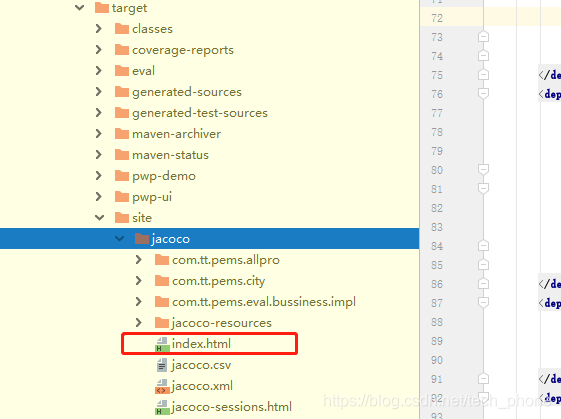
分析结果便会在相应模块下面 target/site/jacoco/index.html 如图
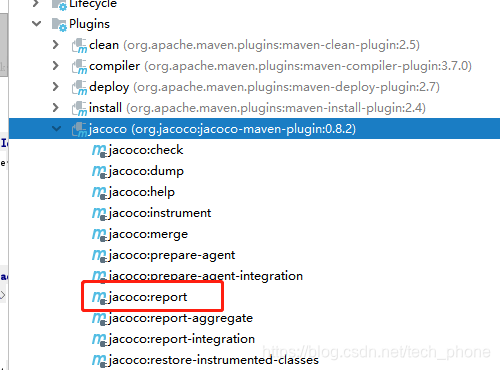
如果没有出现site 出现了coverage-reports\jacoco-unit.exec这个文件,那么可以执行report导出
第二种需要添加vm参数的
<build>
<plugins>
<plugin>
<groupId>org.jacoco</groupId>
<artifactId>jacoco-maven-plugin</artifactId>
<version>0.8.2</version>
<configuration>
<destFile>target/coverage-reports/jacoco-unit.exec</destFile>
<dataFile>target/coverage-reports/jacoco-unit.exec</dataFile>
<excludes>
<!--<!–这个是设置屏蔽规则的地方,在分析报告中就不会出现--!>-->
<exclude>**/*TargetManagerProvider.class</exclude>
</excludes>
</configuration>
<executions>
<execution>
<id>jacoco-initialize</id>
<goals>
<goal>prepare-agent</goal>
</goals>
<!--这个参数就是在下方配置VM时需要用到的-->
<configuration>
<propertyName>jacocoArgLine</propertyName>
</configuration>
</execution>
<!--这个report:对代码进行检测,然后生成index.html在 target/site/index.html中可以查看检测的详细结果-->
<execution>
<id>jacoco-site</id>
<phase>package</phase>
<goals>
<goal>report</goal>
</goals>
</execution>
</executions>
</plugin>
<plugin>
<groupId>org.apache.maven.plugins</groupId>
<artifactId>maven-surefire-plugin</artifactId>
<configuration>
<!--这个是配置VM参数的 这个 $(jacocoArgLine)必须要加上 否则会使用surefire代理 -->
<argLine>-Xms100m -Xmx2048m -XX:PermSize=100M -DSCRIPT_DEBUG=false -Dfile.encoding=UTF-8 ${jacocoArgLine}</argLine>
<forkMode>always</forkMode>
<skip>false</skip>
<testFailureIgnore>false</testFailureIgnore>
</configuration>
</plugin>
</plugins>
</build>
然后重复上述操作





 扫一扫
扫一扫


 3941
3941

 被折叠的 条评论
为什么被折叠?
被折叠的 条评论
为什么被折叠?
 到【灌水乐园】发言





