



 在推流结束后,本文介绍了如何使用vue-video-player组件在前端实现HLS视频的播放。详细步骤包括安装组件、在main.js中导入以及编写vue播放组件代码。在开发过程中要注意避免组件名冲突导致的错误。此外,提供了github资源链接,包含RTMP和MP4的实现案例。
在通过EasyDarwin 推流结束后,需要实现回放功能,在本地存储过程中是通过hls进行存储的,那么前端要实现hls的播放,这里使用的是vue-video-player组件。
vue-video-player 是对video.js 的进一步封装,只需要安装vue-video-player,不需要进一步安装video.js。
1、安装组件
npm install vue-video-player --save2、在main.js 文件中导入
import Vue from 'vue'
import VueVideoPlayer from 'vue-video-player'

// require videojs style
import 'video.js/dist/video-js.css'
// import 'vue-video-player/src/custom-theme.css'

Vue.use(VueVideoPlayer, /* {
  options: global default options,
  events: global videojs events
} */)
3、vue播放组件视频代码
<template>
    <div style="position: relative">
      <div>视频播放</div>
      <video-player style="margin-top: 50px;" class="vjs-custom-skin"
        :options="playerOptions"
        @ready="playerReadied">
     </video-player>
    </div>
  </template>

  <script>
    import 'vue-video-player/src/custom-theme.css'
    // videojs
    // import videojs from 'video.js'

    // hls plugin for videojs6
    require('videojs-contrib-hls/dist/videojs-contrib-hls.js')

    export default {
      name: 'roadVideoPlayer',

      data() {
        return {
            playerOptions: {
                // videojs and plugin options
                height: '600',
                sources: [{
                    withCredentials: false,
                    // hls 需要配置该类型
                    type: "application/x-mpegURL",
                    // 你的hls地址
                    src: "http://xxx.27.xx.xxx:xxxx/record/test/20220531/out.m3u8"
                }],
                controlBar: {
                    timeDivider: false,
                    durationDisplay: false
                },
                flash: { hls: { withCredentials: false }},
                html5: { hls: { withCredentials: false }},
                // 你的视频封面地址
                poster: "",
                //允许覆盖Video.js无法播放媒体源时显示的默认信息。
                notSupportedMessage: '此视频暂无法播放,请稍后再试'
            }
        }
      },
      created() {

      },
      methods: {
        playerReadied(player) {
            var hls = player.tech({ IWillNotUseThisInPlugins: true }).hls
            player.tech_.hls.xhr.beforeRequest = function(options) {
            // console.log(options)
            return options
            }
        }
      }
    }
  </script>

  <style scoped lang="less">

  </style>
开发过程中自己起的组件名和引入的组件名重名了,报了堆栈异常,搞了好久。太粗心大意了。
其他协议的实现方式可以参考 github地址:GitHub - surmon-china/vue-video-player: @videojs component for @vuejs
有rtmp、mp4的实现案例。
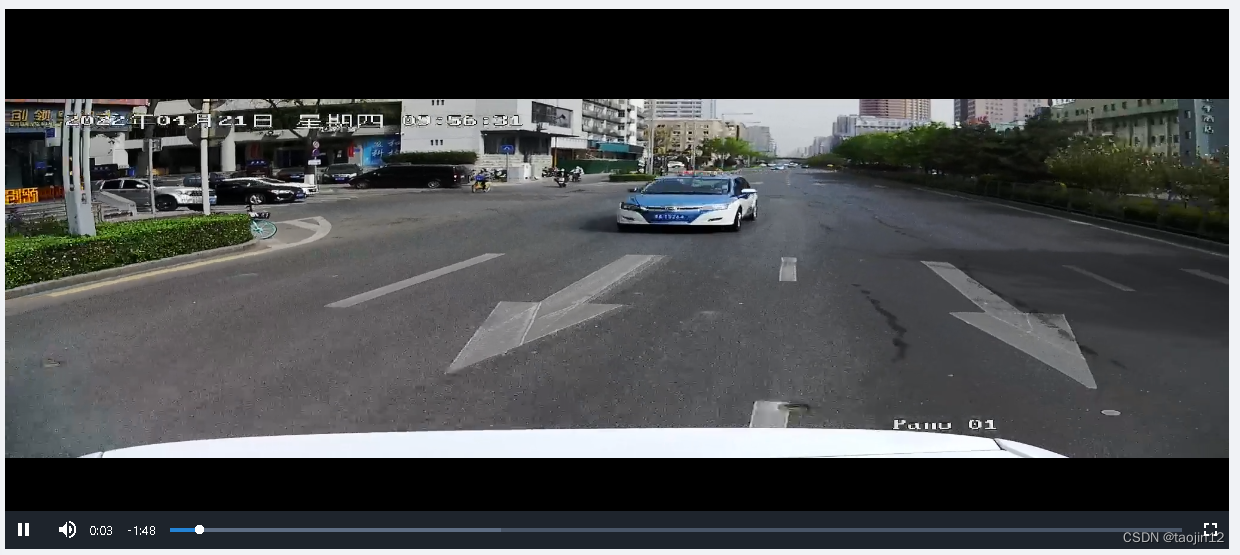
最后展示一下,集成后的展示效果。





 扫一扫
扫一扫


 6626
6626

 被折叠的 条评论
为什么被折叠?
被折叠的 条评论
为什么被折叠?
 到【灌水乐园】发言





