


 本文详细介绍使用Python的Pygame库进行游戏开发的过程,包括安装配置、游戏窗口创建、游戏循环及事件监听等内容,并通过实例演示如何创建背景精灵、敌机等游戏元素。
学习目标:
完整的一个小项目开发
提示:这里可以添加学习目标
例如:
- 一周Python入门项目实战知识
学习内容:
0 安装pygame 模块:
PS C:\Users\tanyugen\PycharmProjects\python_s3> py -m pip install -U pygame --user
# 验证是否安装成功
PS C:\Users\tanyugen\PycharmProjects\python_s3> python -m pygame.examples.aliens
01 使用pygame创建图形窗口
1.1 游戏的初始化和退出
pygame.init()
pygame.quit()
1.2 理解游戏中的坐标系
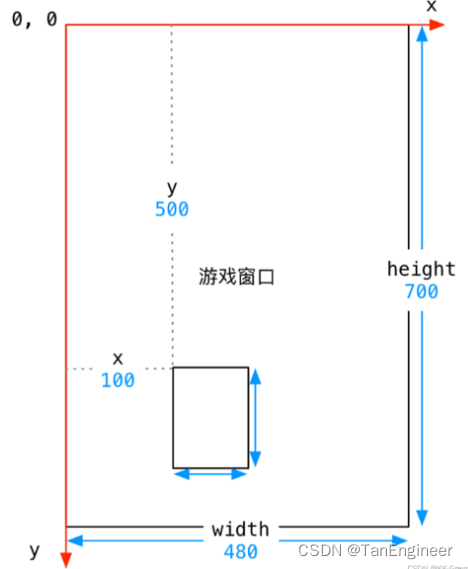
(x, y) (width, height)
import pygame
# 描述矩形区域 Rect(x, y, width, height)
hero_rect = pygame.Rect(100, 500, 120, 125)
print("hero 0 point %d %d" % (hero_rect.x, hero_rect.y))
print("hero size %d %d" % (hero_rect.width, hero_rect.height))
print("%d %d" % hero_rect.size)
1.3 创建游戏主窗口
pygame.display 用于创建和管理窗口
pygame.display.set_mode() # 初始化窗口
pygame.display.update() # 刷新屏幕内容显示,稍后使用
02 理解图像,并实现图像绘制
2.1 使用pygame.image.load() #加载图像
2.2 使用blit方法,将图像绘制到指定位置
2.3 使用pygame.display.update() 更新屏幕的显示

import pygame

pygame.init()

# create game display
screen = pygame.display.set_mode((480, 650))  # set_mode(resolution(0, 0), flags=0, depth=0)
# draw background picture
# 1. load picture
bg = pygame.image.load("./images/background.png")
# 2. blit 绘制图像
screen.blit(bg, (0, 0))
# 3. update screen
pygame.display.update()

# draw hero's plane
hero = pygame.image.load("./images/me1.png")
screen.blit(hero, (150, 500))
pygame.display.update()

while True:
    pass
pygame.quit()
03 游戏循环和游戏时钟
3.1 游戏时钟:
    # 创建时钟对象
    clock = pygame.time.Clock()

    i = 0
    while True:
        # 可以指定循环体内部循环执行的频率
        clock.tick(60)
        print(i)
        pygame.display.update()
        i += 1
        # pass

3.2 英雄的简单动画实现


    # 1. rect记录飞机的初始位置
    hero_rect = pygame.Rect(150, 300, 102, 126)

    while True:
        # 可以指定循环体内部循环执行的频率
        clock.tick(60)
        # 2. 修改飞机的位置
        hero_rect.y -= 1
            # 判断飞机位置
        if hero_rect.y <= -126:
            hero_rect.y = 650
        # 3. blit 绘制图像
        screen.blit(bg, (0, 0)) # 重新绘制背景,覆盖原有残影
        screen.blit(hero, hero_rect)
        # 4. uodate 更新显示
        pygame.display.update()


3.3 游戏循环中的监听事件
    事件 event

    代码实现:
        pygame.event.get() # 可以获得用户当前动作的事件列表

        # 捕获事件
        event_list = pygame.event.get()
        if len(event_list) > 0:
            print(event_list)

    演练:
    import pygame

    pygame.init()

    # create game display
    screen = pygame.display.set_mode((480, 650))  # set_mode(resolution(0, 0), flags=0, depth=0)
    # draw background picture
    # 1. load picture
    bg = pygame.image.load("./images/background.png")
    # 2. blit 绘制图像
    screen.blit(bg, (0, 0))
    # 3. update screen
    # pygame.display.update()

    # draw hero's plane
    hero = pygame.image.load("./images/me1.png")
    # screen.blit(hero, (200, 500))
    # pygame.display.update()

    # 创建时钟对象
    clock = pygame.time.Clock()

    # 1. rect记录飞机的初始位置
    hero_rect = pygame.Rect(200, 300, 102, 126)

    while True:
        # 可以指定循环体内部循环执行的频率
        clock.tick(60)
        # 事件监听
        for event in pygame.event.get():
            # 判读事件类型是否是退出事件
            if event.type == pygame.QUIT:
                print("Game over!!!")
                # 卸载所有模块
                pygame.quit()
                # 直接终止当前正在执行的程序
                exit()
                # 不能使用break,只会退出while循环,不会终止程序
                # break
        # 2. 修改飞机的位置
        hero_rect.y -= 1
        # 判断飞机位置
        if hero_rect.y <= -126:
            hero_rect.y = 650
        # 3. blit 绘制图像
        screen.blit(bg, (0, 0))  # 重新绘制背景,覆盖原有残影
        screen.blit(hero, hero_rect)
        # 4. uodate 更新显示
        pygame.display.update()
        # pass
    pygame.quit()
04 精灵和精灵组
pygame 提供两个类:
pygame.sprite.Sprite 存储图像数据image和位置rect的对象
pygame.sprite.Group
创建游戏精灵派生类

    import pygame

    class GameSprite(pygame.sprite.Sprite):
        """飞机大战游戏精灵"""

        def __init__(self, image_name, speed=1):
            # 调用一下父类的初始化方法
            super().__init__()

            # 定义对象的属性
            self.image = pygame.image.load(image_name)
            self.rect = self.image.get_rect()
            self.speed = speed

        def update(self):

            # 在屏幕垂直方向上移动
            self.rect.y += self.speed

使用from导入plane_sprites模块
    from 导入模块可以直接使用
    import 导入的模块需要通过 模块名. 来使用
代码实现:
01 planes_sprites.py
import random # Python 标准模块
import pygame # Python 第三方模块
# 屏幕大小常量
SCREEN_RECT = pygame.Rect(0, 0, 480, 650)
# 刷新率常量
FRAME_PER_SEC = 60
# 创建敌机的定时器常量
CREATE_ENEMY_EVENT = pygame.USEREVENT
# 英雄发射子弹事件
HERO_FIRE_EVENT = pygame.USEREVENT + 1
class GameSprite(pygame.sprite.Sprite):
"""飞机大战游戏精灵"""
def __init__(self, image_name, speed=1):
# 调用一下父类的初始化方法
super().__init__()
# 定义对象的属性
self.image = pygame.image.load(image_name)
self.rect = self.image.get_rect()
self.speed = speed
def update(self):
# 在屏幕垂直方向上移动
self.rect.y += self.speed
class Background(GameSprite):
"""游戏背景精灵"""
def __init__(self, is_alt=False):
# 调用父类方法,实现精灵实现
super() 最低0.47元/天 解锁文章






 扫一扫
扫一扫


 6966
6966


 到【灌水乐园】发言



