

Jetpack:017-Jetpack中的对话框

本文详细介绍了JetpackCompose库中对话框的概念,包括创建对话框的方法(如设置参数、控制显示与关闭)、弹出对话框的示例以及如何配合条件值使用。重点讲解了AlertDialog可组合函数的用法和配置选项。


我们在上一章回中介绍了Jetpack库中SnackBar相关的内容,本章回中主要介绍 对话框。闲话休提,让我们一起Talk Android Jetpack吧!

1. 概念介绍

我们在本章回中介绍的Dialog就是常用的对话框,主要用来给用户发出提示消息,这一点与上一章回中介绍过使用SnackBar相同,不过它发出的消息不会自动消失,需要用户确认后才会消失,因此对话框常常用来发出需要用户确认的消息。我们将在本章回中详细介绍对话框的使用方法。

2. 使用方法

2.1 创建对话框

在Jetpack compose库中使用AlertDialog可组合函数可以创建对话框,该函数提供了相关的参数来控制自己,下面是常用的参数:

  • onDismissRequest:当对话框关闭时执行相关操作;
  • confirmButton: 主要用来存放确认按钮;
  • dismissButton: 主要用来存放取消按钮;
  • icon:主要用来控制对话框中显示的图标;
  • title:主要用来控制对话框中显示的标题;
  • text:主要用来控制对话框中显示的消息内容;
  • containerColor:主要用来控制对话框的背景颜色;
  • iconContentColor:主要用来控制对话框中图标的颜色;
  • titleContentColor:主要用来控制对话框中标题的颜色;
  • textContentColor:主要用来控制对话框中内容的颜色;
  • properties: 配置对话的属性,常用来配置点击对话框外的窗口时是否关闭对话框;

上面介绍的这些参数都是用来控制对话框的,给它们赋值后就可以创建一个对话框,不过这个对话框会一起显示在页面中,这显然不符合使用场景:当某个条件触发时弹出对话框,给用户相关提示信息,让用户进行确认。接下来我们将介绍如何控制对话框的显示与关闭。

2.2 弹出对话框

我们需要使用一个条件值,然后对该条件值进行判断,如果条件值符合某种条件就弹出对话框,否则不弹出对话框。而且我们还需要在对话框窗口中修改条件值,这样可以在点击对话框窗口中的按钮时关闭对话框。这么介绍可能比较抽象,稍后我们通过具体的代码来演示。

3. 示例代码

//显示对话框
@Composable
fun ExDialog(
    onDismissRequest:  () ->Unit,
    onConfirmation:() -> Unit,
    title: String,
    message: String,
    icon: ImageVector
) {

    AlertDialog(
        icon = { Icon(imageVector = icon, contentDescription = null)},
        title = { Text(text = title)},
        text = { Text(text = message)},
        //控制dialog中文字,标题、图标的颜色,不过没有包含底部yes/no两个文字的颜色
        containerColor = Color.LightGray,
        textContentColor = Color.Black,
        titleContentColor = Color.Red,
        iconContentColor = Color.Yellow,
        //这两个值用来控制点击dialog区域外时,dialog是否会消失,默认值为true
        properties = DialogProperties(
            dismissOnClickOutside = false,
            dismissOnBackPress = false,
        ),
        onDismissRequest = {onConfirmation()},
        confirmButton = {
            TextButton(onClick = {onConfirmation()}) {
                Text(text = "Yes")
            }
        },
        dismissButton = {
            TextButton(onClick = {onDismissRequest()}) {
                Text(text = "No",color = Color.Black )
            }
        }
    )
}

//弹出对话框
@Composable
fun ShowDialog(showDialog:MutableState<Boolean>){
    when {
        showDialog.value -> {
            ExDialog(
                onDismissRequest = {  showDialog.value = false},
                onConfirmation = { showDialog.value = false },
                title = "Title of AlertDialog",
                message = "Message of AlertDialog",
                icon = Icons.Default.Warning
            )
        }
    }
}

//通过点击按钮弹出对话框
val showDialog = remember { mutableStateOf(false) }

Column (
    horizontalAlignment = Alignment.CenterHorizontally,
    verticalArrangement = Arrangement.SpaceAround){
    //点击按钮显示图标
    ElevatedButton(onClick = {
        showDialog.value = true
    }) {
        Text(text = "Show Dialog")
    }

    ShowDialog(showDialog)

上面的示例代码中对相关功能进行了封装,把每一个功能都封装成了独立的函数,大家查看函数前面的注释就能明白函数的功能。下面是程序的运行效果图:
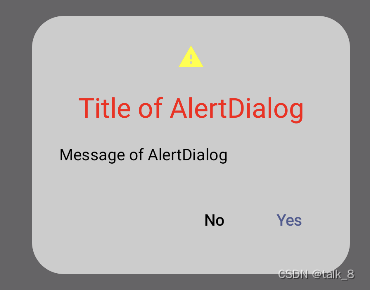
在这里插入图片描述

4. 内容总结

最后,我们对本章回的内容做一个全面的总结:

  • 对话框主要用来显示需要用户确认的信息;
  • 对话框通过AlertDialog可组合函数实现;
  • 对话框需要配合条件值来显示,这样才能符合使用场景;
  • 点击对话框中的按钮时可以关闭对话框;
  • 点击对话框以外的任何内容也可以关闭对话框,不过这个属性可以进行单独配置;

看官们,与Jetpack中对话框相关的内容就介绍到这里,欢迎大家在评论区交流与讨论!

plugins { id 'com.android.application' } android { namespace 'com.example.kucun2' compileSdk 33 defaultConfig { applicationId "com.example.kucun2" minSdk 24 targetSdk 33 versionCode 1 versionName "1.0" testInstrumentationRunner "androidx.test.runner.AndroidJUnitRunner" } buildTypes { release { minifyEnabled false proguardFiles getDefaultProguardFile('proguard-android-optimize.txt'), 'proguard-rules.pro' } } compileOptions { sourceCompatibility JavaVersion.VERSION_17 targetCompatibility JavaVersion.VERSION_17 } buildFeatures { viewBinding true } } dependencies { implementation "androidx.activity:activity:1.7.2" implementation "androidx.activity:activity-ktx:1.7.2" implementation 'com.google.code.gson:gson:2.8.9' implementation 'androidx.appcompat:appcompat:1.6.1' implementation 'com.google.android.material:material:1.11.0' implementation 'androidx.constraintlayout:constraintlayout:2.1.3' implementation 'androidx.lifecycle:lifecycle-livedata-ktx:2.6.1' implementation 'androidx.lifecycle:lifecycle-viewmodel-ktx:2.6.1' implementation 'androidx.navigation:navigation-fragment:2.4.1' implementation 'androidx.navigation:navigation-ui:2.4.1' testImplementation 'junit:junit:4.13.2' androidTestImplementation 'androidx.test.ext:junit:1.1.3' androidTestImplementation 'androidx.test.espresso:espresso-core:3.4.0' // 网络请求 implementation 'com.squareup.retrofit2:retrofit:2.9.0' implementation 'com.squareup.retrofit2:converter-gson:2.9.0' // 表格控件 implementation 'io.github.cymchad:BaseRecyclerViewAdapterHelper:4.0.3' // implementation 'io.github.cymchad:BaseRecyclerViewAdapterHelper:4.1.7' implementation 'androidx.recyclerview:recyclerview:1.3.2' // 刷新控件 implementation 'androidx.swiperefreshlayout:swiperefreshlayout:1.1.0' // Material Design implementation 'com.google.android.material:material:1.11.0' // 对话框 implementation 'com.github.gabriel-TheCode:AestheticDialogs:1.3.6' implementation 'at.favre.lib:bcrypt:0.9.0' // Android专用BCrypt库 implementation 'androidx.room:room-runtime:2.4.3' annotationProcessor 'androidx.room:room-compiler:2.4.3' } 2 issues were found when checking AAR metadata: 1. Dependency 'androidx.activity:activity-ktx:1.8.0' requires libraries and applications that depend on it to compile against version 34 or later of the Android APIs. :app is currently compiled against android-33. Also, the maximum recommended compile SDK version for Android Gradle plugin 7.4.2 is 33. Recommended action: Update this project's version of the Android Gradle plugin to one that supports 34, then update this project to use compileSdkVerion of at least 34. Note that updating a library or application's compileSdkVersion (which allows newer APIs to be used) can be done separately from updating targetSdkVersion (which opts the app in to new runtime behavior) and minSdkVersion (which determines which devices the app can be installed on). 2. Dependency 'androidx.activity:activity:1.8.0' requires libraries and applications that depend on it to compile against version 34 or later of the Android APIs. :app is currently compiled against android-33. Also, the maximum recommended compile SDK version for Android Gradle plugin 7.4.2 is 33. Recommended action: Update this project's version of the Android Gradle plugin to one that supports 34, then update this project to use compileSdkVerion of at least 34. Note that updating a library or application's compileSdkVersion (which allows newer APIs to be used) can be done separately from updating targetSdkVersion (which opts the app in to new runtime behavior) and minSdkVersion (which determines which devices the app can be installed on).
06-05
评论
成就一亿技术人!
拼手气红包6.0元
还能输入1000个字符
 
红包 添加红包
表情包 插入表情
 条评论被折叠 查看
添加红包

请填写红包祝福语或标题

红包个数最小为10个

红包金额最低5元

当前余额3.43前往充值 >
需支付:10.00
成就一亿技术人!
领取后你会自动成为博主和红包主的粉丝 规则
hope_wisdom
发出的红包

打赏作者

talk_8

真诚赞赏,手有余香

¥1 ¥2 ¥4 ¥6 ¥10 ¥20
扫码支付:¥1
获取中
扫码支付

您的余额不足,请更换扫码支付或充值

打赏作者

实付
使用余额支付
点击重新获取
扫码支付
钱包余额 0

抵扣说明:

1.余额是钱包充值的虚拟货币,按照1:1的比例进行支付金额的抵扣。
2.余额无法直接购买下载,可以购买VIP、付费专栏及课程。

余额充值


