


前言
好久没写博客了。最近在做demo,感觉在游戏架构设计方面遇到了瓶颈。在大学这几年里我基本是在全程造轮子,没有去阅读和分析别人写的源码,导致我缺少横向比较,甚至不知道自己的设计是否存在问题。这几天终于能沉下心来读一读别人的代码,查缺补漏,并且吸取一下别人的经验。
不过好的unity开源项目还挺难找的,要么就是像这样设计得过于简陋,要么就是像OpenRA那样有点杂七杂八。最后还是选定了Unity的StandardAsset,简略看了一下,还是有点东西的。
不知道能写到什么程度,反正写一点是一点吧。
用到的素材
赛车[玩家控制]
先来看看这游戏怎么玩。游戏提供了两种操作方式:
- 通过硬件HardwareInput操作,也就是手柄,左摇杆向前加速,向后减速,左右转向。
- 通过手机倾斜转向,虚拟按钮前进后退。
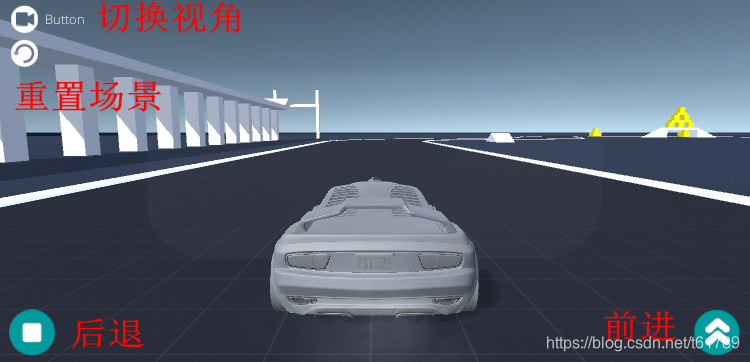
抽丝剥茧的首要任务就是找到线头,那我们就从最核心的车辆系统入手。
这是车辆prefab的内容:
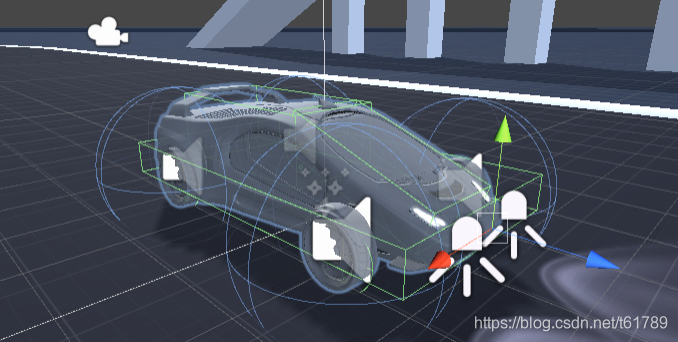
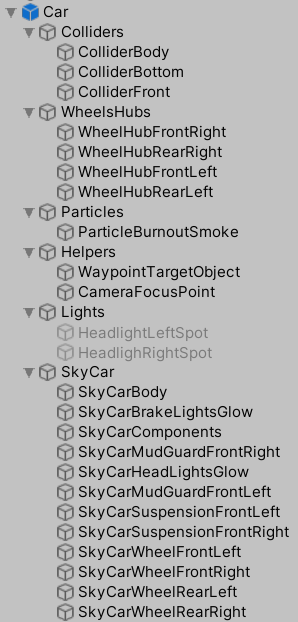
- Colliders是车辆总体的碰撞盒,分为三个部分,顶部,挡风玻璃,底盘,这很好理解。
- WheelsHub是车辆的轮胎碰撞盒,分为四个,对应车辆的四个轮胎,均为WheelCollider。
- Particles是车辆的尾烟,玩一下就可以知道在车辆的行驶过程中尾部会有烟尘飘起,就是这个粒子系统。
- Helpers内WaypointTargetObject用于AI导航,这之后再说,玩家控制用不上。CameraFocusPoint是摄像机的瞄准点。
- Light是车的两个前大灯,为聚光灯模式,设置为Active以后可以亮,否则就不亮。
- SkyCar内是车辆的Mesh,各自独立,用途与其名字对应。
在根节点Car上挂载有车辆的控制逻辑,此外,在四个轮胎上分别有各自的轮胎印控制器,用于模拟轮胎印,所以我们先看最核心的车辆控制逻辑。
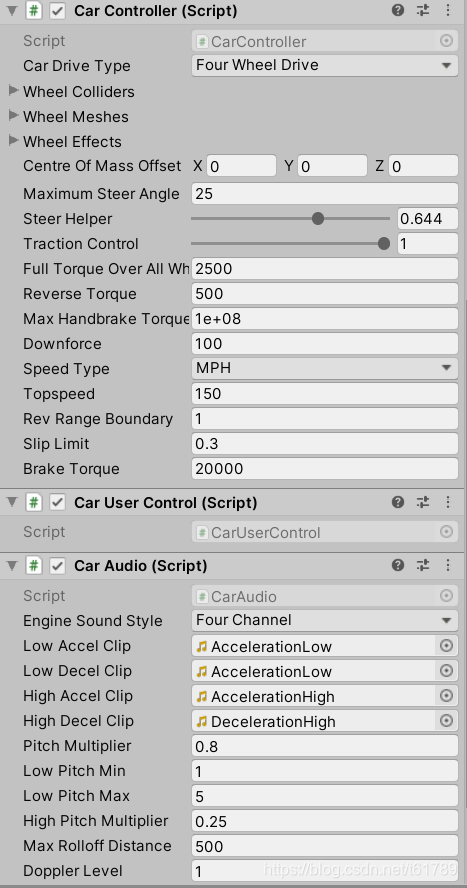
CarController就是车辆的核心逻辑;CarUserControl是控制接口,为用户输入与CarController的中间件;CarAudio被CarController调用,控制声音的播放。
我在CarController里找了一下,并没有发现有Update(),那逻辑是怎么运行的呢?答案就是CarUserControl。
private void FixedUpdate()
        {


            // pass the input to the car!

            float h = CrossPlatformInputManager.GetAxis("Horizontal");  //本章重点
            float v = CrossPlatformInputManager.GetAxis("Vertical");

#if !MOBILE_INPUT
            float handbrake = CrossPlatformInputManager.GetAxis("Jump");
            //m_Car是CarController类型的变量,也就是当前车辆的核心控制脚本
            //他的Move方法定义为public void Move(float steering, float accel, float footbrake, float handbrake)
            //作用是通过几个变量的输入改变车辆速度,具体实现我放在下章分析,这章只考虑如何获取输入
            m_Car.Move(h, v, v, handbrake);
#else
            m_Car.Move(h, v, v, 0f);
#endif
        }
可以看出Unity做了平台适配,让不同的输入方式在不同的平台上得出较为一致的结果,而作为润滑剂的就是CrossPlatformInputManager类,接下来我分析一下他的原理,先放代码。
namespace UnityStandardAssets.CrossPlatformInput
{
public static class CrossPlatformInputManager
{
public enum ActiveInputMethod
{
Hardware,
Touch
}
private static VirtualInput activeInput;
private static VirtualInput s_TouchInput;
private static VirtualInput s_HardwareInput;
static CrossPlatformInputManager()
{
s_TouchInput = new MobileInput();
s_HardwareInput = new StandaloneInput();
//在这里决定使用手机输入还是硬件输入
#if MOBILE_INPUT
activeInput = s_TouchInput;
#else
activeInput = s_HardwareInput;
#endif
}
//切换输入模式
public static void SwitchActiveInputMethod(ActiveInputMethod activeInputMethod)
{
switch (activeInputMethod)
{
case ActiveInputMethod.Hardware:
activeInput = s_HardwareInput;
break;
case ActiveInputMethod.Touch:
activeInput = s_TouchInput;
break;
}
}
//接下来的方法均为静态调用
public static bool AxisExists(string name)
{
return activeInput.AxisExists(name);
}
public static bool ButtonExists(string name)
{
return activeInput.ButtonExists(name);
}
public static void RegisterVirtualAxis(VirtualAxis axis)
{
activeInput.RegisterVirtualAxis(axis);
}
public static void RegisterVirtualButton(VirtualButton button)
{
activeInput.RegisterVirtualButton(button);
}
public static void UnRegisterVirtualAxis(string name)
{
if (name == null)
{
throw new ArgumentNullException("name");
}
activeInput.UnRegisterVirtualAxis(name);
}
public static void UnRegisterVirtualButton(string name)
{
activeInput.UnRegisterVirtualButton(name);
}
// returns a reference to a named virtual axis if it exists otherwise null
public static VirtualAxis VirtualAxisReference(string name)
{
return activeInput.VirtualAxisReference(name);
}
// returns the platform appropriate axis for the given name
public static float GetAxis(string name)
{
return GetAxis(name, false);
}
public static float GetAxisRaw(string name)
{
return GetAxis(name, true);
}
// private function handles both types of axis (raw and not raw)
private static float GetAxis(string name, bool raw)
{
return activeInput.GetAxis(name, raw);
}
// -- Button handling --
public static bool GetButton(string name)
{
return activeInput.GetButton(name);
}
public static bool GetButtonDown(string name)
{
return activeInput.GetButtonDown(name);
}
public static bool GetButtonUp(string name)
{
return activeInput.GetButtonUp(name);
}
public static void SetButtonDown(string name)
{
activeInput.SetButtonDown(name);
}
public static void SetButtonUp(string name)
{
activeInput.SetButtonUp(name);
}
public static void SetAxisPositive(string name)
{
activeInput.SetAxisPositive(name);
}
public static void SetAxisNegative(string name)
{
activeInput.SetAxisNegative(name);
}
public static void SetAxisZero(string name)
{
activeInput.SetAxisZero(name);
}
public static void SetAxis(string name, float value)
{
activeInput.SetAxis(name, value);
}
public static Vector3 mousePosition
{
get {
return activeInput. 最低0.47元/天 解锁文章






 扫一扫
扫一扫


 被折叠的 条评论
为什么被折叠?
被折叠的 条评论
为什么被折叠?
 到【灌水乐园】发言





