 合宙esp32c3单片机实现天气显示


 该博客基于合宙esp32c3 micropython框架,利用优化过的ssd1306驱动,在单片机上实现天气显示。从网站获取天气数据,转成json提取有效信息,设置查找树优化结构,根据天气状态显示中文和对应图,还可更改显示城市。
目录
简介
合宙esp32c3 micropython框架,只支持128*64 I2C oled
ssd1306驱动我优化过的,与其他的不一样,为避免出错,使用我的驱动
把下面两个py文件放入单片机内,
搜索心知天气,注册账号,获得免费的key
效果展示
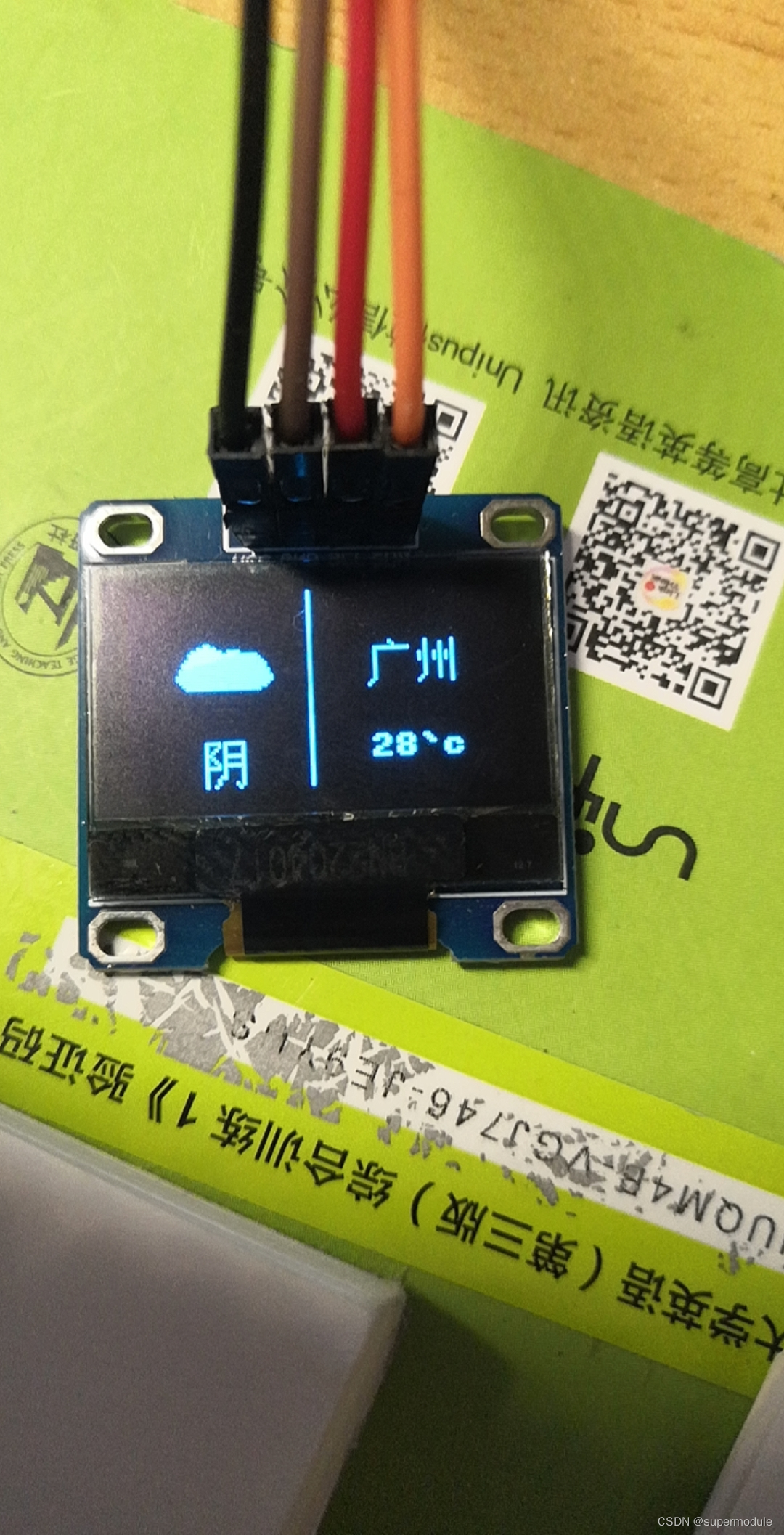
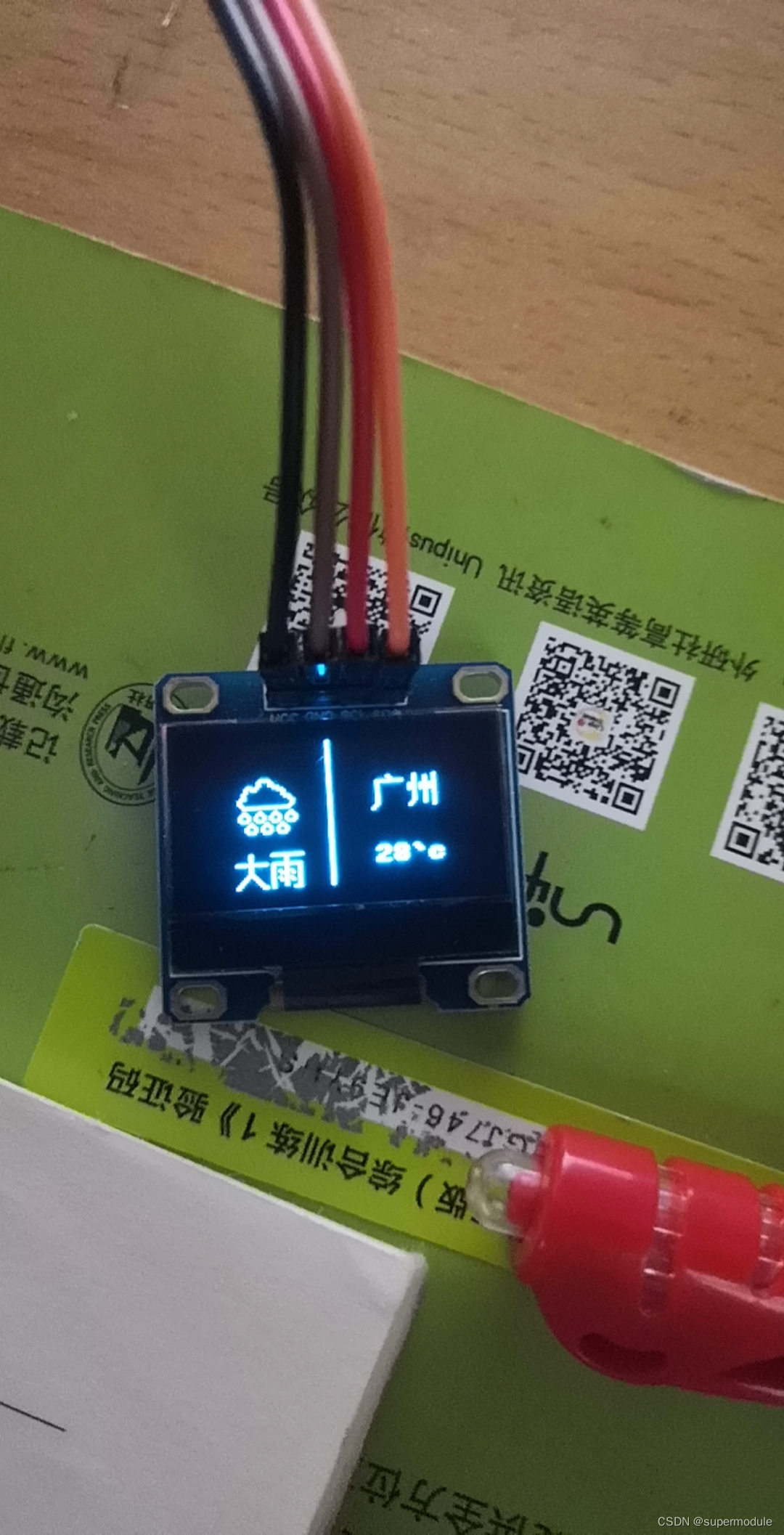
代码
main.py
import network
import urequests
from ssd1306 import SSD1306_I2C
from machine import Pin, I2C
import ujson
from font import textc

i2c = I2C(0, scl=Pin(5), sda=Pin(4))
oled = SSD1306_I2C(i2c)

url = 'https://api.seniverse.com/v3/weather/now.json?key=你的密钥&location=guangzhou&language=zh-Hans&unit=c'


class Weather():
    def __init__(self, ssid, password):

        wifi=network.WLAN(network.STA_IF)
        wifi.active(True)
        #连接wifi,有一定几率连接失败
        while not wifi.isconnected():
            wifi.connect(ssid,password)
            oled.fill(0)
            oled.text('connecting...',0,0)
            oled.show()
        #更新显示连接wifi信息
        oled.fill(0)
        oled.text('connect to szsb',0,0)
        oled.show()

        response = urequests.get(url)
        parsed = ujson.loads(response.text)
        weather_info = parsed['results'][0]['now']
        temperature = weather_info['temperature']
        weather_state = weather_info['text']
        #下面两条语句的作用是一样的,二选一,把unicode编码转为中文字符
        # x=eval('u"%s"' % weather_state)
        x = ujson.loads('"%s"' % weather_state)
        oled.text(temperature + '`c', 80, 48)
        textc(oled, '广', 80, 16)
        textc(oled, '州', 96, 16)
        oled.vline(60, 0, 64)
        if len(weather_state) == 2:
            textc(oled, x[0], 16, 48)
            textc(oled, x[1], 32, 48)
            if x[1] == '雨':
                if weather_state == '大雨':
                    max_rainy = [0x00, 0x00, 0x00, 0x00, 0x00, 0x00, 0x00, 0x00, 0x00, 0x00, 0x00, 0x00, 0x00, 0x00,
                                 0x00, 0x00,
                                 0x00, 0x00, 0x00, 0x00, 0x00, 0x00, 0x00, 0x00, 0x00, 0x00, 0x00, 0x00, 0x00, 0x00,
                                 0x00, 0x00,
                                 0x00, 0x00, 0x00, 0x00, 0x00, 0x03, 0x0C, 0x10, 0x10, 0x08, 0x08, 0x10, 0x60, 0x80,
                                 0x80, 0x80,
                                 0x80, 0x60, 0x20, 0x10, 0x10, 0x08, 0x08, 0x06, 0x01, 0x01, 0x00, 0x00, 0x00, 0x00,
                                 0x00, 0x00,
                                 0x00, 0x00, 0x00, 0x60, 0x91, 0x8A, 0x09, 0x08, 0x08, 0x08, 0x08, 0x09, 0x0A, 0x09,
                                 0x08, 0x08,
                                 0x08, 0x08, 0x09, 0x0A, 0x09, 0x08, 0x08, 0x08, 0x08, 0x09, 0x92, 0x61, 0x00, 0x00,
                                 0x00, 0x00,
                                 0x00, 0x00, 0x00, 0xC0, 0x20, 0x20, 0x26, 0xC9, 0x11, 0x09, 0xC6, 0x20, 0x20, 0x26,
                                 0xC9, 0x11,
                                 0x09, 0xC6, 0x20, 0x20, 0x26, 0xC9, 0x11, 0x09, 0xC6, 0x20, 0x20, 0x20, 0xC0, 0x00,
                                 0x00, 0x00
                                 ]
                    oled.p32(max_rainy, 16, 8)
                elif weather_state == '中雨':
                    mid_rainy = [0x00, 0x00, 0x00, 0x00, 0x00, 0x00, 0x00, 0x00, 0x00, 0x00, 0x00, 0x00, 0x01, 0x01,
                                 0x01, 0x00,
                                 0x00, 0x00, 0x00, 0x00, 0x00, 0x00, 0x00, 0x00, 0x00, 0x00, 0x00, 0x00, 0x00, 0x00,
                                 0x00, 0x00,
                                 0x00, 0x00, 0x00, 0x00, 0x01, 0x06, 0x08, 0x08, 0x30, 0x40, 0x40, 0x80, 0x00, 0x00,
                                 0x00, 0x80,
                                 0x40, 0x40, 0x40, 0x40, 0x40, 0x40, 0x30, 0x08, 0x08, 0x08, 0x06, 0x01, 0x01, 0x00,
                                 0x00, 0x00,
                                 0x00, 0x00, 0x60, 0x90, 0x11, 0x12, 0x14, 0x12, 0x11, 0x10, 0x10, 0x10, 0x11, 0x12,
                                 0x14, 0x12,
                                 0x11, 0x10, 0x10, 0x10, 0x11, 0x12, 0x14, 0x12, 0x11, 0x10, 0x10, 0x10, 0x20, 0xC0,
                                 0x00, 0x00,
                                 0x00, 0x00, 0x00, 0x00, 0x80, 0x40, 0x40, 0x40, 0x80, 0x00, 0x00, 0x00, 0x80, 0x40,
                                 0x40, 0x40,
                                 0x80, 0x00, 0x00, 0x00, 0x80, 0x40, 0x40, 0x40, 0x80, 0x00, 0x00, 0x00, 0x00, 0x00,
                                 0x00, 0x00
                                 ]
                    oled.p32(mid_rainy, 16, 8)
                elif weather_state == '小雨':
                    min_rainy = [0x00, 0x00, 0x00, 0x00, 0x00, 0x00, 0x00, 0x00, 0x00, 0x00, 0x00, 0x00, 0x01, 0x01,
                                 0x01, 0x00,
                                 0x00, 0x00, 0x00, 0x00, 0x00, 0x00, 0x00, 0x00, 0x00, 0x00, 0x00, 0x00, 0x00, 0x00,
                                 0x00, 0x00,
                                 0x00, 0x00, 0x00, 0x00, 0x01, 0x06, 0x08, 0x08, 0x30, 0x40, 0x40, 0x80, 0x00, 0x00,
                                 0x00, 0x80,
                                 0x40, 0x40, 0x40, 0x40, 0x40, 0x40, 0x30, 0x08, 0x08, 0x08, 0x06, 0x01, 0x01, 0x00,
                                 0x00, 0x00,
                                 0x00, 0x00, 0x60, 0x90, 0x10, 0x10, 0x10, 0x10, 0x10, 0x10, 0x10, 0x10, 0x11, 0x12,
                                 0x14, 0x12,
                                 0x11, 0x10, 0x10, 0x10, 0x11, 0x12, 0x14, 0x12, 0x11, 0x10, 0x10, 0x10, 0x20, 0xC0,
                                 0x00, 0x00,
                                 0x00, 0x00, 0x00, 0x00, 0x00, 0x00, 0x00, 0x00, 0x00, 0x00, 0x00, 0x00, 0x80, 0x40,
                                 0x40, 0x40,
                                 0x80, 0x00, 0x00, 0x00, 0x80, 0x40, 0x40, 0x40, 0x80, 0x00, 0x00, 0x00, 0x00, 0x00,
                                 0x00, 0x00
                                 ]
                    oled(min_rainy, 16, 8)
            else:
                cloud = [0x00, 0x00, 0x00, 0x00, 0x00, 0x00, 0x00, 0x00, 0x00, 0x00, 0x00, 0x01, 0x00, 0x00, 0x00, 0x06,
                         0x03, 0x01, 0x00, 0x00, 0x00, 0x0C, 0x06, 0x02, 0x00, 0x00, 0x0E, 0x0E, 0x00, 0x00, 0x00, 0x00,
                         0x00, 0x00, 0x00, 0x00, 0x00, 0x00, 0x00, 0x00, 0x00, 0x00, 0x00, 0x8C, 0xC4, 0x44, 0x00, 0x00,
                         0x00, 0x7F, 0x40, 0x40, 0x40, 0x47, 0x47, 0x40, 0x40, 0x40, 0x7F, 0x00, 0x23, 0x63, 0xC3, 0x00,
                         0x00, 0x00, 0x00, 0x00, 0x03, 0x07, 0x07, 0x1F, 0x3F, 0x3F, 0x3F, 0x3F, 0x7F, 0xFF, 0xFF, 0xFF,
                         0x7F, 0xFF, 0x3F, 0x3F, 0x3F, 0x3F, 0x3F, 0x1F, 0x07, 0x07, 0xFF, 0x00, 0x30, 0x18, 0x08, 0x00,
                         0x00, 0x00, 0x00, 0xE0, 0xF0, 0xF8, 0xF8, 0xF8, 0xF8, 0xF8, 0xF8, 0xF8, 0xF8, 0xF8, 0xF8, 0xF8,
                         0xF8, 0xF8, 0xF8, 0xF8, 0xF8, 0xF8, 0xF8, 0xF8, 0xF8, 0xF8, 0xF0, 0xE0, 0x00, 0x00, 0x00, 0x00
                         ]
                oled.p32(cloud, 16, 8)
        else:
            textc(oled, x, 24, 48)
            if x == '晴':
                sunny = [
                    0x00, 0x00, 0x00, 0x18, 0x1C, 0x0E, 0x07, 0x03, 0x00, 0x00, 0x00, 0x00, 0x00, 0x00, 0x00, 0xF8,
                    0xF8, 0x00, 0x00, 0x00, 0x00, 0x00, 0x00, 0x00, 0x03, 0x07, 0x0E, 0x1C, 0x18, 0x00, 0x00, 0x00,
                    0x01, 0x01, 0x01, 0x01, 0x01, 0x00, 0x00, 0x00, 0x3F, 0x40, 0x80, 0x80, 0x80, 0x80, 0x83, 0x83,
                    0x83, 0x83, 0x80, 0x80, 0x80, 0x80, 0x40, 0x3F, 0x00, 0x00, 0x00, 0x01, 0x01, 0x01, 0x01, 0x01,
                    0x80, 0x80, 0x80, 0x80, 0x80, 0x00, 0x00, 0x00, 0xFC, 0x02, 0x01, 0x01, 0x01, 0x01, 0xC1, 0xC1,
                    0xC1, 0xC1, 0x01, 0x01, 0x01, 0x01, 0x02, 0xFC, 0x00, 0x00, 0x00, 0x80, 0x80, 0x80, 0x80, 0x80,
                    0x00, 0x00, 0x00, 0x18, 0x38, 0x70, 0xE0, 0xC0, 0x00, 0x00, 0x00, 0x00, 0x00, 0x00, 0x00, 0x1F,
                    0x1F, 0x00, 0x00, 0x00, 0x00, 0x00, 0x00, 0x00, 0xC0, 0xE0, 0x70, 0x38, 0x18, 0x00, 0x00, 0x00
                ]
                oled.p32(sunny, 16, 8)
            elif x == '阴':
                shadow = [0x00, 0x00, 0x00, 0x00, 0x00, 0x00, 0x00, 0x00, 0x00, 0x00, 0x00, 0x00, 0x00, 0x00, 0x00,
                          0x00,
                          0x00, 0x00, 0x00, 0x00, 0x00, 0x00, 0x00, 0x00, 0x00, 0x00, 0x00, 0x00, 0x00, 0x00, 0x00,
                          0x00,
                          0x00, 0x00, 0x01, 0x03, 0x0F, 0x1F, 0x1F, 0x3F, 0x3F, 0x7F, 0x7F, 0x3F, 0x3F, 0x1F, 0x1F,
                          0x0F,
                          0x0F, 0x1F, 0x1F, 0x1F, 0x1F, 0x0F, 0x0F, 0x0F, 0x0F, 0x0F, 0x0F, 0x07, 0x03, 0x01, 0x00,
                          0x00,
                          0x18, 0x7C, 0xFE, 0xFF, 0xFF, 0xFF, 0xFF, 0xFF, 0xFF, 0xFF, 0xFF, 0xFF, 0xFF, 0xFF, 0xFF,
                          0xFF,
                          0xFF, 0xFF, 0xFF, 0xFF, 0xFF, 0xFF, 0xFF, 0xFF, 0xFF, 0xFF, 0xFF, 0xFF, 0xFE, 0xFE, 0x7C,
                          0x18,
                          0x00, 0x00, 0x00, 0x00, 0x00, 0x00, 0x00, 0x00, 0x00, 0x00, 0x00, 0x00, 0x00, 0x00, 0x00,
                          0x00,
                          0x00, 0x00, 0x00, 0x00, 0x00, 0x00, 0x00, 0x00, 0x00, 0x00, 0x00, 0x00, 0x00, 0x00, 0x00,
                          0x00]
                oled.p32(shadow, 16, 8)
        oled.show()


w = Weather('szsb', '55555555')
ssd1306.py
import framebuf
# 寄存器定义
SET_CONTRAST        = const(0x81)
SET_ENTIRE_ON       = const(0xa4)
SET_NORM_INV        = const(0xa6)
SET_MEM_ADDR        = const(0x20)
SET_COL_ADDR        = const(0x21)
SET_PAGE_ADDR       = const(0x22)
SET_DISP_START_LINE = const(0x40)
SET_DISP            = const(0xae)
SET_SEG_REMAP       = const(0xa0)
SET_MUX_RATIO       = const(0xa8)
SET_COM_OUT_DIR     = const(0xc0)
SET_DISP_OFFSET     = const(0xd3)
SET_COM_PIN_CFG     = const(0xda)
SET_DISP_CLK_DIV    = const(0xd5)
SET_PRECHARGE       = const(0xd9)
SET_VCOM_DESEL      = const(0xdb)
SET_CHARGE_PUMP     = const(0x8d)


class SSD1306:
    def __init__(self,external_vcc):
        self.width = 128
        self.height = 64
        self.external_vcc = external_vcc
        self.pages = 8
        self.init_display()

    def init_display(self):
        for cmd in (
            SET_DISP | 0x00, #熄屏
            SET_MEM_ADDR, 0x00, #水平寻址
            SET_DISP_START_LINE | 0x00,#显示起始行地址
            SET_SEG_REMAP | 0x01, # column addr 127 mapped to SEG0
            SET_MUX_RATIO, 63,
            SET_COM_OUT_DIR | 0x08, # scan from COM[N] to COM0
            SET_DISP_OFFSET, 0x00,
            SET_COM_PIN_CFG, 0x12,
            # timing and driving scheme
            SET_DISP_CLK_DIV, 0x80,
            SET_PRECHARGE, 0x22 if self.external_vcc else 0xf1,
            SET_VCOM_DESEL, 0x30, # 0.83*Vcc
            # display
            SET_CONTRAST, 0xff, # maximum
            SET_ENTIRE_ON, # output follows RAM contents
            SET_NORM_INV, # not inverted
            # charge pump
            SET_CHARGE_PUMP, 0x10 if self.external_vcc else 0x14,
            0x2e, # 禁止滚动
            0xae | 0x01): #开屏
            self.write_cmd(cmd)
        self.fill(0)
        self.show()

    def v_scroll(self, d=1):
        self.write_cmd(0x2e) # 关闭滚动
        if d:
            self.write_cmd(0x26) # 向左
            self.write_cmd(0x00)
            self.write_cmd(0x07) # 起始页
            self.write_cmd(0x00) # 滚动帧率
            self.write_cmd(0x00) # 结束页
        else:
            self.write_cmd(0x27) # 向左
            self.write_cmd(0x00)
            self.write_cmd(0x00) # 起始页
            self.write_cmd(0x00) # 滚动帧率
            self.write_cmd(0x07) # 结束页

        self.write_cmd(0x00)
        self.write_cmd(0xff)
        self.write_cmd(0x2f) # 开启滚动

    def poweroff(self):
        self.write_cmd(const(0xae) | 0x00)#熄屏

    def contrast(self, contrast):
        self.write_cmd(SET_CONTRAST)
        self.write_cmd(contrast)

    def invert(self, invert):
        self.write_cmd(SET_NORM_INV | (invert & 1))

    def show(self):
        self.write_cmd(SET_COL_ADDR)
        self.write_cmd(0)
        self.write_cmd(127)
        self.write_cmd(SET_PAGE_ADDR)
        self.write_cmd(0)
        self.write_cmd(63)
        self.write_framebuf()

    def fill(self, c):
        self.framebuf.fill(c)

    def pixel(self, x, y, c):
        self.framebuf.pixel(x, y, c)

    def text(self, string, x, y, c=1):
        self.framebuf.text(string, x, y, c)

    def hline(self,x,y,w,c=1):
        self.framebuf.hline(x,y,w,c)

    def vline(self,x,y,h,c=1):
        self.framebuf.vline(x,y,h,c)

    def line(self,x1,y1,x2,y2,c=1):
        self.framebuf.line(x1,y1,x2,y2,c)

    def rect(self,x,y,w,h,c=1,f=False):
        self.framebuf.rect(x,y,w,h,c,f)

    def ellipse(self,x,y,xr,yr,c,f=False,m=15):
        self.framebuf.ellipse(x,y,xr,yr,c,f,m)

    def cube(self,x,y,l):
        self.rect(x,y,l,l)
        self.rect(x+int(0.5*l),int(y-0.5*l),l,l)
        self.line(x,y,int(x+0.5*l),int(y-0.5*l),1)
        self.line(x+l,y,int(x+1.5*l),int(y-0.5*l),1)
        self.line(x,y+l,int(x+0.5*l),int(y+0.5*l),1)
        self.line(x+l,y+l,int(x+1.5*l),int(y+0.5*l),1)

    def p8(self,page,x,y):
        for e in range(8):
            byte=bin(page[e]).replace('0b','')
            while len(byte)<8:
                byte='0'+byte
            for i in range(8):
                if byte[i]=='1':
                    self.pixel(x+e,y+i,int(byte[i]))

    def p16(self,page,x,y):
        for e in range(32):
            byte=bin(page[e]).replace('0b','')
            while len(byte)<8:
                byte='0'+byte
            for i in range(8):
                if byte[i] and e<16:
                    self.pixel(x+e,y+i,int(byte[i]))
                elif byte[i] and e>=16:
                    self.pixel(x-16+e,y+8+i,int(byte[i]))

    def p32(self,page,x,y):
        for e in range(128):
            byte=bin(page[e]).replace('0b','')
            while len(byte)<8:
                byte='0'+byte
            for i in range(8):
                if byte[i] and e<32:
                    self.pixel(x+e,y+i,int(byte[i]))
                elif byte[i] and 32<=e<64:
                    self.pixel(x+e-32,y+8+i,int(byte[i]))
                elif byte[i] and 64<=e<96:
                    self.pixel(x+e-64,y+16+i,int(byte[i]))
                elif byte[i] and 96<=e<128:
                    self.pixel(x+e-96,y+24+i,int(byte[i]))

class SSD1306_I2C(SSD1306):
    def __init__(self,i2c, addr=0x3c, external_vcc=False):
        self.i2c = i2c
        self.addr = addr
        self.temp = bytearray(2)
        # buffer需要8 * 128的显示字节加1字节命令
        self.buffer = bytearray(8 * 128 + 1)
        self.buffer[0] = 0x40  # Co=0, D/C=1
        self.framebuf = framebuf.FrameBuffer1(memoryview(self.buffer)[1:], 128, 64)
        super().__init__(external_vcc)
    def write_cmd(self, cmd):
        self.temp[0] = 0x80 # Co=1, D/C#=0
        self.temp[1] = cmd
        self.i2c.writeto(self.addr, self.temp)

    def write_framebuf(self):
        self.i2c.writeto(self.addr, self.buffer)
font.py
def u6674(oled,x,y):
    oled.rect(x+1,y+2,4,11)
    oled.hline(x+2,y+7,2)
    oled.hline(x+6,y+2,9)
    oled.hline(x+7,y+4,7)
    oled.hline(x+6,y+6,9)
    oled.vline(x+10,y,7)
    oled.rect(x+7,y+8,7,8)
    oled.rect(x+7,y+10,7,3)
    oled.hline(x+8,y+15,4,0)
def u591a(oled,x,y):
    def duo1(x,y):
        oled.line(x+3,y+4,x+7,y)
        oled.hline(x+6,y+2,6)
        oled.line(x+4,y+3,x+6,y+5)
        oled.line(x+11,y+2,x+4,y+9)
    duo1(x,y)
    x+=3
    y+=6
    duo1(x,y)
def u9634(oled,x,y):
    oled.hline(x+2,y+1,11)
    oled.hline(x,y+6,15)
    oled.line(x+7,y+7,x+1,y+13)
    oled.hline(x+2,y+13,10)
    oled.line(x+9,y+10,x+13,y+14)
def u4e91(oled,x,y):
    oled.rect(x+2,y+4,11,7)
    oled.vline(x+7,y,16)
def u5927(oled,x,y):
    oled.hline(x+1,y+5,14)
    oled.vline(x+7,y+1,9)
    oled.line(x+6,y+10,x+1,y+15)
    oled.line(x+8,y+10,x+13,y+15)
    oled.pixel(x+14,y+15,1)
def u5c0f(oled,x,y):
    oled.vline(x+7,y+1,13)
    oled.line(x+5,y+6,x+1,y+10)
    oled.line(x+9,y+4,x+13,y+8)
    oled.line(x+6,y+14,x+5,y+13)
def u96e8(oled,x,y):
    oled.hline(x+1,y+1,14)
    oled.vline(x+7,y+2,13)
    oled.rect(x+1,y+5,13,11)
    oled.hline(x+2,y+15,9,0)
    oled.line(x+4,y+8,x+5,y+9)
    oled.line(x+4,y+11,x+5,y+12)
    oled.line(x+9,y+8,x+10,y+9)
    oled.line(x+9,y+11,x+10,y+12)
def u9634(oled,x,y):
    oled.vline(x+1,y+1,15)
    oled.hline(x+2,y+1,4)
    oled.line(x+5,y+2,x+2,y+5)
    oled.line(x+5,y+8,x+2,y+5)
    oled.hline(x+2,y+9,4)
    oled.vline(x+7,y+1,12)
    oled.line(x+6,y+12,x+4,y+15)
    oled.hline(x+8,y+1,5)
    oled.vline(x+13,y+1,14)
    oled.line(x+12,y+15,x+11,y+14)
    oled.rect(x+7,y+5,7,4)
def u5e7f(oled,x,y):
    oled.line(x+7,y+1,x+8,y+2)
    oled.line(x+1,y+14,x,y+15)
    oled.hline(x+2,y+3,12)
    oled.vline(x+2,y+4,10)
def u5dde(oled,x,y):
    oled.vline(x+1,y+5,3)
    oled.vline(x+3,y+1,12)
    oled.vline(x+6,y+5,3)
    oled.vline(x+8,y+2,12)
    oled.vline(x+10,y+5,3)
    oled.vline(x+12,y+1,14)
    oled.line(x+2,y+13,x+1,y+14)
def u4e0a(oled,x,y):
    oled.vline(x+6,y+1,14)
    oled.hline(x+7,y+6,6)
    oled.hline(x+1,y+14,14)
def u6d77(oled,x,y):
    oled.line(x+2,y+1,x+3,y+2)
    oled.line(x+1,y+5,x+2,y+6)
    oled.line(x+2,y+13,x+4,y+11)
    oled.line(x+9,y,x+5,y+4)
    oled.hline(x+7,y+2,7)
    oled.rect(x+7,y+4,6,9,1,True)
    oled.hline(x+5,y+8,10)
    oled.rect(x+8,y+5,4,3,0)
    oled.rect(x+8,y+9,4,3,0)
    oled.pixel(x+13,y+12,1)
    oled.vline(x+12,y+13,2)
#该字典存储着一些中文的函数指针
cc_dict={'6674':u6674,'591a':u591a,'u9634':u9634,'4e91':u4e91,'5927':u5927,'u5c0f':u5c0f,'96e8':u96e8,'9634':u9634,'5e7f':u5e7f,'5dde':u5dde,'4e0a':u4e0a,'6d77':u6d77}
#显示中文的函数,接受oled对象,要显示的中文,位置
def textc(oled,c,x,y):
    c=hex(ord(c)).replace('0x','')
    cc_dict[c](oled,x,y)
实现思路
从网站获取天气数据,根据文本的字典结构,为了方便,转成json进行有效信息的提取。
获取的天气状态一共有小雨,中雨,大雨,阴,晴,多云
按照天气状态分为两组,两个字的和一个字的
设置了一个查找树,对两个字的进行快速查找,优化if结构
如果选择好了天气状态,就在特定位置显示中文(16*16)和天气状态对应的图(32*32)
剩下的就是显示城市和温度了
我的代码默认是广州,你也可以更改其他城市
在font.py中,我以笔画的方式存储了天气状态对应的中文,还有‘广州’对应的中文,相当于自己建立了一个小字库,当然也可以更改为其他方式显示中文,如取模,烧写特殊固件





 扫一扫
扫一扫


 9376
9376


 到【灌水乐园】发言




