


 博客介绍了要实现的效果,即处理包含嵌套压缩包且内层压缩包中有XML文件的情况,并直接给出了代码,同时提醒有需要特别注意的点。
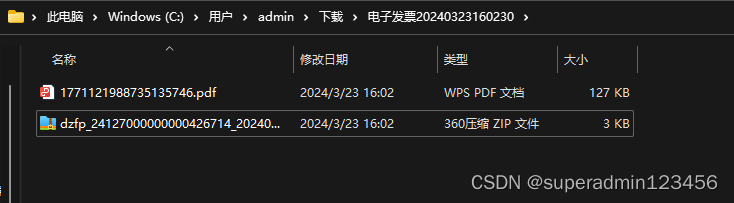
想实现的效果如图,压缩包里还有一个压缩包,里边的压缩包是xml文件
直接上代码
@GetMapping("/downloadMutiFileToZip")
    public void downloadMutiFileToZip(HttpServletResponse response, @RequestParam("qy_id") String qyId,
                                      @RequestParam("jxxlx") String jxxlx,@RequestParam("fp_ids") String[] fp_ids){

        List<Map<String, Object>> fjList = daFjxxService.queryFjxxByQyIdAndJxxlx(qyId, jxxlx,fp_ids,null);
        //如果有附件 进行zip处理
        if (fjList != null && fjList.size() > 0) {
            ByteArrayOutputStream zipData = new ByteArrayOutputStream();
            try(ZipOutputStream zipOutputStream = new ZipOutputStream(zipData)){
                for (Map<String, Object> fjMap : fjList) {
                    String fileName = (String) fjMap.get("fjmc");
                    String filePath = (String) fjMap.get("fjlj");
                    String fjlx = fjMap.get("fjlx").toString();
                    String multiModeType = SpringUtils.getBean(ISysConfigService.class).selectConfigByKey("sys.upload.type");
                    //以下代码为获取附件inputStream
                    InputStream ins = multiModeFileSimpleContext.getInputStream(response, fileName, filePath, multiModeType);
                    if (ins == null) {
                        continue;
                    }

                    byte[] buffer = new byte[1024];

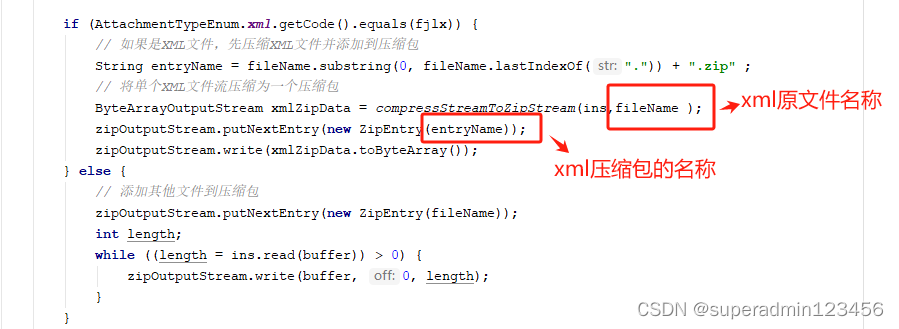
                    if (AttachmentTypeEnum.xml.getCode().equals(fjlx)) {
                        // 如果是XML文件,先压缩XML文件并添加到压缩包
                        String entryName = fileName.substring(0, fileName.lastIndexOf(".")) + ".zip" ;
                        // 将单个XML文件流压缩为一个压缩包
                        ByteArrayOutputStream xmlZipData = compressStreamToZipStream(ins,fileName );
                        zipOutputStream.putNextEntry(new ZipEntry(entryName));
                        zipOutputStream.write(xmlZipData.toByteArray());
                    } else {
                        // 添加其他文件到压缩包
                        zipOutputStream.putNextEntry(new ZipEntry(fileName));
                        int length;
                        while ((length = ins.read(buffer)) > 0) {
                            zipOutputStream.write(buffer, 0, length);
                        }
                    }
                    zipOutputStream.closeEntry();
                }

                // 生成压缩包的文件名称
                SimpleDateFormat sdf = new SimpleDateFormat("yyyyMMddHHmmss");
                String timestamp = sdf.format(new Date());
                String zipFileName = "电子发票"+timestamp+".zip";

                // 将压缩包返回给前端
                sendZipDataToClient(zipData.toByteArray(), zipFileName,response);
            }catch(Exception e){
                e.printStackTrace();
            }

        }
    }

    /**
     * @description: 将单个文件流压缩为一个压缩包的方法
     * @author
     * @date 2024/3/23 15:30
     * @version 1.0
    */
    private static ByteArrayOutputStream compressStreamToZipStream(InputStream stream, String entryName) {
        ByteArrayOutputStream zipData = new ByteArrayOutputStream();

        try (ZipOutputStream zipOutputStream = new ZipOutputStream(zipData)) {
            zipOutputStream.putNextEntry(new ZipEntry(entryName));

            byte[] buffer = new byte[1024];
            int length;
            while ((length = stream.read(buffer)) > 0) {
                zipOutputStream.write(buffer, 0, length);
            }

            zipOutputStream.closeEntry();
        } catch (IOException e) {
            e.printStackTrace();
        }
        return zipData;
    }


    /**
     * @description: 将压缩包数据发送给客户端的方法
     * @author
     * @date 2024/3/23 15:20
     * @version 1.0
    */
    private static void sendZipDataToClient(byte[] zipData, String zipFileName,HttpServletResponse response) {
        try {
            response.setContentType("application/octet-stream");
            response.setHeader("Content-Disposition", "attachment;filename=" + URLEncoder.encode(
                zipFileName, "utf-8"
            ));

            try (OutputStream outputStream = response.getOutputStream()) {
                outputStream.write(zipData);
                outputStream.flush();
            }
        } catch (IOException e) {
            e.printStackTrace();
        } finally {
            if (response != null) {
                try {
                    response.flushBuffer();
                } catch (IOException e) {
                    e.printStackTrace();
                }
            }
        }
    }
需要特别注意的点如下





 扫一扫
扫一扫


 3493
3493


 到【灌水乐园】发言



