


1、下载安装包:
2、执行安装命令
sh install.sh
安装完成

可能出现的错误
报错:
[root@node4 harbor]# sh install.sh
[Step 0]: checking if docker is installed ...
Note: docker version: 20.10.8
[Step 1]: checking docker-compose is installed ...
✖ Need to install docker-compose(1.18.0+) by yourself first and run this script again.
解决:安装 docker-composer
资源:下载后执行安装命令
mv docker-compose /usr/local/bin/docker-compose
sudo chmod +x /usr/local/bin/docker-compose
docker-compose --version
[Step 4]: preparing harbor configs ...
prepare base dir is set to /data/devops/k8s/harbor
Error happened in config validation...
ERROR:root:Error: The protocol is https but attribute ssl_cert is not set
[root@node4 harbor]#
解决方案:
vim harbor.yml 注释掉https 部分
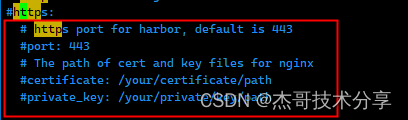
添加后无法启动
"insecure-registries": ["devops.xxxx.com:8083","172.21.0.14:8083"],
vim /etc/docker/daemon.json
[root@node4 harbor]# systemctl restart docker
Job for docker.service failed because the control process exited with error code.
See "systemctl status docker.service" and "journalctl -xe" for details.
解决方案:
查看错误日志:
[root@node4 harbor]# systemctl status docker.service
● docker.service - Docker Application Container Engine
Loaded: loaded (/etc/systemd/system/docker.service; enabled; vendor preset: disabled)
Active: failed (Result: exit-code) since Tue 2023-06-27 10:30:02 CST; 5s ago
Docs: https://docs.docker.com
Process: 2429107 ExecStart=/usr/bin/dockerd --insecure-registry=172.21.0.41:8088 (code=exited, status=1/FAILURE)
Main PID: 2429107 (code=exited, status=1/FAILURE)
Tasks: 100
Memory: 1.8G
CGroup: /system.slice/docker.service
├─2416741 /usr/bin/containerd-shim-runc-v2 -namespace moby -id a12df559a80628f979132b2c77e571fd5ab1c1df87d41489f908ab230104a2c0 -address /var/run/docker/containerd/containerd.sock
├─2416769 /usr/bin/containerd-shim-runc-v2 -namespace moby -id 4390d3667b7f2473f7746289cfb8f2820a227f17ae47d333931573efab25a0db -address /var/run/docker/containerd/containerd.sock
├─2416865 /usr/bin/containerd-shim-runc-v2 -namespace moby -id 95c3fc9fc9935536ea2be0bebbbe76a40f215b4d7cb1f018219b673c03745c35 -address /var/run/docker/containerd/containerd.sock
├─2417010 /usr/bin/containerd-shim-runc-v2 -namespace moby -id ae6df5e0880b91b34d1dc48dabc148d3a998343473f71ad32579b6fcd9b70ecd -address /var/run/docker/containerd/containerd.sock
├─2417063 /usr/bin/containerd-shim-runc-v2 -namespace moby -id d3cdbb819d4f6d9d2b65ad6faec8db4e627343e5b9e72792ebc16da73a7d4033 -address /var/run/docker/containerd/containerd.sock
├─2417182 /usr/bin/containerd-shim-runc-v2 -namespace moby -id e1d119be15f1d1a477165399d9c0b5c47f75fbf5cfb4ad645872e9141709ced2 -address /var/run/docker/containerd/containerd.sock
├─2417236 /usr/bin/containerd-shim-runc-v2 -namespace moby -id 91de8517b47a8cb9160e2d63fb45faac2792b678afb62a3826e5650661f43db7 -address /var/run/docker/containerd/containerd.sock
├─2417324 /usr/bin/containerd-shim-runc-v2 -namespace moby -id 3ab04a63a9fd34b591ca473db6440e66fab87a7e280bc3934f314204f76c2b16 -address /var/run/docker/containerd/containerd.sock
└─2417378 /usr/bin/containerd-shim-runc-v2 -namespace moby -id 8de86ad78fa27ed14e522f336e586920ef113224f8b48a62b2bc5364c78f9f28 -address /var/run/docker/containerd/containerd.sock
Jun 27 10:30:02 node4 systemd[1]: docker.service: Service RestartSec=2s expired, scheduling restart.
Jun 27 10:30:02 node4 systemd[1]: docker.service: Scheduled restart job, restart counter is at 3.
Jun 27 10:30:02 node4 systemd[1]: Stopped Docker Application Container Engine.
Jun 27 10:30:02 node4 systemd[1]: docker.service: Start request repeated too quickly.
Jun 27 10:30:02 node4 systemd[1]: docker.service: Failed with result 'exit-code'.
Jun 27 10:30:02 node4 systemd[1]: Failed to start Docker Application Container Engine.
[root@node4 harbor]# vim /etc/systemd/system/docker.service
[root@node4 harbor]# journalctl -xe -u docker
-- Support: https://access.redhat.com/support
--
-- Unit docker.service has begun starting up.
Jun 27 10:30:00 node4 dockerd[2429107]: unable to configure the Docker daemon with file /etc/docker/daemon.json: the following directives are specified both as a flag and in the configuration file: insecure-regi>
Jun 27 10:30:00 node4 systemd[1]: docker.service: Main process exited, code=exited, status=1/FAILURE
Jun 27 10:30:00 node4 systemd[1]: docker.service: Failed with result 'exit-code'.
-- Subject: Unit failed
-- Defined-By: systemd
-- Support: https://access.redhat.com/support
--
-- The unit docker.service has entered the 'failed' state with result 'exit-code'.
Jun 27 10:30:00 node4 systemd[1]: Failed to start Docker Application Container Engine.
-- Subject: Unit docker.service has failed
-- Defined-By: systemd
-- Support: https://access.redhat.com/support
--
-- Unit docker.service has failed.
--
-- The result is failed.
Jun 27 10:30:02 node4 systemd[1]: docker.service: Service RestartSec=2s expired, scheduling restart.
Jun 27 10:30:02 node4 systemd[1]: docker.service: Scheduled restart job, restart counter is at 3.
-- Subject: Automatic restarting of a unit has been scheduled
-- Defined-By: systemd
-- Support: https://access.redhat.com/support
--
-- Automatic restarting of the unit docker.service has been scheduled, as the result for
-- the configured Restart= setting for the unit.
Jun 27 10:30:02 node4 systemd[1]: Stopped Docker Application Container Engine.
-- Subject: Unit docker.service has finished shutting down
-- Defined-By: systemd
-- Support: https://access.redhat.com/support
--
-- Unit docker.service has finished shutting down.
Jun 27 10:30:02 node4 systemd[1]: docker.service: Start request repeated too quickly.
Jun 27 10:30:02 node4 systemd[1]: docker.service: Failed with result 'exit-code'.
-- Subject: Unit failed
-- Defined-By: systemd
-- Support: https://access.redhat.com/support
--
-- The unit docker.service has entered the 'failed' state with result 'exit-code'.
Jun 27 10:30:02 node4 systemd[1]: Failed to start Docker Application Container Engine.
-- Subject: Unit docker.service has failed
-- Defined-By: systemd
-- Support: https://access.redhat.com/support
--
-- Unit docker.service has failed.
--
-- The result is failed.
发现是配置冲突
:the following directives are specified both as a flag and in the configuration file: insecure-reg
查看配置:

发现 /etc/systemd/system/docker.service 有配置 把配置移动到daemon.json
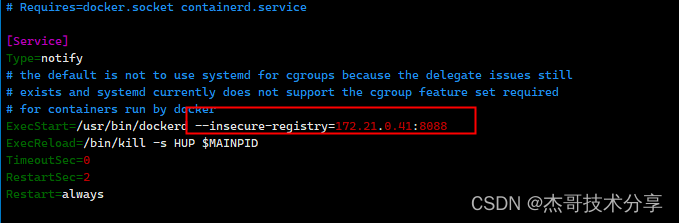
重启:成功

启动: docker-compose ps
[root@node4 harbor]# cd /data/devops/k8s/harbor/
[root@node4 harbor]# docker-compose up -d
docker-compose
[root@node4 harbor]# docker login -uadmin devops.xxxx.com:8083
Password:
WARNING! Your password will be stored unencrypted in /root/.docker/config.json.
Configure a credential helper to remove this warning. See
https://docs.docker.com/engine/reference/commandline/login/#credentials-store
Login Succeeded





 扫一扫
扫一扫


 1606
1606

 被折叠的 条评论
为什么被折叠?
被折叠的 条评论
为什么被折叠?
 到【灌水乐园】发言





