





在src下的components下面新建一个文件夹 SliderVerify
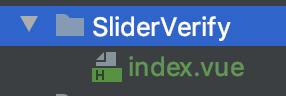
index.vue内容赋值粘贴即可
<template>
  <div class="jc-component__range">
    <div class="jc-range" :class="rangeStatus?'success':''" >
      <i @mousedown="rangeMove" :class="rangeStatus?successIcon:startIcon"></i>
      {{rangeStatus?successText:startText}}
    </div>
  </div>
</template>

<script>
  export default {
    props: {
      // 成功之后的函数
      successFun: {
        type: Function
      },
      //成功图标
      successIcon: {
        type: String,
        default: 'el-icon-success'
      },
      //成功文字
      successText: {
        type: String,
        default: '验证成功'
      },
      //开始的图标
      startIcon: {
        type: String,
        default: 'el-icon-d-arrow-right'
      },
      //开始的文字
      startText: {
        type: String,
        default: '请向右滑动验证'
      },
      //失败之后的函数
      errorFun: {
        type: Function
      },
      //或者用值来进行监听
      status: {
        type: String
      }
    },
    data(){
      return {
        disX : 0,
        rangeStatus: false
      }
    },
    methods:{
      //滑块移动
      rangeMove(e){
        let ele = e.target;
        let startX = e.clientX;
        let eleWidth = ele.offsetWidth;
        let parentWidth =  ele.parentElement.offsetWidth;
        let MaxX = parentWidth - eleWidth;
        if(this.rangeStatus){//不运行
          return false;
        }
        document.onmousemove = (e) => {
          let endX = e.clientX;
          this.disX = endX - startX;
          if(this.disX<=0){
            this.disX = 0;
          }
          if(this.disX>=MaxX-eleWidth){//减去滑块的宽度,体验效果更好
            this.disX = MaxX;
          }
          ele.style.transition = '.1s all';
          ele.style.transform = 'translateX('+this.disX+'px)';
          e.preventDefault();
        }
        document.onmouseup = ()=> {
          if(this.disX !== MaxX){
            ele.style.transition = '.5s all';
            ele.style.transform = 'translateX(0)';
            //执行成功的函数
            this.errorFun && this.errorFun();
          }else{
            this.rangeStatus = true;
            if(this.status){
              this.$parent[this.status] = true;
            }
            //执行成功的函数
            this.successFun && this.successFun();
          }
          document.onmousemove = null;
          document.onmouseup = null;
        }
      }
    }
  };
</script>


<style lang="scss" scoped>
  @mixin jc-flex{
    display: flex;
    justify-content: center;
    align-items: center;
  }
  .jc-component__range{
    border-radius: 4px;
    overflow: hidden;
    .jc-range{
      background-color: #ebebeb;
      position: relative;
      transition: 1s all;
      user-select: none;
      color: #333;
      @include jc-flex;
      height: 40px; /*no*/
      &.success{
        background-color: #7AC23C;
        color: #fff;
        i{
          color: #7AC23C;
        }
      }
      i{
        position: absolute;
        left: 0;
        width: 50px;/*no*/
        height: 100%;
        color: #919191;
        background-color: #fff;
        border: 1px solid #bbb;
        cursor: pointer;
        border-radius: 4px;
        box-shadow: 0 0 10px rgba(0,0,0,.2);
        @include jc-flex;
      }
    }
  }
</style>
在需要的页面中引入 JcRange 滑动验证组件
<template>
	<JcRange status="status"></JcRange>
	// 或者这样调用
	<JcRange
	:successFun="这里传递你的函数(成功)"
	:errorFun="这里传递你的函数(失败)"
	></JcRange>
</template>
<script>
import JcRange from '@/components/public/JcRange.vue'
export default {
	data(){
		return {
			status: false
		}
	},
	components: {
		JcRange
	}
}
</script>





 扫一扫
扫一扫


 1035
1035

 被折叠的 条评论
为什么被折叠?
被折叠的 条评论
为什么被折叠?
 到【灌水乐园】发言





