


小白想实现在窗口点击上传图片按钮后,在旁边的Lable控件中显示上传的图片,但选择图片后一直提示log4cplus的报错,在lable中也不显示图片,且窗口运行一会报错就消失了。以下是小白的代码:
from PyQt5.QtWidgets import QApplication, QMainWindow, QLabel, QPushButton, QVBoxLayout, QWidget, QFileDialog
from PyQt5.QtGui import QPixmap
from PyQt5.uic import loadUi
from PyQt5.QtCore import Qt

class MainWindow(QMainWindow):
    def __init__(self):
        super().__init__()

        # 加载UI文件
        loadUi("XiuGai.ui", self)

        # 将按钮单击连接到函数
        self.btn_picture.clicked.connect(self.on_btn_picture_clicked)

    def on_btn_picture_clicked(self):
        options = QFileDialog.Options()
        fileName, _ = QFileDialog.getOpenFileName(self, "选择图片", "", "Images (*.png *.jpg *.bmp);;All Files (*)", options=options)

        if fileName:
            # 处理选择的文件,例如显示在Label中
            pixmap = QPixmap(fileName)
            self.imageLabel.setPixmap(pixmap.scaled(self.imageLabel.size(), aspectMode=Qt.KeepAspectRatio))

if __name__ == '__main__':
    app = QApplication([])
    window = MainWindow()
    window.show()
    app.exec_()
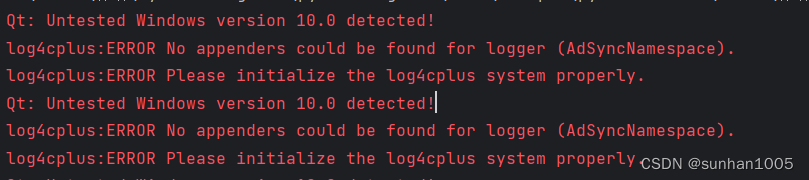
下面是报错信息:





 扫一扫
扫一扫


 679
679


 到【灌水乐园】发言



