



子组件,使用 vue-seamless-scroll 插件,安装方式如下
//vue2
npm install vue-seamless-scroll --save
组件代码
<template>
<div>
  <div class="a-table" v-if="show">
    <div class="a-thead">
      <span class="a-th" v-for="(item, i) in theadList" :key="i" :class="item.type">
        {{ item.name }}
       <em class="caret-wrapper" v-if="item.isSort">
          <i class="sort-caret ascending" @click="sortFc(i,'ascending')"></i>
          <i class="sort-caret descending" @click="sortFc(i,'descending')</i>
        </em>
      </span>
    </div>
    <div class="a-tbody" v-if="tableList.length > 0">
      <vue-seamless-scroll :data="tableList" :class-option="scrollOption" class="wrap">
        <div class="a-tr" v-for="(item, i) in tableList" :key="i" :class="item.isClass?'green-box':''">
          <span class="a-th" v-for="(th, ti) in theadList" :key="ti">{{ item[th.value] }}</span>
        </div>
      </vue-seamless-scroll>
    </div>
    <div class="table-none" v-else>暂无数据</div>
  </div>
</div>
</template>

<script>
import vueSeamlessScroll from "vue-seamless-scroll";
 export default {
   name: 'ScrollTable',
   props: {
     theadList: {
       type: Array,
       default: () => []
     },
     tableList: {
       type: Array,
       default: () => []
     },
     limitMoveNum: {
       type: Number,
       default: 6
     }
   },
   components:{
     vueSeamlessScroll
   },
   computed: {
     scrollOption() {
       return {
         step: 0.4, // 数值越大速度滚动越快
         limitMoveNum: this.limitMoveNum, // 开始无缝滚动的数据量 this.dataList.length
         hoverStop: true, // 是否开启鼠标悬停stop
         direction: 1, // 0向下 1向上 2向左 3向右
         openWatch: true, // 开启数据实时监控刷新dom
         singleHeight: 0, // 单步运动停止的高度(默认值0是无缝不停止的滚动) direction => 0/1
         singleWidth: 0,// 单步运动停止的宽度(默认值0是无缝不停止的滚动) direction => 2/3
         waitTime: 1000, // 单步运动停止的时间(默认值1000ms)
         warehouseName: null
       };
     },
   },
   watch:{
     theadList(val){
       val.map(v => {
         v.type = '';
         return v;
       })
     },
     tableList(val){
       if(!!val){
         this.show = true;
       }
    }
   },
   data() {
     return {
        show: true,
     }
   },
   methods:{
     sortFc(i, type){
       this.theadList.map(t => {
         t.type = '';
         return t;
       })
       this.theadList[i].type = type;
       this.$set(this.theadList[i], 'type', type);     // 防止赋值不上
       if(type === 'ascending'){
         this.tableList.sort((a, b) => a[this.theadList[i].value] - b[this.theadList[i].value]);
       }else{
        this.tableList.sort((a, b) => b[this.theadList[i].value] - a[this.theadList[i].value]);
       }
       // this.$forceUpdate();     // 强制刷新
     }
   }
 }
 </script>
<style scoped lang="scss">
.a-table{
  width: 100%;
  //padding: 12px;
  .a-thead{
    display: flex;
    height:40px;
    background: linear-gradient( 180deg, #EEF5FF 0%, #D5E8FF 100%);
    opacity: 0.89;
    font-family: Microsoft YaHei, Microsoft YaHei;
    font-weight: 400;
    font-size: 14px;
    color: #242424;
    align-items: center;
    justify-content: space-around;
    // letter-spacing: 80px;
  }
  //.a-th:nth-child(2){
  //  width:30%;
  //  text-align: center;
  //}
  //.a-th:nth-child(3){
  //  width:40%;
  //  text-align: center;
//}
  .a-th{
    flex:1;
    text-align: center;

    &:nth-child(1){
      width:60px;
      text-align: center;
      flex: initial;
    }
  }
  .wrap{
    height: 100%;
    overflow: hidden;
    // display: block;
    // height: 120px;
  }
  .a-tbody{
    height: calc(100% - 28px);
    .a-tr{
      display: flex;
      font-weight:  400;
      font-size: 13px;
      color: #5E5E5E;
      min-height: 44px;
      padding: 12px 0;
      opacity: 0.9;
      align-items: center;
      background: #FFFFFF;
      border: 1px solid #EEEEEE;
      img{
        width: 26px;
        height: 26px;
        border-radius: 2px;
        border: 1px solid #FFFFFF;
      }
      &:nth-child(2n){
        background: #F8FBFF;
        border: 0;
      }
    }
    .green-box{
      background: #F3FFF2;
      position: relative;
      &:before{
        content:'关联班级';
        display: inline-block;
        width: 71px;
        height: 17px;
        color:#fff;
        font-size: 12px;
        padding-left: 6px;
        background: linear-gradient( 94deg, #4BBB41 0%, rgba(86,203,81,0) 100%);
        border-radius: 2px 0 0 2px;
        position: absolute;
        top:0;
        left: 0;
      }
    }
  }

}
.table-none{
  height: 40px;
  line-height: 40px;
  color:#b8c4db;
  text-align: center;
  border: 1px solid #EEEEEE;
  border-top:0;
}
// 以下是排序的上下两个小三角 ,   使用手写,用icon的话上下空隙太多,不好调整
.caret-wrapper{
  display: -webkit-inline-box;
display: -ms-inline-flexbox;
  display: inline-flex;
  -webkit-box-orient: vertical;
  -webkit-box-direction: normal;
  -ms-flex-direction: column;
  flex-direction: column;
  -webkit-box-align: center;
  -ms-flex-align: center;
  align-items: center;
  height: 34px;
  width: 24px;
  vertical-align: middle;
  cursor: pointer;
  overflow: initial;
  position: relative;
}
.sort-caret {
  width: 0;
  height: 0;
  border: solid 5px transparent;
  position: absolute;
  left: 7px;
}
.sort-caret.ascending {
  border-bottom-color: #C0C4CC;
  top: 5px;
}
.sort-caret.descending {
  border-top-color: #C0C4CC;
  bottom: 7px;
}
.descending .sort-caret.descending {
  border-top-color: #409EFF;
}
.ascending .sort-caret.ascending {
  border-bottom-color: #409EFF;
}
</style>
父级组件引用方式
import ScrollTable from "@/views/hfZp/components/scrollTable";

export defalut{
    components: {
        ScrollTable,
    },
    data(){
        return {
            teacherThead: [{
                name: '序号',
                value: 'index',
                isSort: true,
              }, {
                name: '教师姓名',
                value: 'teacherName',
              }, {
                name: '发章总数',

                value: 'count',
                isSort: true,
              }, {
                name: '评价人数',
                value: 'number',
              }, {
                name: '评价覆盖率',
                value: 'rate',
              },  {
                name: '人均评价次数',
                value: 'people',
              }],
              teacherTable: [{
                index: 1,
                teacherName: '111',
                count: 10,
                number: 40,
                rate: '80%',

                people: 20,
              }, {
                index: 2,
                teacherName: '111',
                count: 20,
                number: 40,
                rate: '80%',
                people: 20,
              }, {
                index: 3,
                teacherName: '111',
                count: 20,
                number: 40,
                rate: '80%',
                people: 20,
              }, {
                index: 4,
                teacherName: '111',
                count: 20,
                number: 40,
                rate: '80%',
                people: 20,
              }, {
                index: 5,
                teacherName: '111',
                count: 20,
                number: 40,
                rate: '80%',
                people: 20,
              }]
    }
}}
引用时添加组件的高度以及overflow属性,不然滚动的height撑大了
<scroll-table :thead-list="teacherThead" :table-list="teacherTable" style="height:264px;overflow: hidden"/>
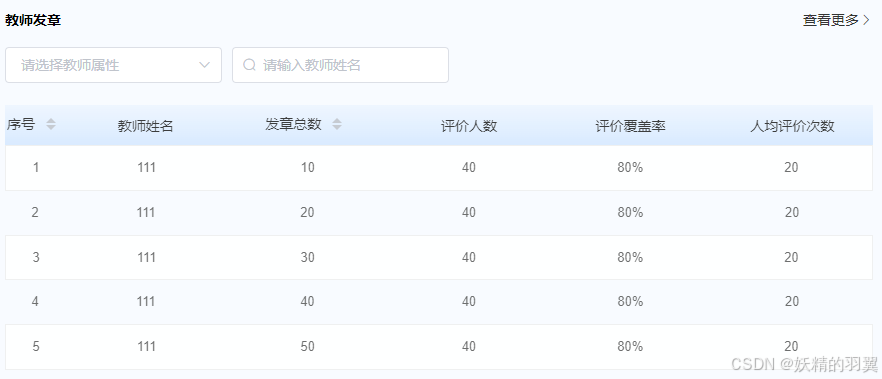
效果如下
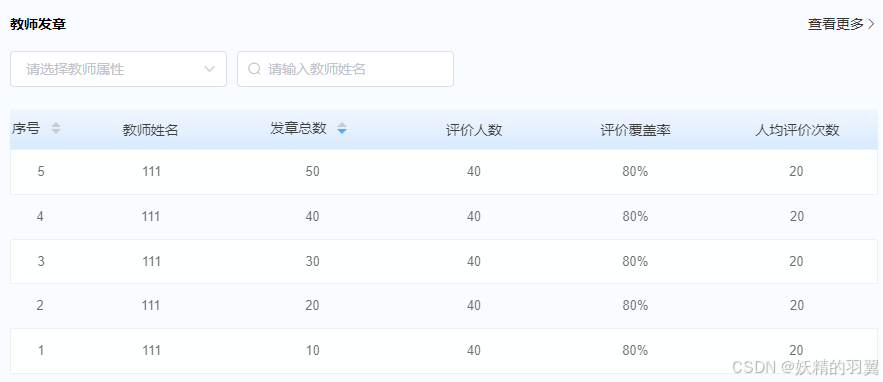
排序后如下 (排序只能按着一个属性进行排序)





 扫一扫
扫一扫


 被折叠的 条评论
为什么被折叠?
被折叠的 条评论
为什么被折叠?
 到【灌水乐园】发言





