



文章目录
Demo1:自定义打印机效果
1. 理论
1.1 baseline定义
添加链接描述
在 Android 布局中,baseline(基线) 是指文本绘制时所依据的一条虚拟水平线。它是字体设计中的一个概念,用于确保不同字体、不同大小的文本在垂直方向上能够对齐得当。
baseline 的作用:
在 Android 中,baseline 主要用于对齐 TextView 或其他文本控件。
当多个文本控件并排显示时,系统会默认以它们的 基线对齐(baseline alignment)
1.2 声明自定义视图(View)的属性(attributes)
<?xml version="1.0" encoding="utf-8"?>
<resources>
    <declare-styleable name="TypewriterTextView">
        <attr name="typingSpeed" format="integer" />
        <attr name="cursorBlinkSpeed" format="integer" />
        <attr name="showCursor" format="boolean" />
        <attr name="typewriterText" format="string" />
    </declare-styleable>
</resources>
- xml中引用
<com.example.view.TypewriterTextView
    android:layout_width="wrap_content"
    android:layout_height="wrap_content"
    app:typingSpeed="100"
    app:cursorBlinkSpeed="500"
    app:showCursor="true"
    app:typewriterText="Hello, this is a typewriter effect!" />
- Java/Kotlin中使用
    init {
        attrs?.let {
            val typedArray = context.obtainStyledAttributes(it, R.styleable.TypewriterTextView)
            val typingSpeed = typedArray.getInt(R.styleable.TypewriterTextView_typingSpeed, 500)
            val cursorBlinkSpeed = typedArray.getInt(R.styleable.TypewriterTextView_cursorBlinkSpeed, 500)
            val showCursor = typedArray.getBoolean(R.styleable.TypewriterTextView_showCursor, true)
            val typewriterText = typedArray.getString(R.styleable.TypewriterTextView_typewriterText)

            // 使用这些值初始化打字机逻辑...

            typedArray.recycle()
        }
    }
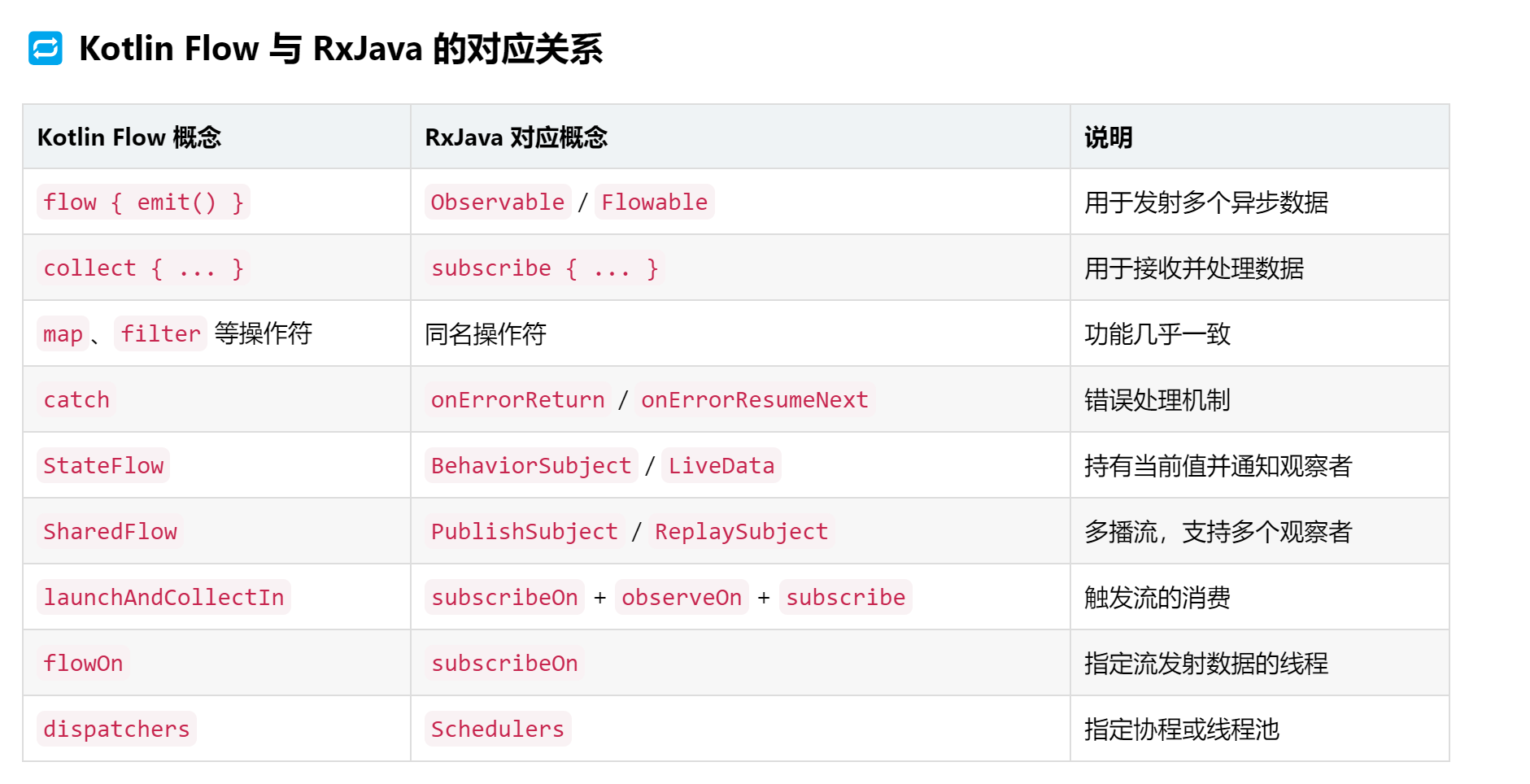
1.3 Flow和Collect
1.4 缓存
  private class SavedState : BaseSavedState {

        companion object {
            @JvmField
            val CREATOR = object : Parcelable.Creator<SavedState> {
                override fun createFromParcel(source: Parcel) = SavedState(source)
                override fun newArray(size: Int) = arrayOfNulls<SavedState?>(size)
            }
        }

        var currentText: String = ""
        var fullText: String = ""
        var cursorPosition: Int = 0
        var isTyping: Boolean = false

        constructor(superState: Parcelable?) : super(superState)

        private constructor(parcel: Parcel) : super(parcel) {
            currentText = parcel.readString() ?: ""
            fullText = parcel.readString() ?: ""
            cursorPosition = parcel.readInt()
            isTyping = parcel.readInt() == 1
        }

        override fun writeToParcel(out: Parcel, flags: Int) {
            super.writeToParcel(out, flags)
            out.writeString(currentText)
            out.writeString(fullText)
            out.writeInt(cursorPosition)
            out.writeInt(
                if (isTyping) {
                    1
                } else {
                    0
                }
            )
        }
    }

    private fun cancelJobs() {
        cursorJob?.cancel()
        typingJob?.cancel()
        isTyping = false
    }
   override fun onSaveInstanceState(): Parcelable? {
        val superState = super.onSaveInstanceState()
        val savedState = SavedState(superState)
        savedState.fullText = fullText
        savedState.currentText = currentText
        savedState.isTyping = isTyping
        savedState.cursorPosition = cursorPosition
        return savedState
    }

    override fun onRestoreInstanceState(state: Parcelable?) {
        if (state is SavedState) {
            super.onRestoreInstanceState(state.superState)
            currentText = state.currentText
            fullText = state.fullText
            cursorPosition = state.cursorPosition
            isTyping = state.isTyping
            text = currentText

            if (isTyping && currentText.length < fullText.length) {
                setTextWithAnimation(fullText)
            }
        } else {
            super.onRestoreInstanceState(state)
        }
    }
2. 完整代码
package person.tools.treasurebox.customview.widget

import android.content.Context
import android.graphics.Canvas
import android.graphics.Paint
import android.os.Parcel
import android.os.Parcelable
import android.util.AttributeSet
import androidx.appcompat.widget.AppCompatTextView
import androidx.lifecycle.LifecycleOwner
import androidx.lifecycle.lifecycleScope
import kotlinx.coroutines.CoroutineScope
import kotlinx.coroutines.Dispatchers
import kotlinx.coroutines.Job
import kotlinx.coroutines.delay
import kotlinx.coroutines.flow.flow
import kotlinx.coroutines.isActive
import kotlinx.coroutines.launch
import person.tools.treasurebox.R

/**
 * 自定义打印机效果
 * 打字动画控制,样式配置,状态保存与恢复
 * 参考 https://juejin.cn/post/7552165815539564554
 */
class TypeWriterTextView @JvmOverloads constructor(
    context: Context, attrs: AttributeSet? = null, defStyleAttr: Int = 0
) : AppCompatTextView(context, attrs, defStyleAttr) {

    //完整文本
    private var fullText = ""

    //当前的文本
    private var currentText = ""

    //打字速度
    private var typingSpeed = 80L

    //是否正在打字
    private var isTyping: Boolean = false

    //光标闪烁速度
    private var cursorBlinkSpeed = 50L

    //是否显示光标
    private var isShowCursor: Boolean = false

    //光标位置
    private var cursorPosition = 0

    //光标是否可见
    private var isCursorVisible = false

    //协程任务
    private var typingJob: Job? = null
    private var cursorJob: Job? = null

    //画笔
    private val cursorPaint = Paint().apply {
        color = currentTextColor
        style = Paint.Style.FILL
        strokeWidth = 4f
    }

    private val textPaint = Paint().apply {
        color = currentTextColor
        textSize = textSize
        typeface = typeface
    }

    init {
        context.obtainStyledAttributes(attrs, R.styleable.TypeWriterTextView).apply {
            typingSpeed = getInt(R.styleable.TypeWriterTextView_typingSpeed, 80).toLong()
            cursorBlinkSpeed = getInt(R.styleable.TypeWriterTextView_cursorBlinkSpeed, 500).toLong()
            isShowCursor = getBoolean(R.styleable.TypeWriterTextView_showCursor, false)
            val text = getString(R.styleable.TypeWriterTextView_typewriterText)
            //如果设置了文本,立即进行打字
            if (!text.isNullOrEmpty()) {
                setTextWithAnimation(text)
            }
            recycle()
        }

    }

    override fun onDraw(canvas: Canvas) {
        super.onDraw(canvas)
        if (isShowCursor && isCursorVisible && isTyping) {
            val textWidth = textPaint.measureText(currentText)
            val startX = paddingLeft + textWidth
            val baseline = baseline.toFloat()
            canvas.drawLine(startX, baseline - textSize, startX, baseline + 10, cursorPaint)
        }
    }

    /**
     * 设置打字速度
     */
    fun setTypingSpeed(speed: Long) {
        typingSpeed = speed
    }

    /**
     * 设置光标闪烁速度
     */
    fun setCursorBlinkSpeed(speed: Long) {
        cursorBlinkSpeed = speed
    }

    /**
     *  是否显示光标
     */
    fun setShowCursor(show: Boolean) {
        isShowCursor = show
        if (!show) {
            cursorJob?.cancel()
        }
        invalidate()
    }

    /**
     * 开始打印动画
     */
    private fun setTextWithAnimation(text: String) {
        cancelJobs()
        fullText = text
        currentText = ""
        cursorPosition = 0
        isTyping = true
        typingJob = getLifecycleScope().launch {
            flow {
                fullText.forEachIndexed { index, char ->
                    delay(typingSpeed)
                    currentText = fullText.substring(0, index + 1)
                    cursorPosition = currentText.length
                    emit(currentText)
                }
            }.collect {
                setText(it)
                invalidate()
            }
            // 打字完成后停止光标闪烁
            isTyping = false
            if (isShowCursor) {
                cursorJob?.cancel()
                // 确保最终文本不包含光标
                setText(fullText)
            }
        }
        //开始光标闪烁效果
        if (isShowCursor) {
            cursorJob = getLifecycleScope().launch {
                while (isActive && isTyping) {
                    isCursorVisible = !isCursorVisible
                    invalidate()
                    delay(cursorBlinkSpeed)
                }
            }
        }
    }

    /**
     * 暂停打字
     */
    fun pauseAnimation() {
        cancelJobs()
    }

    /**
     * 继续打字效果
     */
    fun resumeAnimation() {
        if (currentText.length < fullText.length) {
            setTextWithAnimation(fullText)
        }
    }

    /**
     * 重置打字效果
     */
    fun resetAnimation() {
        cancelJobs()
        currentText = ""
        fullText = ""
        cursorPosition = 0
        //控制UI显示的text
        text = ""
    }

    override fun onDetachedFromWindow() {
        super.onDetachedFromWindow()
        cancelJobs()
    }

    override fun onSaveInstanceState(): Parcelable? {
        val superState = super.onSaveInstanceState()
        val savedState = SavedState(superState)
        savedState.fullText = fullText
        savedState.currentText = currentText
        savedState.isTyping = isTyping
        savedState.cursorPosition = cursorPosition
        return savedState
    }

    override fun onRestoreInstanceState(state: Parcelable?) {
        if (state is SavedState) {
            super.onRestoreInstanceState(state.superState)
            currentText = state.currentText
            fullText = state.fullText
            cursorPosition = state.cursorPosition
            isTyping = state.isTyping
            text = currentText

            if (isTyping && currentText.length < fullText.length) {
                setTextWithAnimation(fullText)
            }
        } else {
            super.onRestoreInstanceState(state)
        }
    }

    /**
     * 自定义SavedState用于存储状态
     */
    private class SavedState : BaseSavedState {

        companion object {
            @JvmField
            val CREATOR = object : Parcelable.Creator<SavedState> {
                override fun createFromParcel(source: Parcel) = SavedState(source)
                override fun newArray(size: Int) = arrayOfNulls<SavedState?>(size)
            }
        }

        var currentText: String = ""
        var fullText: String = ""
        var cursorPosition: Int = 0
        var isTyping: Boolean = false

        constructor(superState: Parcelable?) : super(superState)

        private constructor(parcel: Parcel) : super(parcel) {
            currentText = parcel.readString() ?: ""
            fullText = parcel.readString() ?: ""
            cursorPosition = parcel.readInt()
            isTyping = parcel.readInt() == 1
        }

        override fun writeToParcel(out: Parcel, flags: Int) {
            super.writeToParcel(out, flags)
            out.writeString(currentText)
            out.writeString(fullText)
            out.writeInt(cursorPosition)
            out.writeInt(
                if (isTyping) {
                    1
                } else {
                    0
                }
            )
        }
    }

    private fun cancelJobs() {
        cursorJob?.cancel()
        typingJob?.cancel()
        isTyping = false
    }

    /**
     * 不推荐这种写法,view不应该关心生命周期,可以让外部传参进来
     */
    private fun getLifecycleScope(): CoroutineScope {
        return try {
            (context as? LifecycleOwner)?.lifecycleScope ?: CoroutineScope(Dispatchers.Main)
        } catch (e: Exception) {
            CoroutineScope(Dispatchers.Main)
        }
    }
}






 扫一扫
扫一扫


 2101
2101

 被折叠的 条评论
为什么被折叠?
被折叠的 条评论
为什么被折叠?
 到【灌水乐园】发言





