



 本文详细介绍了数据库的基本操作,包括创建和删除数据库,修改字符集,以及数据表的操作如创建、修改、删除。此外,还涵盖了数据的插入、更新和删除,查询语法,如LIKE、ORDERBY、LIMIT,以及多表连接查询和分组统计。
数据库基本操作
- 创建数据库
create database 数据库名称;
- 删除数据库
drop database 数据库名称;
- 查询所有数据库
show databases;
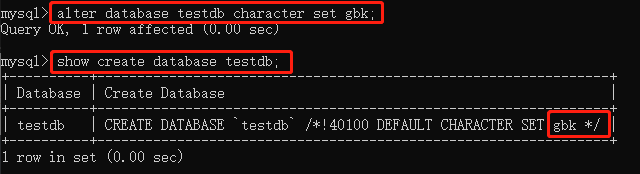
- 将数据库的字符集修改为gbk
alter database 数据库名称 character set gbk;
- 切换数据库
use 数据库名称;
- 查看当前使用的数据库
select database();
数据表的基本操作
1.创建数据表
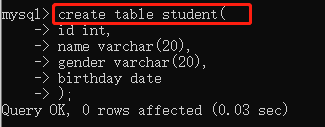
- 创建学生表
create table student(
id int,
name varchar(20),
gender varchar(20),
birthday date
);
2.查看数据表
- 查看当前数据库中所有表
show tables;
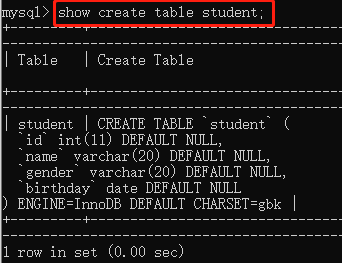
- 查表的基本信息
show create table student;
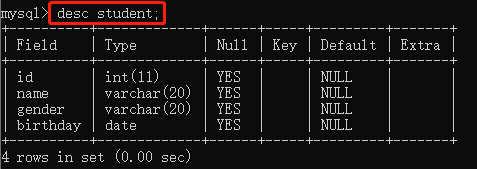
- 查看表的字段信息
desc studnet;
3.修改数据表
- 修改表名
alter table student rename to stu;
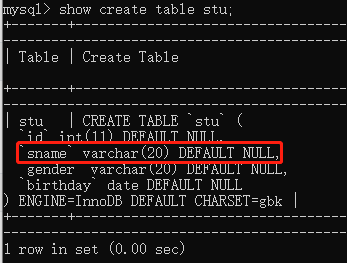
- 修改字段名
alter table stu change name sname varchar(20);
- 修改字段数据类型
alter table stu modify sname int;
- 增加字段
alter table stu add address varchar(20);
- 删除字段
alter table stu drop address;
4.删除数据表
drop table 表名;
数据表插入数据
1.为表中所有字段插入数据
INSERT INTO 表名(字段名1,字段名2,……)VALUES(值1,值2,……);
insert into stu(id,sname,gender,birthday) values(1,'李毅','女','2000-02-03');

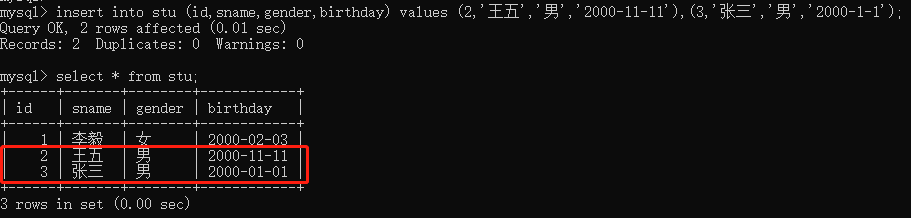
2.同时插入多条记录
INSERT INTO 表名(字段名1,字段名2,……)VALUES(值1,值2,……),(值1,值2,……),……;
insert into stu (id,sname,gender,birthday) values (2,'王五','男','2000-11-11'),(3,'张三','男','2000-1-1')
数据表更新数据
UPDATE 表名 SER 字段名1=值1,字段名2=值2,…… WHERE 条件表达式;
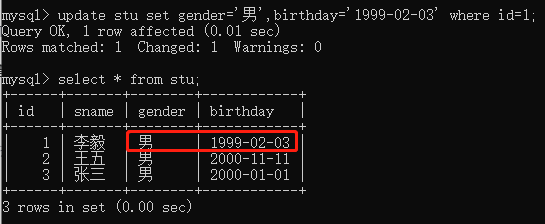
字段名1,字段名2……用于指定要更新的字段名称;值1,值2……用于表示字段的新数据;WHERE条件表达式是可选的,用于指定更新数据需要满足的条件
update stu set gender='男',birthday='1999-02-03' where id=1;
数据表删除数据
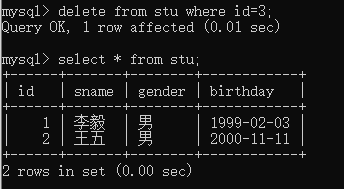
DELETE FROM 表名 WHERE 条件表达式
delete from stu where id=3;
数据表简单查询
1.查询所有字段
SELECT * FROM 表名;
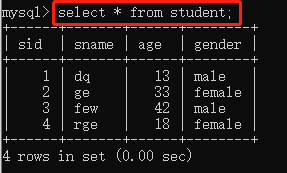
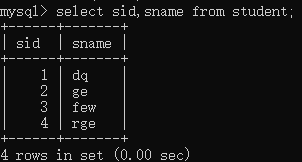
2.查询指定字段(sid,sname)
select sid,sname from student;
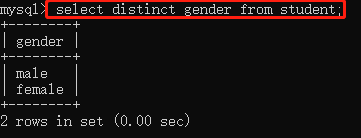
3.从查询结果中过滤重复数据
select distinct gender from student;
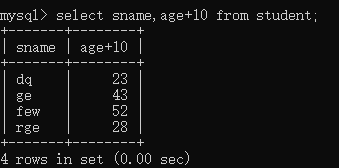
4.算术运算符
在select查询语句中还可以使用加减乘除运算符
select sname,age+10 from student; //年龄+10
函数
1.count()
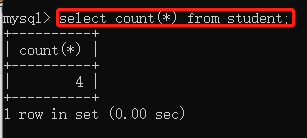
统计表中数据的行数或者统计指定列其值不为NULL的数据个数
select count(*) from student;
2.max()
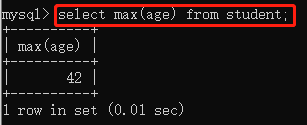
计算指定列的最大值,如果指定列是字符串类型则使用字符串排序运算
select max(age) from student; //表中年龄最大
3.min()
计算指定列的最小值,如果指定列是字符串类型则使用字符串排序运算
4.sum()
计算指定列的数值和,如果指定列类型不是数值类型则计算结果为0
5.avg()
计算指定列的平均值,如果指定列类型不是数值类型则计算结果为
条件查询
1.使用like关键字查询
1、普通字符串
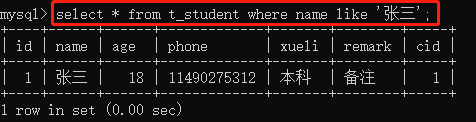
查询name中与张三匹配的学生信息
select * from t_student where name like '张三';
2、含有%通配的字符串
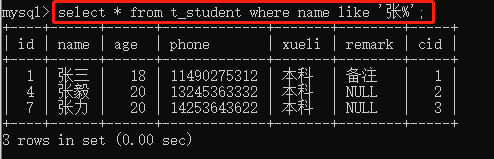
%用于匹配任意长度的字符串。例如,字符串“a%”匹配以字符a开始任意长度的字符串
select * from t_student where name like '张%';
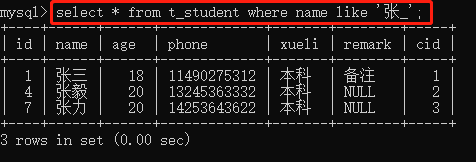
3、含有_通配的字符串
下划线通配符只匹配单个字符,如果要匹配多个字符,需要连续使用多个下划线通配符。例如,字符串“ab_”匹配以字符串“ab”开始长度为3的字符串,
select * from t_student where name like '张_';
2.使用ORDER BY对查询结果排序
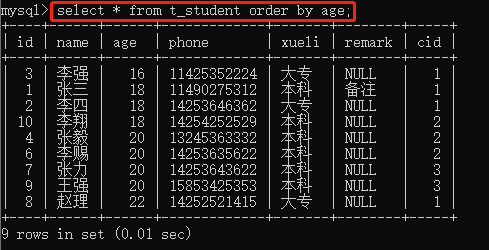
SELECT 字段名1,字段名2,……
FROM 表名
ORDER BY 字段名1 [ASC | DESC],字段名2 [ASC | DESC];
select * from t_student order by age; //按年龄升序
3.使用LIMIT限制查询结果的数量
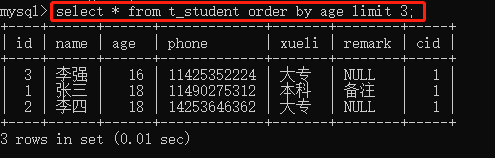
select * from t_student order by age limit 3; //查询年龄最小的3为同学
多表连接
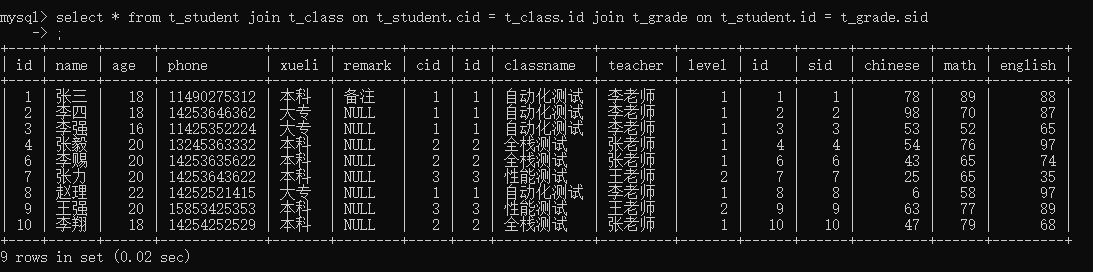
三个表连接
select * from t_student join t_class on t_student.cid = t_class.id join t_grade on t_student.id = t_grade.sid;
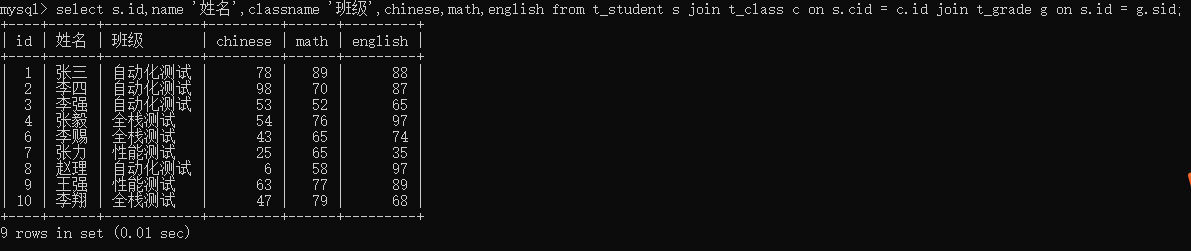
重命名后
select s.id,name '姓名',classname '班级',chinese,math,english from t_student s join t_class c on s.cid = c.id join t_grade g on s.id = g.sid;
总分
select s.id,name '姓名',classname '班级',(g.chinese+g.math+g.english) '总分' from t_student s join t_class c on s.cid = c.id join t_grade g on s.id = g.sid;

分组总分
select c.id '编号',classname '班级',sum(g.chinese+g.math+g.english) '总分' from t_student s join t_class c on s.cid = c.id join t_grade g on s.id = g.sid group by c.id;

分组人数
select c.id '编号',classname '班级', count(*) '人数', sum(g.chinese+g.math+g.english) '总分' from t_student s join t_class c on s.cid = c.id join t_grade g on s.id = g.sid group byc.id;

班级平均分
select c.id '编号',classname '班级', (sum(g.chinese+g.math+g.english)/count(*)) '平均分' from t_student s join t_class c on s.cid = c.id join t_grade g on s.id = g.sid group by c.id;

参考:https://blog.youkuaiyun.com/weixin_45851945/article/details/114287877





 扫一扫
扫一扫


 被折叠的 条评论
为什么被折叠?
被折叠的 条评论
为什么被折叠?
 到【灌水乐园】发言





