


一、软件介绍
文末提供程序和源码下载
AxonHub 是一个现代 AI 网关系统,提供统一的 OpenAI、Anthropic 和 AI SDK 兼容的 API 层,通过 Transformer 管道架构将请求转换到各种 AI 提供者。该系统具有全面的跟踪功能,帮助企业更好地管理和监控 AI 服务使用情况。它还包括全面的测试覆盖范围,以确保系统稳定性和可靠性。
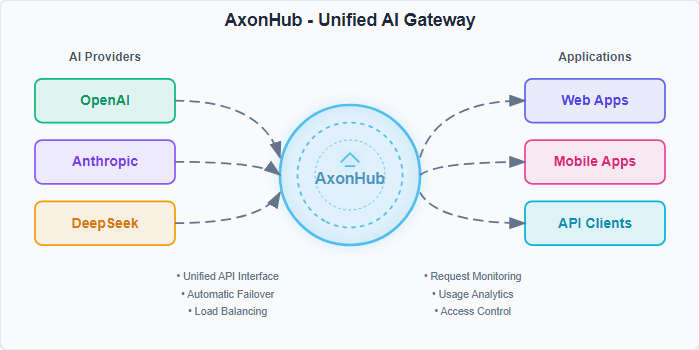
二、Core Problems Solved 核心问题解决
| Problem 问题 | AxonHub Solution AxonHub 解决方案 |
|---|---|
| Vendor Lock-in 供应商锁定 | 🔄 Unified API interface, API format conversion, switch providers anytime 🔄 统一 API 接口,API 格式转换,随时切换供应商 |
| Extensibility 可扩展性 | Flexible transformer architecture, supports multiple transformers 灵活的 Transformer 架构,支持多个 Transformer |
| Service Outages 服务中断 | ⚡ Automatic failover, multi-channel redundancy ⚡ 自动故障转移,多通道冗余 |
| Permission Management 权限管理 | 📊 Comprehensive user permission management 📊 全面用户权限管理 |
| Development Complexity 开发复杂性 | 🛠️ Single SDK, unified interface standard 🛠️ 单一 SDK,统一接口标准 |
核心功能
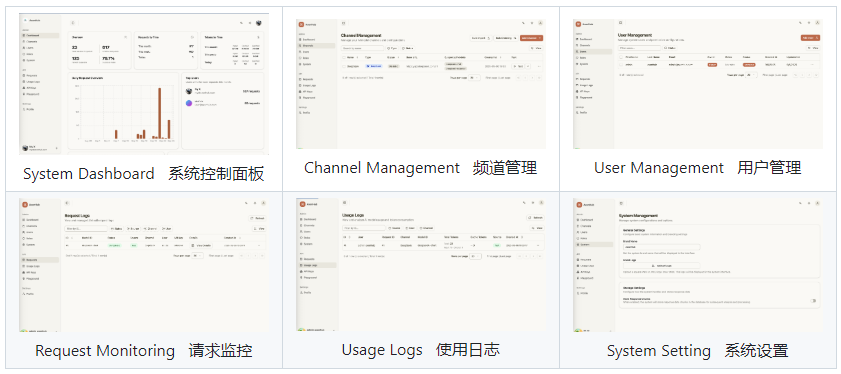
Supported Features 🚀 支持的功能
| Feature 功能 | Status 状态 | Description 描述 | Document 文档 |
|---|---|---|---|
| Chat Completion 聊天完成 | ✅ Done ✅ 完成 | Conversational interface 对话界面 | Chat Completions 聊天补全 |
| Image Generation 图像生成 | ⚠️ Partial ⚠️ 部分 | Image generation 图像生成 | Image Generations 图像生成 |
| Rerank 重排序 | 📝 Todo 📝 待办事项 | Results ranking 结果排序 | - |
| Embedding 嵌入 | 📝 Todo 📝 待办事项 | Vector embedding generation 向量嵌入生成 | - |
| Realtime 实时 | 📝 Todo 📝 待办事项 | Live conversation capabilities 实时对话功能 |
多提供者 AI 网关
| Feature 功能 | Technical Implementation 技术实现 | Business Value 商业价值 |
|---|---|---|
| Unified API Interface 统一 API 接口 | OpenAI compatible standard, zero learning curve 兼容 OpenAI 标准,零学习曲线 | Avoid vendor lock-in, reduce migration risk 避免供应商锁定,降低迁移风险 |
| Automatic Failover 自动故障转移 | Multi-channel retry + load balancing 多通道重试 + 负载均衡 | Service interruption time < 100ms 服务中断时间 < 100ms |
| Stream Processing 流处理 | Native SSE support, real-time response 原生 SSE 支持,实时响应 | 60% user experience improvement 用户体验提升 60% |
API Format Support 🔧 API 格式支持
| Format 格式 | Status 状态 | Compatibility 兼容性 | Modalities 模态 |
|---|---|---|---|
| OpenAI Chat Completions OpenAI 聊天补全 | ✅ Done ✅ 完成 | Fully compatible 完全兼容 | Text, Image 文本、图像 |
| Anthropic | ✅ Done ✅ 完成 | Fully supported 完全支持 | Text 文本 |
| AI SDK | ⚠️ Partial ⚠️ 部分 | Partially supported 部分支持 | Text 文本 |
| Gemini | 🔄 Todo 🔄 待办事项 | - | - |
Permission Control 🏢 权限控制
| Security Feature 安全功能 | Implementation 实现 |
|---|---|
| Fine-grained Permission Control 细粒度权限控制 | Role-based access control (RBAC) 基于角色的访问控制(RBAC) |
| Data Localization 数据本地化 | Configurable data storage policies 可配置的数据存储策略 |
| API Key Management API 密钥管理 | JWT + scope control JWT + 权限控制 |
Deployment Guide 🚀 部署指南
💻 Personal Computer Deployment
💻 个人电脑部署
Perfect for individual developers and small teams. No complex configuration required.
非常适合个人开发者和小型团队。无需复杂配置。
Quick Download & Run 快速下载并运行
-
从文末夸克网盘 下载最新版本
- Choose the appropriate version for your operating system:
选择适合您操作系统的版本:
- Choose the appropriate version for your operating system:
-
Extract and run 解压并运行
# Extract the downloaded file unzip axonhub_*.zip cd axonhub_* # Add execution permissions (only for Linux/macOS) chmod +x axonhub # Run directly - default SQLite database # Install AxonHub to system sudo ./install.sh # Start AxonHub service ./start.sh # Stop AxonHub service ./stop.sh -
Access the application 访问应用程序
<span style="background-color:var(--bgColor-muted, var(--color-canvas-subtle))"><span style="color:var(--fgColor-default, var(--color-fg-default))"><span style="background-color:var(--bgColor-muted, var(--color-canvas-subtle))"><code>http://localhost:8090
</code></span></span></span>
🖥️ Server Deployment 🖥️ 服务器部署
For production environments, high availability, and enterprise deployments.
用于生产环境、高可用性和企业部署。
Database Support 数据库支持
AxonHub supports multiple databases to meet different scale deployment needs:
AxonHub 支持多种数据库以满足不同规模的部署需求:
| Database 数据库 | Supported Versions 支持的版本 | Recommended Scenario 推荐场景 | Auto Migration 自动迁移 | Links 链接 |
|---|---|---|---|---|
| TiDB Cloud TiDB 云 | Starter 入门 | Serverless, Free tier, Auto Scale 无服务器,免费套餐,自动扩展 | ✅ Supported ✅ 支持 | TiDB Cloud TiDB 云 |
| TiDB Cloud TiDB 云 | Dedicated 专用 | Distributed deployment, large scale 分布式部署,大规模 | ✅ Supported ✅ 支持 | TiDB Cloud |
| TiDB | V8.0+ | Distributed deployment, large scale 分布式部署,大规模 | ✅ Supported ✅ 支持 | TiDB |
| Neon DB | - | Serverless, Free tier, Auto Scale 无服务器,免费套餐,自动扩展 | ✅ Supported ✅ 支持 | Neon DB |
| PostgreSQL | 15+ | Production environment, medium-large deployments 生产环境,中大型部署 | ✅ Supported ✅ 支持 | PostgreSQL |
| MySQL | 8.0+ | Production environment, medium-large deployments 生产环境,中大型部署 | ✅ Supported ✅ 支持 | MySQL |
| SQLite | 3.0+ | Development environment, small deployments 开发环境,小规模部署 | ✅ Supported ✅ 支持 | SQLite |
Configuration 配置
AxonHub uses YAML configuration files with environment variable override support:
AxonHub 使用支持环境变量覆盖的 YAML 配置文件:
# config.yml
server:
  port: 8090
  name: "AxonHub"
  debug: false

db:
  dialect: "tidb"
  dsn: "<USER>.root:<PASSWORD>@tcp(gateway01.us-west-2.prod.aws.tidbcloud.com:4000)/axonhub?tls=true"

log:
  level: "info"
  encoding: "json"
Environment variables: 环境变量:
AXONHUB_SERVER_PORT=8090
AXONHUB_DB_DIALECT="tidb"
AXONHUB_DB_DSN="<USER>.root:<PASSWORD>@tcp(gateway01.us-west-2.prod.aws.tidbcloud.com:4000)/axonhub?tls=true"
AXONHUB_LOG_LEVEL=info
Docker Compose Deployment
Docker Compose 部署
# Clone project
git clone https://github.com/looplj/axonhub.git
cd axonhub

# Set environment variables
export AXONHUB_DB_DIALECT="tidb"
export AXONHUB_DB_DSN="<USER>.root:<PASSWORD>@tcp(gateway01.us-west-2.prod.aws.tidbcloud.com:4000)/axonhub?tls=true"

# Start services
docker-compose up -d

# Check status
docker-compose ps
Virtual Machine Deployment
虚拟机部署
Download the latest release from GitHub Releases
从 GitHub Releases 下载最新版本
# Extract and run
unzip axonhub_*.zip
cd axonhub_*

# Set environment variables
export AXONHUB_DB_DIALECT="tidb"
export AXONHUB_DB_DSN="<USER>.root:<PASSWORD>@tcp(gateway01.us-west-2.prod.aws.tidbcloud.com:4000)/axonhub?tls=true"

sudo ./install.sh

# Configuration file check
axonhub config check

# Start service
#  For simplicity, we recommend managing AxonHub with the helper scripts:

# Start
./start.sh

# Stop
./stop.sh
📖 Usage Guide 📖 使用指南
1. Initial Setup 1. 初始设置
-
Access Management Interface
访问管理界面<span style="background-color:var(--bgColor-muted, var(--color-canvas-subtle))"><span style="color:var(--fgColor-default, var(--color-fg-default))"><span style="background-color:var(--bgColor-muted, var(--color-canvas-subtle))"><code>http://localhost:8090 </code></span></span></span> -
Configure AI Providers 配置 AI 提供者
- Add API keys in the management interface
在管理界面中添加 API 密钥 - Test connections to ensure correct configuration
测试连接以确保正确配置
- Add API keys in the management interface
-
Create Users and Roles 创建用户和角色
- Set up permission management
设置权限管理 - Assign appropriate access permissions
分配适当的访问权限
- Set up permission management
2. Channel Configuration 2. 频道配置
Configure AI provider channels in the management interface:
在管理界面配置 AI 提供者频道:
# OpenAI channel example
name: "openai"
type: "openai"
base_url: "https://api.openai.com/v1"
credentials:
  api_key: "your-openai-key"
supported_models: ["gpt-5", "gpt-4o"]
2.1 Test Connection 2.1 测试连接
Click the test button. If the test is successful, the configuration is correct.
点击测试按钮。如果测试成功,则配置正确。
2.2 Enable Channel 2.2 启用通道
After successful testing, click the enable button to activate the channel.
测试成功后,点击启用按钮以激活通道。
3. Add Users 3. 添加用户
- Create user accounts 创建用户账户
- Assign roles and permissions
分配角色和权限 - Create API keys 创建 API 密钥
4. Claude Code/Codex Integration
4. Claude 代码/Codex 集成
4.1 Using AxonHub in Claude Code:
4.1 在 Claude 代码中使用 AxonHub:
# Set Claude Code to use AxonHub
export ANTHROPIC_API_KEY="your-axonhub-api-key"
export ANTHROPIC_BASE_URL="http://localhost:8090/anthropic"
4.2 Using AxonHub in Codex:
4.2 在 Codex 中使用 AxonHub:
configure the model provider in the codex config file: ${HOME}/.codex/config.toml
在 codex 配置文件中配置模型提供者:${HOME}/.codex/config.toml
model = "gpt-5"
model_provider = "axonhub-chat-completions"

[model_providers.axonhub-chat-completions]
# Name of the provider that will be displayed in the Codex UI.
name = "AxonHub using Chat Completions"
# The path `/chat/completions` will be amended to this URL to make the POST
# request for the chat completions.
base_url = "http://127.0.0.1:8090/v1"
# If `env_key` is set, identifies an environment variable that must be set when
# using Codex with this provider. The value of the environment variable must be
# non-empty and will be used in the `Bearer TOKEN` HTTP header for the POST request.
env_key = "AXONHUB_API_KEY"
# Valid values for wire_api are "chat" and "responses". Defaults to "chat" if omitted.
wire_api = "chat"
# If necessary, extra query params that need to be added to the URL.
# See the Azure example below.
query_params = {}
4.3. Model Profiles Feature
4.3. 模型配置功能
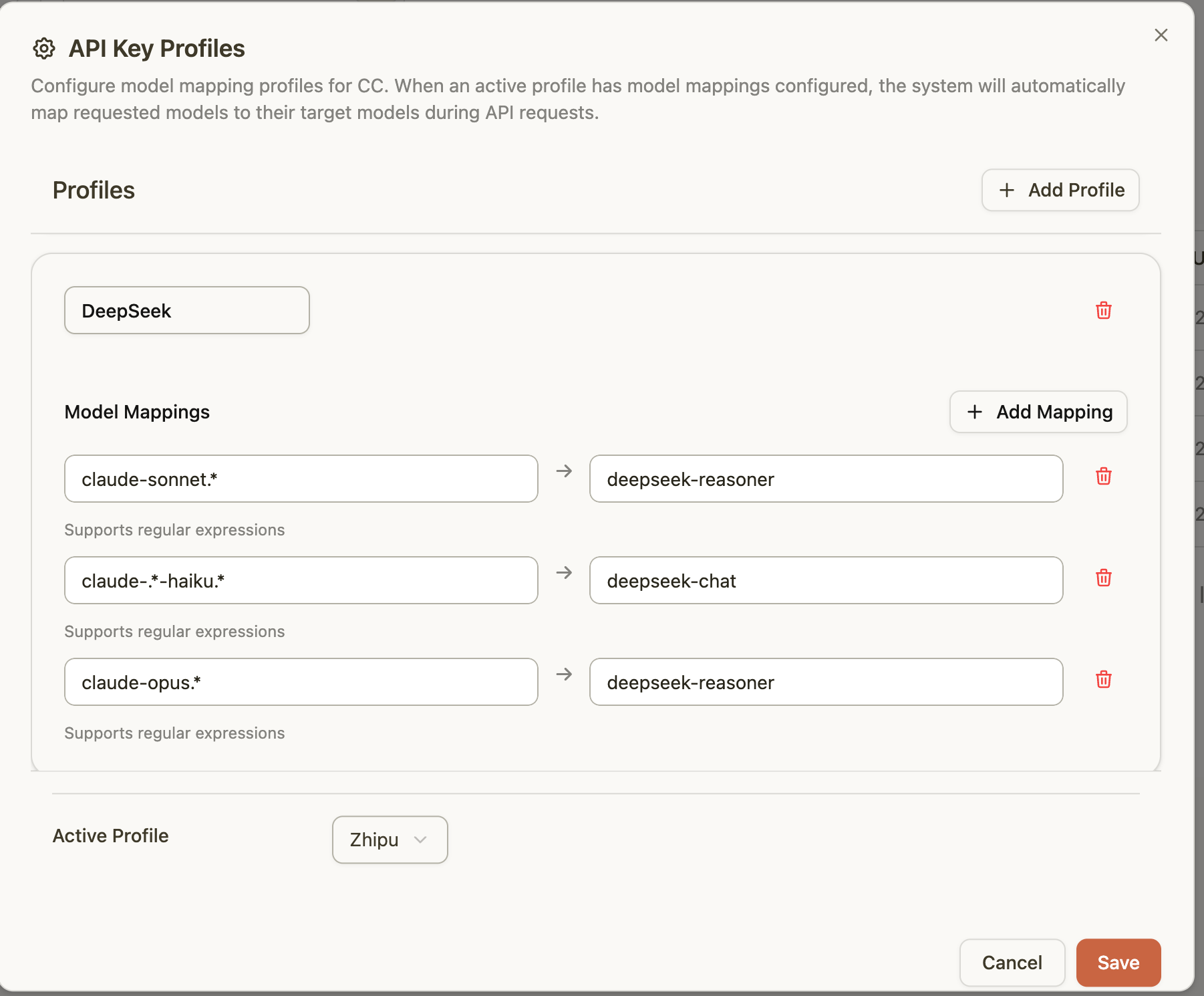
AxonHub introduces a powerful model profiles feature that allows you to configure multiple model mapping profiles for your API keys. This feature is particularly useful for scenarios where you need to:
AxonHub 引入了一个强大的模型配置文件功能,允许您为您的 API 密钥配置多个模型映射配置文件。此功能在您需要以下场景时特别有用:
- Quick Model Switching: Switch between different models without changing your API key configuration
快速模型切换:无需更改 API 密钥配置即可在不同模型之间切换 - Cost Optimization: Map expensive model requests to more cost-effective alternatives automatically
成本优化:自动将昂贵的模型请求映射到更具成本效益的替代方案 - Model Fallback: Configure fallback mappings when certain models are unavailable
模型回退:当某些模型不可用时配置回退映射
4.4 How Profiles Work 4.4 配置文件的工作原理
When an active profile has model mappings configured, the system will automatically map requested models to their target models during API requests. For example:
当一个活跃配置文件中配置了模型映射时,系统会在 API 请求期间自动将请求的模型映射到它们的目标模型。例如:
- Request
claude-sonnet-20241022→ Actually usedeepseek-v3.1(model mapping)
请求claude-sonnet-20241022→ 实际使用deepseek-v3.1(模型映射) - Use regex patterns to match multiple models at once
使用正则表达式模式一次性匹配多个模型
4.5 Claude Code/Codex + Profiles Workflow
4.5 Claude Code/Codex + 配置文件工作流
With the profiles feature, you only need to configure Claude Code once:
通过配置文件功能,您只需配置一次 Claude Code:
- Configure your API key profiles in the AxonHub management interface
在 AxonHub 管理界面配置您的 API 密钥配置文件 - Set up model mappings for different providers (zhipu, deepseek, moonshot, etc.)
为不同提供商(如 zhipu、deepseek、moonshot 等)设置模型映射 - Switch active profiles as needed without changing Claude Code configuration
根据需要切换活动配置文件,而无需更改 Claude Code 配置 - Claude Code automatically uses the model mappings from your active profile
Claude Code 会自动使用您活动配置文件中的模型映射
It eliminates the need to switch API keys or model names in development environments.
它消除了在开发环境中切换 API 密钥或模型名称的需要。
5. SDK Usage 5. SDK 使用
Python SDK
from openai import OpenAI

client = OpenAI(
    api_key="your-axonhub-api-key",
    base_url="http://localhost:8090/v1"
)

response = client.chat.completions.create(
    model="gpt-4o",
    messages=[{"role": "user", "content": "Hello!"}]
)
print(response.choices[0].message.content)
Node.js SDK
import OpenAI from "openai";

const openai = new OpenAI({
  apiKey: "your-axonhub-api-key",
  baseURL: "http://localhost:8090/v1",
});

const completion = await openai.chat.completions.create({
  messages: [{ role: "user", content: "Hello!" }],
  model: "gpt-4o",
});
🛠️ Development Guide 🛠️ 开发指南
Architecture Design 架构设计
AxonHub implements a sophisticated bidirectional data transformation pipeline that ensures seamless communication between clients and AI providers:
AxonHub 实现了一个复杂的双向数据转换管道,确保客户端和 AI 提供者之间的无缝通信:
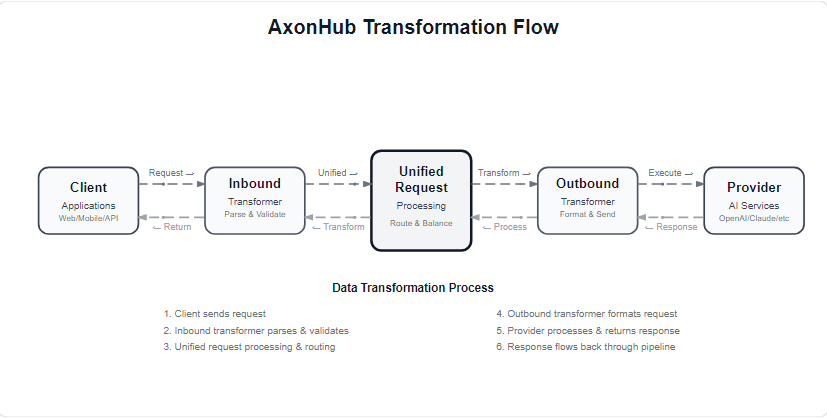
Pipeline Components 管道组件
| Component 组件 | Purpose 目的 | Key Features 主要功能 |
|---|---|---|
| Client 客户端 | Application layer 应用层 | Web apps, mobile apps, API clients Web 应用、移动应用、API 客户端 |
| Inbound Transformer 入站转换器 | Request preprocessing 请求预处理 | Parse, validate, normalize input 解析、验证、规范化输入 |
| Unified Request 统一请求 | Core processing 核心处理 | Route selection, load balancing, failover 路由选择、负载均衡、故障转移 |
| Outbound Transformer 外向式转换器 | Provider adaptation 提供者适配 | Format conversion, protocol mapping 格式转换,协议映射 |
| Provider 提供者 | AI services AI 服务 | OpenAI, Anthropic, DeepSeek, etc. OpenAI、Anthropic、DeepSeek 等 |
This architecture ensures:
该架构确保:
- ⚡ Low Latency: Optimized processing pipeline
⚡低延迟:优化处理流程 - 🔄 Auto Failover: Seamless provider switching
🔄 自动故障转移:无缝服务提供商切换 - 📊 Real-time Monitoring: Complete request tracing
📊 实时监控:完整请求跟踪 - 🛡️ Security & Validation: Input sanitization and output verification
🛡️ 安全与验证:输入清理和输出验证
Technology Stack 技术栈
Backend Technology Stack 后端技术栈
- Go 1.24+ - High-performance backend
Go 1.24+ - 高性能后端 - Gin - HTTP framework Gin - HTTP 框架
- Ent ORM - Type-safe ORM
Ent ORM - 类型安全的 ORM - gqlgen - GraphQL code generation
gqlgen - GraphQL 代码生成 - JWT - Authentication JWT - 认证
Frontend Technology Stack
前端技术栈
- React 19 - Modern UI framework
React 19 - 现代化 UI 框架 - TypeScript - Type safety TypeScript - 类型安全
- Tailwind CSS - Styling framework
Tailwind CSS - 样式框架 - TanStack Router - File-based routing
TanStack Router - 基于文件的路由 - Zustand - State management
Zustand - 状态管理
Development Environment Setup
开发环境设置
# Clone project
git clone https://github.com/looplj/axonhub.git
cd axonhub

# Start backend
make build-backend
./axonhub

# Start frontend (new terminal)
cd frontend
pnpm install
pnpm dev
Build Project
make build
三、软件下载
本文信息来源于GitHub作者地址:https://github.com/looplj/axonhub





 扫一扫
扫一扫


 238
238

 被折叠的 条评论
为什么被折叠?
被折叠的 条评论
为什么被折叠?
 到【灌水乐园】发言





