3 | ↳ android.widget.ProgressBar |
在某些操作的进度中的可视指示器,为用户呈现操作的进度,还它有一个次要的进度条,用来显示中间进度,如在流媒体播放的缓冲区的进度。一个进度条也可不确定其进度。在不确定模式下,进度条显示循环动画。这种模式常用于应用程序使用任务的长度是未知的。进度条也就是一个表示运转的过程,例如发送短信,连接网络等等,表示一个过程正在执行中
1、android.widget. ProgressBar,继承自android.view.View 。在android.widget包中。对应对话框ProgressDialog。ProgressBar有两种展示方式,表盘形式(普通、小、大)和条形填充形式。在layout定义时,需要通过设施style属性类设置展示方式。
ProgressBar的样式有四种:
android:progressBarStyle:默认进度条样式,不确定模式
 android:progressBarStyleHorizontal:水平进度条样式
 android:progressBarStyleLarge :大号进度条样式,也是不确定进度模式
android:progressBarStyleSmall :小号进度条样式,也是不确定进度模式
二、XML重要属性
android:max-- 这事进度条长度最大值
android:progress--设定度条当前进度值
android:secondaryProgress--第二进度条进度值
android:progressBarStyle:默认进度条样式
android:progressBarStyleHorizontal:水平样式
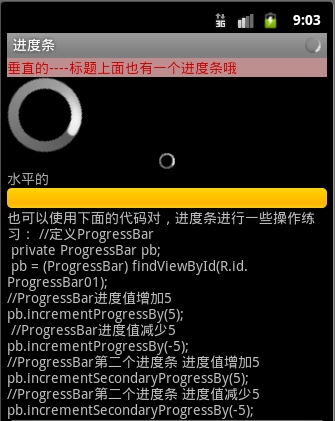
style="?android:attr/progressBarStyleLarge" --- 属性风格类型--大圆圈,如下图
style=”?android:attr/progressBarStyleSmall”--- 属性风格类型--小圆圈,如下图:

style="?android:attr/progressBarStyleHorizontal" --水平进度条 --如下图:

几秒钟之后自动滚到到如下:

也可以用下面的形式代替上面的形式的:
1 | <ProgressBar style="@android:style/Widget.ProgressBar.Inverse"/>//中 |
2 | <ProgressBar style="@android:style/Widget.ProgressBar.Large.Inverse"/> //大圆 |
3 | <ProgressBar style="@android:style/Widget.ProgressBar.Small.Inverse"/> //小圆 |
三、重要方法
getMax():返回这个进度条的范围的上限
getProgress():返回进度
getSecondaryProgress():返回次要进度
incrementProgressBy(int diff):指定增加的进度
isIndeterminate():指示进度条是否在不确定模式下
setIndeterminate(boolean indeterminate):设置不确定模式下
setVisibility(int v):设置该进度条是否可视
四、重要事件
onSizeChanged(int w, int h, int oldw, int oldh):当进度值改变时引发此事件
接下来看案例:
1.定义一个布局文件progressbar.xml
01 | <?xml version="1.0" encoding="utf-8"?> |
02 | <ScrollView xmlns:android="http://schemas.android.com/apk/res/android" |
04 | android:layout_width="fill_parent" |
05 | android:layout_height="match_parent" |
08 | android:layout_width="fill_parent" |
09 | android:layout_height="match_parent" |
10 | android:orientation="vertical"> |
12 | android:id="@+id/startText" |
13 | android:layout_width="fill_parent" |
14 | android:layout_height="wrap_content" |
15 | android:text="垂直的----标题上面也有一个进度条哦" |
16 | android:textColor="#CD0000" |
17 | android:background="#BC8F8F" |
21 | android:id="@+id/progtessBer_btn_id1" |
22 | android:layout_width="wrap_content" |
23 | android:layout_height="wrap_content" |
24 | style="?android:attr/progressBarStyleLarge" |
28 | android:layout_width="wrap_content" |
29 | android:layout_height="wrap_content" |
30 | style="?android:attr/progressBarStyleSmall" |
31 | android:layout_gravity="center_horizontal" |
34 | android:id="@+id/startText1" |
35 | android:layout_width="fill_parent" |
36 | android:layout_height="wrap_content" |
38 | android:textColor="#aaaaaa" |
42 | android:id="@+id/progtessBer_btn_id2" |
43 | android:layout_width="fill_parent" |
44 | android:layout_height="wrap_content" |
45 | style="?android:attr/progressBarStyleHorizontal" |
48 | android:layout_width="fill_parent" |
49 | android:layout_height="wrap_content" |
50 | android:text="@string/progress_text" |
2.之后定义java文件:ProgressBarDemo.java
01 | package com.dream.app.start.first.prograssbar; |
02 | import com.dream.app.start.MenuDemo; |
03 | import com.dream.app.start.R; |
04 | import com.dream.app.start.R.id; |
05 | import com.dream.app.start.R.layout; |
06 | import com.dream.app.start.utils.PublicClass; |
08 | import android.app.Activity; |
09 | import android.content.Intent; |
10 | import android.os.Bundle; |
11 | import android.os.Handler; |
12 | import android.text.method.ScrollingMovementMethod; |
13 | import android.view.View; |
14 | import android.view.View.OnClickListener; |
15 | import android.view.Window; |
16 | import android.widget.AdapterView; |
17 | import android.widget.AdapterView.OnItemClickListener; |
18 | import android.widget.ArrayAdapter; |
19 | import android.widget.Button; |
20 | import android.widget.ListView; |
21 | import android.widget.ProgressBar; |
22 | import android.widget.TextView; |
23 | import android.widget.Toast; |
25 | public class ProgressBarDemo extends PublicClass { |
26 | private ProgressBar progressbar,progressbar_1; |
28 | private int prostatus=0; |
30 | private Handler handler=new Handler(); |
32 | protected void onCreate(Bundle savedInstanceState) { |
34 | super.onCreate(savedInstanceState); |
38 | requestWindowFeature(Window.FEATURE_INDETERMINATE_PROGRESS); |
44 | setContentView(R.layout.progressbar); |
47 | setProgressBarIndeterminateVisibility(true); |
53 | btn2=(Button)findViewById(R.id.button_cancel); |
55 | progressbar=(ProgressBar)findViewById(R.id.progtessBer_btn_id2); |
56 | progressbar_1=(ProgressBar)findViewById(R.id.progtessBer_btn_id1); |
58 | progressbar.setMax(100000); |
59 | progressbar_1.setMax(100000); |
61 | new Thread(new Runnable() { |
66 | while (prostatus++<100000) { |
69 | handler.post(new Runnable() { |
74 | progressbar.setProgress(prostatus); |
75 | progressbar_1.setProgress(prostatus); |
86 | private void toastshow(String str) { |
87 | Toast.makeText(getApplicationContext(), str, Toast.LENGTH_SHORT).show(); |
运行效果如下:

二:用图片实现滚动效果:
1.添加图片到drawable下

2.自定义图片资源文件iamge_progress.xml
1 | <?xml version="1.0" encoding="utf-8"?> |
3 | xmlns:android="http://schemas.android.com/apk/res/android" |
4 | android:drawable="@drawable/image_progress" |
3.定义布局文件,progress.xml
01 | <?xml version="1.0" encoding="utf-8"?> |
02 | <LinearLayout xmlns:android="http://schemas.android.com/apk/res/android" |
03 | android:orientation="vertical" |
04 | android:layout_width="fill_parent" |
05 | android:layout_height="fill_parent" |
06 | android:gravity="center"> |
08 | android:indeterminateDrawable="@drawable/drawable_progress" |
09 | android:layout_height="100dp" |
10 | android:layout_width="100dp"/> |
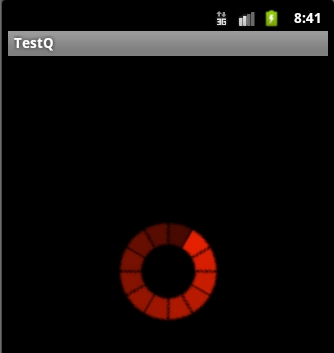
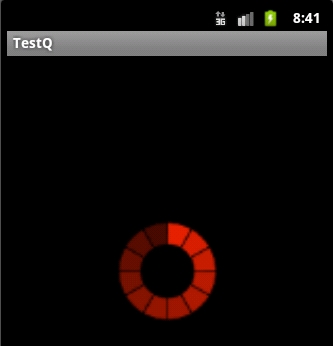
运行效果如下:


三》自定义渐变色进度条:
定义drawable资源文件color_progressbar.xml
01 | <?xml version="1.0" encoding="utf-8"?> |
02 | <layer-list xmlns:android="http://schemas.android.com/apk/res/android"> |
03 | <item android:id="@android:id/background"> |
05 | <corners android:radius="5dip" /> |
06 | <gradient android:startColor="#ff9d9e9d" |
07 | android:centerColor="#ff5a5d5a" |
08 | android:centerY="0.75" |
09 | android:endColor="#ff747674" |
14 | <item android:id="@android:id/secondaryProgress"> |
17 | <corners android:radius="5dip" /> |
18 | <gradient android:startColor="#80ffd300" |
19 | android:centerColor="#80ffb600" |
20 | android:centerY="0.75" |
21 | android:endColor="#a0ffcb00" |
27 | <item android:id="@android:id/progress" |
31 | <corners android:radius="5dip" /> |
32 | <gradient android:startColor="#FF3030" |
33 | android:endColor="#AEEEEE" |
34 | android:angle="270" /> |
2.定义对应的不布局文件:progressbar.xml在此文件中引用我们定义的drawable资源配置文件
01 | <?xml version="1.0" encoding="utf-8"?> |
02 | <LinearLayout xmlns:android="http://schemas.android.com/apk/res/android" |
03 | android:orientation="vertical" |
04 | android:layout_width="fill_parent" |
05 | android:layout_height="fill_parent" |
06 | android:gravity="center"> |
08 | android:id="@+id/color_progressBar" |
09 | android:indeterminateDrawable="@drawable/color_progress" |
10 | android:layout_height="wrap_content" |
11 | android:layout_width="match_parent"/> |
或者在代码中给进度条设置自定义资源文件:
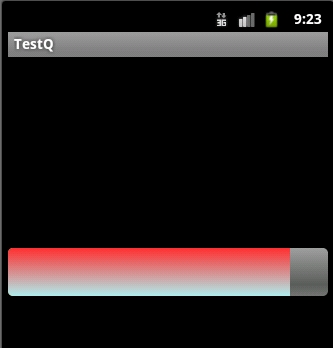
效果如下:

四:自定义progressbar颜色:
1.定义一个图片资源文件:
01 | <?xml version="1.0" encoding="utf-8"?> |
02 | <rotate xmlns:android="http://schemas.android.com/apk/res/android" |
03 | android:fromDegrees="0" |
06 | android:toDegrees="360" > |
09 | android:innerRadiusRatio="3" |
11 | android:thicknessRatio="8" |
12 | android:useLevel="false" > |
15 | android:centerColor="#FFFFFF" |
16 | android:centerY="0.50" |
17 | android:endColor="#FFFF00" |
18 | android:startColor="#000000" |
20 | android:useLevel="false" /> |
2.定义布局文件:
2 | android:id="@+id/color_progressBar2" |
3 | android:indeterminateDrawable="@drawable/color_progress2" |
4 | android:layout_height="wrap_content" |
5 | android:layout_width="wrap_content"/> |
3.效果:



 本文详细介绍了Android中ProgressBar组件的使用方法,包括样式、重要属性、方法、事件及案例解析。此外,还展示了如何自定义进度条的外观,如滚动效果与渐变色进度条,并提供了代码实现。






 扫一扫
扫一扫


 276
276

 被折叠的 条评论
为什么被折叠?
被折叠的 条评论
为什么被折叠?
 到【灌水乐园】发言





