



思路
1.新建TAYTableViewCell 继承自UITableViewCell
2.添加需要使用的属性
3.写方法
4.应用
新建TAYTableViewCell
如图:

添加需要的属性
以一个label和一个imageView 为例:
@interface TAYTableViewCell : UITableViewCell

@property (nonatomic, strong) UILabel *label;
@property (nonatomic, strong) UIImageView *yimageView;

@end
写方法
必写以下方法:
-(instancetype)initWithStyle:(UITableViewCellStyle)style reuseIdentifier:(NSString *)reuseIdentifier
-(void)layoutSubviews
#import "TAYTableViewCell.h"

@implementation TAYTableViewCell

- (void)awakeFromNib {
    [super awakeFromNib];
    // Initialization code
}

- (void)setSelected:(BOOL)selected animated:(BOOL)animated {
    [super setSelected:selected animated:animated];

    // Configure the view for the selected state
}

- (instancetype)initWithStyle:(UITableViewCellStyle)style reuseIdentifier:(NSString *)reuseIdentifier {
    self = [super initWithStyle:style reuseIdentifier:reuseIdentifier] ;

    self.yimageView = [[UIImageView alloc] init] ;
    [self.contentView addSubview: _yimageView];

    self.label = [[UILabel alloc] init] ;
    [self.contentView addSubview: _label] ;

    return  self;

}

- (void)layoutSubviews {
    [super layoutSubviews] ;

   _yimageView.frame = CGRectMake(150, 150, 100, 100) ;

    _label.frame = CGRectMake(250, 50, 300, 30) ;
}


@end
上面两个方法是自带的,下面两个是自己写的
以上cell的自定义就完了
接下来使用
应用
首先需要在 ViewController.h 文件中加入协议
#import <UIKit/UIKit.h>

@interface ViewController : UIViewController
<
UITableViewDelegate,
UITableViewDataSource
>


@end
下面的代码在 ViewController.m 中
//这段代码在 ViewController.m 中
#import "ViewController.h"
#import "TAYTableViewCell.h"

@interface ViewController () {
    UITableView *tableView;
}

@end

@implementation ViewController

- (void)viewDidLoad {
    [super viewDidLoad];
    // Do any additional setup after loading the view.

    //创建tableView并初始化
    self->tableView = [[UITableView alloc] initWithFrame:CGRectMake(0, 55, 414, 640) style:UITableViewStylePlain] ;
    [self.view addSubview:tableView] ;

    //设置代理
    tableView.delegate = self;
    tableView.dataSource = self;

    //对cell进行注册
    [tableView registerClass:[TAYTableViewCell class] forCellReuseIdentifier:@"123"];

    //加到视图中显示
    [self.view addSubview:tableView] ;

}

- (UITableViewCell *)tableView:(UITableView *)tableView cellForRowAtIndexPath:(NSIndexPath *)indexPath {
    //首先创建一个自定义cell
    TAYTableViewCell *cell = [tableView dequeueReusableCellWithIdentifier: @"123"];

    //如果没有获取到cell就创建一个
    if(!cell) {
        cell = [[TAYTableViewCell alloc] initWithStyle:UITableViewCellStyleDefault reuseIdentifier:@"123"];

        cell.selectionStyle = UITableViewCellSelectionStyleGray;
    }

    //设置cell的标签
    cell.label.text = @"123" ;
    cell.label.backgroundColor = [UIColor redColor] ;

    //设置cell的图片
    cell.imageView.image = [UIImage imageNamed: @"yy.jpg"];

    //返回cell
    return cell;
}

//协议必写函数
//设置每组的行数
- (NSInteger)tableView:(UITableView *)tableView numberOfRowsInSection:(NSInteger)section {
    return 1;
}

//设置一行高度
- (CGFloat)tableView:(UITableView *)tableView heightForRowAtIndexPath:(NSIndexPath *)indexPath {
    return 130;
}

@end
效果图:
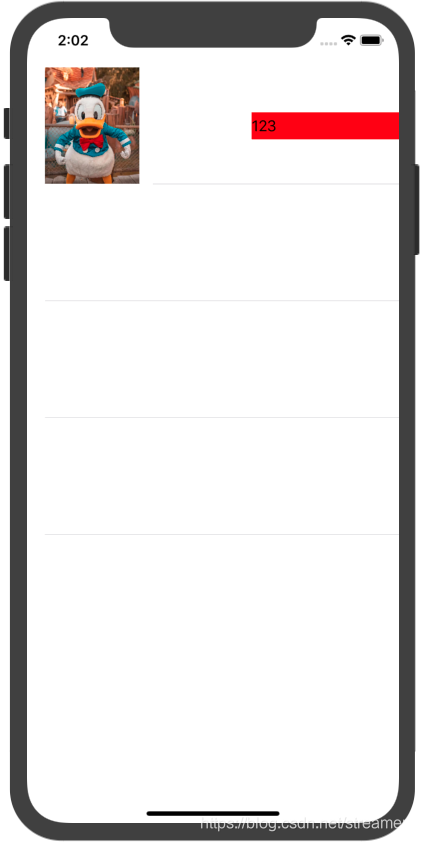
注意
如果在同一个tableView里需要使用的cell样式不同,比如第一个单元格里有一张图和一句话,而第二个单元格里只有一张图,那么需要另自定义一个cell,即定义两个cell。如果你在第二个单元格里仍然使用同一个cell,那么即使你没有给label赋值,它的空间也已经申请了,在层次图中可以看到,会造成空间浪费,并且你想在上面加一个button之类的控件,是点击不到的,被label挡住了。





 扫一扫
扫一扫


 1万+
1万+

 被折叠的 条评论
为什么被折叠?
被折叠的 条评论
为什么被折叠?
 到【灌水乐园】发言





