





概述
pip默认安装源来自国外,很多时候由于墙的原因,导致下载很慢,或者超时,为了解决这个问题,尝试修改了pip默认安装源(具体操作下文介绍)。但在更改默认源后,如果被安装的包有依赖,需要先安装依赖的包,但这个依赖包还是使用的默认源。本文介绍如何解决这些问题。
说明:
-
本文以Ubuntu OS为例进行文档描述。
pip 与easy_install
这两个都是Python的包管理工具,简单来说pip是easy_install的升级版,推荐优先使用pip。
如果python通过源码setup.py文件进行安装,如python setup.py install xxx,那么其安装所依赖包的下载镜像源的配置文件为easy_install的配置,所以即便修改了pip的下载镜像配置文件(e.g:/.pip/pip.conf)是没有效果的,要修改/.pydistutils.cfg才能起作用,具体方式在下文说明。
国内安装源
安装源列表
-
阿里:Simple Index
-
清华大学:Simple Index
-
中国科学技术大学: Simple Index
-
山东理工大学: http://pypi.sdutlinux.org/simple
测速
阿里:
shell
root@pytest-70-97:~# ping -c 3 aliyun.com
PING aliyun.com (140.205.60.46) 56(84) bytes of data.
64 bytes from 140.205.60.46: icmp_seq=1 ttl=44 time=9.64 ms
64 bytes from 140.205.60.46: icmp_seq=2 ttl=44 time=8.91 ms
64 bytes from 140.205.60.46: icmp_seq=3 ttl=44 time=9.25 ms

--- aliyun.com ping statistics ---
3 packets transmitted, 3 received, 0% packet loss, time 2003ms
rtt min/avg/max/mdev = 8.917/9.272/9.647/0.318 ms
root@pytest-70-97:~#
豆瓣:
shell
root@pytest-70-97:~# ping -c 3 douban.com
PING douban.com (154.8.131.171) 56(84) bytes of data.
64 bytes from 154.8.131.171: icmp_seq=1 ttl=49 time=25.7 ms
64 bytes from 154.8.131.171: icmp_seq=2 ttl=49 time=26.3 ms
64 bytes from 154.8.131.171: icmp_seq=3 ttl=49 time=25.8 ms

--- douban.com ping statistics ---
3 packets transmitted, 3 received, 0% packet loss, time 2003ms
rtt min/avg/max/mdev = 25.784/25.981/26.344/0.256 ms
root@pytest-70-97:~#
清华大学:
shell
root@pytest-70-97:~# ping -c 3 tuna.tsinghua.edu.cn
PING tuna.tsinghua.edu.cn (101.6.6.172) 56(84) bytes of data.
64 bytes from 101.6.6.172: icmp_seq=1 ttl=47 time=33.8 ms
64 bytes from 101.6.6.172: icmp_seq=2 ttl=47 time=31.3 ms
64 bytes from 101.6.6.172: icmp_seq=3 ttl=47 time=31.4 ms

--- tuna.tsinghua.edu.cn ping statistics ---
3 packets transmitted, 3 received, 0% packet loss, time 11045ms
rtt min/avg/max/mdev = 31.311/32.210/33.874/1.195 ms
root@pytest-70-97:~#
中国科学技术大学:
shell
root@pytest-70-97:~# ping -c 3 ustc.edu.cn
PING ustc.edu.cn (202.38.64.246) 56(84) bytes of data.
64 bytes from 202.38.64.246: icmp_seq=1 ttl=49 time=16.6 ms
64 bytes from 202.38.64.246: icmp_seq=2 ttl=49 time=16.2 ms
64 bytes from 202.38.64.246: icmp_seq=3 ttl=49 time=16.5 ms

--- ustc.edu.cn ping statistics ---
3 packets transmitted, 3 received, 0% packet loss, time 11025ms
rtt min/avg/max/mdev = 16.204/16.465/16.602/0.212 ms
root@pytest-70-97:~#
华中理工大学:
shell
root@pytest-70-97:~# ping -c 3 hustunique.com
PING hustunique.com (129.211.140.244) 56(84) bytes of data.
64 bytes from 129.211.140.244: icmp_seq=1 ttl=53 time=10.4 ms
64 bytes from 129.211.140.244: icmp_seq=2 ttl=53 time=10.1 ms
64 bytes from 129.211.140.244: icmp_seq=3 ttl=53 time=10.3 ms

--- hustunique.com ping statistics ---
3 packets transmitted, 3 received, 0% packet loss, time 11022ms
rtt min/avg/max/mdev = 10.182/10.323/10.415/0.131 ms
root@pytest-70-97:~#
山东理工大学:
shell
root@pytest-70-97:~# ping -c 3 sdutlinux.org
PING sdutlinux.org (170.178.168.203) 56(84) bytes of data.
64 bytes from becrawl-show.flatreutic.com (170.178.168.203): icmp_seq=1 ttl=51 time=182 ms
64 bytes from becrawl-show.flatreutic.com (170.178.168.203): icmp_seq=2 ttl=51 time=181 ms
64 bytes from becrawl-show.flatreutic.com (170.178.168.203): icmp_seq=3 ttl=51 time=182 ms

--- sdutlinux.org ping statistics ---
3 packets transmitted, 3 received, 0% packet loss, time 2002ms
rtt min/avg/max/mdev = 181.990/182.156/182.343/0.144 ms
root@pytest-70-97:~#
从ping效果上看,还是阿里更快一些,故而本文以阿里pip源为示例进行讲述。
修改pip默认安装源
方法1 配置方式修改(永久有效)
创建或修改pip.conf文件,如果文件或目录不存在,创建之
shell
cd ~
mkdir .pip
cd .pip
vi pip.conf
添加如下内容:
shell
[global]
index-url=http://mirrors.aliyun.com/pypi/simple/

[install]
trusted-host=mirrors.aliyun.com
方法2 命令方式临时修改
pip install -i https://mirrors.aliyun.com/pypi/simple fabric
更改easy_install默认安装源
这个主要是解决开篇提及到的pip安装有依赖包时没有使用指定的源问题。
打开pydistutils.cfg
vi ~/.pydistutils.cfg
写入以下内容
shell
[easy_install]
index_url = https://mirrors.aliyun.com/pypi/simple
安装测试
读取了requirements.txt(pip install -r requirements.txt),安装效果如下:
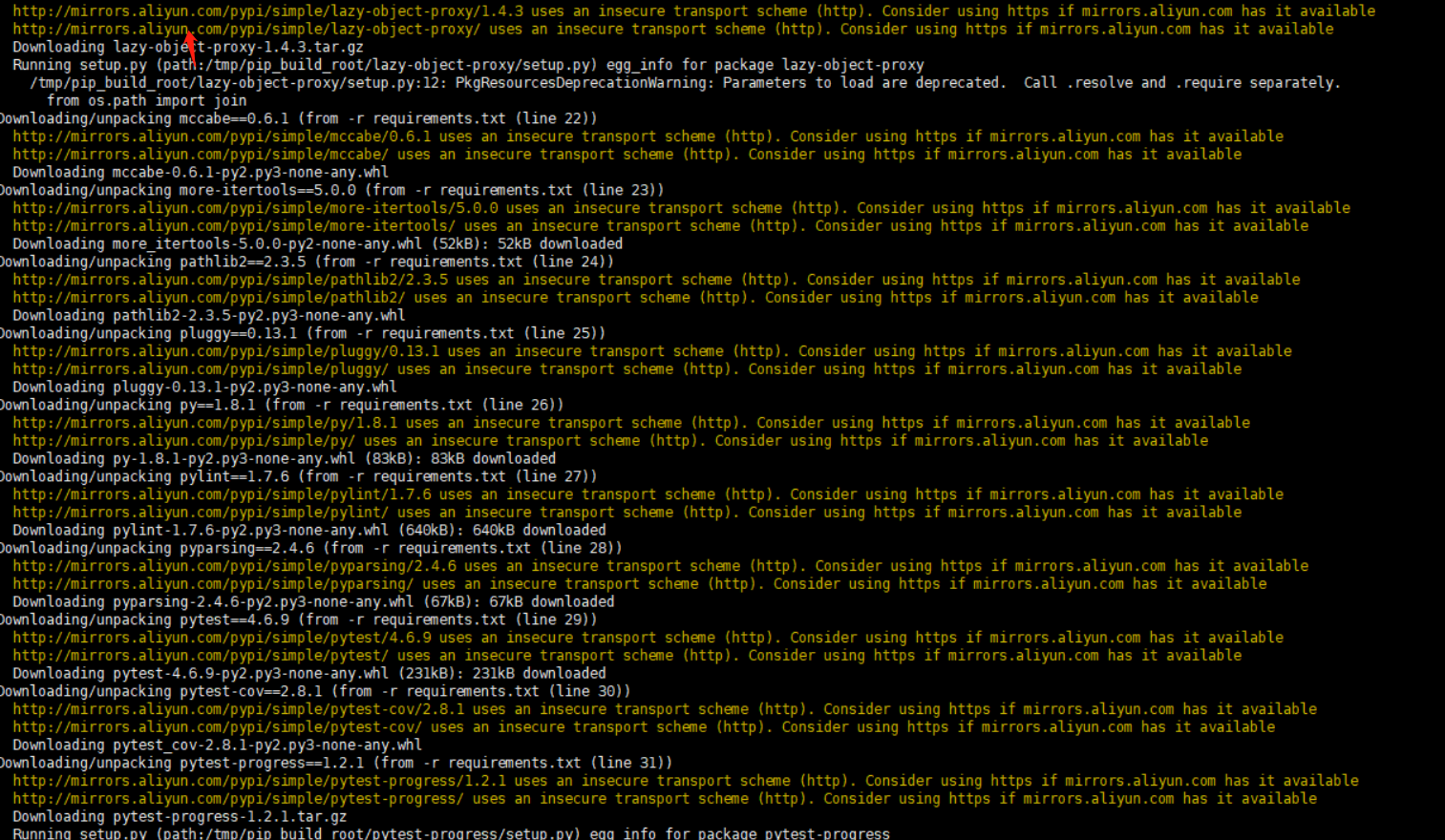
发现已经不在使用python官方源了,换成了阿里的源。
综述
只有同时修改了pip 和 easy_install的默认安装源,才能彻底解决pip install时使用指定安装源。
来源: Transcendent
文章作者: Gavin Wang
文章链接: 更改pip&easy_install默认安装源 | Transcendent
本文章著作权归作者所有,任何形式的转载都请注明出处。





 扫一扫
扫一扫


 3742
3742

 被折叠的 条评论
为什么被折叠?
被折叠的 条评论
为什么被折叠?
 到【灌水乐园】发言





